1. Introduktion
The iCarsoft CR Max BT (Enhanced) is a state-of-the-art wireless bidirectional diagnostic tool designed for comprehensive vehicle analysis and maintenance. This device offers advanced functions including ECU adaptation, teach-in services, and over 49 special reset functions, making it an essential tool for professional mechanics and automotive enthusiasts. It provides in-depth OBD2 detection, detailed bidirectional active tests, and ECU coding capabilities for a wide range of vehicle makes and models.

Figure 1.1: iCarsoft CR Max BT (Enhanced) Diagnostic Tool and Included Adapters.
2. Produktfunktioner
The iCarsoft CR Max BT (Enhanced) is equipped with a robust set of features to address various automotive diagnostic and maintenance needs:
- ECU Adaptation/Teach-in: Supports specific vehicle brands like Porsche, Benz/Sprinter/Smart, Jaguar/Landrover, Volvo, VW, and BMW for new unit adaptation and learning after replacement or updates.
- 49+ vedligeholdelsestjenester: Includes a wide array of reset and calibration functions such as Oil Reset, EPB, SAS, Throttle, DPF, Battery, ABS, Injector, TPMS, Air Suspension, Air Conditioner, Head Lamp, Body Stability, Engine, Transmission, Airbag, Seat, Door-Win-Roof, Odometer, Fuel Pump, Air Filter, Engine Cylinder, Idle, Engine Correction, Door, Immobilizer, EG-R, and more. Many services offer detailed sub-services for precise calibration.
- Bidirectional Actuation Test: Offers over 130,000 actuation test items for comprehensive testing of vehicle modules (ECUs, software units, hardware units) to quickly pinpoint faults and verify new component functionality.
- Full OBD Diagnostic: Provides complete OBD2 services including AUTO-VIN, reading/clearing codes, I/M Readiness, Freeze Frame, O2 Sensor Test, On-Board Monitoring, Evap System Test, retrieving special codes, MIL, PCM Data, and live data streaming (up to 118 data points in 4-in-1 graphic display).
- Battery Registration & ECU Coding: Features battery test for health checks and Battery Management System (BMS) reset. ECU Coding is supported for BMW/MINI/RollsRoyce, Audi/VW/Seat/Skoda/Bentley/Bugatti/Lamborghini to optimize performance, match new hardware, and fix software bugs.
- Trådløs forbindelse: Equipped with a 33FT wireless Bluetooth connector with a searchlight for convenient operation.
- Brugergrænseflade: Features a 7-inch 1024x600 HD resolution touchscreen display.
- Hardware: Powered by a 4-Core chip, 16GB+ memory, and a 5000mAh battery for extended use.
- Medfølgende adaptere: Comes with a 38PIN adapter for Mercedes-Benz and a 20PIN adapter for BMW to support OBDI and OBDII diagnostics on specific older models.

Figure 2.1: ECU Teach-in and Adaptation Capabilities.

Figur 2.2: Overview of 49+ Maintenance Service Functions.

Figure 2.3: Powerful ECU Coding Functionality.
3. Opsætning
3.1 Udpakning og første inspektion
Upon receiving your iCarsoft CR Max BT (Enhanced) package, carefully open the box and verify that all components are present and undamaged. The standard package contents include:
- iCarsoft Max BT Diagnostic Tool
- 38 PIN Adapter for Benz
- 20 PIN Adapter for BMW
- OBD2 hovedkabel
- Brugermanual
3.2 Tænding af enheden
Press and hold the power button located on the side of the device until the screen illuminates. The device will boot up, displaying the iCarsoft logo and then the main menu interface.
3.3 Tilslutning til køretøjet
- Find køretøjets OBD2-port, som typisk findes under instrumentbrættet i førersiden.
- Connect the OBD2 Main Cable to the vehicle's OBD2 port.
- Connect the other end of the OBD2 Main Cable to the wireless Bluetooth connector.
- Ensure the wireless Bluetooth connector is paired with the iCarsoft CR Max BT tablet. The device should automatically detect the connection.
- For older Benz or BMW models, use the appropriate 38PIN or 20PIN adapter in conjunction with the OBD2 Main Cable.
3.4 Softwareopdateringer
It is recommended to update the device software regularly to ensure access to the latest vehicle models, diagnostic functions, and bug fixes. The iCarsoft CR Max BT (Enhanced) offers lifelong free updates. Connect the device to a Wi-Fi network and navigate to the 'Upgrade' section on the main menu to check for and install available updates.
4. Betjeningsvejledning
4.1 Navigering i brugerfladen
The device features a user-friendly touchscreen interface. Tap on icons to select functions and use the on-screen keyboard for data entry. The main menu typically includes options for Diagnostics, Service, Vehicle History, Upgrade, Shop Info, and Settings.
4.2 Performing a Full System Diagnosis
- Vælg 'Diagnostisering' i hovedmenuen.
- The device will attempt to automatically identify the vehicle's VIN (Vehicle Identification Number). If auto-VIN fails, you may manually input the VIN or select the vehicle make, model, and year.
- Once the vehicle is identified, select 'Auto Scan' to perform a comprehensive scan of all available control modules.
- The scan results will display detected fault codes (DTCs) and system statuses.
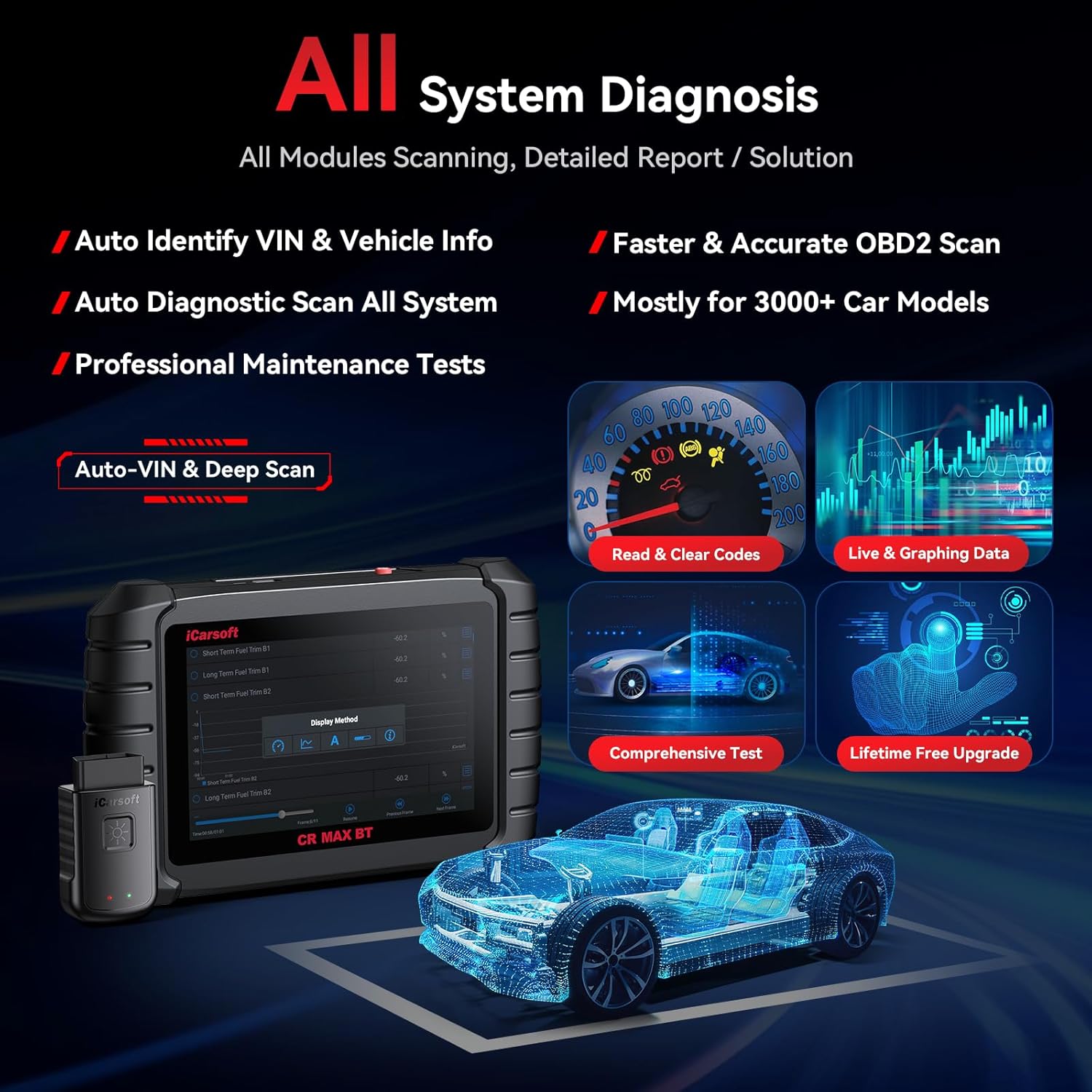
Figure 4.1: All System Diagnosis Interface.
4.3 Brug af specifikke funktioner
After a full system diagnosis or by selecting 'Service' from the main menu, you can access various specialized functions:
- Læs/slet koder: View detailed descriptions of Diagnostic Trouble Codes (DTCs) and clear them after repairs.
- Live datastrøm: Monitor real-time sensor data in text or graphical format. The 4-in-1 graphic display allows for simultaneous viewing of multiple data parameters for comparative analysis.

Figure 4.2: 4-in-1 Graphic Live Data Display.
- Vedligeholdelsestjenester: Select from the 49+ available services (e.g., Oil Reset, EPB, Battery Registration, DPF Regeneration) and follow the on-screen prompts to perform the desired function.
- Bidirectional Actuation Tests: Command specific components or systems to perform actions (e.g., turn on/off fuel pump, cycle ABS motor) to verify their functionality.
- ECU-kodning: For supported vehicles, this function allows for customization, component matching, and software updates within the Engine Control Unit.
- ECU Teach-in/Adaptation: Used when replacing certain components or ECUs to ensure proper communication and function with the vehicle's existing systems.
4.4 Generating and Printing Reports
After completing diagnostic or service procedures, the device can generate a detailed diagnostic report. This report can be saved and printed for record-keeping or client presentation. Navigate to the 'Report' section to view, save, or print reports.
5. Vedligeholdelse
5.1 Rengøring af enheden
Regularly clean the touchscreen and device body with a soft, damp klud. Undgå at bruge slibende rengøringsmidler eller opløsningsmidler, der kan beskadige skærmen ellerasing.
5.2 Softwareopdateringer
As mentioned in the setup section, ensure your device software is kept up-to-date. Connect to Wi-Fi and check for updates periodically via the 'Upgrade' menu. These updates often include new vehicle coverage, functions, and performance enhancements.
5.3 Pleje af batterier
The device is equipped with a 5000mAh Lithium Polymer battery. To prolong battery life:
- Undgå at aflade batteriet helt ofte.
- Opbevar enheden på et køligt, tørt sted, når det ikke er i brug.
- Oplad enheden ved hjælp af den medfølgende oplader.
5.4 Opbevaring
When not in use, store the iCarsoft CR Max BT (Enhanced) and its accessories in the provided protective case to prevent damage from dust, moisture, and impacts.
6. Fejlfinding
This section addresses common issues you might encounter while using the iCarsoft CR Max BT (Enhanced).
| Problem | Mulig årsag | Løsning |
|---|---|---|
| Enheden tænder ikke. | Lavt batteri; enhedfejl. | Oplad enheden i mindst 30 minutter. Hvis den stadig ikke tænder, skal du kontakte support. |
| Kan ikke oprette forbindelse til køretøjet. | Loose cable connection; incorrect adapter; vehicle ignition off; Bluetooth not paired. | Ensure all cables are securely connected. Verify correct adapter for vehicle. Turn vehicle ignition to ON position. Check Bluetooth pairing status on the device. |
| Softwareopdatering mislykkes. | Poor Wi-Fi connection; insufficient storage. | Ensure a stable Wi-Fi connection. Check available storage space on the device. Restart the update process. |
| Specifik funktion ikke tilgængelig for køretøjet. | Vehicle not supported for that specific function; outdated software. | Verify vehicle compatibility for the function (refer to the detailed vehicle coverage list). Ensure software is up-to-date. |
For more complex issues or error codes not listed, please refer to the comprehensive digital user manual accessible on the device or contact iCarsoft customer support.
7. Specifikationer
Key technical specifications for the iCarsoft CR Max BT (Enhanced) Diagnostic Tool:
- Operativsystem: Windows 8.1
- Vise: 7-inch HD Touchscreen (1024x600 resolution)
- Processor: 4-kernet, 1.3 GHz
- Hukommelse: 16GB+
- Batteri: 5000mAh litiumpolymer (inkluderet)
- Varens vægt: Cirka 5.24 pund
- Pakkedimensioner: Cirka 14.41 x 11.1 x 4.25 tommer
- Forbindelse: Wireless Bluetooth (33FT range), USB, Wi-Fi
- Understøttede protokoller: ISO9141-2, ISO14230-2, ISO15765, K/L-Line, Flashing Code, SAE-J1850 VPW, SAE-J1850PWM, ISO11898 (Highspeed, Middlespeed, Lowspeed & Singlewire CAN, fault-tolerant CAN), SAE J2610, GM UART UART Echo Byte Protocol, Honda Diag-H Protocol, TP2.0, TP1.6
- Understøttede sprog: 15 languages including English, German, French, Dutch, Spanish, Czech, Swedish, Russian, Hungarian, Norwegian, Portuguese, Italian, Polish, Danish, Finnish.
- Køretøjskompatibilitet: Works on most 1996 and later OBDII compliant US and Asian vehicles; most 2001 and later OBDII compliant PETROL European vehicles; most 2004 and later OBDII compliant DIESEL European vehicles.

Figure 7.1: Device Specifications and Supported Protocols.
8. Garanti og support
iCarsoft is committed to providing high-quality products and customer satisfaction. The iCarsoft CR Max BT (Enhanced) comes with comprehensive support:
- Lifelong Free Updates: Enjoy continuous software updates for the lifetime of the product, ensuring compatibility with new vehicle models and access to the latest diagnostic features.
- Lifelong Free Hardware Repairs: iCarsoft offers lifelong free hardware repairs, demonstrating confidence in the product's durability and commitment to customer service.
For any technical assistance, warranty claims, or specific vehicle compatibility inquiries, please contact iCarsoft customer support through their official channels. Providing your product model and VIN (Vehicle Identification Number) will help expedite support.


