1. Introduktion
Thank you for choosing the Claiks 63" L Shaped Standing Desk. This electric height-adjustable desk is designed to enhance your workspace with its versatile L-shaped design, integrated LED lighting, and convenient power outlets. It features a dual-motor system for smooth and quiet height adjustments, along with memory presets for personalized comfort. This manual provides essential information for assembly, operation, maintenance, and troubleshooting to ensure optimal performance and longevity of your desk.

Figur 1.1: Overview of the Claiks L-shaped standing desk, showcasing its design with dual monitors, integrated LED lighting, and a visible power outlet on the side.

Figure 1.2: The Claiks L-shaped standing desk integrated into a modern home office environment, highlighting its spacious design and aesthetic appeal.
2. Vigtige sikkerhedsoplysninger
Læs venligst alle sikkerhedsinstruktioner omhyggeligt inden montering og brug. Manglende overholdelse af disse instruktioner kan medføre personskade eller beskadigelse af produktet.
- Saml altid skrivebordet i henhold til de medfølgende instruktioner.
- Do not exceed the weight limit of 132 lbs (60 kg) for the desktop. Overloading can cause instability and damage.
- Ensure the desk is properly anchored to the floor if required, or that casters are locked, to prevent tipping, especially when adjusting height or moving.
- Keep the work area clear of obstacles to prevent accidents during height adjustment. Ensure no objects are under the desk that could obstruct its movement.
- Always use the desk with caution and follow all safety guidelines. Keep children and pets away from the desk during operation.
- Du må ikke sidde eller stå på skrivebordet.
- Afbryd strømmen før rengøring eller vedligeholdelse.
3. Pakkens indhold
Before beginning assembly, please verify that all components listed below are present and undamaged. If any parts are missing or damaged, contact customer support immediately.
- Desk Frame Components (Legs, Crossbars)
- Bordpaneler (L-formede sektioner)
- Electric Motors and Control Box
- Kontrolpanel med hukommelsesforudindstillinger
- Strømudtagsenhed
- Skuffesamling
- LED lys Strip
- Hooks (for headphones/bags)
- Justerbare fødder (x6)
- Lockable Swivel Casters (x6)
- Under-desk Storage Shelf
- Assembly Hardware (Screws, Wrenches, etc.)
- Instruktionsmanual

Figure 3.1: Key components and features of the desk, including the integrated power outlet, adjustable feet for stability, lockable swivel casters for mobility, and a convenient under-desk storage solution.
4. Produktspecifikationer
| Feature | Specifikation |
|---|---|
| Mærke | Claiks |
| Model | B0DRH15MJB |
| Produktmål (D x B x H) | 63" D x 55" B x 28.5" H |
| Justerbart højdeområde | 28.3" til 47.2" |
| Farve | Natur |
| Stil | Modern, L-Shape Standing Desk |
| Grundmateriale | Metal |
| Top materialetype | Konstrueret træ |
| Varens vægt | 98.1 pund |
| Maksimal vægtkapacitet | 132 lbs (60 kg) |
| Inkluderede komponenter | Drawer, Hooks, LED Light, Power Outlet |
| Antal skuffer | 1 (Single, Open Shelf Drawer) |
| Antal hylder | 1 (Integrated Storage Shelf) |
| Særlige funktioner | Cord Rewind, 4 Memory Presets, Dual Motor, Quiet Operation |
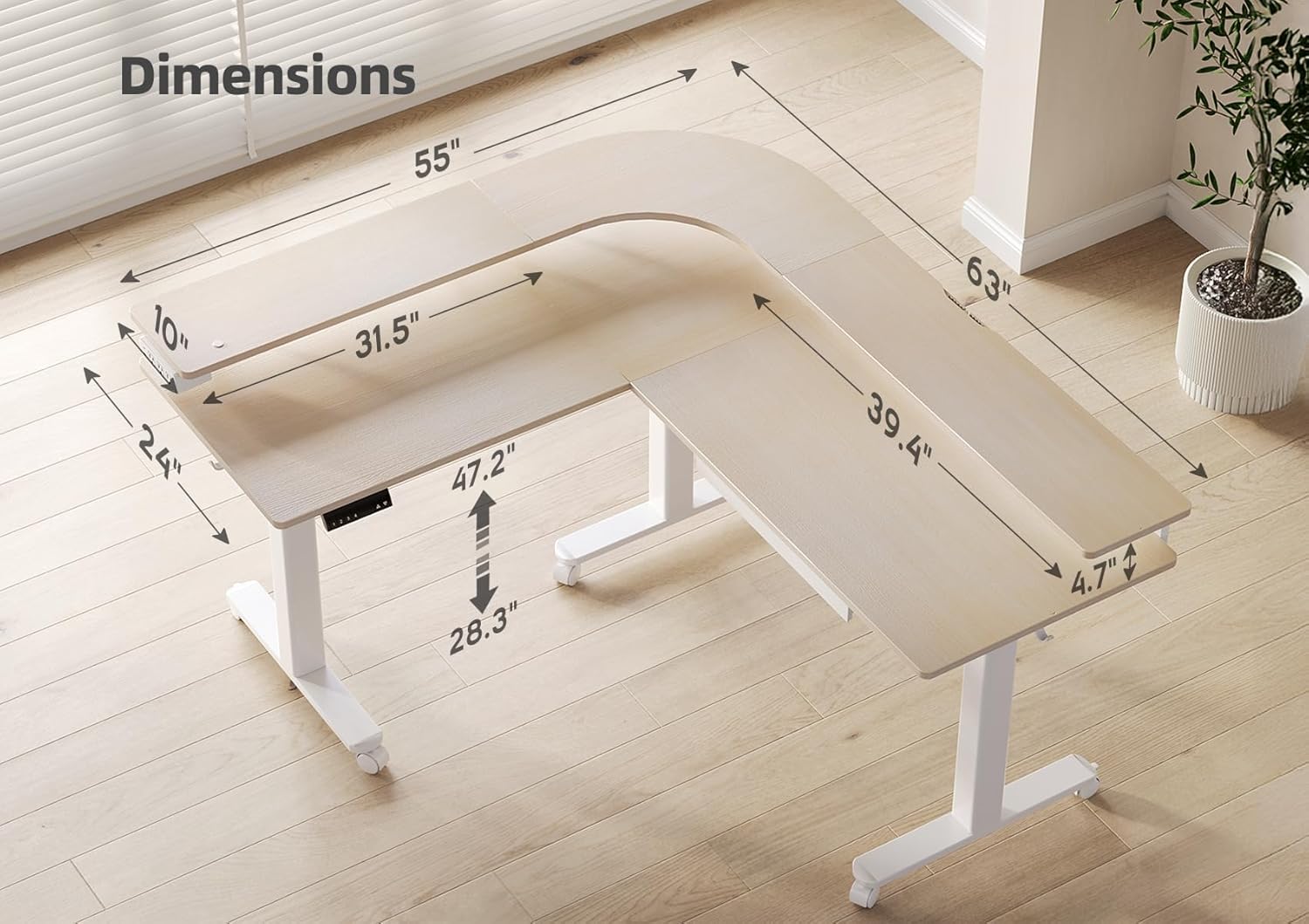
Figure 4.1: Detailed dimensions of the Claiks L-shaped standing desk, illustrating its length, width, and adjustable height range.
5. Opsætning og montering
Assembly of the Claiks L Shaped Standing Desk is required. Please follow the step-by-step instructions provided in the separate assembly guide included with your package. Ensure you have adequate space and assistance if needed, as the desk components can be heavy.
5.1 Tjekliste før montering
- Pak alle komponenter ud, og kontroller dem med pakkens indholdsliste.
- Clear a spacious area for assembly, preferably on a soft surface to prevent scratches.
- Gather necessary tools (usually included, but a Phillips head screwdriver may be helpful).
5.2 General Assembly Steps (Refer to dedicated Assembly Guide for details)
- Assemble the desk frame: Attach the legs to the crossbars.
- Install the electric motors and control box onto the frame.
- Fastgør skrivebordspanelerne til den samlede ramme.
- Install the control panel, power outlet, LED light strip, and drawer.
- Attach adjustable feet or lockable swivel casters as desired.
- Connect all electrical cables according to the wiring diagram in the assembly guide.
- Perform initial calibration as per the assembly guide instructions.
6. Betjeningsvejledning
6.1 Højdejustering
The desk features a dual-motor system for smooth and quiet height adjustment. The height can be adjusted from 28.3 inches (sitting height) to 47.2 inches (standing height).
- Op/Ned knapper: Brug ▲ (Op) og ▼ (Down) buttons on the control panel to manually adjust the desk to your desired height.
- Stille drift: The desk operates with a low noise level (approximately 45dB), ensuring minimal disruption.
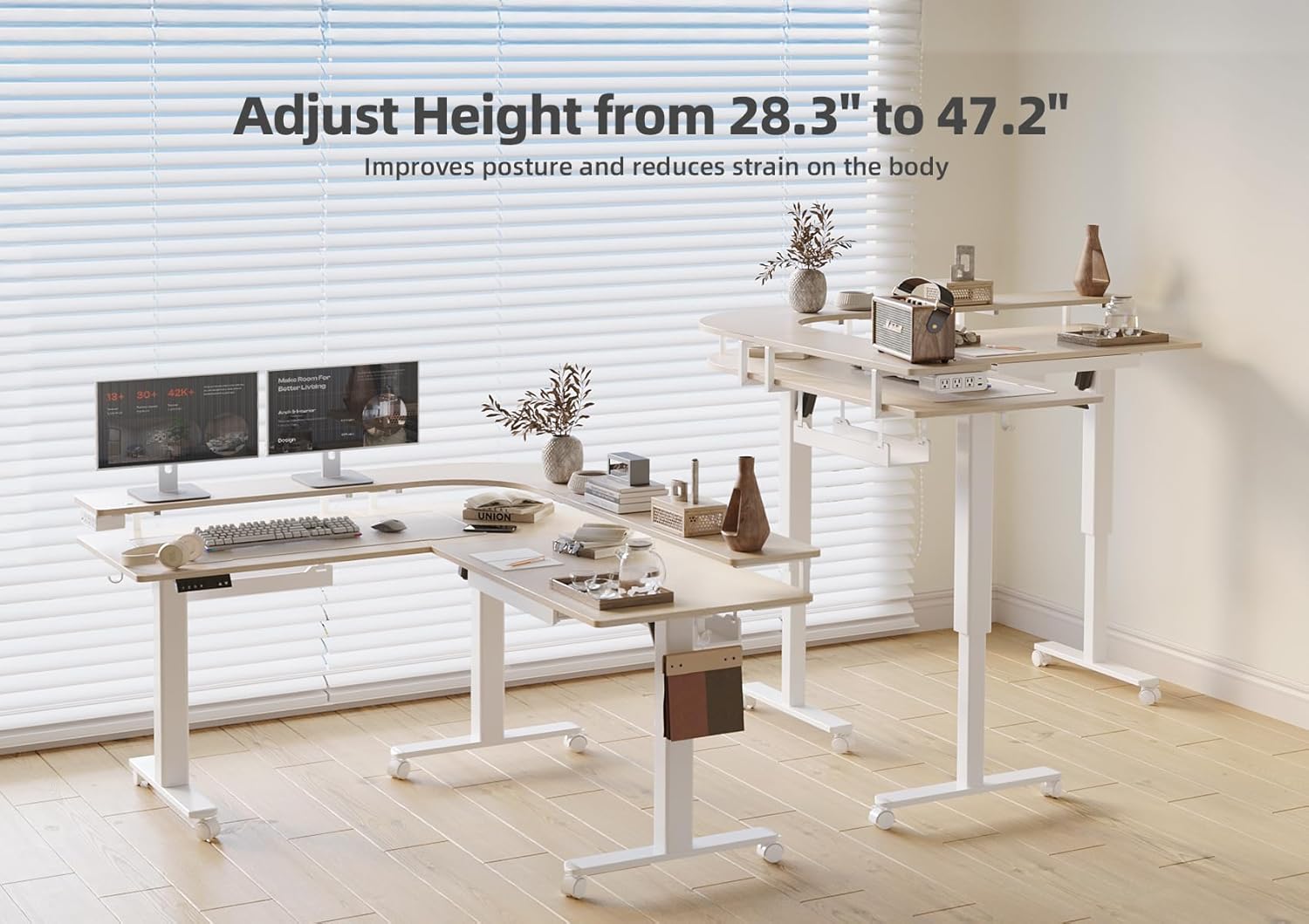
Figure 6.1: The desk's ability to adjust height, promoting better posture and reducing physical strain during work.
6.2 Hukommelsesforudindstillinger
The control panel includes four memory preset buttons (1, 2, 3, 4) to save and recall your preferred sitting and standing heights.
- Sådan gemmer du en højde: Adjust the desk to your desired height using the Up/Down buttons. Press and hold one of the memory preset buttons (1, 2, 3, or 4) until the display flashes or a beep is heard, indicating the height has been saved.
- Sådan husker du en højde: Simply press the corresponding memory preset button (1, 2, 3, or 4) once. The desk will automatically move to the saved height.
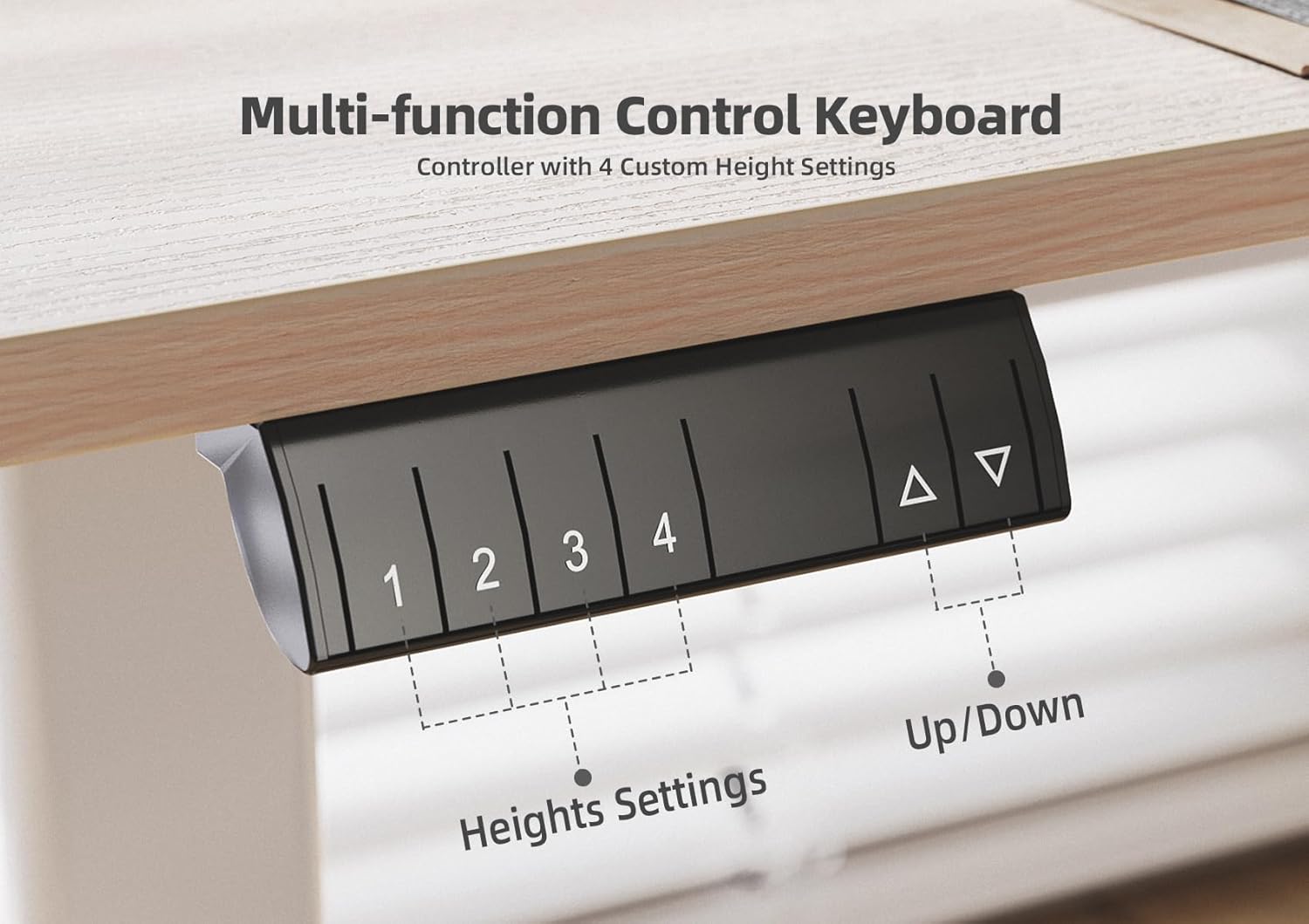
Figure 6.2: The multi-function control keyboard with four custom height settings, allowing users to save and recall their ideal desk positions.
6.3 LED lys
The desk is equipped with built-in LED lights to provide illumination and enhance the ambiance of your workspace.
- Refer to the assembly guide for specific instructions on activating and controlling the LED lights. Typically, there is a dedicated button or a combination of buttons on the control panel for light operation.
- The hidden light feature provides subtle and effective illumination.

Figure 6.3: The integrated LED lighting system, providing ambient light and enhancing the desk's functionality in low-light conditions.
6.4 Power Outlet
A side-mounted power outlet is integrated into the desk for convenient charging of your devices.
- Plug your devices directly into the power outlets.
- Ensure the desk is connected to a grounded power source.
- Do not overload the power outlet. Refer to the power outlet's specifications for maximum wattage.
7. Vedligeholdelse og pleje
Regular maintenance will help prolong the life and appearance of your Claiks standing desk.
- Rensning: Tør skrivebordets overflader af med en blød,amp cloth. Avoid harsh chemicals or abrasive cleaners that could damage the finish. For the metal frame, a mild soap solution can be used.
- Kabelstyring: Periodically check and organize cables to prevent tangling or interference with the desk's movement. Utilize the built-in cable management features.
- Motor and Frame Inspection: Annually inspect the motor and frame for any loose screws or signs of wear. Tighten any loose fasteners.
- Smøring: The lifting columns are generally maintenance-free. Do not attempt to lubricate internal components unless specifically instructed by Claiks customer support.
8. Fejlfinding
If you encounter issues with your Claiks standing desk, refer to the common problems and solutions below. If the problem persists, contact Claiks customer support.
| Problem | Mulig årsag | Løsning |
|---|---|---|
| Skrivebordet bevæger sig ikke eller reagerer ikke på betjeningselementer. | Power disconnected, control box error, overload. |
|
| Skrivebordet bevæger sig ujævnt eller laver usædvanlige lyde. | Loose connections, uneven load, obstruction. |
|
| Hukommelsesforudindstillingerne virker ikke. | Presets not saved correctly, power cycle needed. |
|
| LED lights are not functioning. | Loose connection, light strip damage. |
|
9. Garanti og kundesupport
9.1 Garantioplysninger
The Claiks 63" L Shaped Standing Desk comes with a Begrænset garanti. Please refer to the warranty card included with your product for specific terms, conditions, and duration of coverage. This warranty typically covers manufacturing defects and malfunctions under normal use.
9.2 Returnering og ombytning
Claiks offers a 30-dages nem returnering policy. If you are not satisfied with your purchase, you may return the product within 30 days of receipt. Please refer to the retailer's return policy or contact Claiks customer support for detailed instructions on returns and exchanges.
9.3 Kundesupport
For any questions, technical assistance, or warranty claims, please contact Claiks Customer Support. Have your product model number (B0DRH15MJB) and purchase date ready when contacting support.
You can typically find contact information on the Claiks official website or through the retailer where you purchased the product. For Amazon purchases, you can visit the Claiks Store on Amazon.


