1. Introduktion
Welcome to the user manual for your new XIAOMI Poco X7 Pro 5G smartphone. This guide provides essential information on setting up, operating, maintaining, and troubleshooting your device. Please read this manual thoroughly to ensure optimal performance and longevity of your smartphone.
The Poco X7 Pro is a high-performance 5G smartphone featuring the MediaTek Dimensity 8400-Ultra chipset, built with a 4nm process technology and ARM Cortex-A725 CPU architecture. It is designed for speed and efficiency.
2. Pakkens indhold
Upon unboxing your Poco X7 Pro, please verify that the following items are included:
- XIAOMI Poco X7 Pro 5G Smartphone
- Protective film (pre-applied or in box)
Note: Other accessories such as a power adapter, charging cable, or SIM ejector tool may be sold separately and are not always included in the standard package. Please check the product packaging for a complete list of included items.
3. Enhed overview
Familiarize yourself with the physical components of your Poco X7 Pro 5G.

Figur 3.1: Forside view of the Poco X7 Pro 5G smartphone, highlighting its storage capacity.
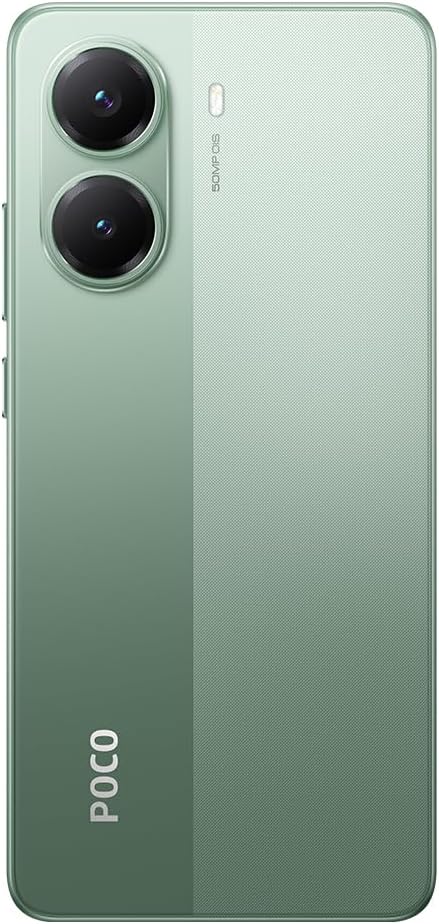
Figur 3.2: Bagside view of the Poco X7 Pro 5G, showcasing the camera setup and design.
3.1. Fysiske komponenter
- Vise: 6.67-inch AMOLED screen with 2712x1220 resolution and 120Hz refresh rate. Protected by Gorilla Glass 7i.
- Bagkamera: 50 MP main camera with OIS (Optical Image Stabilization) and f/1.5 aperture, utilizing a Sony IMX882 sensor. Supports 4K video recording at 60fps with dual OIS and EIS stabilization.
- Forreste kamera: (Specific MP not detailed in features, but typically located at the top center of the display).
- Knapper: Power button and volume rockers typically located on the side.
- Porte: USB-C-port til opladning og dataoverførsel.
- SIM-bakke: Slot for inserting SIM cards.
4. Indledende opsætning
4.1. Isætning af SIM-kortet
- Find SIM-kortbakken på siden af din enhed.
- Insert the SIM ejector tool (if available, otherwise a thin pin) into the small hole next to the tray to open it.
- Placer dit/dine Nano-SIM-kort i bakken med de gyldne kontakter nedad.
- Skub forsigtigt bakken tilbage i åbningen, indtil den flugter med enheden.
4.2. Tænd din enhed
- Press and hold the Power button (usually on the right side) until the XIAOMI logo appears on the screen.
- Følg instruktionerne på skærmen for at fuldføre den indledende opsætning, herunder valg af sprog, Wi-Fi-forbindelse og login på din Google-konto.
4.3. Opladning af batteriet
Your device comes with a 6,000 mAh battery. For optimal performance, fully charge the device before first use.

Figure 4.1: Illustration of the 6000 mAh battery and 90W HyperCharge capability, allowing a full charge in approximately 42 minutes.
- Connect a compatible USB-C charging cable to the device's charging port.
- Connect the other end of the cable to a compatible power adapter (sold separately) and plug it into a power outlet.
- The device supports 90W fast wired charging, capable of charging from 0% to 100% in approximately 42 minutes.
5. Grundlæggende betjening
5.1. Berøringsskærmbevægelser
- Tryk på: Select an item or activate a function.
- Tryk og hold: Få adgang til kontekstmenuer eller flyt elementer.
- Stryg: Naviger gennem skærme eller lister.
- At klemme: Zoom ind eller ud på billeder og web sider.
5.2. Kamerafunktioner
Your Poco X7 Pro features an advanced camera system.

Figure 5.1: Detail of the 50 MP main camera with OIS and the 20 MP front camera.
- Bagkamera: The 50 MP main camera with OIS (Optical Image Stabilization) and f/1.5 aperture uses Sony's IMX882 sensor. It supports 4K video recording at 60fps with dual OIS and EIS stabilization for clear and steady footage.
- Forreste kamera: Capture high-quality selfies and video calls.
- Kameratilstande: Explore various modes such as Portrait, Night, Pro, and Panorama for diverse photographic experiences.
5.3. Skærmfunktioner
The device's display offers exceptional visual quality.

Figure 5.2: Key display specifications including brightness, refresh rate, and resolution.
- Lysstyrke: Advertised to reach up to 3,200 nits of peak brightness for excellent visibility even in bright conditions.
- Opdateringshastighed: Features a 120Hz refresh rate for smooth scrolling and fluid animations.
- Berør Sampling sats: Offers a 2,560 Hz touch sampling rate for highly responsive touch input.
- Opløsning: 2712 x 1220 pixels, providing sharp and detailed visuals.
6. Vedligeholdelse
6.1. Rengøring af din enhed
- Brug en blød, fnugfri klud til forsigtigt at tørre telefonens skærm og kabinet af.
- Undgå at bruge skrappe kemikalier, slibende rengøringsmidler eller trykluft.
- The Poco X7 Pro has an IP68 dust and water resistance rating, meaning it can withstand immersion in up to 1.5 meters of fresh water for up to 30 minutes. However, it is not recommended for use in water and water damage is not covered under warranty.
6.2. Softwareopdateringer
Regularly check for and install software updates to ensure your device has the latest features, security patches, and performance improvements. Your device runs on Android 15.
- Gå til Indstillinger > Om telefonen > MIUI-version (or similar) to check for updates.
- Sørg for, at din enhed er forbundet til Wi-Fi og har tilstrækkelig batteriopladning, før du starter en opdatering.
7. Fejlfinding
Hvis du støder på problemer med din enhed, kan du prøve følgende almindelige løsninger:
- Enheden tænder ikke: Sørg for, at batteriet er opladet. Tilslut enheden til en oplader i mindst 15 minutter, og prøv derefter at tænde den igen.
- Apps der går ned eller fryser: Close the problematic app and reopen it. If the issue persists, restart your phone. You can also clear the app's cache or reinstall it.
- Dårlig netværksforbindelse: Check if your SIM card is properly inserted. Try toggling Airplane Mode on and off. If the issue persists, contact your network provider.
- Batteriet aflades hurtigt: Reduce screen brightness, disable unnecessary background apps, and turn off features like Bluetooth or GPS when not in use. Check battery usage in settings to identify power-hungry apps.
- Berøringsskærmen reagerer ikke: Restart your device. If the screen remains unresponsive, a factory reset might be necessary (back up your data first).
For mere komplekse problemer, se den officielle XIAOMI-support webwebsted eller kontakt kundeservice.
8. Tekniske specifikationer
Detailed specifications for the XIAOMI Poco X7 Pro 5G:
| Feature | Specifikation |
|---|---|
| Mærke | XIAOMI |
| Modelnavn | POCO X7 PRO |
| Operativsystem | Android 15 |
| Processor type | Snapdragon (MediaTek Dimensity 8400-Ultra) |
| Processorhastighed | 3.25 GHz |
| RAM størrelse | 8 GB |
| Lagerkapacitet | 256 GB |
| Skærmstørrelse | 6.67 tommer |
| Display Type | AMOLED |
| Opløsning | 2712 x 1220 |
| Opdateringshastighed | 120 Hz |
| Batterikapacitet | 6000 mAh (litium-ion) |
| Opladning | 90W Fast Wired Charging |
| Bagkamera | 50 MP with OIS, f/1.5 aperture, Sony IMX882 sensor |
| Video opløsning | 4K at 60fps (with dual OIS and EIS stabilization) |
| Forbindelse | 5G, Bluetooth, NFC, USB, Wi-Fi |
| Vand/støv modstand | IP68 |
| Vægt | 400 g |
| Year Model | 2025 |
9. Sikkerhedsoplysninger
Please observe the following safety precautions to prevent injury or damage to your device:
- Udsæt ikke enheden for ekstreme temperaturer, direkte sollys eller åben ild.
- Undgå at tabe enheden eller udsætte den for kraftige stød.
- Brug kun godkendte opladere og tilbehør.
- Forsøg ikke selv at skille enheden ad eller reparere den. Kontakt autoriseret servicepersonale.
- Hold apparatet væk fra medicinsk udstyr, da det kan forstyrre dets funktion.
- Bortskaf enheden og dens batteri på en ansvarlig måde i henhold til lokale regler.
10. Garanti og support
Your XIAOMI Poco X7 Pro 5G is covered by a limited warranty. For specific warranty terms and conditions, please refer to the warranty card included with your product or visit the official XIAOMI webwebsted.
For technical support, service, or further assistance, please contact XIAOMI customer service or visit their official support channels. You can find contact information on the XIAOMI webwebsted.


