1. Introduktion
This manual provides essential instructions for the setup, operation, and maintenance of your VILCORN R46S Retro Handheld Game Console. Please read this manual thoroughly before using the device to ensure proper functionality and to maximize your gaming experience.

Figur 1.1: Front view of the VILCORN R46S console. The screen displays key features such as HD output, battery capacity, dual joysticks, and HD color screen.
2. Sikkerhedsoplysninger
- Keep the device away from water and fire to prevent damage and ensure user safety.
- Forsøg ikke at skille enheden ad eller ændre den. Dette kan ugyldiggøre garantien og forårsage skade.
- Brug kun det medfølgende opladningskabel og adapter til at oplade enheden.
- Undgå langvarig udsættelse for direkte sollys eller ekstreme temperaturer.
- Dette produkt anbefales til børn fra 3 år.
3. Produktfunktioner
- Vise: 4.0-inch IPS OCA display with 720x720 resolution and 1:1 aspect ratio.
- Processor: High-performance RK3566 quad-core CPU.
- Batteri: Built-in 3500mAh 3.8V LiPo battery, providing approximately 3-5 hours of gameplay.
- Opbevaring: Dual TF card slots for independent system and game storage.
- Forbindelse: Supports 2.4GHz WiFi and Bluetooth.
- Operativsystem: Open Source Linux System, allowing for system upgrades and compatibility with mainstream 64-bit 3D simulators.
- Periferiudstyr: Supports Bluetooth handles, speakers, and headsets.
- Streaming: Supports WiFi Moonlight streaming function.

Figur 3.1: The 4-inch IPS OCA fully laminated 2.5D HD MIPL screen with 720*720 high resolution provides clear picture quality and soft colors, designed to reduce eye strain during extended play.
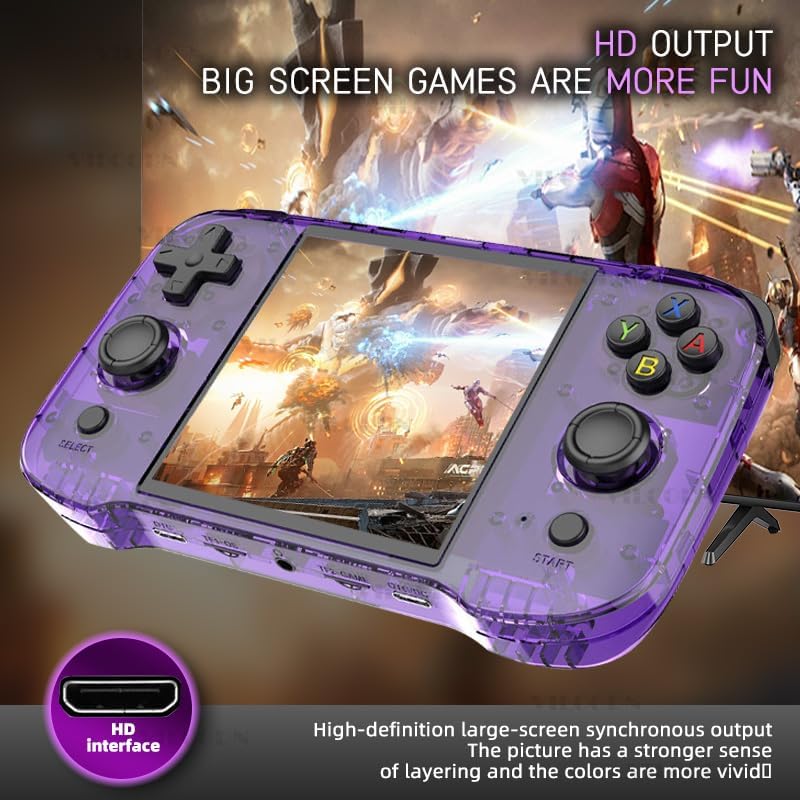
Figur 3.2: The console features high-definition large-screen synchronous output via an HDMI interface, enhancing the visual experience with greater depth and vivid colors.
4. Enhedslayout og kontroller
Familiarize yourself with the buttons and ports on your R46S console:
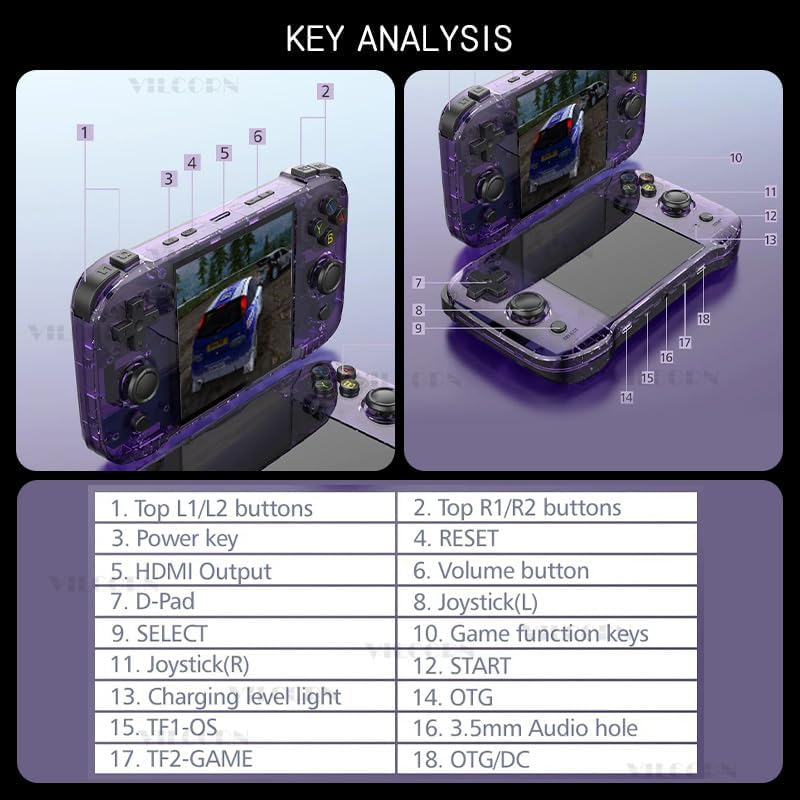
Figur 4.1: Key Analysis of the VILCORN R46S console.
| Ingen. | Feature |
|---|---|
| 1 | Øverste L1/L2-knapper |
| 2 | Øverste R1/R2-knapper |
| 3 | Tænd / sluk-tast |
| 4 | RESET knap |
| 5 | HDMI -udgangsport |
| 6 | Lydstyrke-knap |
| 7 | D-Pad (retningspad) |
| 8 | Joystick (V) |
| 9 | SELECT -knap |
| 10 | Spilfunktionstaster (A, B, X, Y) |
| 11 | Joystick (H) |
| 12 | START-knap |
| 13 | Charging level light indicator |
| 14 | OTG port |
| 15 | TF1-OS (MicroSD-kortslot til operativsystem) |
| 16 | 3.5mm Audio hole (Headphone Jack) |
| 17 | TF2-GAME (MicroSD card slot for Games) |
| 18 | OTG/DC (Charging port) |

Figur 4.2: The console features dual joysticks with an ergonomic design, allowing for precise game operation and adaptability to various game types.
5. Opsætningsvejledning
- Indledende opkrævning: Before first use, fully charge the console using the provided USB-C cable and a compatible power adapter. The charging level light (13) will indicate charging status.
- Indsæt MicroSD-kort:
- Insert the MicroSD card containing the operating system into the TF1-OS slot (15).
- Insert the MicroSD card containing your games into the TF2-GAME slot (17).
- Tænd: Press and hold the Power key (3) until the screen illuminates.
- Valg af sprog (hvis relevant): Follow on-screen prompts to select your preferred language.
- Netværksforbindelse (valgfrit): To enable WiFi Moonlight streaming or system updates, navigate to the system settings and connect to a 2.4GHz WiFi network.
- Bluetooth-parring (valgfrit): To connect Bluetooth peripherals (controller, speaker, headset), go to system settings and initiate pairing.
6. Betjeningsvejledning
- Navigering i menuen: Use the D-Pad (7) or Joysticks (8, 11) to navigate through the game system menus. The Game function keys (10) (A, B, X, Y) and SELECT (9) / START (12) buttons are used for selection and confirmation.
- Selecting a Game System: From the main menu, scroll to select your desired game system (e.g., Super Nintendo, Game Boy Advance, PSP). Press the 'A' button (part of 10) to enter.
- Launching a Game: Within a game system, use the D-Pad or Joysticks to browse the list of available games. Select a game and press the 'A' button to launch it.
- Betjening i spillet: Controls will vary by game. The console features L1/L2 (1), R1/R2 (2) shoulder buttons, a D-Pad (7), dual joysticks (8, 11), and A, B, X, Y function keys (10).
- Justering af lydstyrke: Use the Volume button (6) to increase or decrease the audio output.
- Exiting a Game / System: Specific button combinations (often SELECT + START or a dedicated menu button) are typically used to exit a game or return to the main system menu. Refer to the system's on-screen instructions if available.
- Sluk: Press and hold the Power key (3) until the power-off options appear, then select to shut down the device. A quick press may put the device into sleep mode.
7. Vedligeholdelse
- Rensning: Brug en blød, tør klud til at rengøre konsollens yderside. Brug ikke flydende rengøringsmidler eller aerosoler.
- Opbevaring: Opbevar enheden et køligt, tørt sted væk fra direkte sollys og ekstreme temperaturer.
- Batteripleje: For at forlænge batteriets levetid bør du undgå at aflade batteriet helt ofte. Oplad enheden regelmæssigt, selvom den ikke er i brug i længere perioder.
- Softwareopdateringer: Periodically check for system updates through the device's settings menu to ensure optimal performance and access to new features.
8. Fejlfinding
- Enheden tændes ikke:
- Sørg for, at batteriet er opladet. Tilslut opladeren, og vent et par minutter, før du forsøger at tænde igen.
- If the device is unresponsive, press the RESET button (4) with a thin object (e.g., a paperclip) and then try to power on.
- Games are not loading or performing poorly:
- Verify that the game MicroSD card is correctly inserted into the TF2-GAME slot (17).
- Sørg for spillet file format is compatible with the installed system emulator.
- For performance issues, try restarting the device.
- Ingen lyd:
- Check the volume level using the Volume button (6).
- If headphones are connected, ensure they are fully plugged into the 3.5mm Audio hole (16).
- Cannot connect to WiFi/Bluetooth:
- Ensure you are within range of a 2.4GHz WiFi network. The device does not support 5GHz networks.
- Verify correct password entry for WiFi.
- For Bluetooth, ensure the peripheral is in pairing mode and within close proximity to the console.
9. Specifikationer
| Feature | Detalje |
|---|---|
| Modelnavn | R46S |
| Mærke | VILCORN |
| Vise | 4.0-inch IPS OCA, 720x720 resolution, 1:1 aspect ratio |
| Processor | RK3566 Quad-core CPU |
| Batteri | 3500mAh 3.8V LiPo (approx. 3-5 hours playtime) |
| Opbevaring | Dual MicroSD card slots (TF1-OS, TF2-GAME) |
| Forbindelse | 2.4 GHz WiFi, Bluetooth |
| Operativsystem | Open Source Linux-system |
| Dimensioner | 7.8 x 5.11 x 1.6 tommer |
| Anbefalet alder | 3 år og opefter |
| Fabrikant | Shenzhen Jiajue Technology Co., Ltd |

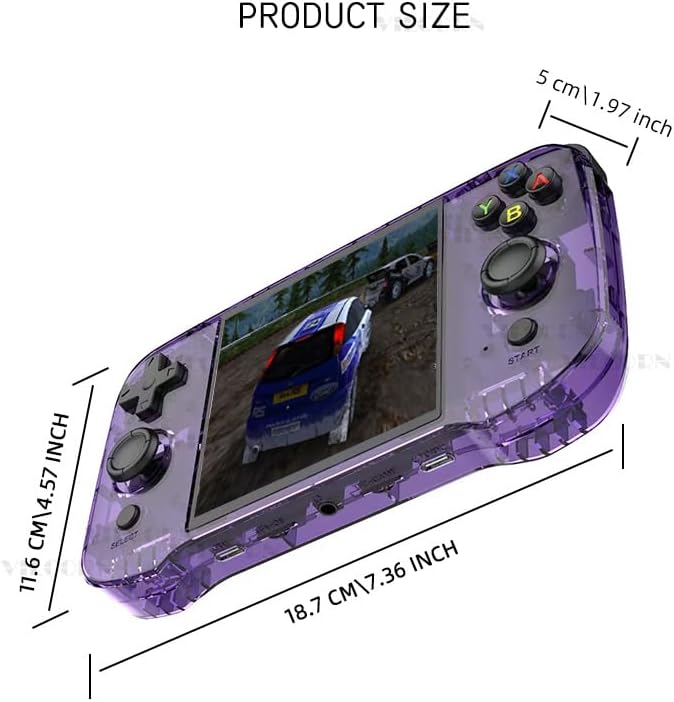
Figur 9.1: Product dimensions of the VILCORN R46S console: 18.7 cm (7.36 inches) length, 11.6 cm (4.57 inches) width, and 5 cm (1.97 inches) thickness.
Figur 9.2: The console is equipped with a built-in 3500mAh polymer battery (note: image shows 4000mAh, but product text specifies 3500mAh), featuring two-way protection for charge and discharge, allowing for several hours of play on a single full charge.
10. Hvad er der i æsken
- 1 x VILCORN R46S Handheld Game Console
- 1 x USB-C opladningskabel
- 1 x Brugermanual (dette dokument)
11. Garanti og support
For warranty information and technical support, please refer to the contact details provided by your retailer or visit the official VILCORN webwebsted. Behold din købskvittering som købsbevis i tilfælde af garantikrav.
