1. Introduktion
Welcome to the user manual for your new ZZB Android 15 Tablet. This versatile 2-in-1 device is designed to provide a seamless experience for both productivity and entertainment, transforming effortlessly between tablet, laptop, and computer modes with its included accessories. Featuring the latest Android 15 operating system, a vibrant 10.1-inch IPS display, and robust memory specifications, your tablet is ready for a wide range of tasks, from video playback and gaming to multitasking and creative work.
2. Pakkens indhold
Kontroller venligst, at alle nedenstående varer er inkluderet i din pakke. Hvis der mangler eller er beskadigede varer, bedes du kontakte kundesupport.
- 1 x ZZB 10.1-inch Android 15 Tablet
- 1 x Bluetooth-tastatur
- 1 x trådløs mus
- 1 x Stylus Pen
- 1 x Foldable Protective Case
- 1 x USB-C Charger Cable
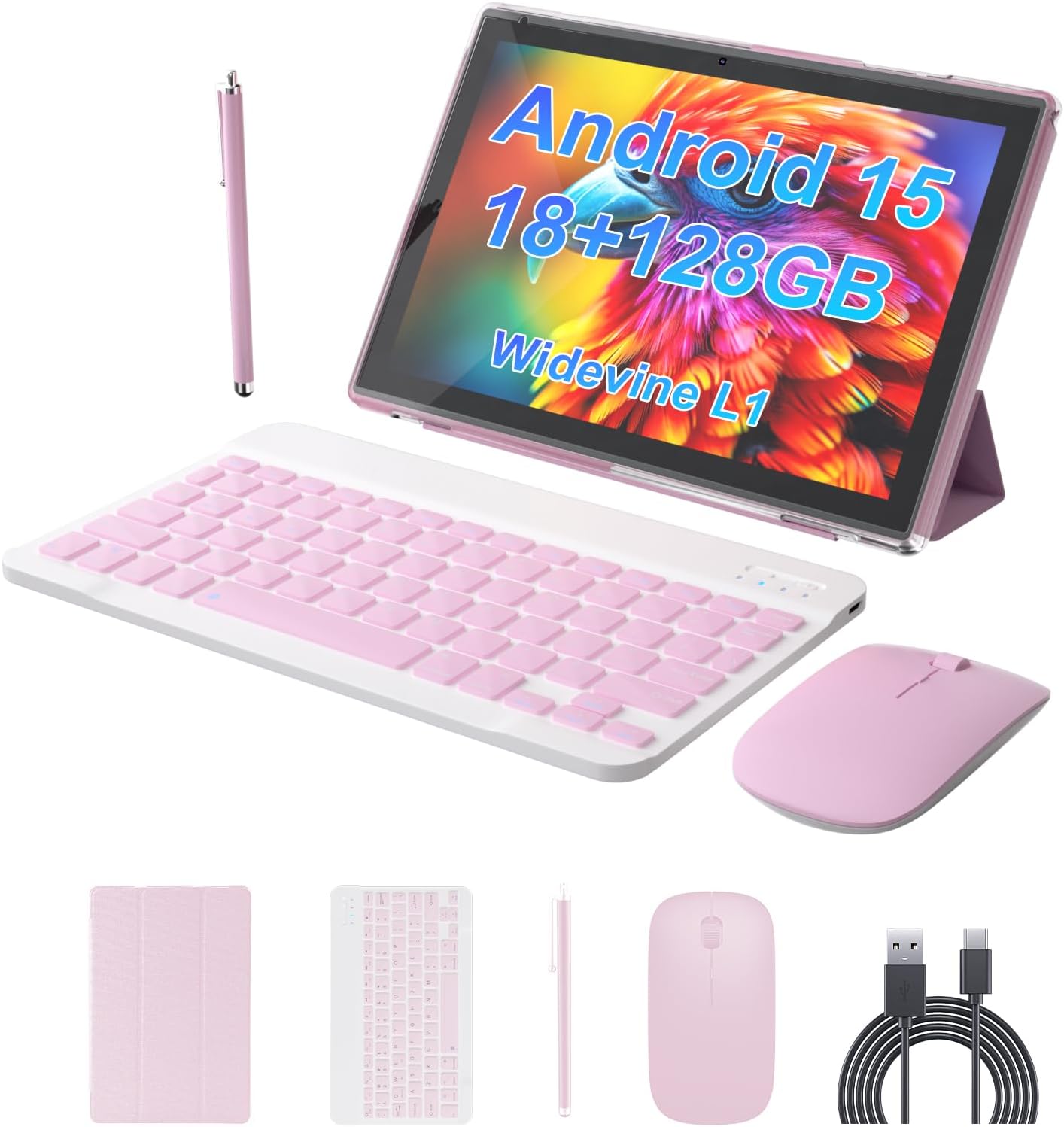
Image 2.1: All components included in the ZZB Android 15 Tablet package.
3. Opsætningsvejledning
3.1 Indledende opladning
Before first use, fully charge your tablet. Connect the provided USB-C charger cable to the tablet's USB-C port and the other end to a compatible USB-A wall charger (not included). The 6000mAh battery provides up to 8 hours of uninterrupted video playback once fully charged.

Image 3.1: The tablet's charging port and battery capacity details.
3.2 Tænd/sluk
- For at tænde: Press and hold the Power button located on the side of the tablet until the ZZB logo appears.
- For at slukke: Press and hold the Power button until the power options menu appears, then select "Power Off".
- For at genstarte: Tryk på tænd/sluk-knappen og hold den nede, indtil menuen med strømindstillinger vises, og vælg derefter "Genstart".
3.3 Indledende Android-opsætning
Upon first power-on, follow the on-screen prompts to complete the initial Android 15 setup. This includes selecting your language, connecting to a Wi-Fi network, and signing in with your Google account.
3.4 Tilslutning af tilbehør (tastatur og mus)
The included keyboard and mouse connect wirelessly via Bluetooth 5.0.
- Aktiver Bluetooth: Gå til Indstillinger > Tilsluttede enheder > Bluetooth og tænd Bluetooth.
- Pair Keyboard: Turn on the keyboard. Press the pairing button (usually on the back or side) until the indicator light flashes. Select the keyboard from the list of available devices on your tablet and follow any on-screen prompts to complete pairing.
- Pair Mouse: Turn on the mouse. Press the pairing button (if available, or it may automatically enter pairing mode). Select the mouse from the list of available devices on your tablet.

Image 3.2: The tablet set up in laptop mode with keyboard and mouse.
4. Betjeningsvejledning
4.1 Grundlæggende navigation
The tablet's 10.1-inch IPS touchscreen supports standard Android gestures:
- Tryk på: Vælg et element, eller åbn en app.
- Stryg: Navigate through home screens, menus, or scroll content.
- Knib-for-at-zoome: Forstør eller formindsk indhold som f.eks. fotos eller web sider.
- Langt tryk: Få adgang til kontekstmenuer eller flyt appikoner.

Image 4.1: The Android 15 OS interface on the tablet.
4.2 Brug af kameraerne
The tablet is equipped with a 2.0MP front camera and an 8.0MP rear camera.
- Forreste kamera: Ideel til videoopkald og selfies.
- Bagkamera: Suitable for capturing photos and videos of your surroundings.
Access the camera application from the home screen or app drawer to start capturing moments.

Billede 4.2: Overview of the tablet's dual camera system.
4.3 Lagerstyring
Your tablet comes with 128GB of internal storage (ROM) and 18GB of RAM (including 12GB expandable memory). For additional storage, you can expand it up to 2TB using an SD card (sold separately).
- Indsæt SD-kort: Locate the SD card slot on the side of the tablet and gently insert the card until it clicks into place.
- Administrer lagerplads: Gå til Indstillinger > Opbevaring til view brug og administration files.

Image 4.3: Tablet memory and storage capabilities.
4.4 Forbindelse
- Wi-Fi 6: Supports both 2.4G and 5G Wi-Fi for stable and fast internet connection. Access Wi-Fi settings via Indstillinger > Netværk og internet > Wi-Fi.
- Bluetooth 5.0: For connecting wireless accessories like headphones, speakers, and the included keyboard and mouse. Access Bluetooth settings via Indstillinger > Tilsluttede enheder > Bluetooth.

Image 4.4: The tablet in use for study or work.
5. Vedligeholdelse
- Rensning: Brug en blød, fnugfri klud til at rengøre skærmen og kabinettet. Undgå slibende rengøringsmidler eller opløsningsmidler.
- Batteripleje: To prolong battery life, avoid extreme temperatures. It is recommended to fully charge the tablet before it completely drains.
- Softwareopdateringer: Tjek regelmæssigt for systemopdateringer via Indstillinger > System > Systemopdatering for at sikre optimal ydeevne og sikkerhed.
- Lagerstyring: Ryd periodisk unødvendigt files og apps for at opretholde en problemfri drift.
6. Fejlfinding
| Problem | Mulig løsning |
|---|---|
| Tabletten tænder ikke. | Ensure the tablet is fully charged. Press and hold the Power button for at least 10-15 seconds. |
| Wi-Fi connection is unstable or drops. | Restart your Wi-Fi router. Forget the network on the tablet and reconnect. Ensure you are within range of the Wi-Fi signal. |
| Bluetooth accessories (keyboard/mouse) do not connect. | Ensure Bluetooth is enabled on the tablet and the accessories are in pairing mode. Recharge or replace batteries in accessories if applicable. Try unpairing and re-pairing. |
| Tabletten kører langsomt. | Close unused applications. Clear cache and data for frequently used apps. Restart the tablet. Consider uninstalling unnecessary apps or moving large files til et SD-kort. |
| Batteriet aflades hurtigt. | Reduce screen brightness. Disable Wi-Fi/Bluetooth when not in use. Close background apps. Limit location services. |
7. Specifikationer
| Feature | Detalje |
|---|---|
| Modelnavn | YQ10SMAX |
| Operativsystem | Android 15 |
| Skærmstørrelse | 10.1 tommer |
| Skærmopløsning | 1280 x 800 pixels (IPS HD) |
| VÆDDER | 18GB (including 12GB expandable memory) |
| Internt lager (ROM) | 128 GB |
| Udvidelig opbevaring | Op til 2 TB via SD-kort (sælges separat) |
| Batterikapacitet | 6000mAh |
| Forreste kamera | 2.0 MP |
| Bagkamera | 8.0 MP |
| Wi-Fi | Wi-Fi 6 (2.4G/5G) |
| Bluetooth | Bluetooth 5.0 |
| Dimensioner (LxBxH) | 9.7 x 6.8 x 0.35 tommer |
| Varens vægt | 2.75 pund |
| Farve | Lyserød |
8. Garanti og support
For warranty information and technical support, please refer to the documentation provided with your purchase or visit the official ZZB website. If you encounter any issues not covered in this manual, please contact ZZB customer service for assistance.


