1. Introduktion
Thank you for choosing the AVATTO Smart WLAN Roller Shutter Switch. This device allows you to control your blinds and roller shutters remotely via the Smart Life/Tuya app, voice commands through Alexa or Google Assistant, and directly via its touch-sensitive glass surface. This manual provides detailed instructions for installation, setup, operation, and troubleshooting to ensure optimal performance and safety.
2. Sikkerhedsoplysninger
WARNING: Electrical installation should only be performed by a qualified electrician. Ensure power is disconnected at the circuit breaker before installation to prevent electric shock.
- Do not install with wet hands.
- Overskrid ikke den maksimale belastningsgrad på 10 Amps / 800W.
- Operate only within the specified voltage område på 100-240V AC, 50-60Hz.
- Denne enhed er kun designet til indendørs brug.
- Opbevares utilgængeligt for børn.
3. Produktspecifikationer
| Feature | Specifikation |
|---|---|
| Produktdimensioner | 8 x 8 x 4 cm |
| Vægt | 360 g |
| Driftstilstand | ON-OFF-ON |
| Nuværende vurdering | 10 Amps |
| Operation Voltage | 100-240 Volts AC, 50-60Hz |
| Kontakttype | Normalt lukket |
| Switch Type | Kapacitiv berøringskontakt |
| Materiale | Plastic, Glass Surface |
| Trådløs frekvens | WiFi 2.4 GHz |
| Max Power | 800W / bande |
4. Installation
4.1 Ledningsdiagram
Before proceeding, ensure your motor has 4 wires, as this switch is compatible with 4-wire roller shutter motors. Disconnect power at the circuit breaker before wiring.
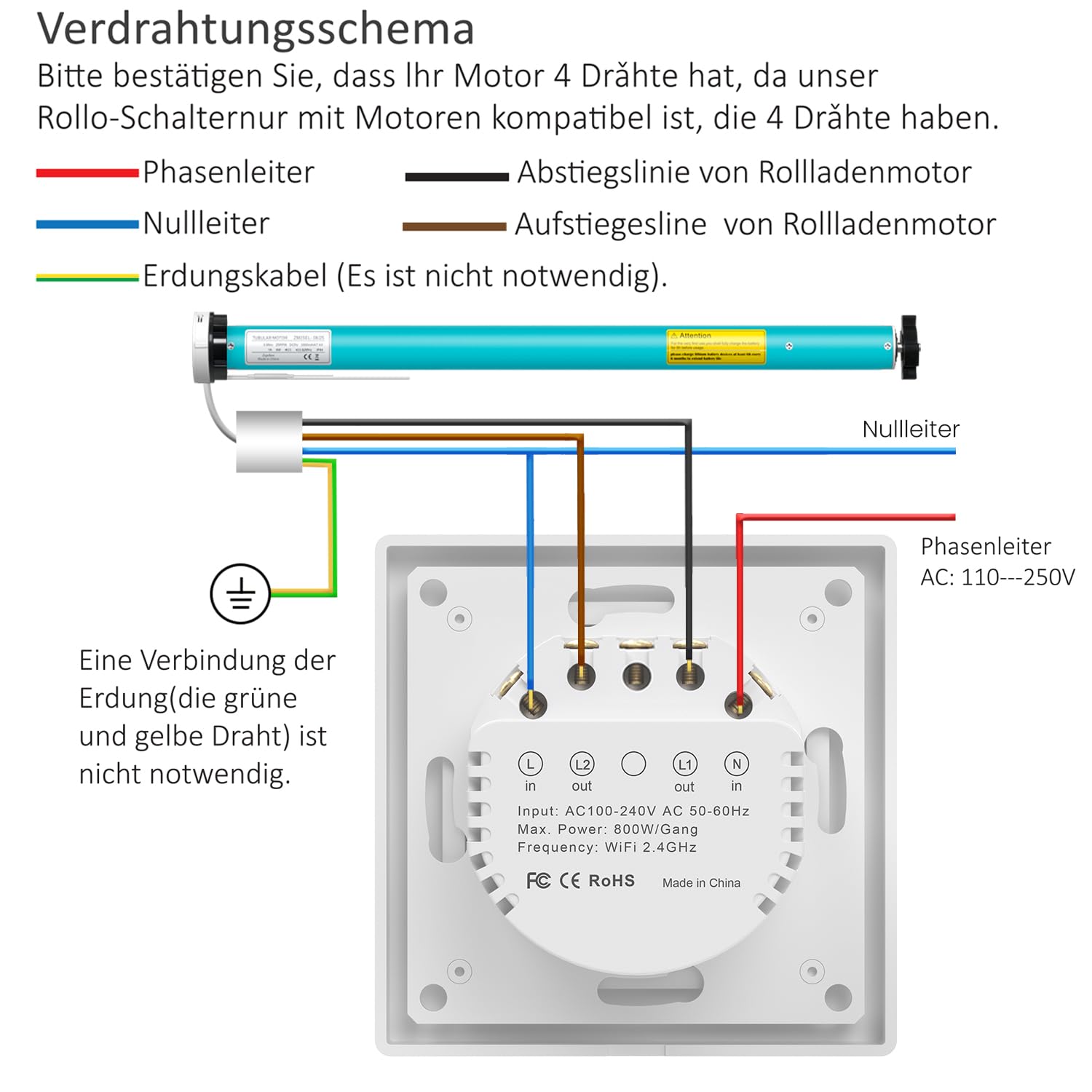
Billedbeskrivelse: A detailed wiring diagram showing the connections for the AVATTO roller shutter switch. The diagram illustrates connections for Live (L), Neutral (N), L1 (Ascending line for roller shutter motor), and L2 (Descending line for roller shutter motor). An optional ground wire connection is also shown. The switch itself has input and output terminals clearly labeled.
- Phase Conductor (Live): Connect the Live wire (typically brown or black) to the 'L in' terminal.
- Neutral leder: Connect the Neutral wire (typically blue) to the 'N in' terminal.
- Ascending Line (Motor Up): Connect the motor's ascending wire to the 'L1 out' terminal.
- Descending Line (Motor Down): Connect the motor's descending wire to the 'L2 out' terminal.
- Jordingskabel: Connecting the grounding cable (green and yellow wire) is not strictly necessary for the switch's operation but is recommended for safety if available.
4.2 Fysisk installation
The AVATTO switch is designed for flexible installation and fits standard 55mm frames. It can be installed independently or combined with other AVATTO modules.

Billedbeskrivelse: This image displays the modular design of the AVATTO switch, showing the main switch unit, the mounting frame, and the glass cover. It illustrates how the switch can be installed independently in an 80x80mm frame, combined with other AVATTO modules (like light switches, sockets, thermostats) in multi-gang frames, and how damaged switches can be replaced.
- After wiring, secure the switch module into the wall box.
- Attach the removable cover frame (80 x 80 mm) to the switch module.
- Snap the glass touch surface onto the frame.
- Gendan strømmen ved afbryderen.
5. Opsætning og tilslutning
5.1 App Remote Control (Smart Life / Tuya App)
The AVATTO Smart WLAN Roller Shutter Switch can be controlled remotely using the Smart Life or Tuya app.
- Download appen "Smart Life" eller "Tuya Smart" fra din smartphones appbutik (tilgængelig til iOS og Android).
- Registrer eller log ind på din konto.
- Sørg for, at din smartphone er forbundet til et 2.4 GHz Wi-Fi-netværk.
- In the app, tap "+" to add a new device.
- Følg instruktionerne i appen for at sætte kontakten i parringstilstand (normalt ved at trykke på en knap på kontakten og holde den nede, indtil en indikatorlampe blinker).
- Select the device type (e.g., "Curtain Switch" or "Roller Shutter Switch") and complete the pairing process.

Billedbeskrivelse: An image showing the AVATTO Smart WLAN Roller Shutter Switch alongside a smartphone displaying the control app. The app interface features "Open," "Pause," and "Close" buttons, a Wi-Fi indicator, and a percentage slider for precise control of the roller shutter position. The physical switch is shown with its glass touch surface and internal components.
5.2 Stemmestyring (Alexa / Google Assistant)
Once the switch is added to the Smart Life or Tuya app, you can link it to Amazon Alexa or Google Assistant for voice control.
- Åbn Alexa- eller Google Home-appen.
- Naviger til afsnittet "Færdigheder og spil" (Alexa) eller "Fungerer med Google" (Google Home).
- Søg efter "Smart Life" or "Tuya Smart" and enable the skill/service.
- Link your Smart Life/Tuya account when prompted.
- Discover devices. Your roller shutter switch should now appear and be controllable by voice.

Billedbeskrivelse: This image illustrates the voice control capabilities of the AVATTO switch, showing a user interacting with an Alexa device (Echo Dot) to control curtains. Text bubbles show commands like "Alexa, set the curtain to 55%." Logos for Alexa, Google Home, Smart Life, and Tuya are displayed, indicating compatibility.
6. Betjeningsvejledning
6.1 Manuel berøringsstyring
The glass touch surface of the switch allows for direct control:
- Tryk på Pil op to open the blinds.
- Tryk på Pil ned to close the blinds.
- Tryk på Center circle to pause the blinds at their current position.
The LED indicators on the switch show the current open percentage of the blinds.

Billedbeskrivelse: An image demonstrating the precise percentage control feature. The AVATTO switch is shown with its LED indicators, which light up to represent different open percentages (0%, 30%, 40%, 50%, 60%, 80%, 100%). A smartphone app interface also shows a slider for setting the curtain position by percentage, with a visual representation of blinds opening to 50%.
6.2 App kontrol
Using the Smart Life or Tuya app, you can:
- Open, close, or pause your blinds from anywhere.
- Set the blinds to a specific percentage of openness using a slider.
- Timer funktion: Create personalized schedules to automatically open or close your blinds at specific times (e.g., open at 7:00 AM, close at 10:00 PM).
- Gruppekontrol: Combine multiple AVATTO roller shutter switches into a group within the app for simultaneous control.
- Intelligent Linking: Connect the switch with other Tuya smart devices to create automated scenes (e.g., "Good Morning" scene opens blinds and turns on lights).
- Baggrundslys kontrol: The backlight of the switch can be switched on or off via the app settings.

Billedbeskrivelse: This image demonstrates the timer control feature. A smartphone screen shows the "Schedule" interface in the Smart Life app, with entries for "17:30 Open Everyday" and "22:00 Close Once." Visuals of a window with blinds illustrate the effect of these schedules, showing blinds opening in the morning (07:00 ON) and closing at night (22:00 OFF).
7. Vedligeholdelse
To ensure the longevity and proper functioning of your AVATTO Smart WLAN Roller Shutter Switch:
- Clean the glass surface with a soft, dry, or slightly damp klud. Undgå slibende rengøringsmidler eller opløsningsmidler.
- Udsæt ikke enheden for overdreven fugt eller ekstreme temperaturer.
- Regularly check for any loose connections during routine electrical inspections (performed by a qualified professional).
8. Fejlfinding
| Problem | Mulig årsag | Løsning |
|---|---|---|
| Switch is unresponsive / Offline in app | No power; Wi-Fi disconnected; App issue. | Check circuit breaker. Ensure 2.4GHz Wi-Fi is active and strong. Restart router. Restart the switch by briefly turning off power at the breaker. Re-pair if necessary. |
| Blinds only partially open/close (calibration issue) | Incorrect motor travel limits or calibration. | Check the motor's own limit settings. Some motors require manual calibration. If the switch has an automatic calibration feature, ensure it's performed correctly. Consult motor manual if issue persists. |
| Stemmestyring virker ikke | Incorrect voice command; Skill not linked; Device not discovered. | Use precise commands (e.g., "Alexa, open [device name]"). Ensure Smart Life/Tuya skill is enabled and linked in Alexa/Google Home app. Re-discover devices. |
| Berøringsknapper reagerer ikke | Power issue; Software glitch. | Check power. Briefly cycle power to the switch at the circuit breaker. |
9. Garanti og support
AVATTO products are designed for reliability and performance. For specific warranty information, please refer to the documentation provided with your purchase or contact AVATTO customer support.
For technical assistance or further inquiries, please visit the official AVATTO webwebstedet eller kontakt deres kundeserviceafdeling. Gem din købskvittering til garantikrav.


