1. Introduktion
Thank you for choosing the Hagibis MMS03 Aluminum Stand. This manual provides essential information for the proper setup, operation, and maintenance of your new stand. Designed specifically for the Mac Mini M4 and M4 Pro models, this stand offers enhanced stability, improved ventilation, and a sleek aesthetic that complements your device.
The Hagibis MMS03 stand is crafted from durable aluminum alloy, ensuring a robust and long-lasting support solution for your Mac Mini. Its elevated design promotes passive cooling, helping to maintain optimal operating temperatures for your device.
2. Pakkens indhold
Kontroller venligst, at alle varer er til stede i pakken:
- 1 x Hagibis MMS03 Aluminum Stand
- 1 x produktæske

Image: The Hagibis MMS03 Aluminum Stand shown next to its retail packaging box.
3. Opsætningsvejledning
Setting up your Hagibis MMS03 stand is a straightforward process. Follow these steps to properly position your Mac Mini.
- Forbered overfladen: Place the stand on a flat, stable surface. Ensure the area is clear of obstructions to allow for optimal airflow.
- Position the Mac Mini: Carefully place your Mac Mini M4 or M4 Pro onto the Hagibis MMS03 stand. The stand is designed to cradle the Mac Mini securely.

Image: A Mac Mini M4 unit positioned on the Hagibis MMS03 stand, demonstrating proper placement.
- Align for Power Button Access: Ensure the Mac Mini is aligned so that its power button corresponds with the reserved cutout on the stand. This allows for easy access to the power button without needing to move the device.

Image: The stand features a reserved hole to provide convenient access to the Mac Mini's power button.
- Bekræft stabilitet: Gently check that the Mac Mini is stable on the stand. The integrated silicone pads on the stand's surface prevent scratches and provide a secure, anti-slip grip.

Image: Illustration highlighting the double-sided silicone mats on the stand, designed for anti-slip functionality and device protection.
4. Betjeningsvejledning
The Hagibis MMS03 stand is a passive accessory designed to enhance the functionality and longevity of your Mac Mini.
- Forbedret ventilation: The elevated design creates an optimal cooling space beneath your Mac Mini, allowing for improved airflow and passive heat dissipation. This helps prevent overheating and maintains stable performance.

Image: This diagram demonstrates how the elevated design of the stand facilitates better airflow and cooling for the Mac Mini M4.
- Organiseret arbejdsområde: The open frame design allows for convenient access to all ports and facilitates cable management, contributing to a tidy and efficient workspace. The space underneath can also be utilized for storing small accessories.
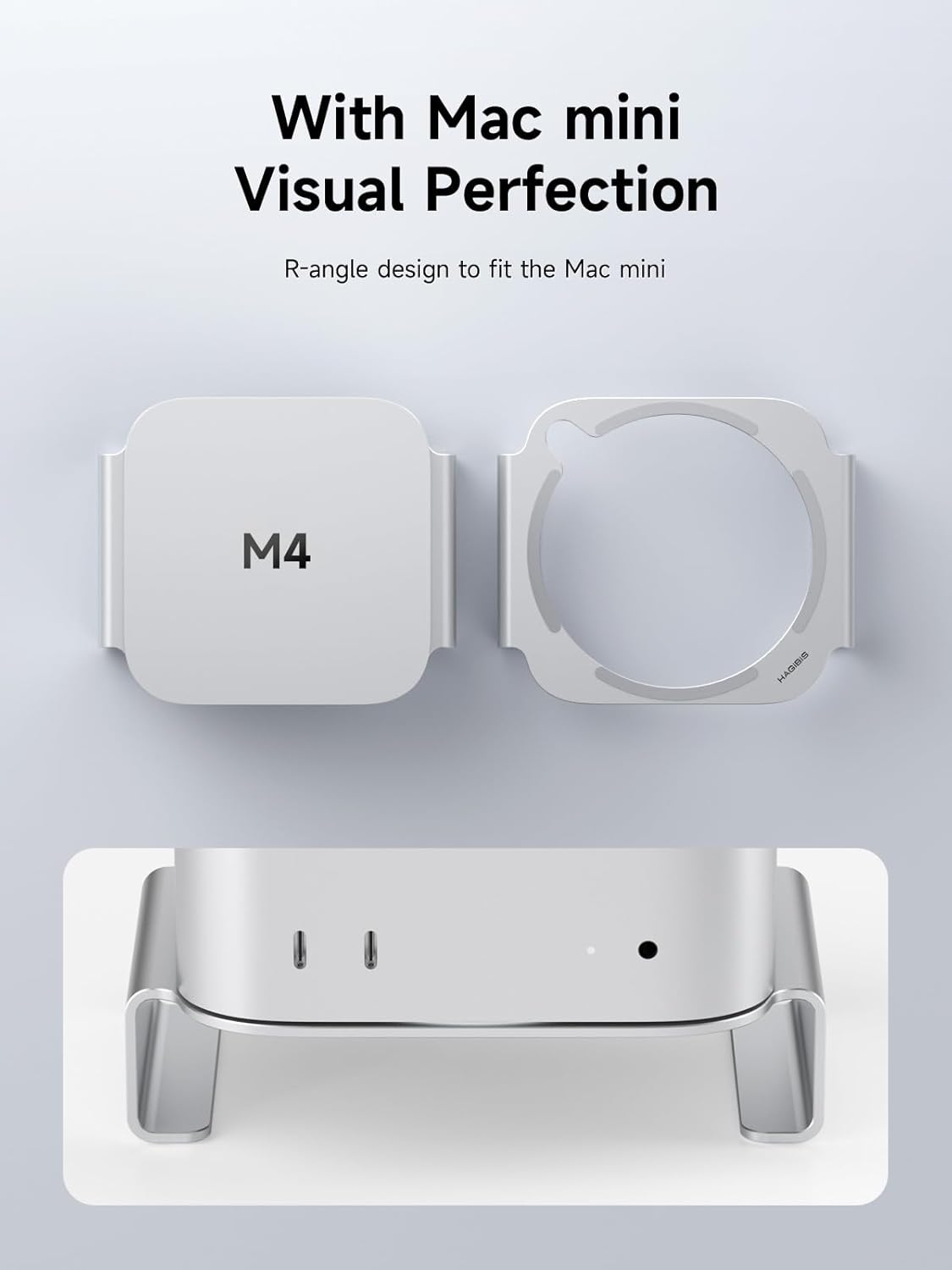
Image: A Mac Mini M4 positioned on the Hagibis stand, illustrating how the space beneath can be used for storing a phone and stylus.
- Æstetisk integration: The aluminum alloy construction and R-angle design are specifically chosen to visually complement the Mac Mini, creating a cohesive and professional setup.

Image: A top-down perspective of the Hagibis MMS03 stand and Mac Mini M4, emphasizing the R-angle design for a seamless and precise fit.
5. Vedligeholdelse og pleje
To ensure the longevity and appearance of your Hagibis MMS03 Aluminum Stand, follow these simple maintenance guidelines:
- Rensning: Wipe the stand regularly with a soft, dry, lint-free cloth. For stubborn marks, a slightly damp en tør klud kan bruges, og derefter straks efterfølges af en tør klud.
- Undgå barske kemikalier: Do not use abrasive cleaners, solvents, or harsh chemicals, as these can damage the aluminum finish and silicone pads.
- Inspect Silicone Pads: Periodically check the silicone pads for wear or damage. Ensure they are clean and free of debris to maintain optimal grip and protection for your Mac Mini.
6. Fejlfinding
The Hagibis MMS03 stand is a simple, passive device. Most issues can be resolved with basic checks.
- Issue: Mac Mini feels unstable on the stand.
Løsning: Ensure the Mac Mini is centered and properly seated on the stand. Verify that the silicone pads are clean and intact, providing adequate grip. The stand should be placed on a flat, level surface.
- Issue: Mac Mini appears to be overheating despite using the stand.
Løsning: While the stand aids in passive cooling, it does not actively cool the device. Ensure the Mac Mini's own vents are not obstructed by dust or other objects. Confirm that the stand is placed in an area with good air circulation. If overheating persists, consult your Mac Mini's official support resources.
- Issue: Difficulty accessing the power button.
Løsning: Re-position the Mac Mini on the stand to ensure the power button aligns perfectly with the reserved cutout. The cutout is designed for direct access.
7. Produktspecifikationer
| Mærke | Hagibis |
| Modelnummer | MMS03 |
| Materiale | Aluminiumslegering, silikone |
| Farve | Sølv |
| Kompatible enheder | Mac Mini (M4/M4 Pro 2024) |
| Speciel funktion | Ergonomic, Passive Cooling |
| Formfaktor | Tower (Vertical Stand) |
| Monteringstype | Bordmontering |

Image: Detailed dimensions of the Hagibis MMS03 stand, including width, depth, height, elevation, and the diameter of the central opening.
8. Garantioplysninger
No specific manufacturer warranty information is provided for the Hagibis MMS03 Aluminum Stand in the product details. Please refer to your point of purchase or the Hagibis official website for any available warranty details or return policies.
9. Kundesupport
For further assistance, questions, or concerns regarding your Hagibis MMS03 Aluminum Stand, please contact Hagibis customer support through their official webwebstedet eller den forhandler, hvorfra du købte produktet.
Hagibis Official Webwebsted: www.hagibis.com (Bemærk: Dette er en pladsholder URL. Please refer to the actual official webwebsted for support.)


