1. Introduktion
Tak for købetasing the Lazmin112 HiFi MP3 Player. This portable digital music player is designed to deliver high-fidelity, lossless audio playback with a user-friendly interface and versatile connectivity options. Featuring a 2.4-inch HD display and Bluetooth 5.3, it provides an immersive listening experience for all your favorite music.
This manual provides detailed instructions on how to set up, operate, and maintain your new MP3 player. Please read it thoroughly before use to ensure optimal performance and longevity of your device.
2. Produktet er slutview
Familiarize yourself with the components and controls of your Lazmin112 HiFi MP3 Player.
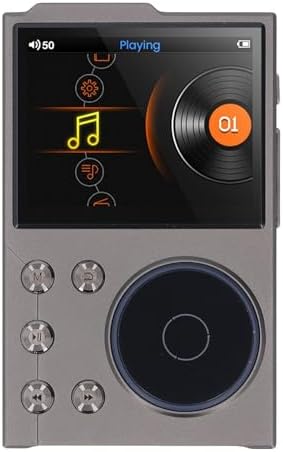
Figur 2.1: Forside View
This image displays the front of the MP3 player, highlighting its 2.4-inch HD screen and the intuitive control buttons, including the central scroll wheel for navigation and playback controls.
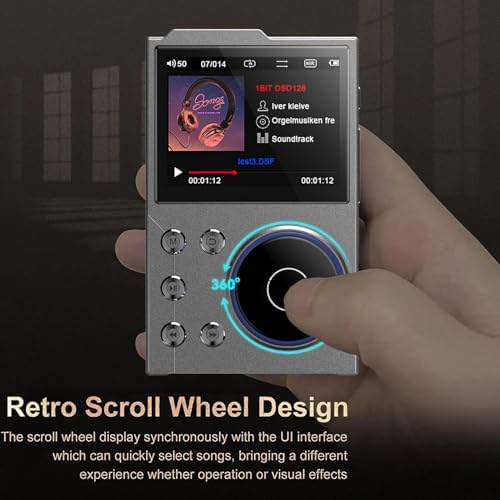
Figure 2.2: Retro Scroll Wheel Design
En detaljeret view of the scroll wheel, emphasizing its design for quick song selection and navigation through the user interface. This feature enhances the user experience for browsing music libraries.
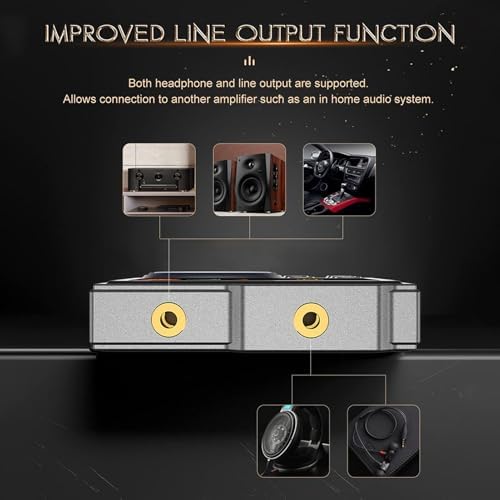
Figure 2.3: Improved Line Output Function
This image illustrates the top of the device, showing both the headphone output and line output ports. It highlights the player's versatility for connecting to headphones, home audio systems, or car auxiliary inputs.

Figure 2.4: Expandable Storage
En side view of the MP3 player, pointing out the slot for expandable storage (microSD card). This demonstrates the ability to significantly increase the device's music capacity beyond its internal memory.
3. Opsætning
3.1 Opladning af enheden
Before first use, fully charge your MP3 player. Use the provided USB cable to connect the device to a computer's USB port or a compatible USB wall adapter (not included).
- Tilslut den lille ende af USB-kablet til afspillerens USB-port.
- Connect the large end of the USB cable to a powered USB port.
- Batteriindikatoren på skærmen viser opladningsstatus.
- En fuld opladning tager typisk cirka 2 timer.

Figur 3.1: Opladning og batterilevetid
This image illustrates the player being charged and highlights its long play time of up to 24 hours on a full 750mAh battery charge.
3.2 Adding Music and Files
The player has 16GB of built-in memory and supports expandable storage up to 256GB via a microSD card (not included).
- Indsæt MicroSD-kort (valgfrit): Locate the microSD card slot on the side of the player (refer to Figure 2.4). Gently insert the card until it clicks into place.
- Tilslut til computer: Tilslut MP3-afspilleren til din computer ved hjælp af det medfølgende USB-kabel.
- Overførsel Files: The player will appear as a removable disk drive on your computer. Drag and drop your music files (FLAC, APE, DFF, MP3, WAV, WMA, M4A, MP2, AAC, ALAC, OGG, AIFF, Native DSD) into the player's storage or the microSD card.
- Sikker udkastning: Engang file transfer is complete, safely eject the device from your computer before disconnecting the USB cable.
4. Betjeningsvejledning
4.1 Tænd/sluk
- Tænd: Tryk og hold tænd/sluk-knappen nede (normalt placeret på siden eller toppen), indtil skærmen lyser.
- Sluk: Press and hold the Power button until the "Power Off" prompt appears, then confirm.
4.2 Navigering i brugerfladen
The player features a 2.4-inch HD screen and a scroll wheel for intuitive navigation.
- Scrollhjul: Rotate the scroll wheel to move through menus and lists.
- Midter knap: Press the center button of the scroll wheel to select an item or confirm an action.
- Tilbage knap: Use the dedicated Back button (often labeled 'M' or an arrow) to return to the previous screen.
- Menuknapper: Other buttons around the scroll wheel typically control playback (Play/Pause, Next/Previous Track) and volume.
4.3 Musikafspilning
Sådan afspiller du musik:
- From the main menu, select "Music" or "My Music".
- Browse by Artist, Album, Song, Genre, or Folder.
- Vælg en sang eller et album for at starte afspilningen.
- Use the physical buttons for Play/Pause, Skip Forward/Backward, and Volume adjustment.
4.4 Bluetooth-forbindelse
The player supports Bluetooth 5.3 for wireless audio streaming to compatible devices (headphones, speakers) or functioning as a Bluetooth receiver.
- Vælg "Bluetooth" i hovedmenuen.
- Slå Bluetooth til.
- Afspilleren vil scanne efter tilgængelige enheder.
- Select your desired Bluetooth device from the list to pair.
- Once paired, audio will stream wirelessly to the connected device.
4.5 Avancerede funktioner
- Equalizer (EQ): Juster lydprofiles to your preference.
- Line Out: Connect the player to external amplifiers or home audio systems using the dedicated line-out port (refer to Figure 2.3).
- USB DAC-tilstand: Connect the player to a computer or smartphone via USB to use it as an external DAC (Digital-to-Analog Converter) for enhanced audio quality.

Figure 4.1: HiFi Music Player Features
This image highlights the player's support for various high-resolution audio formats (DSD, Hi-Res Audio, HD Audio) and features like an equalizer and auto-upgrade capabilities.
5. Vedligeholdelse
5.1 Rengøring
- Use a soft, dry, lint-free cloth to clean the device's surface and screen.
- Do not use abrasive cleaners, alcohol, or chemical solvents, as they may damage the finish or screen.
5.2 Opbevaring
- Opbevar afspilleren et køligt, tørt sted væk fra direkte sollys og ekstreme temperaturer.
- Avoid exposing the device to water or high humidity.
5.3 Pleje af batterier
- For at forlænge batteriets levetid bør du undgå at aflade batteriet helt ofte.
- Hvis enheden opbevares i længere tid, skal den oplades til ca. 50% før opbevaring.
6. Fejlfinding
| Problem | Mulig årsag | Løsning |
|---|---|---|
| Enheden tænder ikke. | Lavt batteri; enheden er frosset. | Charge the device for at least 10 minutes. If still unresponsive, press and hold the Power button for 10-15 seconds to force a restart. |
| Ingen lyd fra hovedtelefoner. | Headphones not properly connected; volume too low; corrupted audio file. | Ensure headphones are fully plugged in. Increase volume. Try playing a different audio file. Check if Bluetooth is enabled and connected to another device. |
| Kan ikke oprette forbindelse til Bluetooth-enhed. | Bluetooth not enabled; device out of range; pairing mode not active on target device. | Ensure Bluetooth is enabled on both devices. Move devices closer. Put the target Bluetooth device into pairing mode. Restart both devices. |
| Files not appearing on the player. | Ukorrekt file format; files not transferred correctly; storage issue. | Verificere file formats are supported (FLAC, MP3, etc.). Re-transfer files. Check if the microSD card is properly inserted and formatted. |
7. Specifikationer
| Modelnavn | Lazmin112awp71bn68v |
| Mærke | Lazmin112 |
| Vise | 2.4 tommer HD-skærm |
| Batteritype | Built-in Polymer Lithium-ion Battery |
| Batterikapacitet | 750 mAh |
| Bluetooth version | Bluetooth 5.3 (Bidirectional) |
| Intern opbevaring | 16 GB |
| Udvidelig opbevaring | Up to 256 GB (via MicroSD card) |
| Understøttede lydformater | FLAC, APE, DFF, MP3, WAV, WMA, M4A, MP2, AAC, ALAC, OGG, AIFF, Native DSD (up to 128 bits/5.6 MHz) |
| Dimensioner (ca.) | 97 mm x 60.4 mm x 13.9 mm (3.82 tommer x 2.38 tommer x 0.55 tommer) |
| Vægt (ca.) | 187 g |
| Udgangsporte | Headphone Output, Line Output |
8. Garanti og support
8.1 Garantioplysninger
This product comes with a standard manufacturer's warranty. Please refer to the warranty card included in your product packaging for specific terms and conditions, including warranty duration and coverage details. Keep your purchase receipt as proof of purchase for warranty claims.
8.2 Kundesupport
For technical assistance, troubleshooting, or any questions regarding your Lazmin112 HiFi MP3 Player, please contact the seller or manufacturer's customer support. Contact information can typically be found on the product packaging or the seller's webwebsted.
For online support, you may visit the Lazmin112 store on Amazon: Lazmin112 Amazon Store