1. Introduktion
Welcome to the user manual for your Nothing Phone (3a). This guide provides detailed instructions on setting up, operating, maintaining, and troubleshooting your device to ensure optimal performance and user experience.

Figure 1.1: The Nothing Phone (3a) showcasing its unique transparent back design and Glyph Interface.
2. Opsætning
2.1. Udpakning og indledende inspektion
Upon receiving your Nothing Phone (3a), carefully open the packaging and inspect the contents. Ensure all items listed in the "What's in the Box" section are present and undamaged.
- Nothing Phone (3a) device
- USB-C kabel
- SIM-bakkeudkaster
- Forudpåført skærmbeskytter
2.2. Isætning af SIM-kortet
- Find SIM-kortbakken på siden af telefonen.
- Sæt SIM-kortbakkens udløserværktøj ind i det lille hul ved siden af bakken, og tryk godt ned, indtil bakken springer ud.
- Placer dit/dine Nano-SIM-kort i bakken med de gyldne kontakter nedad.
- Sæt forsigtigt SIM-kortbakken tilbage i telefonen, indtil den klikker på plads.
2.3. Guide til første opstart og opsætning
Press and hold the power button on the right side of the phone until the Nothing logo appears. Follow the on-screen instructions to complete the initial setup, including language selection, Wi-Fi connection, Google account sign-in, and data transfer.
3. Operating Your Nothing Phone (3a)
3.1. Nothing OS 3.1 Overview
The Nothing Phone (3a) runs on Nothing OS 3.1, an intuitive and customizable Android-based operating system. It features functional adaptations for an optimized user experience.

Figure 3.1: Visual representation of Nothing OS 3.1's customizable interface.
3.2. Kamerasystem
The Nothing Phone (3a) is equipped with an advanced camera system designed to capture high-quality photos and videos.
- Hovedkamera: 50-MP OIS (Optical Image Stabilization) main camera for detailed and stable shots.
- Telekamera: 50-MP telephoto lens with up to 30x Ultra Zoom for capturing distant subjects.
- Ultra-wide kamera: 8-MP ultra-wide-angle lens for expansive landscape and group shots.
- Forreste kamera: 32-MP front camera for sharp selfies and video calls.

Figure 3.2: Detailed breakdown of the Phone (3a)'s Elite Camera System components.

Figure 3.3: Illustration of the telephoto zoom lens technology and its capability to capture distant scenes.
3.3. Essential Key and Essential Space
The Essential Key is a new physical button on the side of your device. A short press captures screen content, while a long press allows you to record voice notes, ideas, and inspirations. The Essential Space organizes your captures and provides personalized suggestions.

Figure 3.4: The Essential Key and its integration with the Essential Space for content organization.
3.4. Glyfgrænseflade
The Glyph Interface on the back of the phone provides unique LED light and sound notifications for calls, messages, and other alerts, offering a distinct visual and auditory experience.

Figure 3.5: The Glyph Interface on the rear of the Nothing Phone (3a), demonstrating its illuminated patterns.
4. Vedligeholdelse
4.1. Batteristyring
The Nothing Phone (3a) features a 5,000 mAh battery with 50W fast charging. To maximize battery lifespan:
- Undgå ekstreme temperaturer.
- Brug det medfølgende USB-C-kabel til opladning.
- Undgå at aflade batteriet helt ofte.

Figure 4.1: Visual representation of the 5,000 mAh battery capacity.
4.2. Rengøring af din enhed
Use a soft, lint-free cloth to clean the screen and back of your phone. For stubborn smudges, slightly dampRengør kluden med vand. Undgå at bruge skrappe kemikalier eller slibende materialer.
4.3. Softwareopdateringer
Tjek regelmæssigt for og installer softwareopdateringer for at sikre, at din enhed har de nyeste funktioner, sikkerhedsrettelser og forbedringer af ydeevnen. Naviger til Indstillinger > System > Softwareopdatering for at søge efter opdateringer.
5. Fejlfinding
5.1. Almindelige problemer og løsninger
| Spørgsmål | Mulig årsag | Løsning |
|---|---|---|
| Telefonen tænder ikke | Lavt batteri, softwarenedbrud | Charge the phone for at least 30 minutes. Perform a forced restart by holding the power button for 10-15 seconds. |
| Apps går ned eller fryser | App bug, insufficient RAM, outdated software | Clear app cache/data. Close background apps. Update the app or phone software. |
| Dårlig batterilevetid | High screen brightness, background apps, network issues | Adjust screen brightness. Close unused apps. Disable unnecessary features like GPS/Bluetooth. |
5.2. Fabriksindstilling
If issues persist, a factory reset may be necessary. This will erase all data on your phone, so ensure you have backed up important information. Navigate to Indstillinger > System > Nulstil indstillinger > Slet alle data (fabriksnulstilling).
6. Specifikationer
Key technical specifications for the Nothing Phone (3a) (Model: A059).
| Feature | Detalje |
|---|---|
| Modelnavn | Intet Telefon (3a) |
| Modelnummer | A059 |
| Operativsystem | Android 15, Intet OS 3.1 |
| Vise | 6.77-inch Flexible FHD+ AMOLED, 120 Hz, 1.07 billion colors |
| Processor | Snapdragon 7s Gen 3 (2.5 GHz, 8-core) |
| VÆDDER | 12 GB (up to 20GB RAM Boost) |
| Opbevaring | 256 GB |
| Hovedkamera | 50-MP OIS |
| Telefoto kamera | 50-MP (30x Ultra Zoom) |
| Ultravidvinkelkamera | 8 MP |
| Forreste kamera | 32 MP |
| Batteri | 5,000 mAh (50W Fast Charging) |
| Dimensioner | 7.75 x 0.83 x 16.35 cm |
| Vægt | 201 gram |
| Vand/støv modstand | IP64 |
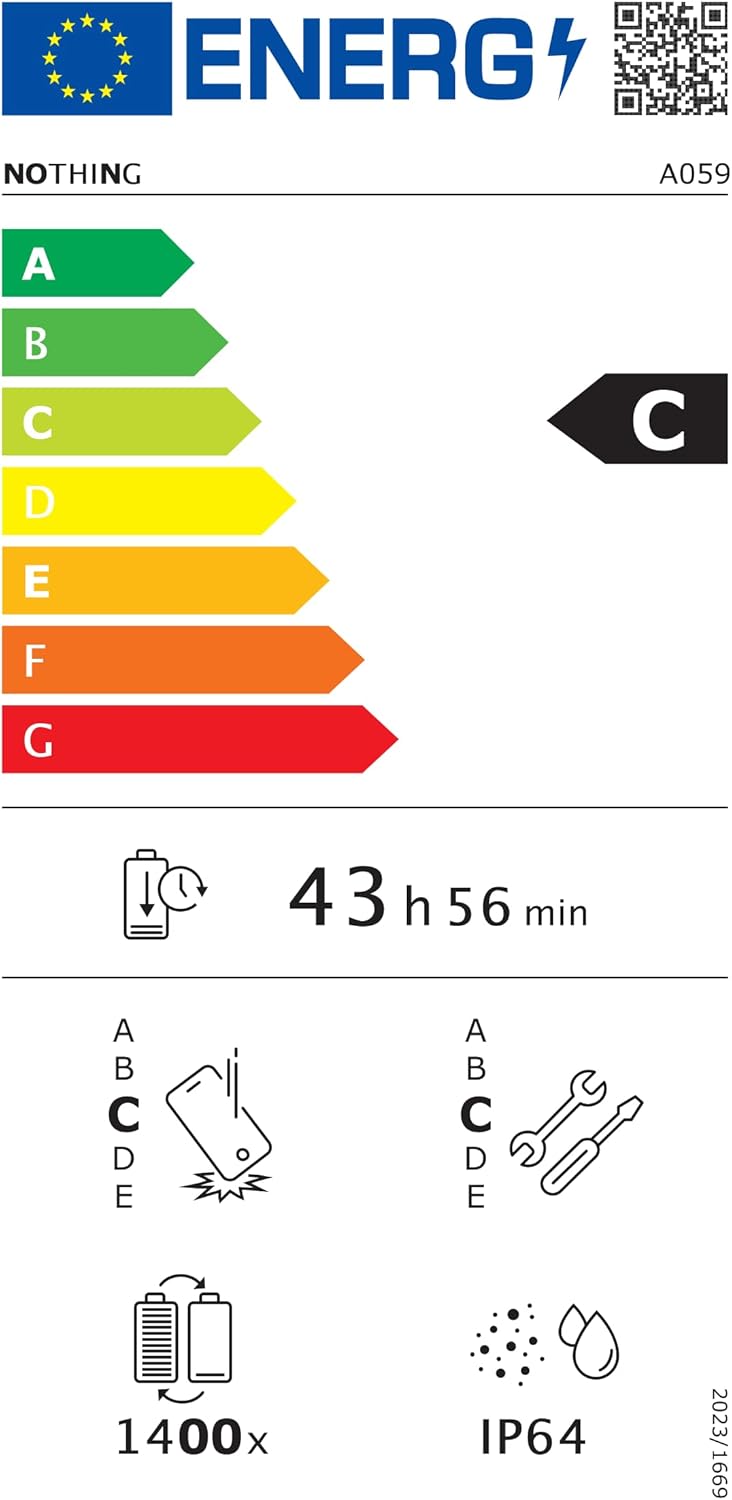
Figure 6.1: EU Energy Label for Nothing Phone (3a), indicating energy efficiency and IP64 rating. More details available at eprel.ec.europa.eu/qr/2179652.
7. Garanti og support
Your Nothing Phone (3a) comes with a manufacturer's warranty. Please refer to the warranty card included in your product packaging for specific terms and conditions.
For further assistance, technical support, or warranty claims, please visit the official Nothing support webwebstedet eller kontakt deres kundeservice. Du kan finde flere oplysninger på Ingenting Butik på Amazon.


