Indledning
Thank you for choosing the Porodo Lifestyle 4K Digital Camera. This camera is designed to capture your world in stunning detail, offering 4K video recording and high-resolution 50MP images. With features like 16x digital zoom, a flip flash, and a 180° rotating screen, it is ideal for vlogging, photography, and various content creation needs. This manual provides essential information on setting up, operating, and maintaining your camera to ensure optimal performance and longevity.
Sikkerhedsoplysninger
- Udsæt ikke kameraet for ekstreme temperaturer, direkte sollys eller høj luftfugtighed.
- Undgå at tabe kameraet eller udsætte det for kraftige stød.
- Keep the camera away from water and liquids unless specifically designed for underwater use (this model is not).
- Forsøg ikke at skille kameraet ad eller ændre det. Dette vil ugyldiggøre garantien.
- Brug kun den angivne batteritype og opladningsmetode.
- Opbevares utilgængeligt for børn.
Pakkens indhold
Markér venligst feltet for følgende elementer:
- Porodo Lifestyle 4K Digital Camera
- Genopladeligt batteri (650mAh)
- Type-C opladerkabel
- Brugervejledning (dette dokument)
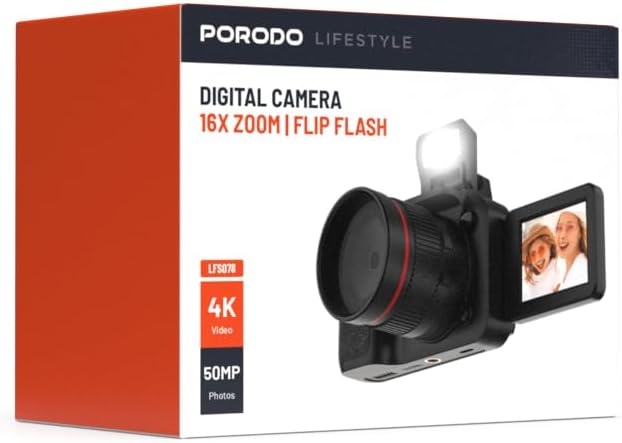
Billede: Forside view of the Porodo Lifestyle 4K Digital Camera retail box, showing the camera and key features.

Billede: Bagside view of the Porodo Lifestyle 4K Digital Camera retail box, displaying product specifications and features.
Produkt overview
Familiarize yourself with the various parts of your Porodo Lifestyle 4K Digital Camera.

Image: The Porodo Lifestyle 4K Digital Camera shown with its 180° rotating screen flipped open and the integrated flash extended upwards.
- Linse: Main optical component for capturing images and videos.
- Flip Flash: Giver ekstra belysning under forhold med svagt lys.
- 180° Rotating Screen (2.2'' Display): Giver mulighed for fleksibel viewing angles, ideal for vlogging and selfies.
- Power knap: Tænder/slukker kameraet.
- Udløserknap: Tager billeder eller starter/stopper videooptagelse.
- Zoom kontrol: Adjusts the 16x digital zoom.
- Navigationsknapper: For menu navigation and settings adjustment.
- Type-C port: Til opladning og dataoverførsel.
- Hukommelseskortslot: For inserting an SD card (not included).
Opsætning
1. Batteriinstallation og opladning
- Find batteridækslet i bunden af kameraet.
- Skub låsen for at åbne dækslet.
- Isæt det medfølgende 650 mAh batteri, og sørg for, at kontakterne er justeret korrekt.
- Close the battery compartment cover until it clicks securely.
- Connect the camera to a power source using the Type-C charging cable. The charging indicator will illuminate.
- A full charge takes approximately 2.5 hours. The indicator will change or turn off when charging is complete.
2. Installation af hukommelseskort
A memory card (SD card, not included) is required to store photos and videos.
- Locate the memory card slot, usually on the side or bottom of the camera.
- Insert the SD card with the metal contacts facing the correct direction (refer to the diagram near the slot if available) until it clicks into place.
- For at fjerne det skal du forsigtigt skubbe kortet ind, indtil det springer ud.
3. Første opstart
- Tryk og hold tænd/sluk-knappen nede i et par sekunder, indtil skærmen lyser.
- Upon first use, you may be prompted to set the date and time. Use the navigation buttons to adjust and confirm.
Betjeningsvejledning
Basic Photo Mode (50MP)
- Tænd kameraet. Det vil typisk være i fototilstand som standard.
- Frame your shot using the 2.2'' display.
- Tryk udløserknappen halvt ned for at fokusere (hvis relevant).
- Press the Shutter button fully to capture a 50MP image.

Image: A person holding the Porodo Lifestyle 4K Digital Camera, demonstrating a typical usage scenario for capturing photos.

Billede: En anden view of a person holding the Porodo Lifestyle 4K Digital Camera, illustrating the camera's ergonomic design during use.
Basic Video Mode (4K)
- Switch the camera to video mode (usually via a dedicated button or menu option).
- Press the Shutter button once to start 4K video recording. A recording indicator (e.g., red dot, timer) will appear on the screen.
- Tryk på udløserknappen igen for at stoppe optagelsen.

Image: The Porodo Lifestyle 4K Digital Camera highlighting its 4K video resolution capability.
Using the 16X Digital Zoom
- While in photo or video mode, use the zoom controls (often marked with 'W' for Wide and 'T' for Telephoto) to adjust the 16x digital zoom.
- Press 'T' to zoom in and 'W' to zoom out.
Using the Flip Flash
- To activate the flash, manually flip it up from its resting position.
- The camera will automatically use the flash when needed in low-light conditions, depending on your flash settings (e.g., Auto, Fill-in, Red-eye reduction).
- To turn off the flash, gently push it back down until it locks into place.
Using the 180° Rotating Screen
- The 2.2'' display can be rotated 180 degrees.
- Flip the screen out from the side of the camera and rotate it to face forward for selfies or vlogging, or to various angles for creative shots.
- Ensure the screen is securely positioned before shooting.

Image: The Porodo Lifestyle 4K Digital Camera illustrating its 2.2-inch display and 180-degree flip screen functionality.
Afspilning og sletning Files
- Enter Playback mode (usually via a dedicated button or menu option).
- Brug navigationsknapperne til at rulle gennem dine fotos og videoer.
- For at slette en file, select it and press the Delete button (often marked with a trash can icon). Confirm deletion when prompted.
Tilslutning til en computer
- Sluk kameraet.
- Connect the camera to your computer using the provided Type-C cable.
- Turn on the camera. It should appear as a removable disk drive on your computer.
- You can now transfer photos and videos to your computer.
Opretholdelse
Rengøring af kameraet
- Brug en blød, fnugfri klud til at rengøre kamerahuset.
- For the lens and screen, use a specialized lens cleaning cloth and solution. Do not use abrasive materials.
- Avoid spraying cleaning solutions directly onto the camera. Apply to the cloth first.
Batteripleje
- Recharge the battery fully before first use.
- Undgå at aflade batteriet helt ofte for at forlænge dets levetid.
- If storing the camera for an extended period, charge the battery to about 50% and remove it from the camera.
Opbevaring
- Opbevar kameraet et køligt, tørt sted, væk fra direkte sollys og ekstreme temperaturer.
- Use a camera bag or case to protect it from dust and scratches.
Fejlfinding
| Problem | Mulig årsag | Løsning |
|---|---|---|
| Kameraet tænder ikke. | Batteriet er dødt eller ikke installeret korrekt. | Oplad batteriet. Sørg for, at batteriet er isat med den korrekte polaritet. |
| Kan ikke tage billeder/videoer. | Hukommelseskortet er fuldt, ikke isat eller beskadiget. | Indsæt et hukommelseskort. Slet unødvendigt files. Format the card (this will erase all data). |
| Images/Videos are blurry. | Lens is dirty. Insufficient light. Camera shake. | Clean the lens. Use the flash or shoot in brighter conditions. Hold the camera steady. |
| Blitzen virker ikke. | Flash is not flipped up. Flash setting is off. | Ensure the flash is manually flipped up. Check flash settings in the menu. |
| Kameraet fryser. | Softwarefejl. | Fjern og sæt batteriet i igen for at nulstille kameraet. |
Specifikationer
Detailed technical specifications for the Porodo Lifestyle 4K Digital Camera:

Image: Visual representation of the camera's core capabilities: 4K video, 50MP photos, and 16x digital zoom.

Image: A detailed table outlining the technical specifications of the Porodo Lifestyle 4K Digital Camera.
- Modelnavn: Porodo Lifestyle 4K Digital Camera – 50MP, 16x Zoom, Flip Flash, 180° Rotating Screen
- Varemodelnummer: 6849108448116
- Mærke: Porodo
- Maksimum Webcam billedopløsning: 50 MP
- Videoopløsning: 4K (3840x2160)
- Digital zoom: 16X
- Optisk zoom: 1.0
- Vise: 2.2'' (180° Rotating Screen)
- Batterikapacitet: 650mAh (1 P76 battery included)
- Arbejdstid: Op til 3 timer
- Opladningstid: Cirka 2.5 timer
- Opladningsport: Type-C
- Fotosensorteknologi: CMOS
- Understøttet File Formater: JPG (billeder), AVI (videoer)
- Billedstabilisering: Digital
- Aspektforhold: 16:9, 4:3
- Målingsbeskrivelse: Sted
- Produktdimensioner: 6 x 13 x 9 cm; 310 g
- Oprindelsesland: Kina
Garanti og support
Porodo products are designed with quality and reliability in mind. For warranty information and technical support, please refer to the official Porodo webwebstedet eller kontakt din lokale forhandler.
Online support: Besøg Porodo Store on Amazon for produktinformation og opdateringer.
Udvidede garantimuligheder: Additional warranty plans may be available through authorized retailers. Please check with your point of purchase for details.


