1. Introduktion
The VAULTEK Slider Series Smart Handgun Safe is designed to provide secure and rapid access to your firearm. Featuring robust carbon steel construction, advanced biometric and keypad access, and ViSN WiFi connectivity for real-time alerts, this safe offers a blend of security and convenience. Its slim vertical design and proprietary mounting plate allow for versatile placement in various environments.

Figure 1.1: VAULTEK Slider Series Smart Handgun Safe.
2. Opsætning
2.1. Udpakning og indledende inspektion
Fjern forsigtigt alle komponenter fra emballagen. Kontroller, at alle medfølgende dele er til stede:
- VAULTEK Slider Safe Unit
- (2) Backup Keys
- AC strømadapter
- Monteringsplade
- Monteringshardware
Video 2.1: Official unboxing of the ViSN Slider safe, demonstrating the contents and initial presentation.

Figure 2.1: All items included with your VAULTEK Slider Safe.
2.2. Powering the Safe
Connect the provided AC Power Adapter to the safe and a wall outlet. The safe is designed for continuous power, ensuring optimal performance and constant monitoring capabilities via ViSN WiFi. The internal rechargeable battery provides backup power in case of an outage.
2.3. Montering af pengeskabet
The proprietary mounting plate allows for secure installation in various locations, including under desks, inside vehicles, or on nightstands. The safe can be quickly removed from the mounting plate by an authorized user for portability.
- Select a suitable mounting location. Ensure the surface is stable and can support the weight of the safe and its contents.
- Attach the mounting plate to the desired surface using the provided mounting hardware. The plate supports standard VESA 75mm and 100mm hole patterns.
- Align the safe with the mounting plate and slide it into place until it securely locks.

Figure 2.2: Safe mounted discreetly under a desk for quick access.

Figure 2.3: The proprietary mounting plate allows for secure and versatile installation.
2.4. ViSN WiFi Connectivity and App Setup
The ViSN (VAULTEK Intelligent Safe Network) platform utilizes WiFi-enabled cloud technology for advanced safe management and live alerts. Download the exclusive iOS/Android smartphone app for intuitive guided setup and real-time monitoring.
- Download the VAULTEK ViSN app from your device's app store.
- Follow the in-app instructions to connect your safe to your WiFi network.
- Configure settings, access points, and alert preferences within the app.
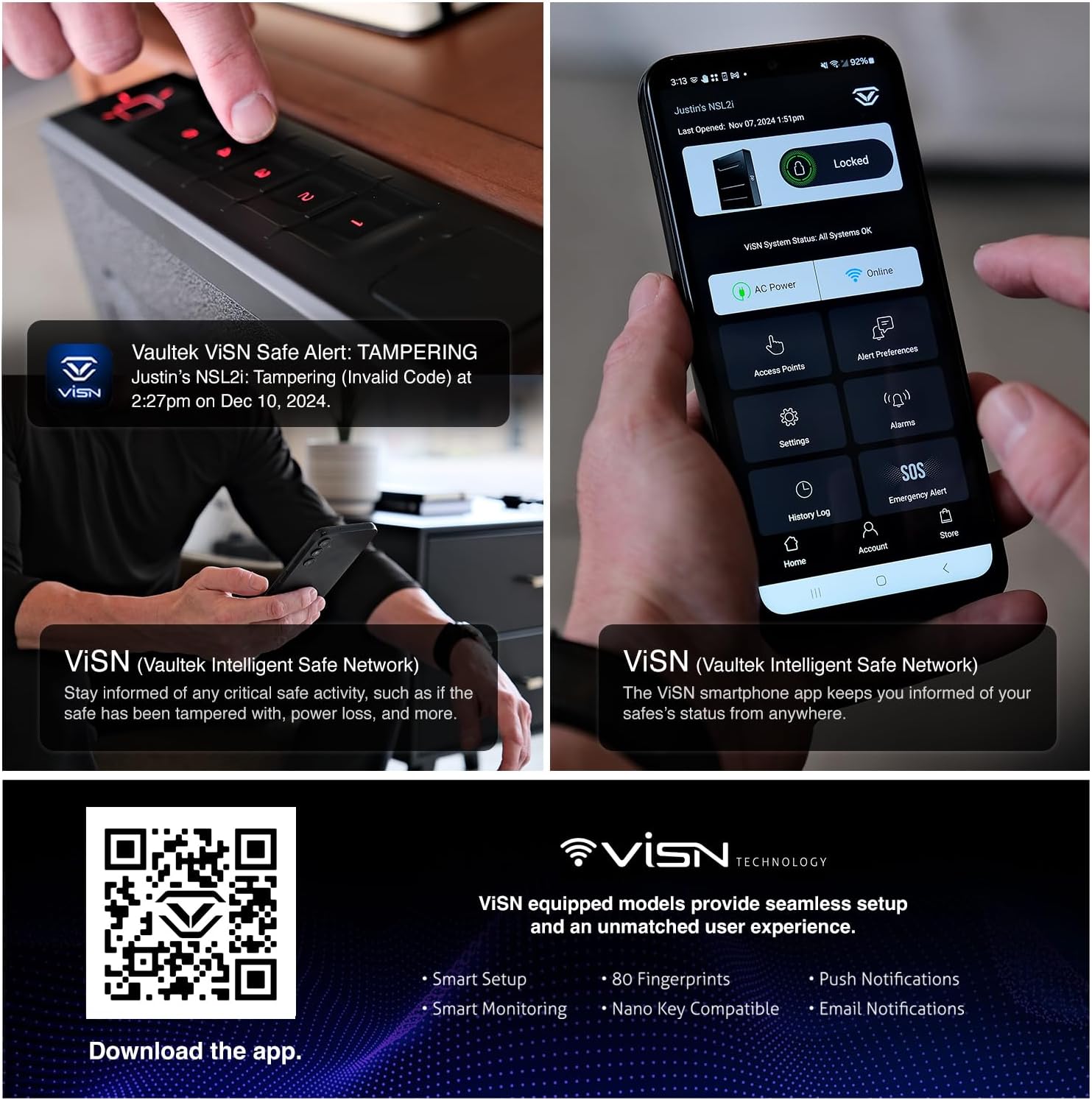
Figure 2.4: The ViSN app provides real-time monitoring and control of your safe.

Figure 2.5: Stay informed with live notifications directly to your smartphone.
For app download, scan the QR code: https://qrco.de/bfCd27
3. Betjening af pengeskabet
3.1. Access Methods
The Slider Series safe offers four fast access points:
- Biometrisk scanner: High-resolution fingerprint scanner capable of storing up to 80 unique fingerprints for rapid access.
- Rapid Fire 5-Digit Backlit Smart Sense Keypad: Proximity sensor auto-illuminates keys for quick button navigation. The master code can be 4-8 digits in length.
- Backup Manual Key: Two physical keys are included for traditional access.
- Nano Key 3.0 (sælges separat): An optional remote access button for immediate deployment.

Figure 3.1: Multiple secure access options for convenience and speed.

Figure 3.2: The precision rail system ensures rapid firearm deployment.
3.2. Indvendige funktioner
The safe's interior is designed for optimal firearm storage and accessibility:
- Optics Ready Design: Allows storage of pistols with mounted optics.
- High-Density Foam Holster: Protects a single firearm and includes space for 1 spare magazine. Fits compact pistols up to full-size handguns 8.875” in overall length.
- Indvendig LED belysning: Illuminates the firearm when the safe is open for clear visibility in low light conditions.

Figure 3.3: Interior designed to accommodate handguns up to 8.875 inches with optics.

Figure 3.4: Interior LED lighting for enhanced visibility.
4. Vedligeholdelse
4.1. Rensning
To maintain the safe's appearance and functionality, wipe the exterior with a soft, damp cloth. Avoid abrasive cleaners or solvents that could damage the finish. Periodically inspect the sliding mechanism for any debris and clean as necessary.
4.2. Batteristyring
While the safe is designed to be continuously powered by the AC adapter, the internal rechargeable battery provides essential backup. Ensure the safe remains plugged in when possible to keep the battery charged. The ViSN app will provide alerts regarding battery status.
5. Fejlfinding
| Problem | Mulig årsag | Løsning |
|---|---|---|
| Safe not opening with biometric scan. | Fingerprint not registered or scanner dirty. | Ensure finger is clean and dry. Re-register fingerprint if necessary. Try alternative access methods (keypad, manual key). |
| Keypad not responding or lighting up. | Problem med lavt batteri eller strøm. | Ensure AC adapter is connected. Check battery level via ViSN app. Use manual key if necessary. |
| ViSN app not connecting to safe. | WiFi connectivity issues or app settings. | Verify safe is powered on and connected to WiFi. Check router and internet connection. Restart app or safe. |
| Sliding door mechanism feels stiff. | Debris in rail system. | Inspect and clean the precision rail system. Avoid applying lubricants not specified by VAULTEK. |
6. Specifikationer
- Mærke: VAULTEK
- Model: Skyder
- Produktdimensioner: 11.25" D x 2.6" B x 9.1" H
- Varens vægt: 11.71 pund
- Materiale: Carbon Steel (16-gauge)
- Låsetype: Anti-Impact Latch Technology
- Kontroltype: Biometric + Keypad + Key
- Farve: Sort
- Særlige funktioner: Biometric Fingerprint, Mounting Plate Included, Anti-Theft, Vaultek ViSN WiFi Connectivity for Instant Live Alerts, Vaultek Precision Build Quality
- Monteringstype: Ambidextrous Mounting Plate Included
- Inkluderede komponenter: (2) Backup Keys, AC Power Adapter, Mounting Plate, and Mounting Hardware
- Alarm: Hørbar
- Vandmodstandsniveau: Ikke vandafvisende
- Kammerdybde: 11 tommer
- UPC: 850014786809
7. Garanti og support
For detailed warranty information and customer support, please refer to the official VAULTEK webwebstedet eller kontakt deres kundeserviceafdeling. Gem din købskvittering til garantikrav.
VAULTEK Store: Visit the VAULTEK Store on Amazon


