Produkt overview
The SwanScout 710S is a versatile dual wireless charging station designed for simultaneous charging of two wireless charging-enabled phones and one Galaxy Watch. It features an integrated digital clock with adjustable brightness and a foldable design for portability and horizontal charging of earbuds. This manual provides essential information for setting up, operating, maintaining, and troubleshooting your charging station.
Hvad er der i æsken
Kontroller venligst, at alle komponenter er til stede ved udpakning:
- 1 x SwanScout 710S Dual Wireless Charging Station
- 1 x USB-C opladningskabel
- 1 x 30W PD Charging Brick (Power Adapter)
- 1 x brugermanual

Image: The SwanScout 710S charging station, USB-C cable, power adapter, and user manual as packaged.
Opsætningsinstruktioner
- Tilslut strømadapteren: Insert the USB-C end of the provided charging cable into the charging port on the back of the SwanScout 710S charging station.
- Sæt i stikkontakten: Connect the other end of the USB-C cable to the 30W PD charging brick, and then plug the charging brick into a standard wall power outlet.
- Tænd: The digital clock display on the charging station will illuminate, indicating that the device is powered on and ready for use.

Image: The SwanScout 710S charging station set up on a desk, connected to a wall outlet via its 30W charging adapter.
Betjeningsvejledning
Opladning af dine enheder
The SwanScout 710S supports simultaneous wireless charging for two phones and one Galaxy Watch. Ensure your devices are compatible with wireless charging.
- Charging Phones: Place your wireless charging-enabled phones vertically on the designated charging pads. The raised design and printed guide lines assist in precise positioning for optimal charging efficiency. The charging status will be indicated on the station's display.
- Charging Galaxy Watch: Place your compatible Galaxy Watch on the dedicated watch charging stand located on the side of the station.
- Charging Earbuds (Folded Flat): When the charging station is folded flat horizontally, it can also charge wireless charging-compatible earbuds. Ensure the earbuds charging case is placed flat on the charging coil for optimal performance.

Image: The SwanScout 710S charging two smartphones and a Galaxy Watch simultaneously.

Image: The SwanScout 710S in its folded flat configuration, charging a smartphone and wireless earbuds.
Clock Functionality
The integrated digital clock offers adjustable brightness and time format settings.
- Justering af lysstyrke: The clock display has four brightness levels (100%, 50%, 20%, and OFF). Touch the brightness control button (sun icon) on the right side of the display to cycle through the brightness levels. This allows you to dim or turn off the display for undisturbed sleep.
- Setting Time and 12/24-Hour Format:
- To switch between 12-hour and 24-hour format, short press the 'O' button.
- To enter time setting mode, long press the 'O' button for 3 seconds. The hour digits will start blinking.
- Brug knapperne '+' og '-' til at justere timetallet.
- Short press the 'O' button again to switch to minute adjustment.
- Brug knapperne '+' og '-' til at justere minutterne.
- Long press the 'O' button for 3 seconds to exit time setting mode.

Image: The SwanScout 710S clock display demonstrating various brightness settings, including off.
Compatibility Guidelines
For optimal charging, ensure your devices meet the following compatibility requirements:
- Telefoner: Compatible with iPhone and Samsung/Google wireless charging phones, including Samsung Galaxy S series (S10 to S25 Ultra), Z Fold/Flip series, iPhone 8 and above, Google Pixel 3 and above.
- Ure: Compatible with Samsung Galaxy Watch 8 Classic/8/Ultra/7/6 Classic/6/5 Pro/5/4/4 Classic/3/Active 2/Active 1. Not compatible with Samsung Galaxy Watch 1, Samsung Gear Series, Google Pixel Watch 2/3, or other non-listed watches.
- høretelefoner Compatible with Galaxy Buds series (Buds, Buds+, Buds Pro, Buds Live, Buds 2, Buds 2 Pro, Buds 3, Buds 3 Pro), AirPods (ANC, Pro, 2, 3), Google Pixel Buds Pro, Google Pixel Buds Pro 2, and other earbuds with wireless charging cases.
- Telefoncovers: Supports protective cases less than 5mm thick. Do not use cases with magnetic pads, metal components, or credit cards inserted, as these can interfere with wireless charging.

Image: Visual guide for phone case compatibility, highlighting acceptable thickness and materials to avoid.
Opretholdelse
- Rensning: Disconnect the charging station from power before cleaning. Use a soft, dry cloth to wipe the surface. Do not use abrasive cleaners, solvents, or immerse the device in water.
- Opbevaring: When not in use for extended periods, store the charging station in a cool, dry place, away from direct sunlight and extreme temperatures. The foldable design allows for compact storage.
- Sikkerhedsforanstaltninger:
- Do not expose the device to high temperatures or throw it into fire.
- Undgå at tabe eller udsætte enheden for kraftige stød.
- Opbevares utilgængeligt for børn og kæledyr.
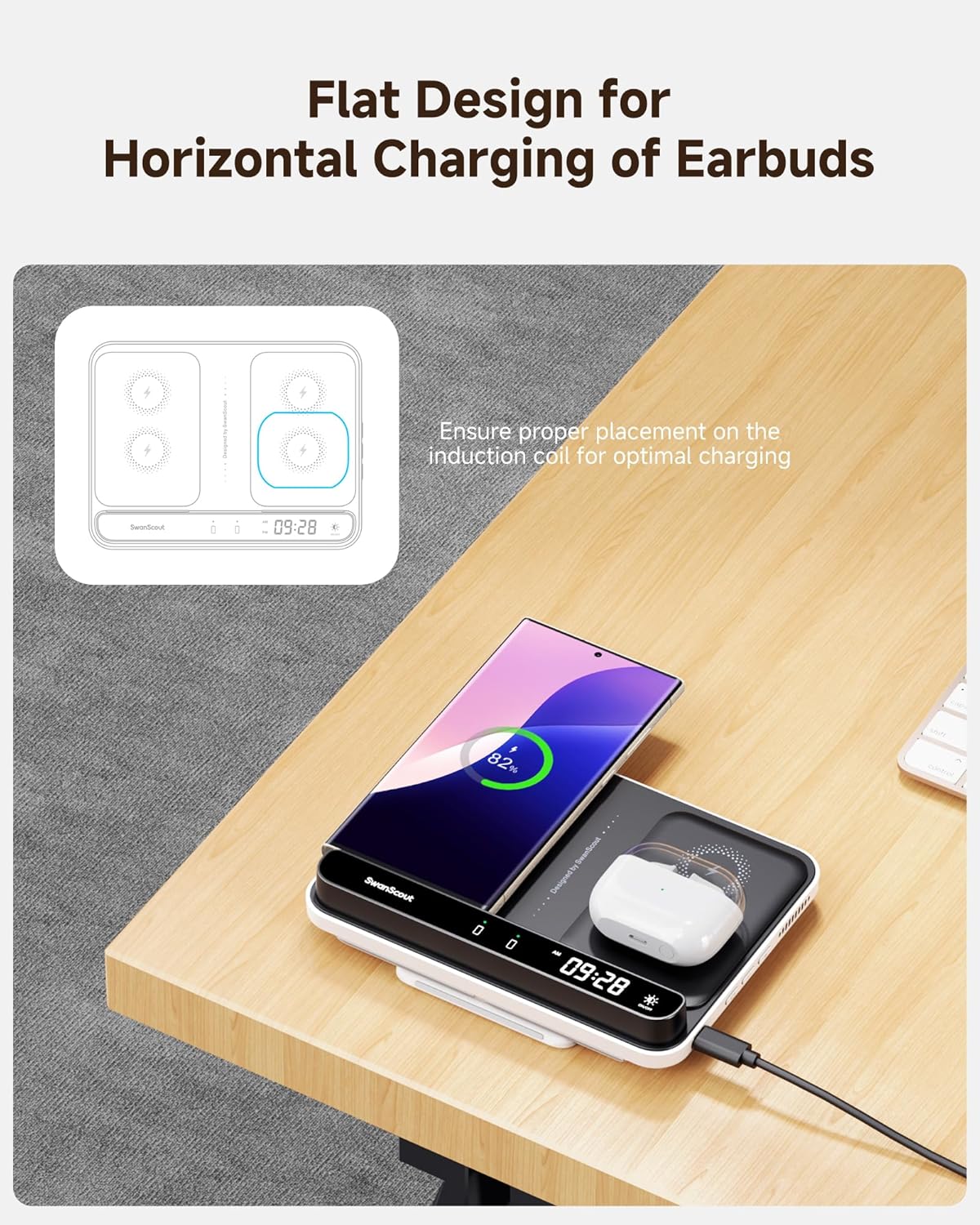
Image: The SwanScout 710S in its compact, folded state, illustrating its ease of storage and portability.
Fejlfinding
| Problem | Mulig årsag | Løsning |
|---|---|---|
| Enheden oplader ikke. |
|
|
| Clock display is off or too dim. |
|
|
| Opladningen er langsom. |
|
|
Specifikationer
| Feature | Detalje |
|---|---|
| Modelnummer | S10031 |
| Produktdimensioner | 6.93 x 5.28 x 1.3 tommer |
| Varens vægt | 9.2 ounce |
| Input bindtage | 12 volt |
| Samlet USB-porte | 1 (USB type C) |
| Wattage | 30 watt (total effekt) |
| Phone Charging Output | Dual 10W Max (per phone) |
| Watch Charging Output | 3W Maks |
| Opladningsudgang for øretelefoner | 3.5W Maks |
| Speciel funktion | Wireless Charging, Foldable Design, Adjustable Brightness Clock |
| Fabrikant | Shenzhen Swanscout Innovations Technology Co., Ltd. |
Garanti og support
For product support, warranty information, or any inquiries, please contact SwanScout directly:
- Webwebsted: www.swanscout.com
- E-mail: support@swanscout.com
Gem venligst din købskvittering i tilfælde af garantikrav.


