1. Introduktion
This manual provides detailed instructions for the setup, operation, maintenance, and troubleshooting of your ATTACK SHARK X66 Gasket Wireless Mechanical Keyboard. Please read this manual thoroughly before using the product to ensure optimal performance and longevity.

Billede: Top-down view of the ATTACK SHARK X66 Gasket Wireless Mechanical Keyboard, showcasing dens kompakte layout og tastaturdesign.
2. Produktet er slutview
2.1 Nøglefunktioner
- 60% Compact Design: Features 66 keys and a volume knob, optimizing desktop space while maintaining portability.
- Upgraded Gasket Mount: Incorporates 5 layers of sound insulation (PORON Sandwich Foam, Foamed IXPE Under Shaft Pads, PET Acoustic Premium Pads, Shaft Seat Sound Deadening Foam, Customized Bottom Foams) for reduced noise and a smooth typing experience.
- Triple Mode Connectivity: Supports Bluetooth, 2.4GHz wireless, and USB-C wired connections.
- Multi-Device Tasking: Three Bluetooth channels (FN+Q/FN+W/FN+E) for efficient switching between devices.
- Langtidsholdbart batteri: Equipped with a 3000mAh large-capacity rechargeable battery.
- Hot-swap-switche: Full hot-swappable design compatible with 3-pin/5-pin switches, featuring pre-lubed Strawberry switches for a creamy sound and smooth keystroke.
- Dynamisk RGB-baggrundsbelysning: Offers 9 backlight colors and 18 lighting effects with 16 million LED colors, customizable via software.
- Holdbare nøglehætter: Features side-printed gradient PBT keycaps that are resistant to oiling, non-slip, and wear-resistant.

Billede: Overview of the X66 keyboard highlighting key features such as RGB Backlight, Triple Mode Connectivity, Hot Swappable switches, PBT Keycaps, 60% Layout, 3000mAh Battery, and Gasket Structure.
2.2 Pakkens indhold
- ATTACK SHARK X66 Mechanical Keyboard
- USB-C Cable (1.5 meters)
- 2-in-1 Key Puller and Switch Puller
- Additional Strawberry Switches (2 pieces)
- Brugermanual
3. Opsætning
3.1 Forbindelsestilstande
The X66 keyboard supports three connection modes: 2.4GHz wireless, Bluetooth, and USB-C wired.

Image: Diagram illustrating the three connectivity modes: Bluetooth 5.0, 2.4GHz Wireless with a USB dongle, and Type-C Wired connection.
- 2.4 GHz trådløs forbindelse:
- Find 2.4 GHz USB-modtageren.
- Sæt modtageren i en ledig USB-port på din computer.
- On the keyboard, slide the mode switch to the '2.4G' position. The keyboard will automatically connect.
- Bluetooth-forbindelse:
- On the keyboard, slide the mode switch to the 'BT' position.
- Tryk på og hold nede for at gå ind i parringstilstand FN + Q, FN + W., eller FN + E for 3-5 seconds until the corresponding key's backlight flashes rapidly.
- On your device (PC, Mac, Tablet), search for Bluetooth devices and select 'ATTACK SHARK X66' to pair.
- Once paired, the key's backlight will stop flashing and remain steadily lit. You can pair up to three Bluetooth devices and switch between them using FN + Q/W/E.
- USB-C kablet forbindelse:
- Tilslut det medfølgende USB-C-kabel til tastaturets USB-C-port.
- Tilslut den anden ende af kablet til en ledig USB-port på din computer.
- Tastaturet skifter automatisk til kablet tilstand og begynder at oplade.
3.2 Operativsystemskift
The keyboard features a dedicated switch for Windows and Mac operating systems.
- Locate the 'Win/Mac' switch on the side or back of the keyboard.
- Slide the switch to the appropriate operating system setting for optimal key mapping.
4. Betjeningsvejledning
4.1 Volume Knob Functionality
The aluminum CNC metal knob provides convenient control over audio.
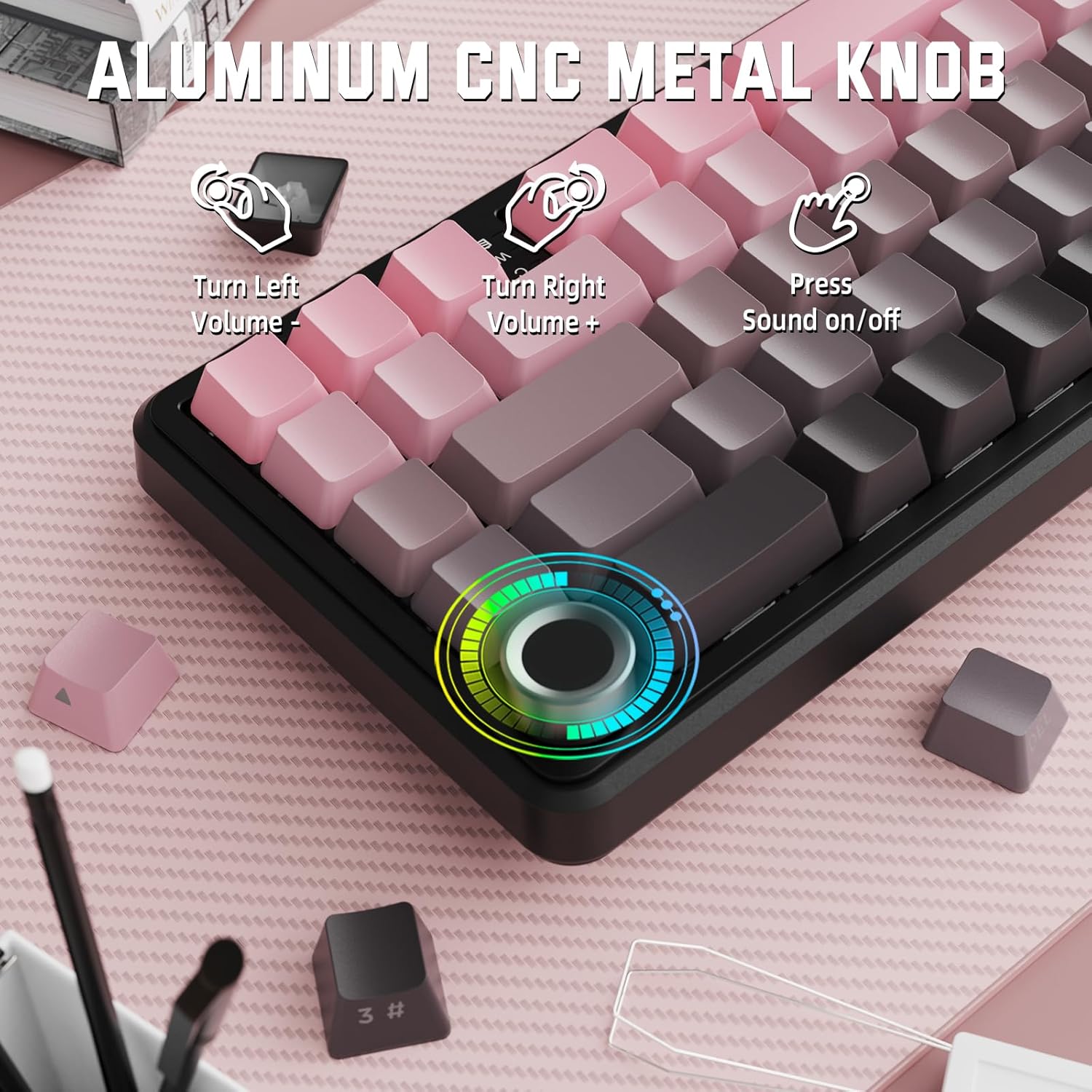
Image: Close-up of the volume knob with icons indicating its functions: Turn Left (Volume -), Turn Right (Volume +), Press (Sound on/off).
- Drej til venstre: Sænk volumen.
- Drej til højre: Øg volumen.
- Trykke: Slå lyd til/fra.
4.2 Funktionstastkombinationer (FN-tast)
Due to the compact 60% layout, some functions are accessed via the FN key.
| Kombination | Fungere |
|---|---|
| FN + Q/W/E | Switch between Bluetooth devices 1, 2, and 3 |
| FN + Backspace | Kontroller batterikapaciteten |
| FN + 1-0 (top row) | F1-F10 functions (e.g., FN+1 for F1) |
| FN + -/= | F11/F12 functions |
| FN + \| | Slet |
| FN + P | Udskriv skærm |
| FN + [ { | Hjem |
| FN + ] } | Ende |
| FN + ; : | Side op |
| FN + ' " | Side ned |
| FN + Arrow Keys | Navigation (e.g., FN+Up Arrow for Page Up) |
5. Tilpasning
5.1 RGB-baggrundsbelysningsindstillinger
The keyboard features dynamic RGB backlighting with multiple effects and colors.

Image: Visual representation of RGB backlight controls including turning on/off, changing lighting mode, speed, direction, brightness, and color, often in combination with the FN key.
- Turn on/off Lighting / Power Saving Mode: Specific key combination (refer to keyboard legends or software).
- Lystilstand: Cycle through 18 lighting effects.
- Lyshastighed: Juster hastigheden af dynamiske lyseffekter.
- Lysretning: Change the direction of certain lighting effects.
- Lysstyrke: Adjust the intensity of the backlight.
- Lysfarve: Select from 9 preset backlight colors or customize via software.
5.2 Softwareprogrammering
For advanced customization of RGB modes, macros, and key remapping, dedicated software is available.
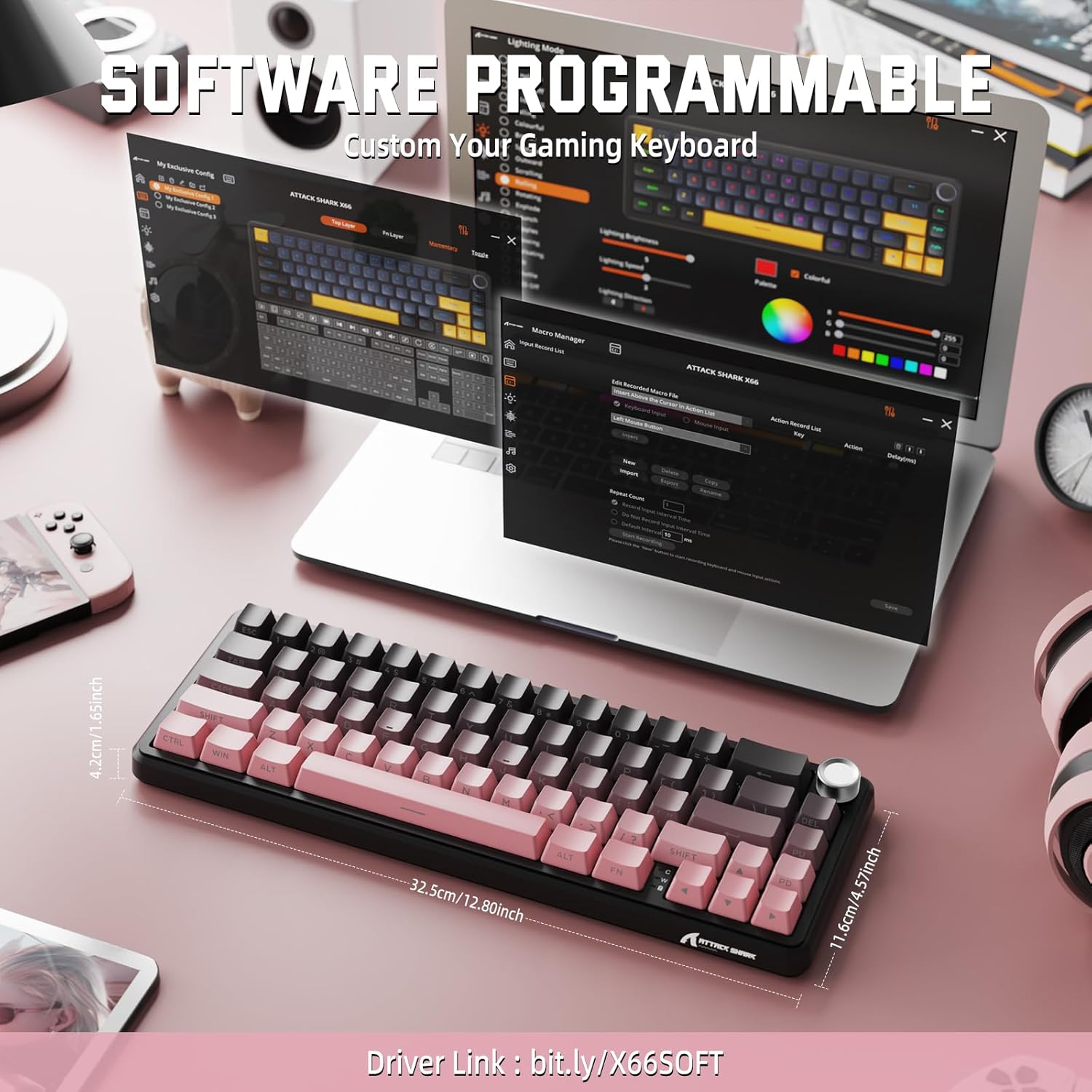
Image: Screenshot of the keyboard's software interface, showing options for custom key assignments, macro recording, and RGB lighting customization. A driver link is provided for download.
Download the official software from the manufacturer's webwebsted. Softwaren giver dig mulighed for at:
- Tilpas RGB-lyseffekter og farver.
- Program macros for complex key sequences.
- Remap individual keys to different functions.
- Opret og gem flere profiles til forskellige applikationer eller spil.
6. Vedligeholdelse
6.1 Rengøring af tastaturet
- Frakobl tastaturet fra alle strømkilder før rengøring.
- Brug en blød, fnugfri klud lidt damprengøres med vand eller en mild rengøringsopløsning til at tørre tastaturerne og kabinettet af.
- Brug trykluft til støv og snavs mellem tasterne.
- Undgå at bruge skrappe kemikalier, slibemidler eller opløsningsmidler.
6.2 Hot Swappable Switch Replacement
The keyboard's hot-swappable design allows for easy switch replacement without soldering.

Image: Illustration showing how to remove and insert mechanical switches on the X66 keyboard, highlighting compatibility with 3-pin and 5-pin switches.
- Brug den medfølgende tastaftrækker til forsigtigt at fjerne den ønskede tast.
- Brug den medfølgende afbrydertrækker til forsigtigt at gribe fat i de øverste og nederste klips på afbryderen og trække den lige op.
- Align the pins of the new switch with the holes on the PCB. Ensure the pins are straight to avoid bending.
- Gently press the new switch into place until it clicks securely.
- Sæt tastaturdækslet på igen.
6.3 Batteristyring
The keyboard is equipped with a 3000mAh rechargeable battery.

Image: Visual guide on how to check the battery capacity using FN + Backspace, showing different battery level indicators (30%, 50%, 100%) with corresponding key light patterns.
- Opladning: Connect the keyboard via the USB-C cable to a computer or a USB power adapter. The charging indicator will show the charging status.
- Kontrol af batteriniveau: Trykke FN + Backspace to display the current battery capacity via the key backlights.
- Batterilevetid: A full charge provides long-lasting usage, but actual duration varies based on RGB lighting usage and connection mode.
7. Fejlfinding
| Problem | Mulig årsag | Løsning |
|---|---|---|
| Tastaturet reagerer ikke | Low battery, incorrect connection mode, driver issue. | Charge the keyboard. Ensure the mode switch is set correctly (2.4G, BT, or Wired). Reconnect the USB receiver/cable. Re-pair Bluetooth. Try a different USB port. |
| Bluetooth-forbindelsen er ustabil | Interference, distance, low battery. | Ensure no strong interference sources nearby. Move closer to the device. Charge the keyboard. Re-pair the Bluetooth connection. |
| 2.4 GHz trådløs forbindelse opretter ikke forbindelse | Receiver not plugged in, incorrect mode, interference. | Ensure the 2.4GHz receiver is securely plugged in. Set the keyboard mode switch to '2.4G'. Try a different USB port for the receiver. |
| RGB-belysningen virker ikke eller er forkert | Lighting settings, software issue. | Check lighting control key combinations (FN + lighting keys). Ensure software is installed and updated. Reset lighting settings via software. |
| Nøgler registreres ikke eller dobbelttastning | Defekt kontakt, snavs under tastaturet. | Remove keycap and clean around the switch. If issue persists, replace the switch using the provided switch puller and spare switches. |
| Lydstyrkeknappen fungerer ikke | Softwarekonflikt, fysisk blokering. | Ensure no software is overriding media controls. Check for any physical debris around the knob. Restart the computer. |
8. Specifikationer
| Feature | Detalje |
|---|---|
| Modelnummer | X66 |
| Layout | 66 Keys, 60% Compact QWERTY |
| Forbindelse | Bluetooth (5.0), 2.4GHz Wireless, USB-C Wired |
| Afbrydere | Hot Swappable (3-pin/5-pin compatible), Pre-lubed Strawberry Mechanical Switches |
| tasterne | Side-printed Gradient PBT |
| Baggrundsbelysning | RGB (16+ Million Colors, 9 preset colors, 18 effects) |
| Batterikapacitet | 3000mAh |
| Kompatible enheder | Windows, Mac OS, Laptop, PC, Tablet |
| Materiale | Polybutylene Terephthalate, Polycarbonate |
| Varens vægt | 2 pund (ca. 0.91 kg) |
| Pakkedimensioner | 14.02 x 6.54 x 2.05 tommer (ca. 35.6 x 16.6 x 5.2 cm) |
| Fabrikant | ANGREDE HAJ |
9. Garanti og support
For warranty information and technical support, please refer to the official ATTACK SHARK webwebstedet eller kontakt din forhandler. Gem din købskvittering til garantikrav.
Fabrikant: ANGREDE HAJ
Sælger: MAGIC-REFINER US
10. Produktvideo
Video: En officiel produktvideoasing the features and design of the ATTACK SHARK X66 Gasket Wireless Mechanical Keyboard, including its compact size, RGB lighting, hot-swappable switches, and multi-mode connectivity. The video highlights the keyboard's aesthetic appeal and functional aspects.


