Indledning
The TOMLOV DM9B Digital Microscope is a versatile and powerful tool designed for detailed observation and analysis. Featuring a 7-inch rotatable FHD screen, 12MP ultra-precise focusing camera, and up to 1200X magnification, it is ideal for a wide range of applications including coin collecting, soldering, PCB repair, and general scientific observation. This manual provides comprehensive instructions for setting up, operating, and maintaining your DM9B Digital Microscope.
Sikkerhedsoplysninger
- Keep the device away from water and high humidity to prevent electric shock.
- Do not attempt to disassemble or modify the microscope. Refer all servicing to qualified personnel.
- Use only the specified power adapter (5V) to avoid damage.
- Avoid direct exposure of the lens to strong light sources, which may damage the sensor.
- Ensure the microscope is placed on a stable, level surface to prevent tipping.
- Opbevares utilgængeligt for små børn for at forhindre utilsigtet indtagelse af små dele.
Pakkens indhold
Kontroller venligst, at alle nedenstående varer er inkluderet i din pakke:
- 7-Inch Digital Microscope x1
- 32 GB Micro SD-kort x1
- Adjustable Aluminum Alloy Stand x1
- USB-kabel x1
- Detailed English User Manual x1

Image: All components included in the TOMLOV DM9B Digital Microscope package, including the microscope monitor, base, bracket, remote control, USB cable, 32GB SD card, light barrier, and user manual.
Produkt overview
The TOMLOV DM9B Digital Microscope features a robust design with key components for optimal performance.

Image: The TOMLOV DM9B Digital Microscope fully assembled, showing the 7-inch LCD screen, microscope lens, adjustable stand, base, two gooseneck LED lights, and the wired remote control.
Nøglefunktioner:
- 7-tommer roterbar FHD-skærm: Provides a clear, high-definition view of magnified objects. The screen can be rotated up to 90 degrees for ergonomic viewing.
- 12MP Ultra-Precise Focusing Camera: Captures high-quality images and videos.
- 5X-1200X forstørrelse: Allows for detailed observation of microscopic details. Actual magnification varies based on screen size and object distance.
- 8 LED Fill Lights + 2 Gooseneck Lights: Ensures optimal illumination of the specimen.
- Konstruktion af aluminiumslegering: Provides durability and stability for various applications.
- PC View Kompatibilitet: Connects to Windows and macOS for larger screen viewing and data analysis.
- 32 GB Micro SD-kort: Included for convenient storage of photos and videos.
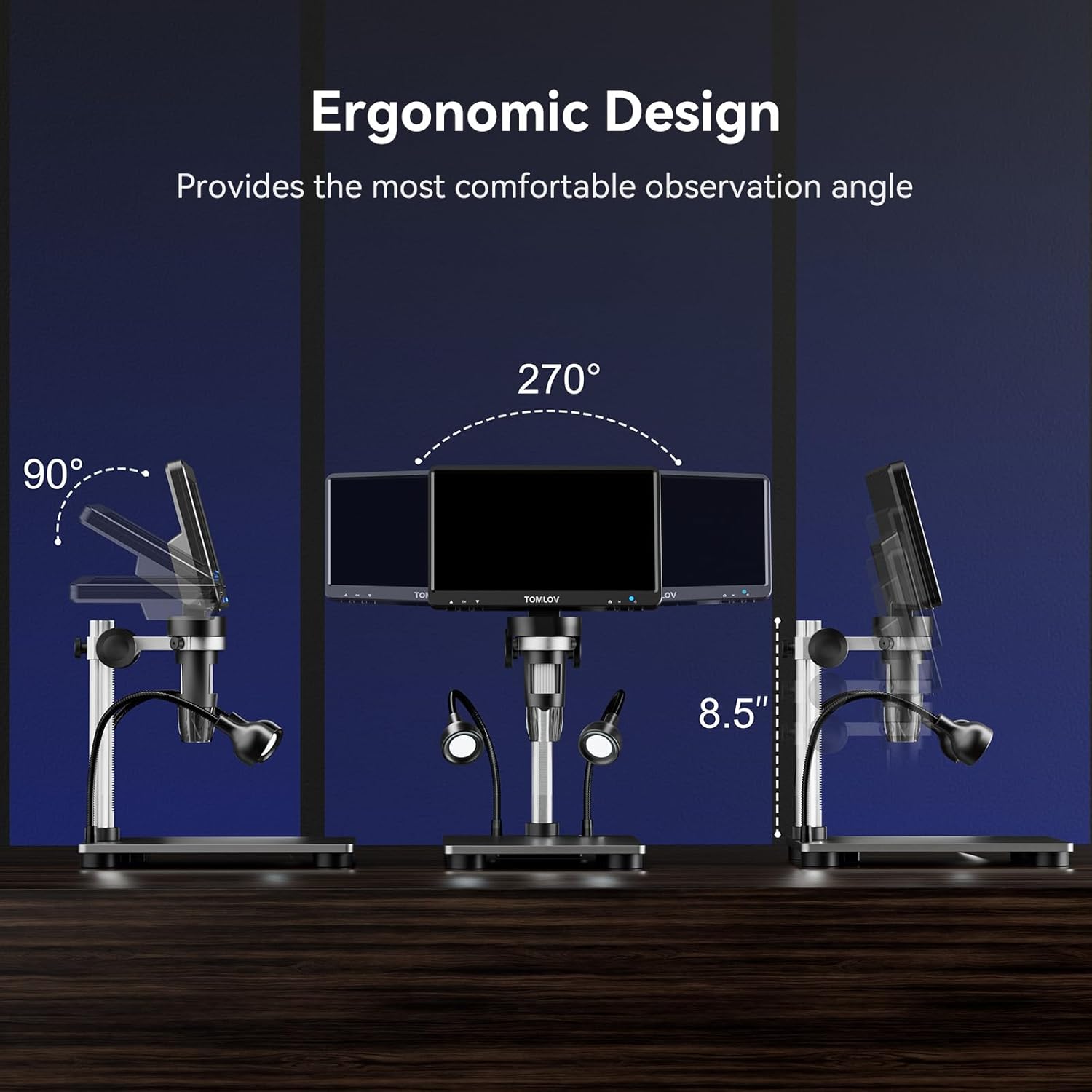
Image: Illustration of the ergonomic design, demonstrating the 90-degree tilt and 270-degree swivel capabilities of the 7-inch LCD screen for comfortable observation angles.
Opsætning
Follow these steps to assemble and prepare your TOMLOV DM9B Digital Microscope for use:
- Saml stativet: Attach the adjustable aluminum alloy stand to the base. Ensure all screws are tightened securely.
- Mount the Microscope Monitor: Slide the microscope monitor unit onto the bracket on the stand. Secure it in place using the locking knob.
- Connect Gooseneck Lights: Insert the two gooseneck LED lights into the designated ports on the base. Adjust their position as needed.
- Indsæt SD-kort: Locate the TF (Micro SD) card slot on the side of the monitor. Insert the included 32GB Micro SD card until it clicks into place.
- Strømtilslutning: Connect the USB cable to the DC5V port on the microscope monitor and plug the other end into a suitable 5V USB power adapter (not included) or a computer USB port.
- Første gang tændt: Press and hold the power button on the microscope monitor to turn on the device.

Image: Visual guide showing the four basic steps to operate the microscope: 1. Turn on the microscope, 2. Adjust the distance between the object and the microscope lens, 3. Rotate the focus wheel to focus, 4. Observe object details on the HD screen.
Betjeningsvejledning
Grundlæggende betjening
- Tænd/sluk: Press and hold the power button on the monitor for 3 seconds to turn the device on or off.
- Skærmrotation: The 7-inch LCD screen can be tilted up to 90 degrees and swiveled for optimal viewkomfort.
Magnification and Focusing
To achieve clear images:
- Place the object you wish to observe on the base plate directly under the microscope lens.
- Adjust the height of the microscope unit on the stand to change the initial magnification and bring the object roughly into view.
- Rotate the focusing wheel on the microscope lens until the image on the screen is sharp and clear.

Image: A visual representation demonstrating the varying magnification levels (5X, 500X, 1200X) achievable with the TOMLOV DM9B Digital Microscope, showing increasing detail of a circuit board.
Justering af belysning
The microscope is equipped with 8 adjustable LED fill lights around the lens and 2 flexible gooseneck lights for optimal illumination.
- Use the light adjustment buttons on the monitor or remote control to increase or decrease the brightness of the main LED lights.
- Manually adjust the position of the gooseneck lights to eliminate shadows and provide targeted illumination.
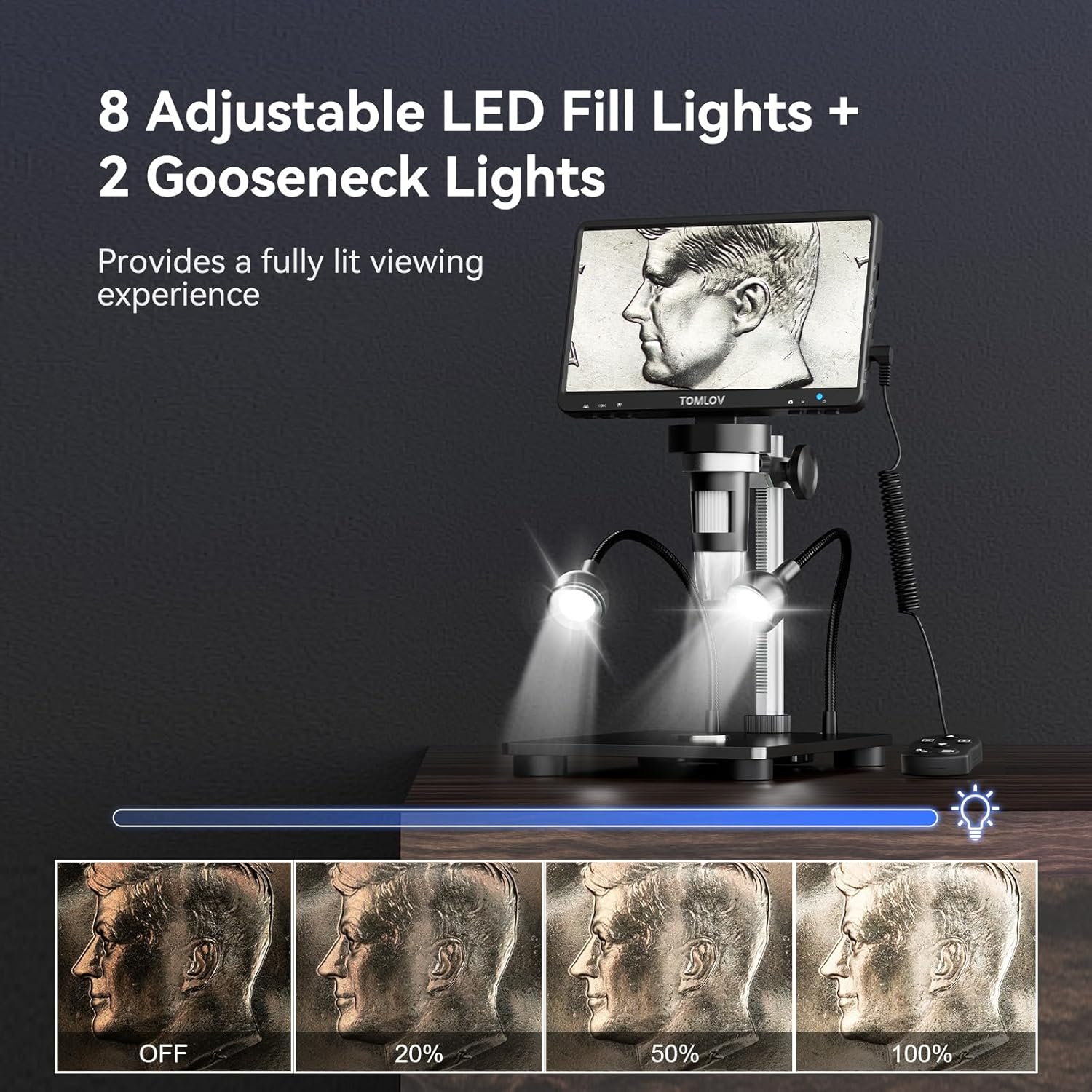
Image: A demonstration of the 8 adjustable LED fill lights and 2 gooseneck lights, showing different brightness levels from off to 100% illumination on a coin.
Foto- og videooptagelse
The DM9B allows you to capture high-resolution photos and videos directly to the included 32GB Micro SD card.
- Press and hold the Menu button for 3 seconds to switch between "Photographing," "Video Recording," and "Playback" modes.
- In Photographing mode, press the OK button to take a photo.
- In Video Recording mode, press the OK button to start/stop recording.
- Use the remote control for convenient capture without disturbing the microscope.

Image: Display illustrating the video recording mode and photo capture mode on the microscope screen, highlighting the inclusion of a 32GB SD card for storage.
Video: An instructional video demonstrating how to use the TOMLOV DM9 Digital Microscope, covering assembly, basic operation, and various applications.
PC Connection (PC View)
For en større viewing experience and easier data sharing, connect your microscope to a PC or laptop.
- Tilslut mikroskopet til din computer ved hjælp af det medfølgende USB-kabel.
- No additional software is required. For Windows, use the default "Windows Camera" app. For macOS, use "Photo Booth."
- The microscope will function as a webkamera, så du kan view the live feed on your computer screen.

Image: The TOMLOV DM9B Digital Microscope connected via USB to a laptop, demonstrating the PC view feature for real-time observation on a larger screen.
Opretholdelse
- Rengøring af linse og skærm: Use a soft, lint-free cloth specifically designed for optical surfaces. For stubborn smudges, a small amount of lens cleaning solution can be applied to the cloth (not directly to the lens/screen).
- Rengøring af kroppen: Wipe the microscope body with a dry, soft cloth. Avoid using abrasive cleaners or solvents.
- Opbevaring: Store the microscope in a cool, dry place, away from direct sunlight and extreme temperatures. If not in use for extended periods, remove the Micro SD card and ensure the device is powered off.
- Batteripleje: The microscope contains a rechargeable Lithium Ion battery. For optimal battery life, avoid fully discharging the battery frequently and store the device with a partial charge if not used for a long time.
Fejlfinding
| Problem | Mulig årsag | Løsning |
|---|---|---|
| Intet billede på skærmen. | Device not powered on; loose cable connection; screen brightness too low. | Ensure power button is pressed; check USB cable connection; adjust screen brightness. |
| Billedet er sløret. | Incorrect focus; object too far/close; dirty lens. | Adjust focusing wheel; adjust microscope height; clean the lens. |
| Kan ikke optage billeder/videoer. | SD card not inserted or full; incorrect mode selected. | Ensure SD card is inserted correctly and has free space; switch to Photographing or Video Recording mode. |
| PC view virker ikke. | USB cable issue; incorrect software/app used. | Try a different USB port/cable; ensure you are using "Windows Camera" (Windows) or "Photo Booth" (macOS). |
| Lysene virker ikke. | Lights turned off or brightness set to minimum; loose connection. | Adjust light brightness; check gooseneck light connections. |
Specifikationer
| Feature | Detalje |
|---|---|
| Modelnavn | DM9B |
| Skærmstørrelse | 7 tommer FHD LCD |
| Kameraopløsning | 12 MP |
| Forstørrelsesområde | 5X til 1200X |
| Lyskilde | 8 Adjustable LED Fill Lights + 2 Gooseneck Lights |
| Materiale | Aluminum Alloy (Base, Stand, Holder) |
| Opbevaring | 32 GB Micro SD-kort (medfølger) |
| PC-kompatibilitet | Windows, macOS (via USB) |
| Strømindgang | 5 volt |
| Batteri | 1 lithium-ion batteri (medfølger) |
| Varens vægt | 2.12 pund |
| Pakkedimensioner | 9.69 x 8.31 x 3.5 tommer |
Garanti og support
TOMLOV products are designed and manufactured to the highest quality standards. For information regarding warranty coverage, technical support, or service inquiries, please refer to the contact information provided on the official TOMLOV webwebstedet eller produktemballagen. Gem din købskvittering som købsbevis i tilfælde af garantikrav.


