1. Produktet er slutview
The DDPAI Dash Cam Hardwire Kit is designed to provide continuous power to your compatible DDPAI dash camera, enabling 24-hour parking surveillance. This kit ensures your dash cam remains operational even when your vehicle's engine is off, offering enhanced security and monitoring capabilities. It converts 12V/2A vehicle power to 5V/3A for the dash cam.

Image 1.1: The DDPAI Hardwire Kit, showing the Type-C connector, power module, and fuse taps.
Kompatibilitet
This hardwire kit is specifically compatible with the following DDPAI dash camera models:
- DDPAI Z60
- DDPAI Z60 πLink
- DDPAI Z50 Pro

Image 1.2: Visual representation of compatible dash cam models: Z50 Pro, Z60 Pro, and Z60.
2. Sikkerhedsoplysninger
Please read and understand all safety instructions before installation and use. Improper installation can lead to vehicle damage or electrical issues.
- Sørg for, at køretøjets tænding er slukket, og at batteriet er frakoblet, før installationen påbegyndes.
- Consult a professional if you are unsure about any part of the installation process.
- Do not modify the hardwire kit or its components.
- Hold produktet væk fra vand og ekstreme temperaturer.

Image 2.1: The hardwire kit incorporates multiple safety protections including low voltage, overcurrent, short-circuit, overload, and reverse connection protection.
3. Pakkens indhold
Bekræft at alle varer er til stede i pakken:
- DDPAI Hardwire Kit (Type-C connector)
- Fuse Taps (various sizes for compatibility)
- Sikringsudtræk
4. Specifikationer
| Input bindtage | DC 12V/2A |
| Udgang Voltage | DC 5V/3A |
| Kabellængde | 3 meter (ca. 9.8 fod) |
| Connector Type | USB Type-C |
| Speciel funktion | 24-Hour Parking Monitor, IPS Power Management |
| Produktdimensioner | 0.7 x 3 x 2 tommer |
| Varens vægt | 3.46 ounce |
5. Opsætning og installation
Proper installation of the hardwire kit is crucial for enabling the parking monitor function and protecting your vehicle's battery. This process involves connecting to your vehicle's fuse box.
Installationstrin:
- Identify Fuse Box Location: Locate your vehicle's fuse box. Common locations include under the dashboard, in the glove compartment, or in the engine bay. Refer to your vehicle's owner's manual for the exact location.
- Identificér strømkilder: You will need to identify two types of fuse slots:
- Constant Power (BAT): A fuse that provides power even when the ignition is off (e.g., hazard lights, interior lights). This is for the parking monitor function.
- Accessory Power (ACC): A fuse that provides power only when the ignition is on (e.g., radio, cigarette lighter). This is for normal driving recording.
- Tilslut fastledningssættet:
- Tilslut red wire (BAT) of the hardwire kit to the identified constant power fuse slot using an appropriate fuse tap.
- Tilslut yellow wire (ACC) of the hardwire kit to the identified accessory power fuse slot using an appropriate fuse tap.
- Tilslut sort ledning (GND) to a metal bolt or screw on the vehicle's chassis to establish a ground connection. Ensure it is a clean, unpainted metal surface.
- Før kablet: Carefully route the hardwire cable from the fuse box to your dash cam's mounting location, tucking it along the vehicle's trim for a clean installation.
- Opret forbindelse til Dash Cam: Plug the Type-C connector of the hardwire kit into your DDPAI dash cam.
- Test funktionalitet: Reconnect the vehicle battery (if disconnected) and start the engine to ensure the dash cam powers on. Turn off the engine and remove the key to verify the parking monitor function activates.
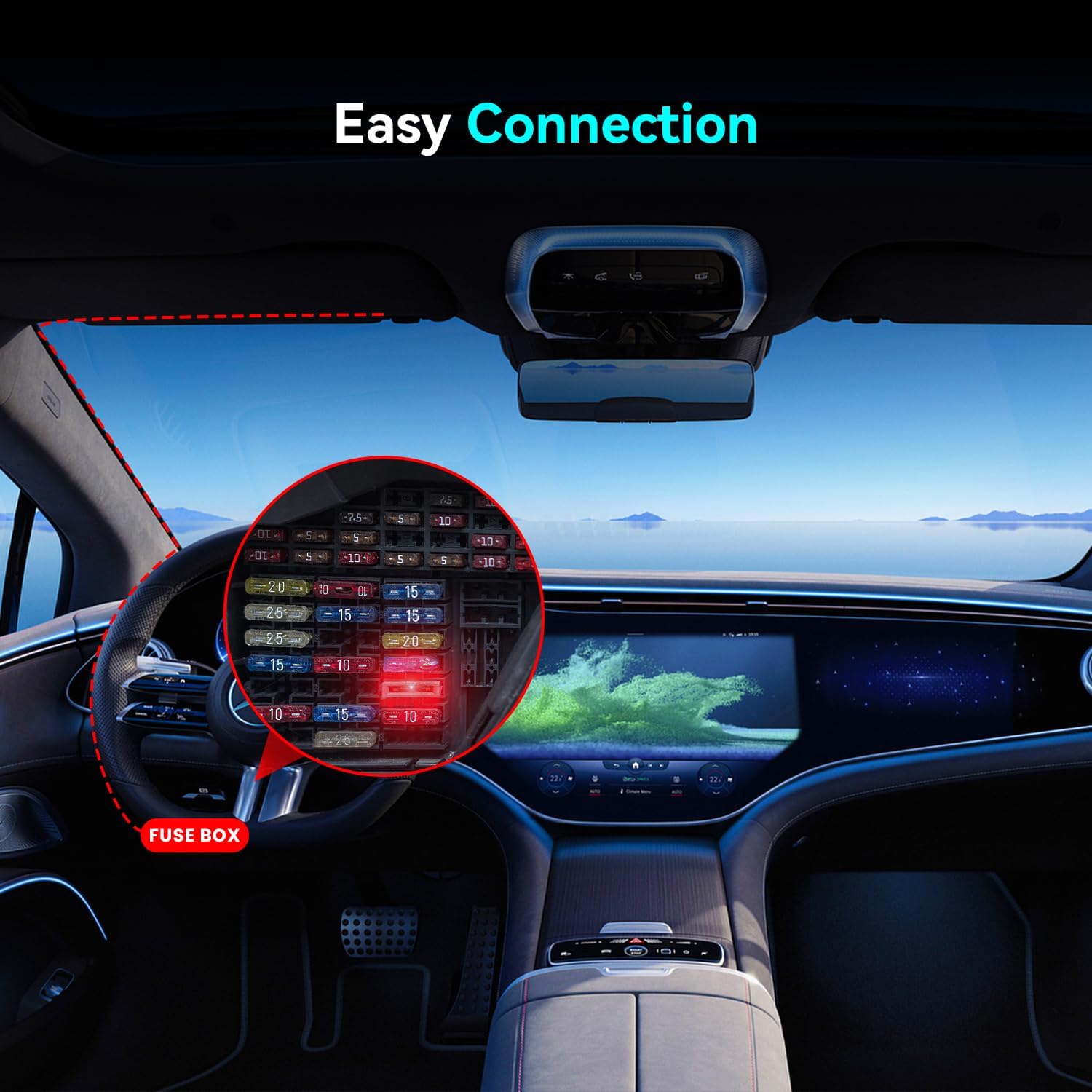
Billede 5.1: Eks.ample of a fuse box location within a vehicle, highlighting the connection points for the hardwire kit.
6. Betjeningsvejledning
Once installed, the DDPAI Hardwire Kit operates automatically with your compatible dash cam to provide continuous power and enable parking surveillance.
24-timers parkeringsovervågning:
When your vehicle's ignition is turned off, the hardwire kit will continue to supply power to the dash cam from the constant power source. This allows the dash cam to enter parking surveillance mode, recording events such as impacts or motion (depending on your dash cam's settings).

Image 6.1: The hardwire kit enables 24-hour parking monitoring for your dash cam, providing continuous surveillance.
IPS Power Management:
The hardwire kit, in conjunction with DDPAI dash cams' IPS (Intelligent Power System) power management, intelligently monitors your vehicle's battery voltage. If the vehicle battery voltage drops below a preset threshold, the hardwire kit will automatically cut off power to the dash cam to prevent complete battery drain, ensuring your vehicle can still start.

Image 6.2: A graph illustrating how IPS Power Management detects vehicle voltage and initiates a low voltage shutdown (LVS) to protect the battery.
7. Vedligeholdelse
The DDPAI Hardwire Kit requires minimal maintenance. Follow these guidelines to ensure optimal performance:
- Kontrollér regelmæssigt alle forbindelser for at sikre, at de er sikre.
- Keep the cable routing tidy and free from obstructions that could cause damage.
- Avoid exposing the hardwire kit to excessive moisture or extreme temperatures.
8. Fejlfinding
If you encounter issues with your hardwire kit, refer to the following common problems and solutions:
| Problem | Mulig årsag | Løsning |
|---|---|---|
| Dashcam'et tænder ikke. | Loose connection, incorrect fuse tap, blown fuse, incorrect fuse slot. | Check all cable connections. Ensure fuse taps are correctly installed. Replace any blown fuses. Verify constant and accessory power fuse slots with a circuit tester. |
| Parking monitor does not activate. | Incorrect constant power connection, dash cam settings. | Ensure the red (BAT) wire is connected to a constant power fuse. Check your dash cam's settings to confirm parking mode is enabled. |
| Bilens batteri aflades hurtigt. | Incorrect IPS power management settings, prolonged parking monitoring in low battery conditions. | Verify IPS power management settings on your dash cam (if adjustable). Ensure the low voltage cutoff threshold is set appropriately. Limit parking monitoring duration if necessary. |
| Dash cam powers off unexpectedly. | Lavt køretøjs batteri voltage, faulty connection. | The IPS power management system may have cut power to protect the battery. Check vehicle battery health. Inspect connections for looseness. |
9. Garanti og support
Garantioplysninger:
DDPAI offers an 18 måneders garanti on this hardwire kit from the date of purchase. This warranty covers manufacturing defects. A 7 dages returret is also available for products with defects.
Kundesupport:
For any questions, technical assistance, or warranty claims, please contact DDPAI customer support:
- E-mail: servicecenter@ddpai.com

Billede 9.1: Overview of DDPAI's after-sale service, including warranty and support contact.


