Indledning
Welcome to the user manual for your Innokin Sidera DNA60C Mod 60W with Zenith Minimal Tank 4ml. This device is designed for an advanced vaping experience, combining cutting-edge technology with user-friendly features. Please read this manual carefully to ensure proper operation and maintenance of your device.
The Sidera SBS (Side-by-Side) Box Mod integrates a sophisticated DNA60C chipset with a vibrant color screen, offering compatibility with tanks up to 24mm in diameter. Its ergonomic side-by-side design, premium aluminum alloy construction, dual fire button, 18650 battery compatibility, advanced temperature control, and adjustable power output from 1-60W make it a versatile and powerful device. Escribe software support allows for further customization.
Pakkens indhold
Kontroller venligst, at alle varer er til stede i din pakke:
- Innokin Sidera DNA60C Mod
- Zenith Minimal Tank 4ml
- Brugervejledning (dette dokument)
- USB Cable (for Escribe software connection, not for charging)
- Spare Parts (O-rings, screws, etc.)
Note: 18650 battery is not included and must be purchased separately.
Produkt overview
Familiarize yourself with the components of your Innokin Sidera DNA60C Mod and Zenith Minimal Tank.
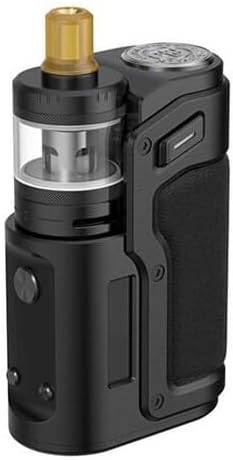
Figur 1: Innokin Sidera DNA60C Mod with Zenith Minimal Tank (Black)
This image shows the complete Innokin Sidera DNA60C Mod and Zenith Minimal Tank assembly in black. The tank is mounted side-by-side with the mod body, featuring a clear e-liquid reservoir and a gold-colored drip tip. The mod has a textured grip and visible control buttons.

Figur 2: Innokin Sidera DNA60C Mod in Bronze and Black
This image displays two Innokin Sidera DNA60C Mods, one in bronze and one in black, highlighting their side-by-side design and premium finish. The Evolv DNA60C branding is visible, emphasizing the advanced chipset.

Figur 3: Ergonomic Side-by-Side Design
This image illustrates the ergonomic side-by-side design of the Sidera Mod, showcasing its comfortable grip and the integration of the tank alongside the mod body. It highlights the aluminum alloy construction and laser accents, available in Bronze, Black, and Stainless Steel finishes.

Figur 4: DNA60C Chipset Features
This image details the key features powered by the DNA60C chipset, including ergonomic side-by-side design, customizable color screen, compatibility with tanks up to 24mm, dual fire button design, and 18650 battery compatibility. A close-up of the Evolv DNA60C chip is also shown.

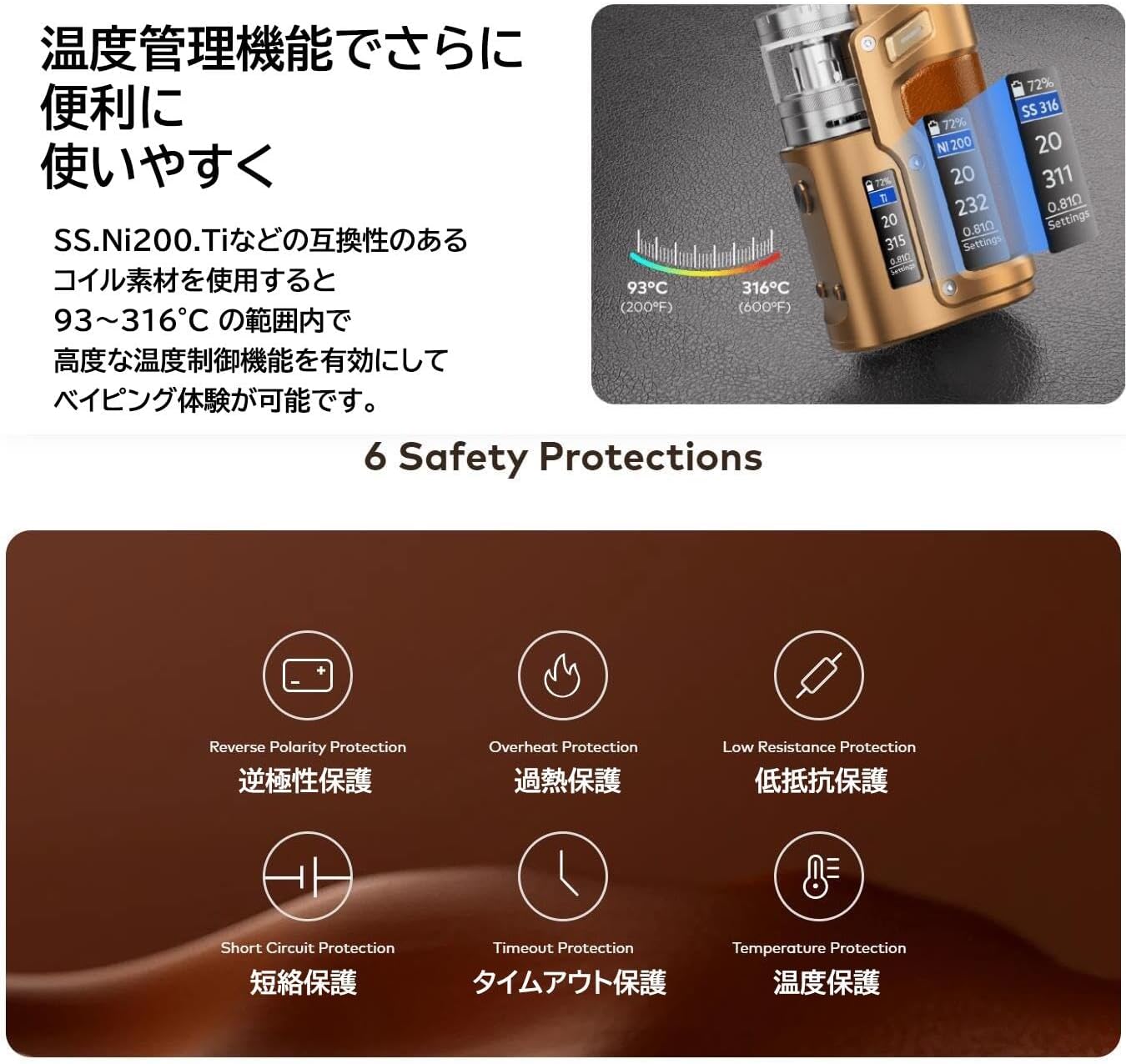
Figur 5: Temperature Control and Safety Protections
This image highlights the advanced temperature control capabilities of the Sidera Mod, showing a screen display with temperature settings. It also lists six safety protections: Reverse Polarity, Overheat, Low Resistance, Short Circuit, Timeout, and Temperature Protection.
Figur 6: Key Features: Dual Fire Button, Battery, Screen, Escribe
This image showcases four key aspects: the dual fire button design for quick and intuitive operation, the easy installation of the 18650 battery with a screw-on cap, the premium color screen display for clear settings, and the Escribe software support for performance updates and customization on Windows and Mac.
Opsætningsvejledning
1. Batteriinstallation
- Locate the battery cap on the bottom of the Sidera Mod.
- Unscrew the battery cap counter-clockwise.
- Insert one 18650 battery into the battery compartment with the positive (+) end facing up (towards the tank). Ensure correct polarity.
- Screw the battery cap back on clockwise until secure.
2. Tank Assembly and Installation
- Ensure the coil is properly installed in the Zenith Minimal Tank.
- Fill the tank with your preferred e-liquid.
- Screw the Zenith Minimal Tank onto the 510 connection of the Sidera Mod. Do not overtighten.
3. Første opstart
Press the fire button 5 times rapidly to turn the device on. The color screen will illuminate.
Betjeningsvejledning
Tænd/sluk
- To turn on: Press the fire button 5 times rapidly.
- To turn off: Press the fire button 5 times rapidly.
Justering af Wattage/Temperatur
The DNA60C chipset allows for precise control. Use the adjustment buttons (usually located below the screen) to navigate menus and adjust settings. Refer to the on-screen prompts for specific adjustments.
- Wattage-tilstand: Adjust power output from 1W to 60W.
- Temperaturkontroltilstand: Supports various coil materials (SS, Ni200, Ti). Adjust temperature between 93°C (200°F) and 316°C (600°F).
Vaping
Press and hold the fire button while inhaling from the drip tip. Release the button when finished.
Skærmtilpasning
The color screen is customizable. Connect the device to a computer and use the Escribe software for advanced customization options, including themes and display information.
Opretholdelse
Rengøring af enheden
- Wipe the exterior of the mod with a soft, dry cloth.
- For the 510 connection, use a cotton swab lightly dampened with isopropyl alcohol to clean any e-liquid residue. Ensure it is completely dry before use.
- Clean the tank regularly by disassembling it and rinsing components with warm water. Allow to air dry completely.
Udskiftning af spole
- When you notice a burnt taste or reduced vapor production, it's time to replace the coil.
- Unscrew the base of the Zenith Minimal Tank.
- Pull out the old coil and insert a new one, ensuring it is seated firmly.
- Reassemble the tank and fill with e-liquid. Allow the coil to prime for 5-10 minutes before vaping.
Batteripleje
- Always use high-quality 18650 batteries from reputable brands.
- Do not use damaged batteries (torn wraps, dents).
- Charge batteries using an external charger for optimal battery life and safety. The USB port on the mod is primarily for Escribe software connection and firmware updates, not for regular charging.
- Store batteries in a safe, non-conductive case when not in use.
Fejlfinding
| Problem | Mulig årsag | Løsning |
|---|---|---|
| Enheden tænder ikke | Battery not inserted correctly or depleted. Device is off. | Check battery polarity and charge. Press fire button 5 times rapidly to turn on. |
| Ingen dampproduktion | Coil not installed, coil burnt out, tank empty, low battery, device locked. | Ensure coil is installed. Replace coil. Refill tank. Charge battery. Unlock device (if applicable). |
| Brændt smag | Coil burnt out, insufficient e-liquid, chain vaping. | Replace coil. Refill tank. Allow coil to prime. Take shorter breaks between puffs. |
| Lækage tank | O-rings damaged/missing, coil not seated properly, overfilling. | Check and replace O-rings. Ensure coil is firmly seated. Do not overfill. |
| Skærmen reagerer ikke | Device frozen, low battery. | Try removing and reinserting the battery. Charge battery. |
Sikkerhedsbeskyttelse
The DNA60C chipset includes several safety features:
- Omvendt polaritetsbeskyttelse: Prevents damage from incorrect battery insertion.
- Overophedningsbeskyttelse: Shuts down the device if it gets too hot.
- Low Resistance Protection: Prevents firing with coils below safe resistance levels.
- Kortslutningsbeskyttelse: Protects against short circuits in the atomizer.
- Timeoutbeskyttelse: Prevents continuous firing for too long.
- Temperaturbeskyttelse: In temperature control mode, prevents coil from exceeding set temperature.
Specifikationer
| Feature | Detalje |
|---|---|
| Mærke | Innokin |
| Model | Sidera DNA60C Mod |
| Tank Included | Zenith Minimal Tank 4ml |
| Chipsæt | Evolv DNA60C |
| Strømudgang | 1-60W (Adjustable) |
| Batteritype | Single 18650 (not included) |
| Max Tank Diameter | 24 mm |
| Vise | Customizable Color Screen |
| Byggemateriale | Aluminiumslegering |
| Dimensions (Mod) | 81.0 x 53.9 x 31.2 mm |
| Dimensions (Tank) | 24 x 50.70 mm |
| Funktioner | Ergonomic Side-by-Side Design, Dual Fire Button, Advanced Temperature Control, Escribe Software Support |
Garanti og support
For warranty information and technical support, please contact Innokin customer service or visit their official webwebsted. Gem din købsbevis til garantikrav.
Official Innokin Webwebsted: www.innokin.com