1. Produktet er slutview
The Rosewill Helium NAS Black ATX Mid Tower Computer Case is engineered for optimal performance and extensive storage capabilities, making it suitable for DIY NAS, media servers, and small business applications. Its design prioritizes airflow, efficient cooling, and versatile component compatibility.
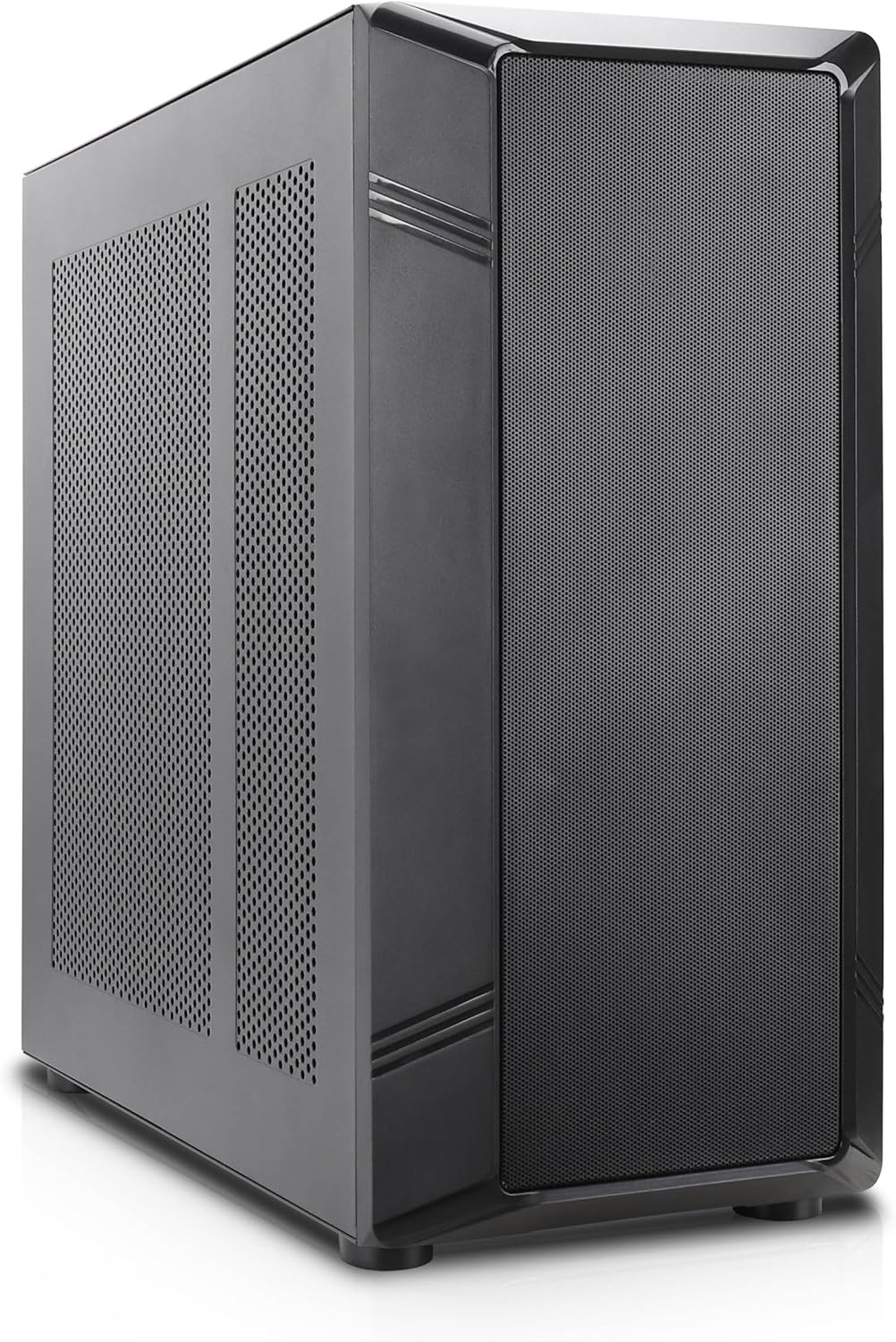
Figur 1: Vinklet front view of the Rosewill Helium NAS Black ATX Mid Tower Computer Case.
Nøglefunktioner:
- Maximized Airflow: All-mesh side panels ensure unrestricted airflow for optimal cooling and prevention of thermal throttling.
- Quiet, Efficient Cooling: Four pre-installed 140mm PWM fans provide silent and efficient cooling, maintaining system stability under heavy workloads.
- Massiv lagerkapacitet: Supports up to 10 x 3.5" HDDs and 3 x 2.5" SSDs, ideal for large media libraries, virtual machines, and data-intensive applications.
- Alsidig kompatibilitet: Supports ATX motherboards and 360 AIO Radiators, offering flexibility for various system configurations and high-performance cooling solutions.
2. Opsætning og installation
Follow these steps for proper installation of your computer components.
2.1 Forberedelse af sagen
- Placer etuiet på en stabil, flad overflade.
- Remove the side panels by unscrewing the thumbscrews at the rear and sliding the panels off.

Figure 2: Interior layout of the Rosewill Helium NAS case, showing component mounting areas.
2.2 Installation af bundkort
- Install the I/O shield into the motherboard tray opening.
- Align your ATX motherboard with the standoffs inside the case.
- Fastgør bundkortet med de medfølgende skruer.
2.3 Installation af lagerdrev
The case supports up to 10 x 3.5" HDDs and 3 x 2.5" SSDs. Utilize the dedicated drive cages for secure mounting.
Video 1: Demonstration of hard drive cage installation and cabling. This video illustrates the process of securing and connecting multiple hard drives within a PC case, which is applicable to the Rosewill Helium NAS case's storage capabilities.
- For 3.5" HDDs, slide the drives into the designated bays within the drive cages and secure them with screws.
- For 2.5" SSDs, mount them in the dedicated SSD trays, typically located behind the motherboard tray or on top of the HDD cages, and secure with screws.
- Connect SATA power and data cables to each installed drive.
2.4 Installation af strømforsyning
- Mount the power supply unit (PSU) in the bottom rear compartment of the case.
- Fastgør strømforsyningen med skruer fra bagsiden af kabinettet.
- Route the necessary power cables to your motherboard and other components.
2.5 Installation af grafikkort og udvidelseskort
- Fjern de nødvendige PCIe-slotdæksler fra bagsiden af kabinettet.
- Insert your graphics card or other expansion cards into the appropriate PCIe slots on the motherboard.
- Fastgør kortene med skruer.
2.6 Kabelstyring
Utilize the cable routing cutouts and tie-down points behind the motherboard tray to organize cables. This improves airflow and aesthetics. Zip ties are included for assistance.
3. Betjeningsvejledning
3.1 Frontpanel I/O

Figure 3: Front panel I/O ports located on the top of the case.
- Power knap: Press to power on/off the system.
- Nulstil knap: Tryk for at genstarte systemet.
- USB 3.1 Type-C-port: Til højhastigheds dataoverførsel.
- USB 3.0-porte: Til tilslutning af USB 3.0-kompatible enheder.
- USB 2.0-porte: Til tilslutning af USB 2.0-kompatible enheder.
- HD-lydstik: Til tilslutning af hovedtelefoner og mikrofoner.
3.2 Indledende tænding
- Ensure all components are securely installed and cables are properly connected.
- Tilslut strømkablet til strømforsyningen og en stikkontakt.
- Press the power button on the front panel to start your system.
4. Vedligeholdelse
Regular maintenance ensures optimal performance and longevity of your computer case and components.
4.1 Rengøring af støvfiltre
The Rosewill Helium NAS case features removable dust filters on the top and bottom for easy cleaning.
- Gently pull out the bottom dust filter.
- The top mesh panel is magnetic and can be easily lifted off.
- Clean the filters using compressed air or a soft brush to remove accumulated dust.
- Reinstall the filters once clean.
4.2 Generel rengøring
- Brug en blød, tør klud til at tørre kabinettets yderside af.
- For interior cleaning, use compressed air to remove dust from fans and components. Ensure the system is powered off and unplugged before cleaning.
5. Fejlfinding
Dette afsnit indeholder løsninger på almindelige problemer, du kan støde på.
- Systemet tænder ikke:
- Check all power connections, including the PSU, motherboard, and front panel power switch cables.
- Sørg for, at strømforsyningskontakten er i 'ON'-positionen.
- Overheating Components:
- Verify all case fans are spinning correctly.
- Clean dust filters and internal components to improve airflow.
- Ensure CPU cooler and GPU fans are functioning.
- For meget ventilatorstøj:
- Check for loose cables or obstructions hitting fan blades.
- Ensure fans are securely mounted.
- Adjust fan speeds through motherboard BIOS or software if supported.
- Frontpanel I/O virker ikke:
- Verify that all front panel cables (USB, Audio, Power, Reset) are correctly connected to the motherboard headers.
6. Specifikationer
| Feature | Specifikation |
|---|---|
| Mærke | Rosewill |
| Serie | Helium NAS |
| Modelnavn | Helium NAS |
| Varemodelnummer | B0DP3PQFKW |
| Sagstype | Mid Tower |
| Bundkort kompatibilitet | ATX |
| Farve | Sort |
| Materiale | Aluminium, rustfrit stål |
| Varens vægt | 19.71 pund |
| Produktmål (LxBxH) | 25 x 24.41 x 12.68 tommer |
| 3.5" harddiskunderstøttelse | Op til 10 |
| 2.5" SSD-understøttelse | Op til 3 |
| Forudinstallerede ventilatorer | 4 x 140 mm PWM-blæsere |
| Afkølingsmetode | Air, Water (360 AIO Radiator Support) |
| Front Panel USB 2.0 Ports | 2 |
| Front Panel USB 3.0 Ports | 2 |
| Anbefalede anvendelser | AI Server, Media Server, NAS, Workstation |
7. Garanti og support
For warranty information, technical support, or further assistance, please refer to the official Rosewill webwebstedet eller kontakt deres kundeserviceafdeling. Gem din købskvittering til garantikrav.


