1. Introduktion og overview
The avedio links 8K HDMI 2.1 Switch is a versatile bi-directional device designed to manage your HDMI connections efficiently. It allows you to connect two HDMI source devices to one display (2 In 1 Out mode) or one HDMI source device to two displays (1 In 2 Out mode, displaying one screen at a time). This switch supports advanced video resolutions including 8K@60Hz, 4K@144Hz/120Hz/60Hz, and 1080P@240Hz, ensuring a high-quality visual experience. It is ideal for gamers, home theater enthusiasts, and professionals requiring flexible HDMI routing.

Image: The avedio links 8K HDMI 2.1 Switch unit shown alongside its compact remote control.
2. Produktfunktioner
- Bi-Directional Functionality: Operates as a 2 In 1 Out switcher or a 1 In 2 Out splitter (one display at a time).
- 8K Ultra HD-understøttelse: Supports 8K@60Hz, 4K@144Hz/120Hz/60Hz, and 1080P@240Hz, with backward compatibility.
- Avancerede videoteknologier: Features VRR (Variable Refresh Rate), Dynamic HDR, HDCP 2.3, and Dolby Vision for immersive viewing.
- Høj båndbredde: Supports 48Gbps signal transmission for seamless performance.
- Premium bygning: Constructed with durable aluminum alloy for stable performance and heat dissipation.
- Dobbelte kontroltilstande: Switch inputs via the physical button on the unit or the included infrared remote control.
- Plug and Play: No software or drivers required for operation.
- Ekstern strømforsyning (ekstraudstyr): Includes a USB-C cable for power in cases where the HDMI port cannot provide sufficient power.

Image: Visual representation of the 8K capabilities and high bandwidth of the HDMI 2.1 switch.

Image: Explanation of Variable Refresh Rate (VRR) support for smooth gaming.
3. Pakkens indhold
Kontroller venligst, at alle varer er til stede i din pakke:
- avedio links 8K HDMI 2.1 Switch Unit
- Infrarød fjernbetjening
- USB-C strømkabel
Note: HDMI cables are not included and must be purchased separately. For optimal performance with 8K@60Hz or 4K@120Hz, a high-quality HDMI 2.1 cable is recommended.
4. Produktdiagram og porte
The avedio links HDMI switch features clearly labeled ports for easy connection. The unit includes two input ports (INPUT 1, INPUT 2) and one output port (OUTPUT), along with a DC 5V USB-C power input.

Billede: En detaljeret view of the HDMI switch's input, output, and power ports.
5. Opsætning og installation
The avedio links HDMI switch offers flexible setup options:
5.1. 2 In 1 Out Mode (Connecting two sources to one display)
- Connect your first HDMI source device (e.g., PS5, Xbox) to the INDGANG 1 port on the switch using an HDMI cable.
- Connect your second HDMI source device (e.g., Nintendo Switch, Fire Stick) to the INDGANG 2 port on the switch using an HDMI cable.
- Tilslut PRODUKTION port of the switch to your display (e.g., TV, monitor, projector) using an HDMI cable.
- If your HDMI source devices do not provide sufficient power, connect the included USB-C power cable from the switch's DC 5V port to a USB power source (e.g., USB wall adapter, TV USB port).

Image: Connection diagram illustrating the 2 In 1 Out setup for the HDMI switch.
5.2. 1 In 2 Out Mode (Connecting one source to two displays)
Note: In this mode, only one display can be active and show content at a time.
- Connect your HDMI source device (e.g., TV box, Blu-ray DVD player) to the INPUT port on the switch using an HDMI cable.
- Tilslut UDGANG 1 port of the switch to your first display using an HDMI cable.
- Tilslut UDGANG 2 port of the switch to your second display using an HDMI cable.
- If your HDMI source device does not provide sufficient power, connect the included USB-C power cable from the switch's DC 5V port to a USB power source.
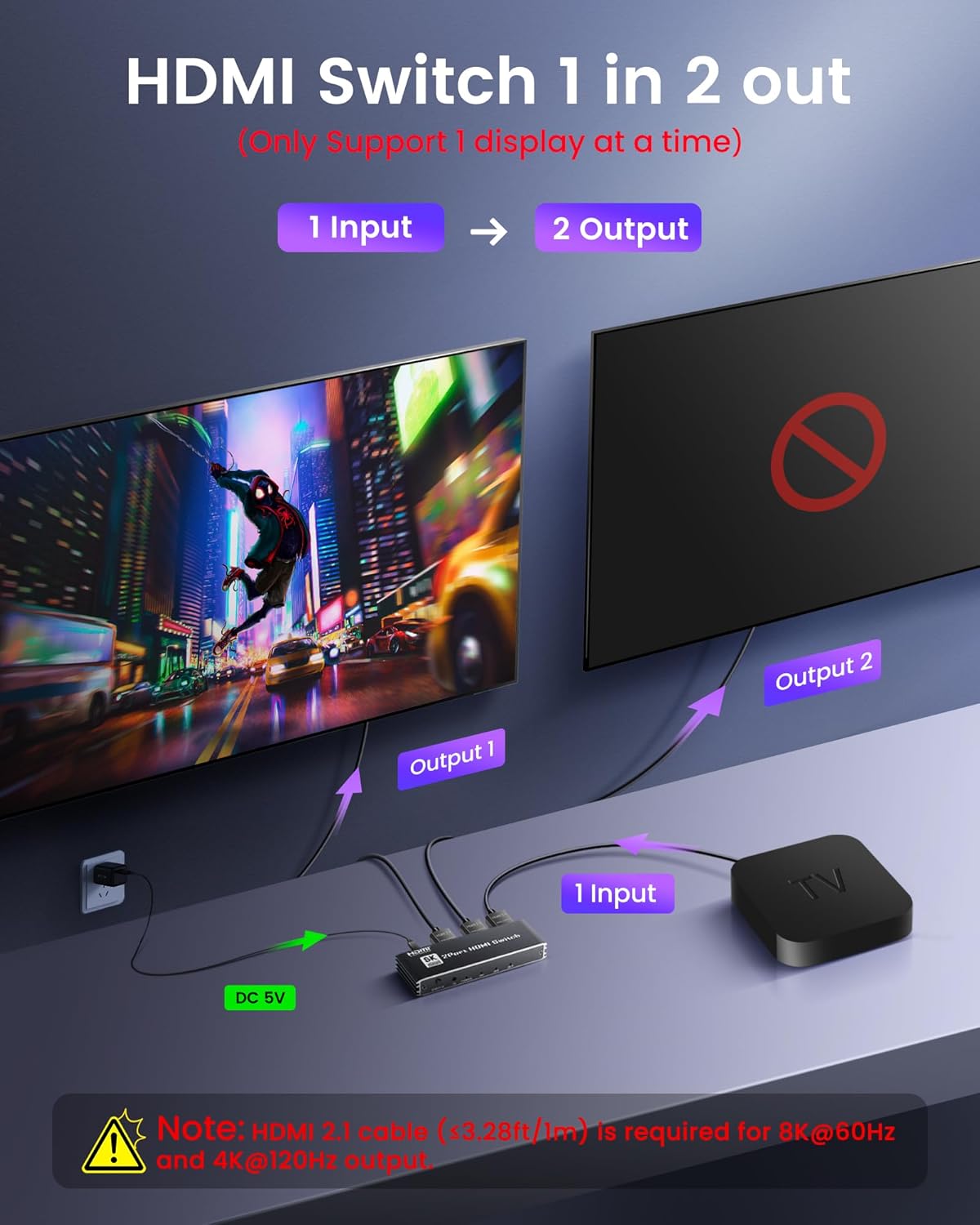
Image: Connection diagram illustrating the 1 In 2 Out setup for the HDMI switch.
6. Betjeningsvejledning
Once connected, the avedio links HDMI switch is plug-and-play. You can switch between connected devices using two methods:
6.1. Manuel omskiftning
Press the button on the front of the HDMI switch unit to cycle through the connected input/output devices.
6.2. Fjernbetjeningsskift
Point the included infrared remote control at the front of the HDMI switch unit and press the desired input/output button to switch. Ensure there are no obstructions between the remote and the switch for optimal performance.

Image: Illustration of both remote control and manual button switching methods.
7. Fejlfinding
If you encounter issues with your avedio links HDMI switch, please refer to the following common solutions:
- Doesn't Work / Doesn't Switch:
- Ensure the device is receiving sufficient power. Connect the included USB-C cable to a 5V 1A power source if needed.
- Use a high-quality HDMI 2.1 cable with a total length not exceeding 3.28ft (1 meter) for 8K@60Hz or 4K@120Hz.
- Try adjusting the resolution of your source device to 1080P to test functionality.
- Only One of the HDMI Ports Works:
- In 1 In 2 Out (splitter) mode, only one screen can display at a time. This is normal operation.
- Sørg for, at alle kabler er korrekt tilsluttet.
- Not Working / No Output:
- Check if the signal indicator light on the switch is illuminated. If not, ensure power is supplied and all source devices are active.
- Try connecting more than two input source devices and keep them all on to ensure sufficient signal detection.
- Black Screen, Flickering, or Signal Drop:
- Verify that the HDMI cable you are using supports 8K resolution and is a standard HDMI 2.1 version.
- The total length of the HDMI 2.1 cable (input + output) should not exceed 3.28ft (1 meter) for 8K@60Hz or 4K@120Hz.
- Cannot Display 4K@120Hz or 8K@60Hz:
- Check that your input device, output device, and HDMI cable all support 4K@120Hz or 8K@60Hz.
- Ensure you are using a standard HDMI 2.1 cable and that the total cable length (input + output) does not exceed 3.28ft (1 meter).
Note: When connecting input and output devices to your display, our product may have a 3-second delay, which is normal.

Image: A visual guide to common troubleshooting scenarios and solutions.

Image: Chart detailing recommended HDMI cable lengths and specifications for various resolutions.
8. Specifikationer
| Feature | Specifikation |
|---|---|
| Model | 8K HDMI 2.1 Bi-Directional Switch |
| Mærke | avedio links |
| Connector Type | HDMI |
| Farve | Sort |
| Understøttede opløsninger | 8K@60Hz, 4K@144Hz/120Hz/60Hz, 1080P@240Hz |
| Båndbredde | 48 Gbps |
| Kompatibilitet | PS5, PS4 Pro, Xbox Series X/S, Nintendo Switch, Apple TV, Fire Stick, Roku, DVD players, TVs, projectors, monitors |
| Strømindgang | DC 5V (via USB-C) |
| Varens vægt | 3.52 ounce |
| Pakkedimensioner | 4.72 x 4.25 x 0.75 tommer |
| Oprindelsesland | Kina |
9. Sikkerhedsoplysninger
- Udsæt ikke enheden for fugt, ekstreme temperaturer eller direkte sollys.
- Undgå at tabe eller udsætte enheden for kraftige stød.
- Forsøg ikke selv at skille enheden ad eller reparere den. Overlad al service til kvalificeret personale.
- Use only the provided USB-C power cable or a certified 5V 1A power adapter.
- Hold enheden væk fra kilder til stærk elektromagnetisk interferens.
10. Garanti og support
For warranty information, technical support, or any product-related inquiries, please contact avedio links customer service directly. Refer to the product packaging or the official avedio links webwebsted for kontaktoplysninger.


