1. Introduktion
This manual provides instructions for the safe and effective use of your iJoy Disney Stitch Disco Party Bluetooth Over-Ear Headphones. Please read this manual thoroughly before operating the device and retain it for future reference.

Billede 1.1: Forside view of the iJoy Disney Stitch Disco Party Bluetooth Over-Ear Headphones.
2. Pakkens indhold
Bekræft at alle varer er til stede i pakken:
- iJoy Disney Stitch Disco Party Bluetooth Over-Ear Headphones
- USB opladningskabel
- Ekstra lydkabel
- Beskyttende bæretaske
- Brugermanual
3. Produktet er slutview
Gør dig bekendt med hovedtelefonens komponenter og betjeningselementer.
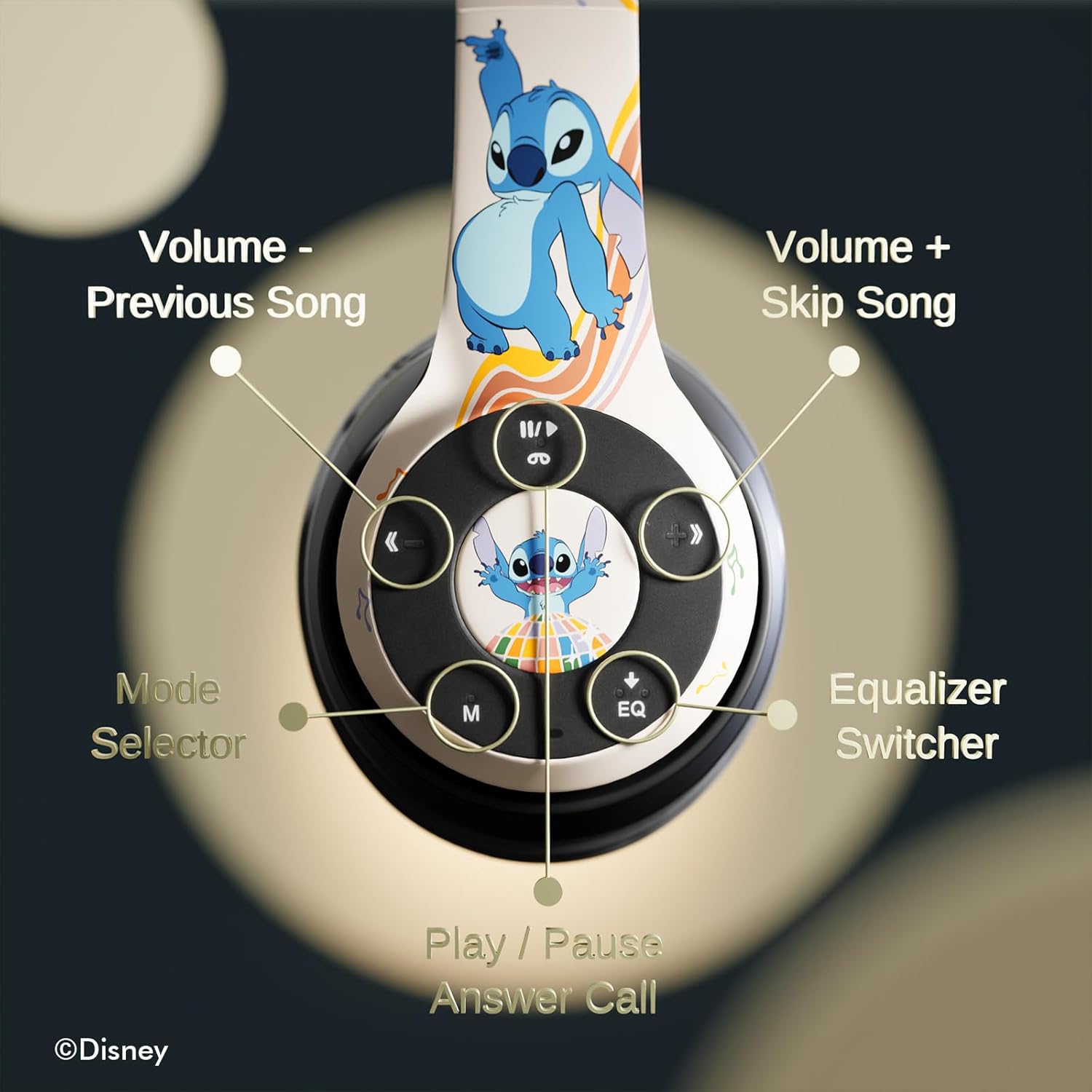
Billede 3.1: Detaljeret view af kontrolknapperne på den højre ørekop.
Kontrolfunktioner:
- Volume - / Previous Song: Kort tryk for at sænke lydstyrken, langt tryk for at sænke forrige nummer.
- Volume + / Skip Song: Kort tryk for at skrue op for lydstyrken, langt tryk for næste nummer.
- Play / Pause / Answer Call: Short press to play/pause music or answer/end a call. Long press to reject a call.
- Mode Selector (M): Press to switch between Bluetooth, Micro SD, and FM Radio modes.
- Equalizer Switcher (EQ): Press to cycle through available equalizer presets.
- LED-indikator: Displays power, charging, and Bluetooth connection status.
- Indbygget mikrofon: Til håndfri opkald.
- Micro SD -kortplads: Til direkte lydafspilning fra et Micro SD-kort.
4. Opsætning
4.1. Opladning af hovedtelefonerne
Before initial use, fully charge the headphones. Connect the supplied USB charging cable to the charging port on the headphones and to a USB power source (e.g., computer USB port, wall adapter). The LED indicator will illuminate during charging and change color or turn off when charging is complete. A full charge provides approximately 15 hours of playtime.

Image 4.1: The headphones offer up to 15 hours of audio playback on a single charge.
4.2. Bluetooth-parring
- Sørg for, at hovedtelefonerne er opladet og slukket.
- Tryk på tænd/sluk-knappen, og hold den nede, indtil LED-indikatoren blinker, hvilket angiver parringstilstand.
- Aktiver Bluetooth på din enhed (smartphone, tablet osv.) og søg efter tilgængelige enheder.
- Select "iJoy Stitch Headphones" from the list of found devices.
- Når den er tilsluttet, vil LED-indikatoren stoppe med at blinke og forblive konstant.

Image 4.2: The headphones are compatible with various Bluetooth-enabled devices.
4.3. Micro SD Card Usage
Insert a Micro SD card (not included) into the Micro SD card slot on the headphones. The headphones will automatically switch to Micro SD mode and begin playing audio files from the card. Use the Mode button to switch to this mode if already in another mode.
5. Betjeningsvejledning
5.1. Tænd/sluk
- Tænd: Press and hold the Power button until the LED indicator illuminates.
- Sluk: Tryk på tænd/sluk-knappen, og hold den nede, indtil LED-indikatoren slukker.
5.2. Musikafspilning
- Afspil/pause: Tryk på knappen Afspil/pause.
- Næste nummer: Tryk længe på Lydstyrke + -knappen.
- Forrige nummer: Tryk længe på lydstyrkeknappen.
- Lydstyrke op: Tryk kort på Lydstyrke + knappen.
- Skrue ned for lyden: Tryk kort på lydstyrkeknappen.
5.3. Opkaldsstyring
- Besvar/afslut opkald: Tryk på knappen Afspil/pause.
- Afvis opkald: Tryk længe på Afspil/Pause-knappen.
5.4. FM-radiofunktion
In FM Radio mode (selected via the Mode button), the headphones can scan and play FM radio stations. Use the Volume +/- buttons to change stations or adjust volume.
5.5. Equalizer Function
Press the EQ button to cycle through different audio equalizer presets, adjusting the sound profile til din præference.
6. Vedligeholdelse
6.1. Rensning
Wipe the headphones with a soft, dry cloth. Do not use abrasive cleaners or solvents. Avoid exposing the headphones to excessive moisture.
6.2. Opbevaring
When not in use, store the headphones in the provided protective carrying case. The foldable design allows for compact storage, protecting them from damage.
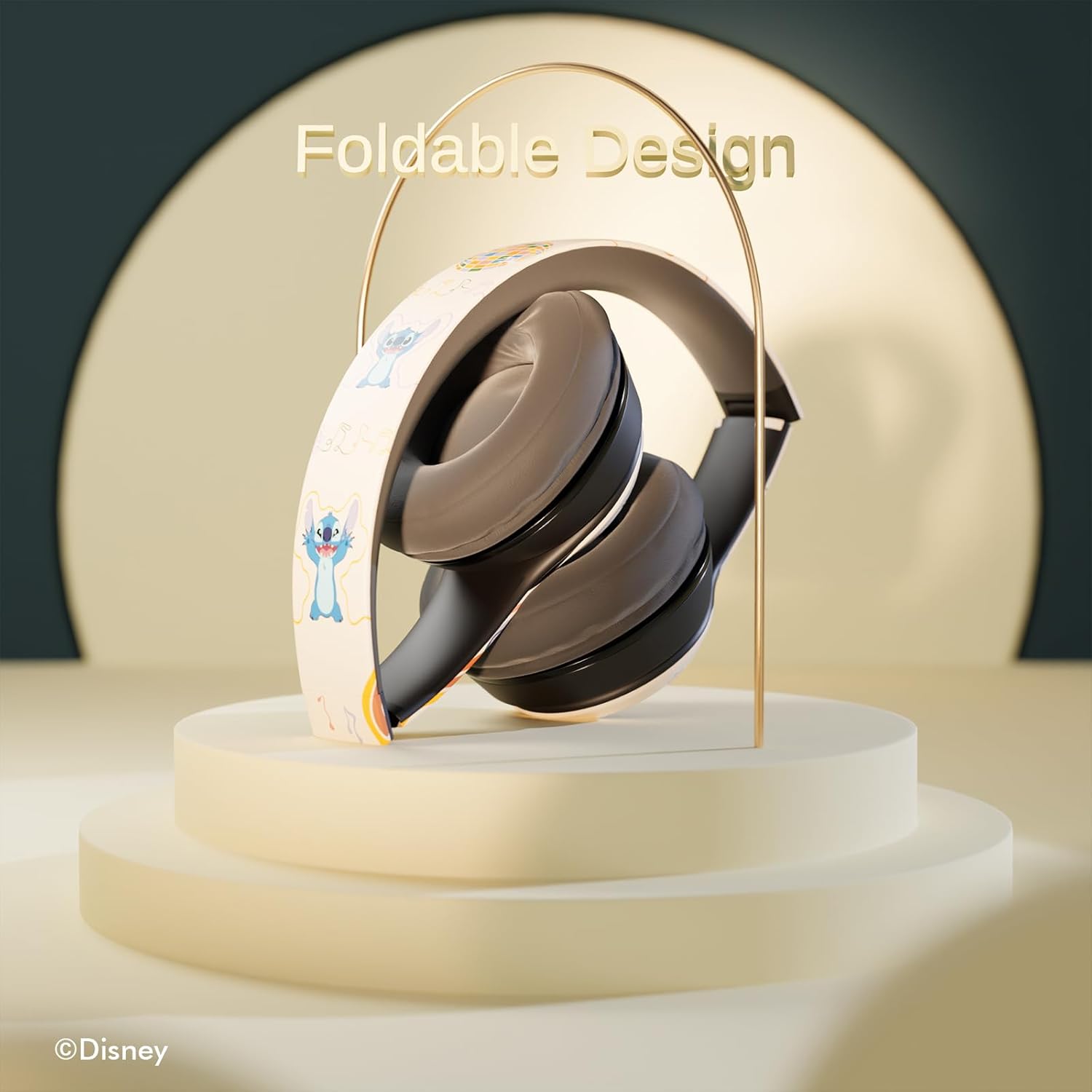
Image 6.1: The headphones feature a foldable design for easy storage and portability.
7. Fejlfinding
Hvis du støder på problemer med dine hovedtelefoner, kan du se følgende almindelige problemer og løsninger:
- Ingen strøm: Sørg for, at hovedtelefonerne er fuldt opladet. Tilslut dem til en strømkilde, og kontroller LED-indikatoren.
- Kan ikke parres via Bluetooth:
- Ensure the headphones are in pairing mode (LED flashing).
- Bekræft, at Bluetooth er aktiveret på din enhed.
- Flyt hovedtelefonerne tættere på din enhed.
- Turn off and on both the headphones and your device, then attempt pairing again.
- Ingen lyd:
- Kontroller lydstyrkeniveauet på både hovedtelefonerne og din tilsluttede enhed.
- Ensure the headphones are correctly paired or the audio cable is fully inserted.
- If using a Micro SD card, ensure it contains compatible audio files and is inserted correctly.
- Dårlig lydkvalitet:
- Flyt tættere på din Bluetooth-enhed for at reducere interferens.
- Sørg for, at der ikke er nogen forhindringer mellem hovedtelefonerne og din enhed.
- Prøv en anden lydkilde eller file.
8. Specifikationer
| Modelnavn | Disney Stitch Disco Party |
| Varemodelnummer | 810146469544 |
| Forbindelsesteknologi | Trådløs (Bluetooth) |
| Trådløs kommunikationsteknologi | Bluetooth |
| Aldersinterval (beskrivelse) | Voksen, barn |
| Kontroltype | Lydstyrkekontrol, berøring |
| Særlige funktioner | Built-in Radio Receiver, Foldable and Adjustable headband, Micro SD Card Plug-in, Microphone Included |
| Varens vægt | 0.26 kilo (9.1 ounce) |
| Batterier | 1 Lithium Polymer batteri (medfølger) |
| Frekvensområde | 20 Hz - 20,000 Hz |
| Vandmodstandsniveau | Ikke vandafvisende |
| Øreplacering | Over Ear |
| Støjkontrol | Lydisolering |

Image 8.1: The headphones feature sound isolation and include an auxiliary cable for wired connection.
9. Sikkerhedsoplysninger
Overhold følgende sikkerhedsretningslinjer for at forhindre skader på enheden eller personskade:
- Do not expose the headphones to extreme temperatures, direct sunlight, or excessive moisture.
- Undgå at tabe hovedtelefonerne eller udsætte dem for kraftige stød.
- Do not disassemble or attempt to repair the headphones yourself. This may void the warranty and cause damage.
- Adjust volume to a moderate level to prevent hearing damage. Prolonged exposure to loud sounds can cause permanent hearing loss.
- Brug ikke hovedtelefoner under kørsel, cykling eller i situationer, hvor det kan være farligt at ikke høre omgivende lyde.
10. Garanti og support
This product is covered by a manufacturer's warranty. For specific warranty details, please refer to the documentation included with your purchase or contact iJoy customer support. For technical assistance or inquiries, please visit the official iJoy webwebsted eller kontakt deres kundeserviceafdeling.


