Indledning
Welcome to the comprehensive instruction manual for your HISINGY Firefly FPV Drone Kit. This manual provides essential information for the safe and effective operation, maintenance, and troubleshooting of your drone. The Firefly FPV Drone Kit is designed for beginners and kids, offering features like FPV goggles, Altitude Hold, Automatic Emergency Stop, and APP control for an immersive flying experience.

Image: HISINGY Firefly FPV Drone Kit components including drone, controller, and FPV goggles.
Pakkens indhold
Your HISINGY Firefly FPV Drone Kit includes the following items:
- Firefly Drone x 1
- TX-50 Controller x 1
- ARX-300 FPV Goggles x 1
- ES950 Lithium Battery x 1
- ES950CH Charger x 1
- Firefly Unit Postcard x 1
- Fuselage Decal Sticker x 1
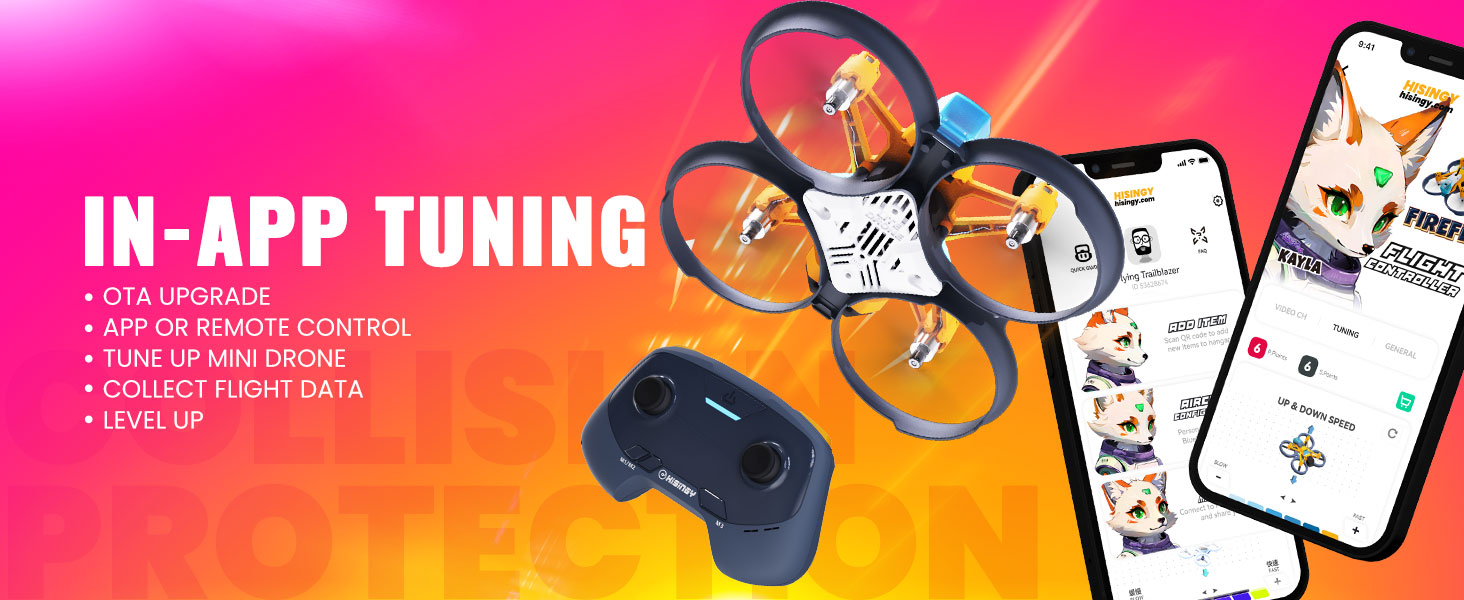
Image: A visual representation of the HISINGY Firefly FPV Drone Kit's package contents.
Sikkerhedsretningslinjer
Adhering to safety guidelines is crucial for a safe and enjoyable flying experience. Please read and understand the following:
- Do Not Fly Over People or Streets: Always operate the drone in open, clear areas away from crowds and public roads.
- Do Not Touch Spinning Propeller Blades: Keep hands and face clear of the propellers when the drone is powered on. Propellers can cause injury.
- Pay Attention to Local Laws and Regulations: Always be aware of and comply with local drone flying regulations, including no-fly zones around airports, military bases, and historical architecture.
- Miljøforhold: Undgå at flyve i stærk vind eller ugunstige vejrforhold.
- Batterisikkerhed: Use only approved chargers and batteries. Do not overcharge or puncture batteries.
Opsætning
1. Opladning og installation af batteri
Ensure all batteries are fully charged before your first flight. Connect the ES950CH Charger to a USB power source and insert the ES950 Lithium Battery. Once charged, carefully install the battery into the drone.
2. Opsætning af controller
The TX-50 Controller requires 2 AAA batteries (not included). Install them in the battery compartment. Power on the controller by pressing the power button.
3. FPV Goggles Setup
The ARX-300 FPV Goggles are ready to use. Ensure they are charged via their USB-C port. Adjust the head strap for a comfortable fit. If the image appears blurry, you can extend or retract the display portion for better focus.
4. Drone Power-On and Binding
After installing the flight battery, place the drone on a flat, stable surface. Power on the drone. The drone and controller are pre-bound from the factory. If re-binding is necessary, push the left stick up and down on the controller to enter bind mode. The LED on the quadcopter will blink twice, indicating a successful connection.
Video: A quick guide demonstrating the setup and basic operation of the HISINGY Firefly FPV Drone Kit.
Betjeningsvejledning
1. Grundlæggende flyvekontrol
- Start/Landing: Short press the one-key takeoff/land button on the controller. The drone will ascend to about 5 feet or descend and land automatically.
- Stig op/ned: Move the left stick up and down.
- Yaw (Rotate): Move the left stick left and right to spin the quadcopter counter-clockwise and clockwise.
- Forward/Backward/Left/Right: Use the right stick to move the quadcopter in these directions.
2. Avancerede funktioner
- Højdehold: Dronen holder en stabil højde, hvilket gør den nemmere for begyndere at styre.
- Automatic Emergency Stop: In case of emergency or loss of control, long press the emergency stop button on the controller to quickly stop the propellers.
- FPV Functionality: With the FPV goggles, you can experience real-time video streaming from the drone's camera.
- APP Control (HISINGY App): Download the HISINGY app to connect and control the micro drone via Bluetooth. You can adjust settings like flight speed, collect flight data, and perform OTA upgrades.
- Liftoff Compatibility: The remote control can connect the quadcopter to FPV simulators like Liftoff for practice.
- DIY Accessories: The modular design supports a rich ecology of DIY spare parts for customization.

Image: HISINGY Firefly drone highlighting Altitude Hold, Automatic Emergency Stop, and Modular Design features.
Video: En genudgivelseview of the HISINGY Firefly FPV Drone Kit, showcasing its flight capabilities and features.

Image: Smartphone screens displaying the HISINGY app interface for drone tuning and flight data.
Video: Instructions on how to use the HISINGY app for drone control and settings adjustment.

Image: HISINGY drone controller connected via Bluetooth to a laptop running the Liftoff FPV simulator.

Image: A wide array of HISINGY DIY drone parts and accessories displayed on a table.
Opretholdelse
- Propelinspektion: Kontrollér regelmæssigt propeller for skader. Udskift straks bøjede eller knækkede propeller med de medfølgende reservedele.
- Rensning: Keep the drone clean from dust, dirt, and debris. Use a soft, dry cloth to wipe surfaces.
- Batteripleje: Opbevar batterier et køligt og tørt sted. Lad ikke batterier være helt afladede i længere perioder.
- Firmwareopdateringer: Periodically check the HISINGY app for available firmware updates to ensure optimal performance.
Video: A guide on how to use the Firefly FPV DVR Converter for video recording and management.
Fejlfinding
- Dronen svarer ikke: Ensure the drone and controller are powered on and properly bound. Check battery levels.
- Dronedrift: Perform a gyroscope calibration. Use the trim buttons on the controller to adjust for any persistent drift.
- No FPV Feed: Check that the FPV goggles are powered on and connected to the correct channel. Ensure the drone's camera is functioning.
- Problemer med appforbindelse: Verify Bluetooth is enabled on your smartphone and the drone. Restart both the app and the drone if issues persist.
- Propeller roterer ikke: Check for any obstructions around the propellers. Ensure the drone is armed (refer to controller instructions).
Specifikationer
| Feature | Detalje |
|---|---|
| Mærke | HISENDE |
| Modelnavn | Firefly FPV RTF Kit |
| Speciel funktion | Adjustable, First Person View (FPV), Lightweight, Rechargeable, Speed Adjustment |
| Aldersinterval (beskrivelse) | 8+ år |
| Farve | Gul |
| Forbindelsesteknologi | 2.4G |
| Varens vægt | 61 gram (2.15 ounce) |
| Materiale | ABS |
| Battericellesammensætning | Lithium Ion |
| Fjernbetjening inkluderet? | Ja |
| Produktdimensioner | 10.5 cm L x 8.6 cm B x 7.2 cm H |
| Fabrikant | HISENDE |
Image: Comparison table of different HISINGY drone kits and their features.
Garanti og support
HISINGY is committed to providing excellent customer service. Our comprehensive customer service guarantees that all concerns are swiftly addressed, offering solutions, replacements, and a consistent flying journey. Whether you’re flying a nano drone, small drone with camera, or a more advanced professional drone, we provide support every step of the way.
For any inquiries, technical assistance, or warranty claims, please contact our professional and responsive service team through the official HISINGY channels or your point of purchase.


