1. Introduktion
This manual provides comprehensive instructions for the Alienware TENKEYLESS Gaming Keyboard, model AW420K. It covers setup, operation, maintenance, troubleshooting, and product specifications to ensure optimal performance and longevity of your device.
2. Produktet er slutview
The Alienware AW420K is a high-performance tenkeyless gaming keyboard designed for competitive gaming and efficient daily use. It features durable construction, customizable RGB lighting, and responsive mechanical switches.

Figur 2.1: Top-down view of the Alienware AW420K Tenkeyless Gaming Keyboard, showcasing its compact design and vibrant RGB backlighting.
2.1 Nøglefunktioner
- Tenkeyless design: Streamlined form factor for more desk space and improved portability.
- Cherry MX Red-switche: Industry-leading mechanical switches with a 100 million actuation lifecycle for consistent, high-performance keystrokes.
- AlienFX RGB-belysning: Per-key RGB lighting configurable through Alienware Command Center software, offering up to 16.8 million colors for personalized aesthetics.
- Dobbelt-Shot PBT-taster: Two layers of plastic with legends molded into the cap for enhanced durability and wear resistance.
- Integrated Cable Routing: Channels on the underside of the keyboard for organized cable management.
- Justerbar højde: Flip-up risers with three height settings for ergonomic typing angles.

Figure 2.2: The compact TKL design of the AW420K keyboard allows for more space on your gaming setup and easy movability.
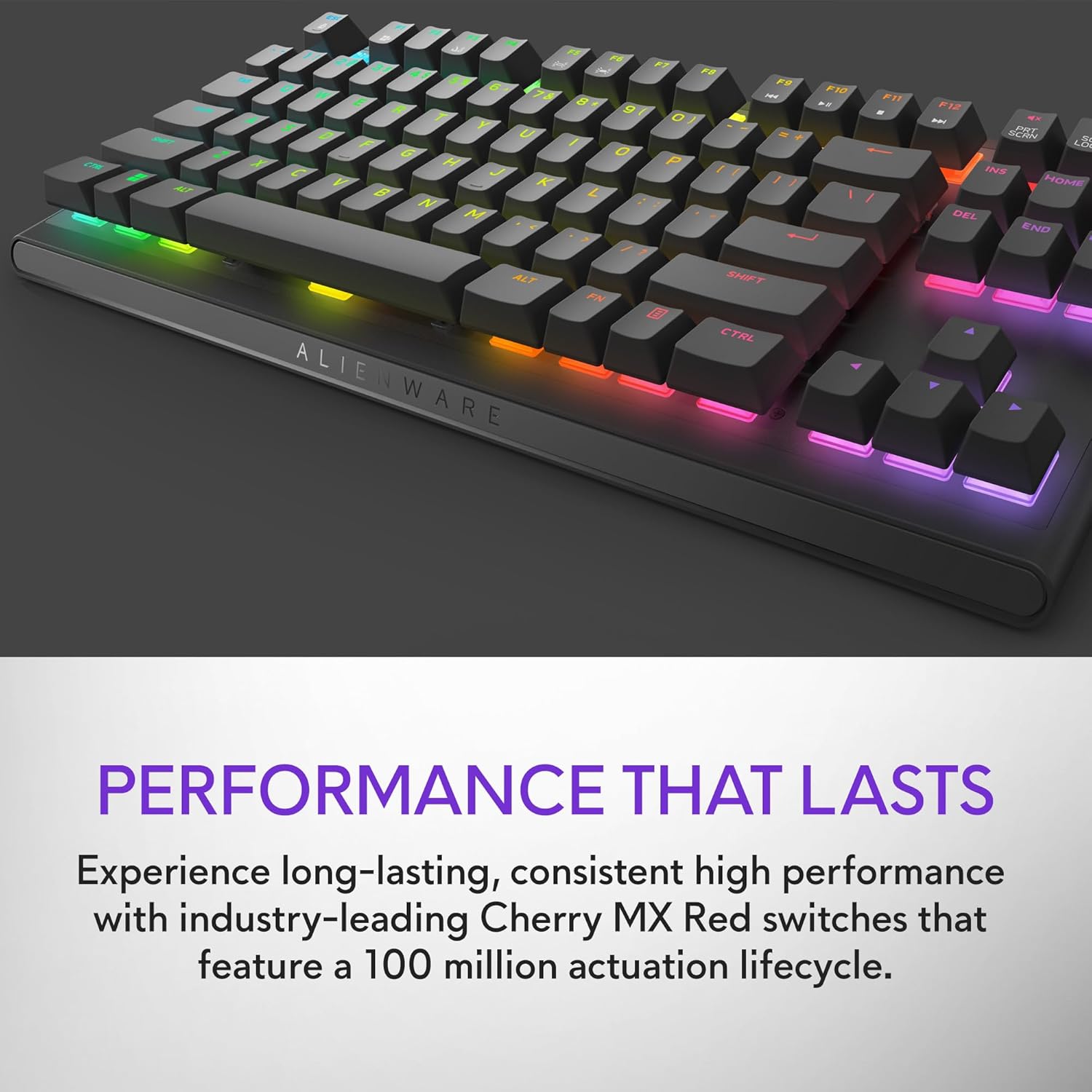
Figure 2.3: The keyboard features Cherry MX Red switches, known for their durability and consistent performance over 100 million keystrokes.

Figure 2.4: Customize your gaming experience with AlienFX per-key RGB lighting, offering up to 16.8 million colors via Alienware Command Center software.
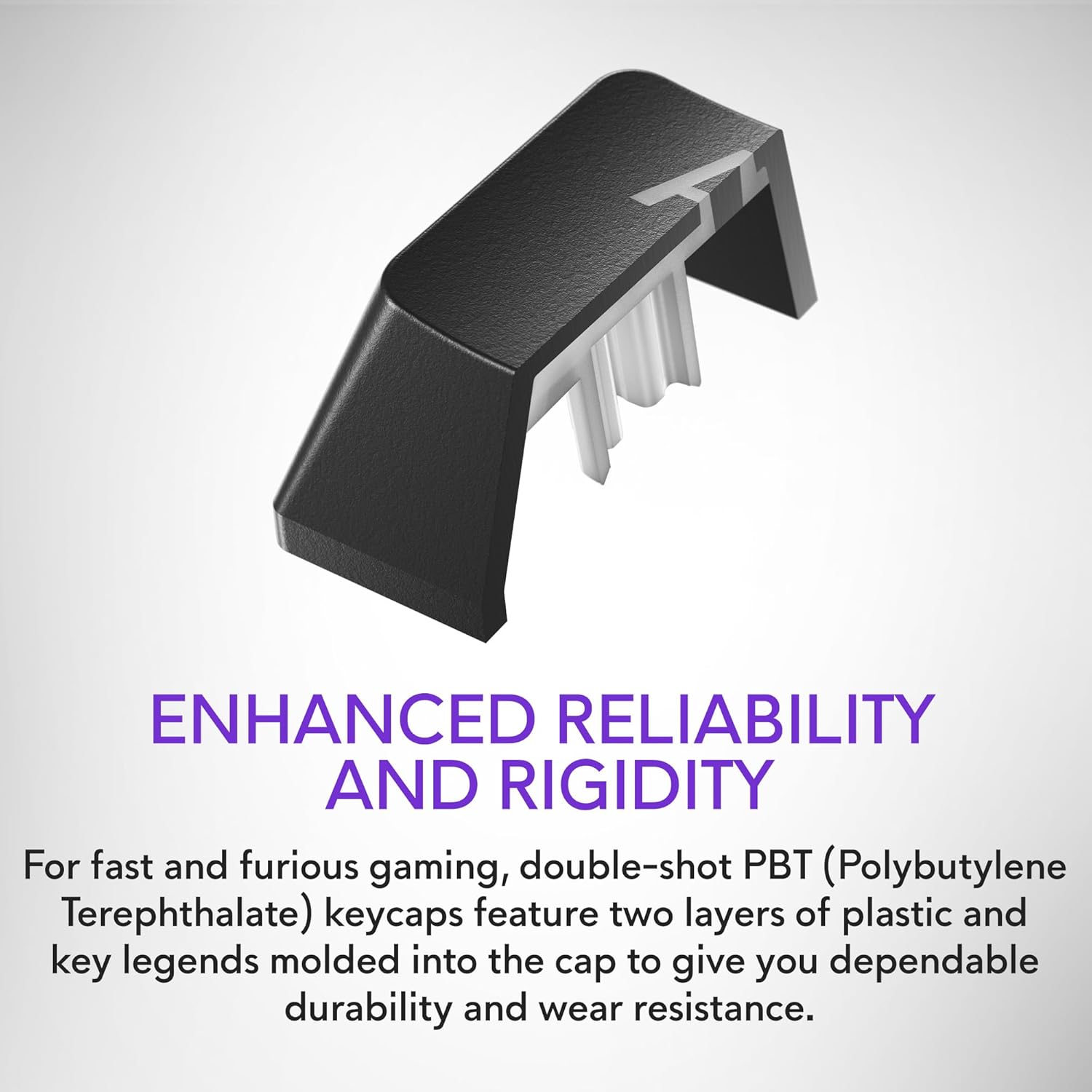
Figure 2.5: Double-shot PBT keycaps provide enhanced reliability and rigidity, ensuring legends do not wear off over time.
3. Opsætning
Follow these steps to set up your Alienware AW420K Gaming Keyboard:
- Pak tastaturet ud: Tag forsigtigt tastaturet og alt medfølgende tilbehør ud af emballagen.
- Tilslut USB-kablet: The keyboard features a detachable USB paracord cable. Connect the USB-C end to the port on the keyboard's underside.
- Før kablet: Utilize the integrated cable routing channels on the underside of the keyboard to direct the cable to your preferred setup. This helps in keeping your desk tidy.
- Tilslut til computer: Plug the USB-A end of the cable into an available USB port on your computer. The keyboard is USB powered.
- Juster højden: Flip up the risers on the back of the keyboard to select one of the three available height settings for your ideal typing angle.
- Installer software (valgfrit, men anbefalet): For full customization of RGB lighting and programmable keys, download and install the Alienware Command Center software from the official Alienware support webwebsted.

Figure 3.1: The detachable USB-C cable provides a secure and convenient connection.

Figure 3.2: Integrated cable routing on the underside helps manage the connection cable for a clean setup.

Figure 3.3: Flip-up risers allow for three height settings to achieve your ideal typing angle.
4. Betjening af tastaturet
The Alienware AW420K keyboard is designed for intuitive use with advanced features for gaming and productivity.
4.1 Grundlæggende funktioner
- Indtastning: Standard QWERTY layout for general typing.
- Spil: Responsive Cherry MX Red switches provide a smooth and linear feel, ideal for fast-paced gaming.
- Mediekontrol: Dedicated media keys (e.g., volume roller, mute button) are typically located on the top right of the keyboard for quick audio adjustments.
4.2 Customization with Alienware Command Center
The Alienware Command Center software unlocks the full potential of your keyboard:
- RGB belysning: Customize per-key RGB lighting with a spectrum of 16.8 million colors. Choose from various effects, create your own profiles, and synchronize lighting with other Alienware devices.
- Makro programmering: Assign complex macros to programmable keys for in-game advantages or streamlined workflows.
- Profile Ledelse: Opret og gem flere profiles for different games or applications, allowing for quick switching of lighting and key assignments.
Video 4.1: An official video demonstrating the features and design of the Alienware Tenkeyless Gaming Keyboard - AW420K, including its RGB lighting and compact form factor.
5. Vedligeholdelse
Korrekt vedligeholdelse sikrer dit tastaturs levetid og optimale ydeevne.
- Rengøring af taster: The floating keycap design makes cleaning easy. Use a soft brush or compressed air to remove dust and debris from between the keys. For stubborn grime, gently wipe keycaps with a damp, fnugfri klud. Undgå for meget fugt.
- Rengøring af chassiset: Wipe the keyboard chassis with a soft, dry cloth. Do not use harsh chemicals or abrasive materials.
- Kabelpleje: Undgå skarpe bøjninger eller for meget træk i USB-kablet for at forhindre skader.
6. Fejlfinding
If you encounter issues with your Alienware AW420K keyboard, try the following troubleshooting steps:
- Tastaturet reagerer ikke:
- Sørg for, at USB-kablet er korrekt tilsluttet til både tastaturet og computeren.
- Prøv at tilslutte tastaturet til en anden USB-port på din computer.
- Genstart din computer.
- RGB Lighting Not Working/Customizing:
- Verify that the Alienware Command Center software is installed and up to date.
- Check the software settings to ensure lighting effects are enabled and configured correctly.
- Ensure no conflicting software is running that might interfere with RGB control.
- Nøgler registreres ikke:
- Rengør eventuelt snavs under den berørte tastatur.
- Hvis problemet fortsætter, kan det være tegn på et hardwareproblem.
Hvis disse trin ikke løser problemet, henvises der til afsnittet Garanti og support for yderligere assistance.
7. Specifikationer
| Mærke | Alienware |
| Modelnavn | ALIENWARE TENKEYLESS GAMING KEYBOARD - AW420K |
| Varemodelnummer | AW420K |
| Hardware platform | PC |
| Varens vægt | 1.74 pund |
| Produktmål (LxBxH) | 5.81 x 14.46 x 2.19 tommer |
| Farve | Månens mørke side |
| Strømkilde | USB-drevet |
| Fabrikant | Dell |
| Forbindelsesteknologi | USB-C |
| Tastaturbeskrivelse | Mekanisk |
| Antal nøgler | 87 |
| Tastatur baggrundsbelysning | RGB |
| Særlige funktioner | Backlit, Programmable Keys, Split Keyset Design |
8. Garanti og support
For warranty information and technical support, please refer to the official Alienware website or contact Alienware customer service. Keep your proof of purchase for warranty claims.
You can typically find support resources, drivers, and software updates on the Dells support Webwebsted (as Alienware is a Dell brand).


