1. Introduktion
The SYNCO Xtalk XMax2 is a professional full-duplex wireless intercom system designed for seamless, real-time two-way communication. Ideal for live production teams, film crews, event organizers, and stage operations, this system ensures clear and reliable communication over long distances. Featuring advanced noise cancellation, versatile connectivity, and extended battery life, the XMax2 enhances team coordination in demanding environments.
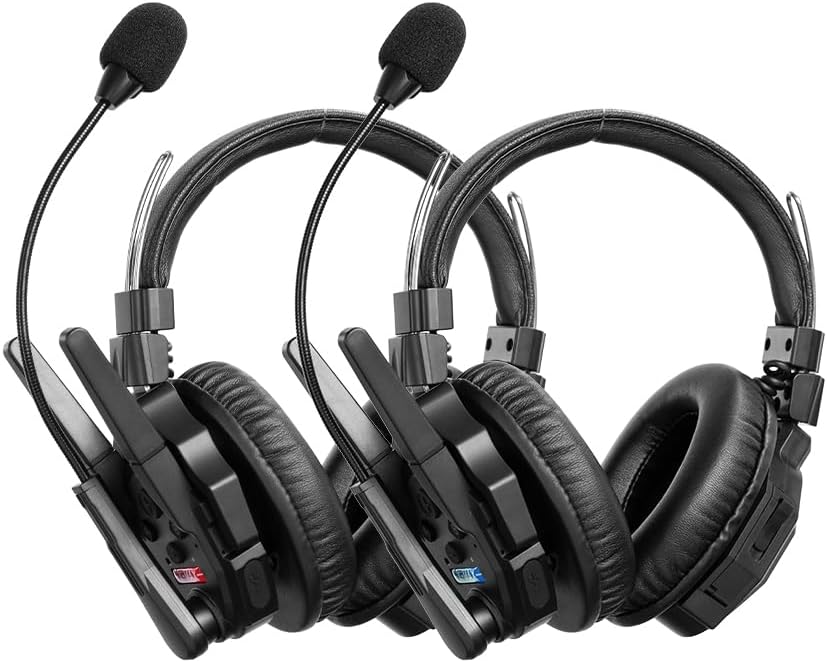
2. Hvad er der i æsken
Your SYNCO Xtalk XMax2 package includes the following components:
- Xtalk XMax2 Headset x2
- Rechargeable Battery x4 (2 per headset)
- Cable x2 (for charging/data)
- Charging Station x1 (for multiple batteries)
- Mic Windshield x4 (2 per headset)
- One-Ear Foam Cushion x4 (2 per headset)

3. Opsætning
3.1 Indledende opladning
Before first use, ensure all rechargeable batteries are fully charged using the provided charging station and cable. Insert the batteries into the charging slots and connect the cable to a power source. The charging indicator will show the status.
3.2 Headset-samling
- Attach the microphone boom to the designated port on the headset.
- Place a mic windshield over the microphone for improved audio clarity and protection.
- Ensure the ear cushions are securely fitted for comfort and sound isolation.
3.3 Pairing and Master Device Configuration
The XMax2 headsets come pre-paired from the factory. For initial setup or re-pairing, use the Xtalk EasyGo software for seamless configuration. This software allows for one-button pairing and interconnection across all headset models, reducing latency to as low as 80ms for up to 13 devices.

Any headset can be assigned as the system master. The system features automatic fallback if the master device is disconnected, ensuring continuous communication.
4. Betjeningsvejledning
4.1 Tænd/sluk
For at tænde skal du trykke på tænd/sluk-knappen og holde den nede, indtil indikatorlampen lyser. For at slukke skal du trykke på tænd/sluk-knappen og holde den nede, indtil indikatorlampen slukker.
4.2 Full-Duplex Communication
The XMax2 system supports full-duplex communication, allowing all connected users to speak and listen simultaneously without interruption. This is ideal for dynamic team environments.

4.3 AI-Powered Noise Cancellation
The headset features ENC dual microphones and advanced AI algorithms to automatically filter out background noise while preserving voice clarity. The over-ear design further blocks ambient sound, ensuring clear communication in noisy environments.

4.4 Dual-Mode Function: Intercom + Bluetooth
In addition to intercom use, the XMax2 supports Bluetooth connection to your phone. This allows for private calls or music playback. Easily switch between intercom and Bluetooth modes without removing the headset.

4.5 One-Button Remote Muting Function
The Dominant mode allows for one-button muting of all remote headsets, addressing issues caused by multiple devices speaking simultaneously. This provides the master user with control over the communication flow.

4.6 Signal Boost Mode
Activate Boost Mode for stronger signal stability in complex environments or wide-open spaces. This feature allows for one-button frequency switching, instantly amplifying the signal to overcome interference from walls, buildings, or high-speed movement.

4.7 Realtidsovervågning
The XMax2 features SmartFlow Sync with a unique 3.5mm real-time monitoring port. This allows you to seamlessly communicate with your team while monitoring audio from devices like cameras and recorders, eliminating the need for an additional headset.

5. Funktioner overview
- Langdistancekommunikation: Up to 500 meters (1640 ft) with advanced 2.4GHz wireless technology.
- AI-Powered Dual Mic Noise Cancellation: Filters out background noise for clear voice transmission.
- Dobbelttilstandsfunktionalitet: Seamlessly switch between intercom and Bluetooth for calls or music.
- Forlænget batterilevetid: Up to 24 hours of runtime with a 1050mAh removable battery.
- Swappable Battery Design: Allows for quick battery changes with the included 6-slot charging dock.
- Intelligent Master Control: Any headset can be assigned as master with automatic fallback.
- Dominant Function: One-button mute for all remote users.
- Signal Boost Mode: Enhances signal stability in challenging environments.
- Comfortable Dual-Ear Design: Over-ear design provides sound isolation and comfort for extended use.


6. Vedligeholdelse
6.1 Rengøring
- Wipe the headsets and charging station with a soft, dry cloth.
- For genstridigt snavs, brug en let damp klud med mild sæbe, og tør derefter grundigt.
- Brug ikke hårde kemikalier eller slibende rengøringsmidler.
- Regularly clean the microphone windshields and replace if damaged.
6.2 Opbevaring
- Opbevar systemet et køligt, tørt sted væk fra direkte sollys og ekstreme temperaturer.
- Hvis batterierne opbevares i længere perioder, skal du sørge for at batterierne er delvist opladet (ca. 50%) for at forlænge deres levetid.
6.3 Pleje af batterier
- Use only SYNCO-approved replacement batteries.
- Undgå at aflade batterier helt ofte.
- Do not expose batteries to high temperatures or puncture them.
7. Fejlfinding
| Problem | Mulig årsag | Løsning |
|---|---|---|
| Ingen lyd/intermitterende lyd | Out of range, low battery, interference, incorrect pairing. | Move closer to master unit, charge batteries, activate Boost Mode, re-pair headsets using EasyGo software. |
| Poor audio quality/muffled sound | Microphone position, damaged windshield, excessive background noise, signal interference. | Adjust microphone closer to mouth, replace windshield, ensure AI noise cancellation is active, activate Boost Mode. |
| Headsettet tænder ikke | Battery depleted, battery not inserted correctly, faulty battery. | Charge battery, re-insert battery, try a different charged battery. |
| Problemer med Bluetooth-forbindelse | Headset not in Bluetooth mode, device not discoverable, interference. | Ensure headset is in Bluetooth mode, make sure phone/device Bluetooth is on and discoverable, move closer to device. |
| Delay in speech (latency) | Environmental factors, distance, number of connected devices. | While some latency is inherent in wireless systems, ensure optimal signal strength and minimize environmental obstructions. Use EasyGo software to optimize settings. |
8. Specifikationer
| Feature | Detalje |
|---|---|
| Modelnavn | Xtalk XMax2 |
| Forbindelsesteknologi | Trådløs (RF) |
| Frekvensrespons | 2.4 GHz (20 Hz - 20,000 Hz) |
| Støjkontrol | Aktiv støjreduktion |
| Hovedtelefonstik | 3.5 mm Jack (for monitoring) |
| Batteritype | Lithium-ion (2 påkrævet, inkluderet) |
| Batterilevetid | Op til 24 timer |
| Materiale | Aluminium, plast |
| Farve | Sort |
| Varens vægt | 2 pund |
| Fabrikant | SYNKO |
| Oprindelsesland | Kina |
9. Garanti og support
For warranty information and technical support, please refer to the official SYNCO webwebstedet eller kontakt deres kundeservice direkte. Gem din købskvittering som købsbevis i tilfælde af garantikrav.
You can visit the official SYNCO Store for more information and support: SYNCO Store on Amazon


