1. Introduktion
This manual provides essential information for the safe and efficient operation of your VIZIO 50-inch 4K UHD LED Smart TV, model V4K50C-08. Please read this manual thoroughly before using your television and retain it for future reference.
The VIZIO V4K50C-08 Smart TV delivers vivid 4K picture quality with Dolby Vision HDR, enhancing detail, contrast, and color. It features WiFi 6 for faster streaming and gaming, and built-in VIZIO Home for instant access to applications, free channels, and on-demand titles.

Billede 1.1: Forside view of the VIZIO 50-inch 4K UHD LED Smart TV.
2. Sikkerhedsoplysninger
Always follow basic safety precautions when using this television to reduce the risk of fire, electric shock, and injury to persons. Keep this manual handy for reference.
- Udsæt ikke dette apparat for regn eller fugt.
- Bloker ikke ventilationsåbninger. Installer i overensstemmelse med producentens anvisninger.
- Må ikke installeres i nærheden af varmekilder såsom radiatorer, varmeapparater, komfurer eller andre apparater (inklusive ampløftere), der producerer varme.
- Beskyt netledningen mod at blive trådt på eller klemt, især ved stik, stikkontakter og det sted, hvor de kommer ud af apparatet.
- Brug kun tilbehør/tilbehør specificeret af producenten.
- Overlad al service til kvalificeret servicepersonale.
3. Hvad er der i æsken
Your VIZIO 50-inch 4K UHD LED Smart TV package includes the following items:
- VIZIO 50-inch 4K UHD LED Smart TV
- Stemmefjernbetjening
- 2 AAA-batterier (til fjernbetjening)
- Strømkabel
- TV-bord (2 stk.)

Image 3.1: Included components and TV dimensions.
4. Opsætning
4.1 Montering af stativet
- Placer forsigtigt tv'et med forsiden nedad på en blød, ren overflade for at forhindre skader.
- Juster hvert stativstykke med de tilsvarende riller i bunden af tv'et.
- Fastgør hvert stativstykke med de medfølgende skruer. Sørg for, at de er spændt godt fast.
4.2 Tilslutning af eksterne enheder
Connect your external devices to the appropriate ports on the back or side of your VIZIO TV.
- HDMI: For high-definition video and audio devices (e.g., Blu-ray players, gaming consoles). Your TV features multiple HDMI ports, including HDMI 1 (eARC) for enhanced audio return channel functionality.
- USB: Til tilslutning af USB-lagerenheder.
- Antenne: For connecting an over-the-air antenna.
- Audio Out Optical (S/PDIF): Til tilslutning til en soundbar eller lydmodtager.
- Ethernet: Til en kablet netværksforbindelse.
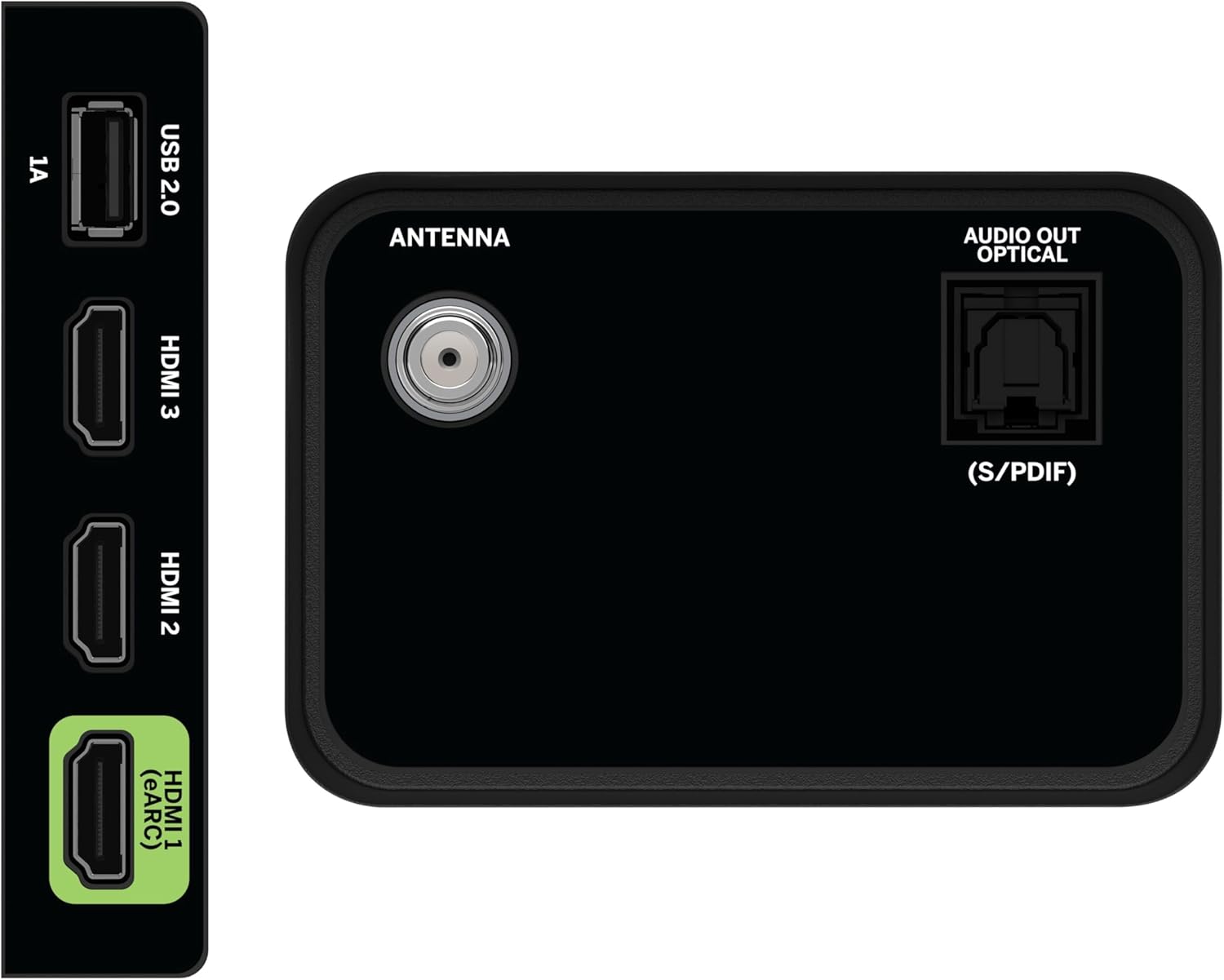
Image 4.1: Rear and side input/output ports.
4.3 Første opstart og netværksforbindelse
- Sæt strømkablet i tv'et og derefter i en stikkontakt.
- Press the Power button on the remote or on the TV.
- Follow the on-screen prompts to select your language, country, and connect to your Wi-Fi network (WiFi 6 supported for faster performance).
4.4 VIZIO Account Setup
A VIZIO Account is required for Smart TV functionality and product updates. Follow the on-screen instructions to create or log in to your VIZIO Account. This allows access to VIZIO Home, app subscriptions, and free channels.

Image 4.2: VIZIO Account setup via mobile device.
5. Betjening af dit TV
5.1 Fjernbetjening overview
The included Voice Remote provides intuitive control over your TV. It features dedicated buttons for popular streaming apps and voice assistance integration.
- Input: Skift mellem tilsluttede enheder.
- Magt: Tænd/sluk for tv'et.
- Navigationsplade: Use the directional buttons and OK button to navigate menus.
- Hjem: Access the VIZIO Home screen.
- WatchFree+: Direct access to VIZIO's free streaming service.
- Stemmeknap: Aktiver stemmekommandoer.
- Lydstyrke/kanal: Juster lydstyrken og skift kanal.
- App-genveje: Quick access to pre-installed streaming applications.

Image 5.1: VIZIO Voice Remote and mobile app functionality.
5.2 Navigating VIZIO Home
The VIZIO Home screen is your central hub for all entertainment. It provides quick access to:
- Apps & Inputs: Browse and launch your favorite streaming apps (Netflix, Prime Video, Hulu, Disney+, etc.) and switch between connected inputs.
- Live tv: Access hundreds of free channels and thousands of free On Demand titles with the built-in WatchFree+ app.
- Trending Now: Discover popular movies and shows.

Image 5.2: The VIZIO Home screen, your destination for easy streaming.
5.3 Billedindstillinger
Your VIZIO TV features Dolby Vision HDR, HDR10+, HDR10, and HLG for a true-to-life picture with a wider range of color and detail. Adjust picture modes (e.g., Calibrated, Vivid, Game) in the settings menu to optimize your viewoplevelse.

Image 5.3: Breathtaking details for a crystal-clear 4K picture with Dolby Vision.
5.4 Lydindstillinger
Experience immersive sound with DTS Virtual:X setting. You can also connect Bluetooth headphones for private listening.

Image 5.4: Pair your wireless Bluetooth headphones for uninterrupted audio.
5.5 Smarte funktioner
The VIZIO Smart TV supports Apple AirPlay and Google Cast Built-in, allowing you to stream content directly from your compatible devices. WiFi 6 ensures better streaming and gaming performance in a congested smart home environment.
5.6 Spilfunktioner
For gamers, the TV offers Dolby Vision HDR Gaming for enhanced in-game color. When a console or PC is detected, Auto Low Latency Mode is automatically enabled to reduce input lag.

Image 5.5: Venture into game realism with Dolby Vision HDR.
6. Vedligeholdelse
6.1 Rengøring af dit TV
- Tag altid stikket ud af tv'et inden rengøring.
- Brug en blød, fnugfri klud til forsigtigt at tørre skærmen og kabinettet af.
- Do not use liquid or aerosol cleaners directly on the TV.
6.2 Softwareopdateringer
Your VIZIO TV will automatically receive software updates when connected to the internet. Ensure your TV is connected to a network for optimal performance and access to the latest features.
7. Fejlfinding
If you encounter issues with your VIZIO TV, try the following common solutions:
- Ingen strøm: Sørg for, at strømkablet er korrekt tilsluttet til både tv'et og stikkontakten. Prøv en anden stikkontakt.
- Intet billede/lyd: Check all cable connections (HDMI, audio). Ensure the correct input source is selected.
- Fjernbetjeningen virker ikke: Udskift batterierne. Sørg for, at der ikke er nogen forhindringer mellem fjernbetjeningen og tv'et.
- Problemer med netværksforbindelse: Restart your router and modem. Reconnect the TV to the Wi-Fi network via the settings menu.
- Dårlig billedkvalitet: Check the source content resolution. Adjust picture settings in the TV menu.
For further assistance, refer to the VIZIO support webwebsted eller kontakt kundeservice.
8. Specifikationer
| Feature | Specifikation |
|---|---|
| Mærke | VIZIO |
| Modelnummer | V4K50C-08 |
| Skærmstørrelse | 50 tommer |
| Displayteknologi | LED |
| Opløsning | 4K UHD |
| HDR-understøttelse | Dolby Vision HDR, HDR10+, HDR10, HLG |
| Opdateringshastighed | HDMI VRR |
| Forbindelsesteknologi | Bluetooth, HDMI, Wi-Fi (WiFi 6) |
| Særlige funktioner | Apple AirPlay, Bluetooth Headphone compatibility, Built-in apps with VIZIO Home, Closed Captioning, Google Chromecast, Sleep Timer, Voice Assistance Integration, Voice Remote |
| Produktdimensioner | 9.68" D x 43.69" B x 27.57" H |
| Varens vægt | 28.4 pund |
| Aspektforhold | 16:9 |
9. Garanti og support
For warranty information and customer support, please visit the official VIZIO website or refer to the warranty card included with your product. VIZIO provides award-winning customer support to assist with any questions or issues you may have.


