
1. Introduktion
This manual provides comprehensive instructions for the safe and effective use of your Pericat PJ108 Projector. Please read this manual thoroughly before operating the device and retain it for future reference.

Image 1.1: The Pericat PJ108 Projector displaying various streaming service icons and a smartphone screen mirroring content. This image illustrates the projector's primary function and connectivity options.
2. Pakkens indhold
Bekræft, at alle nedenstående varer er inkluderet i din pakke:
- PJ108 Projector (x1)
- HDMI-kabel (x1)
- Fjernbetjening (x1)
- Instruktionsmanual (x1)
- Strømkabel (x1)
- AV-kabel (x1)
3. Produktet er slutview
3.1. Dimensioner og bærbarhed
The PJ108 projector is designed for portability, featuring compact dimensions of approximately 6.7 x 5.5 x 2.55 inches and a weight of 1.37 pounds.

Image 3.1: A person placing the compact Pericat PJ108 Projector into a handbag, illustrating its small size and portability. The image also shows the projector's approximate dimensions: 7 inches (L), 5.5 inches (W), and 2.7 inches (H).
3.2. Indgangs-/udgangsporte
Projektoren er udstyret med flere porte for alsidig tilslutning:
- HDMI-port: For connecting devices such as TV sticks, gaming consoles (Xbox, PS3/4/5), PCs, and laptops.
- USB-port: Til tilslutning af USB-drev for at afspille medier files.
- AV-port: Til tilslutning af ældre enheder ved hjælp af det medfølgende AV-kabel.
- 3.5 mm hovedtelefonstik: For connecting external audio devices like headphones or speakers.
- DC IN: Strømindgangsport.

Billede 3.2: En detaljeret view of the rear panel of the Pericat PJ108 Projector, highlighting its various connectivity ports including AV, HDMI, USB, and DC IN. This image demonstrates the projector's versatile connection options for different devices.
4. Opsætning
4.1. Placering
Position the projector on a stable, flat surface or mount it according to your preference. Ensure there are no obstructions to the air inlets and outlets to prevent overheating.
- Projektionsafstand: The optimal projection distance ranges from 4.1 feet to 17.5 feet.
- Skærmstørrelse: This distance allows for a display size between 35 inches and 200 inches.
- Miljø: For best performance, use the projector in a dark environment.
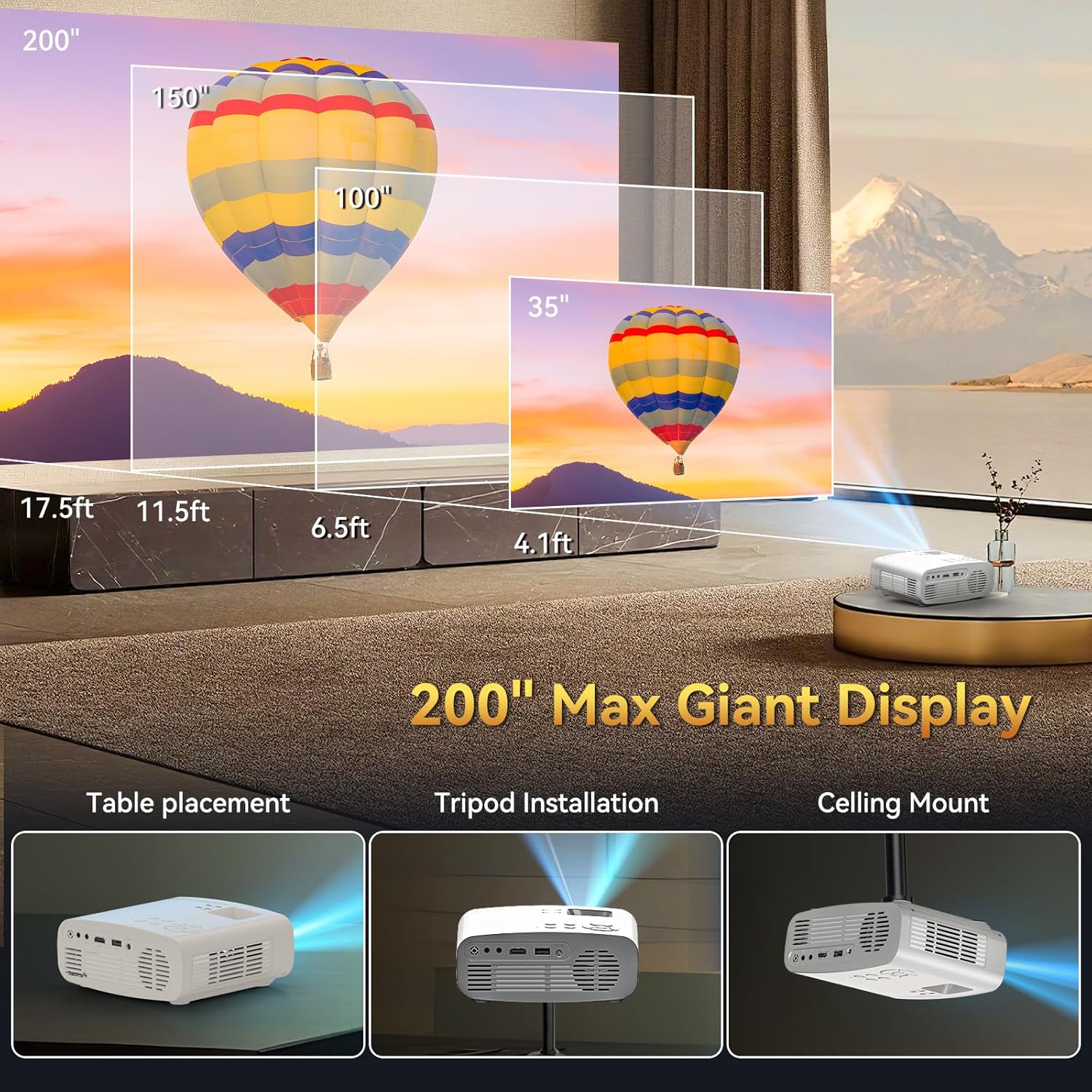
Image 4.1: An illustration demonstrating the flexible projection distances and corresponding screen sizes (35", 100", 150", 200") achievable with the Pericat PJ108 Projector, ranging from 4.1 feet to 17.5 feet. This image also shows different placement options: table, tripod, and ceiling mount.
4.2. Strømtilslutning
- Connect the power cable to the DC IN port on the projector.
- Sæt den anden ende af strømkablet i en stikkontakt.
4.3. Fokus- og Keystone-korrektion
Adjust the focus ring on the projector lens until the image is clear. Use the keystone correction feature (usually a dial or digital setting) to correct any trapezoidal distortion, ensuring a rectangular image.
4.4. Monteringsmuligheder
The projector supports various installation methods:
- Bordplacering: Placer projektoren på en flad overflade.
- Installation af stativ: Mount the projector onto a compatible tripod.
- Loftmontering: Install the projector on the ceiling using a suitable mount (mount not included).

Image 4.2: An illustrative image showcasing the three primary installation methods for the Pericat PJ108 Projector: table placement, tripod installation, and ceiling mount. This highlights the projector's adaptability to different viewing miljøer.
5. Betjeningsvejledning
5.1. Tænd/sluk
Tryk på tænd/sluk-knappen på projektoren eller fjernbetjeningen for at tænde eller slukke enheden.
5.2. Kildevalg
Use the 'Source' button on the projector or remote control to select the desired input source (HDMI, USB, AV, Screen Mirroring).
5.3. Trådløs forbindelse
5.3.1. Wi-Fi-forbindelse
The projector supports dual-band 2.4G and 5G Wi-Fi for stable online video and music streaming. Ensure both your smart device and the projector are connected to the same Wi-Fi network.

Image 5.1: An illustration depicting the Wi-Fi 6 wireless connection capability of the Pericat PJ108 Projector, showing compatibility with Windows, iOS, and Android devices. It also contrasts wired (HDMI/USB) and wireless connection methods.
5.3.2. Bluetooth-forbindelse
The projector features Bluetooth 5.3 technology, allowing connection to wireless Bluetooth headsets or speakers for an enhanced audio experience. The built-in 15W speaker provides clear sound quality.

Image 5.2: The Pericat PJ108 Projector positioned among a Bluetooth speaker and wireless headphones, illustrating its Bluetooth 5.3 functionality for connecting to external audio devices.
5.4. Skærmspejling
The projector supports screen mirroring from smartphones and tablets. However, due to copyright restrictions, direct screen mirroring of content from streaming services like Netflix, Amazon Prime, Disney, and Hulu is not supported. To view content from these platforms, connect a TV stick (e.g., Fire TV Stick) to the projector's HDMI port.

Image 5.3: The Pericat PJ108 Projector connected to a TV stick, displaying a user interface with various streaming applications such as Netflix, Amazon Prime, and Hulu. This image demonstrates how to access copyrighted content via a TV stick.
5.5. Zoomfunktion
The projector includes a 50-100% zoom function, allowing you to adjust the screen size without moving the projector. This feature is accessible via the projector's menu or remote control.

Image 5.4: An illustration showing the 50-100% zoom function of the Pericat PJ108 Projector, demonstrating how the projected image size can be adjusted without physically moving the projector.
6. Vedligeholdelse
6.1. Rensning
- Linse: Brug en blød, fnugfri klud, der er specielt designet til optiske linser, til forsigtigt at tørre projektorlinsen af. Undgå slibende materialer eller barske kemikalier.
- Ydre: Clean the projector's exterior with a soft, dry cloth.
- Vents: Periodically check and clean the air inlets and outlets to ensure proper ventilation and prevent dust buildup, which can affect performance and lifespan.
6.2. Opbevaring
When not in use, store the projector in a cool, dry place, away from direct sunlight and extreme temperatures. Protect it from dust and moisture.
7. Fejlfinding
7.1. Problemer med Wi-Fi-forbindelse
- Problem: Projector cannot connect to Wi-Fi.
- Løsning: Due to potential compatibility issues with the WPA3 protocol, it is recommended to set your router's encryption mode to "WPA2" or "WPA2/WPA3" to ensure a smooth connection.
- Løsning: Ensure both your smart device and the projector are connected to the same Wi-Fi network.
7.2. Intet billede eller dårlig billedkvalitet
- Problem: Intet billede vises.
- Løsning: Check power connections and ensure the projector is turned on. Verify the correct input source is selected.
- Problem: Sløret billede.
- Løsning: Juster fokusringen på objektivet.
- Problem: Distorted image (trapezoid shape).
- Løsning: Brug keystone-korrektionen til at justere billedets form.
- Problem: Billedet er svagt.
- Løsning: Ensure the projector is used in a dark environment for optimal brightness.
7.3. Ingen lyd
- Problem: No sound from the projector or connected speakers.
- Løsning: Check the volume settings on the projector and any connected audio devices. Ensure Bluetooth devices are properly paired. If using HDMI, verify the audio output settings on the source device.
7.4. Screen Mirroring Restrictions
- Problem: Cannot mirror copyrighted content from streaming apps (Netflix, Hulu, etc.).
- Løsning: This is a copyright restriction. To view such content, connect a TV stick (e.g., Fire TV Stick) to the projector's HDMI port.
8. Specifikationer
| Feature | Specifikation |
|---|---|
| Mærke | Pericat |
| Model | PJ108 |
| Indfødt opløsning | 1920 x 1080P |
| 4K support | Ja |
| Kontrastforhold | 10000:1 |
| Lysstyrke | 150 ANSI Lumens |
| Forbindelsesteknologi | Wi-Fi (2.4G/5G), Bluetooth 5.3, HDMI, USB, 3.5mm Jack, AV |
| Skærmstørrelse | 35"-200" |
| Projektionsafstand | 4.1-17.5 fod |
| Zoomfunktion | 50-100 % |
| Keystone korrektion | ±15° Manuel |
| Indbygget højttaler | 15W |
| Produktdimensioner | 6.7 x 5.5 x 2.55 tommer |
| Varens vægt | 1.37 pund |
9. Garanti og support
Pericat is committed to product quality and customer satisfaction. The PJ108 Projector comes with a lifetime service warranty.
- Kundeservice: 24/7 customer service is available to assist with any issues.
- Returnerer: A 30-day no-reason return policy is provided.
- Udskiftning: A 1-year free replacement policy is offered.
If you encounter any problems, please contact our customer service team for assistance.

Image 9.1: Icons representing Pericat's customer support commitments: 24-hour service, 30-day return policy, 1-year free replacement, and lifetime support.
