Indledning
This manual provides comprehensive instructions for the setup, operation, maintenance, and troubleshooting of your Bloody AT98 Alpha Optical Switch Performance Keyboard. Please read this manual thoroughly before using the product to ensure proper function and longevity.
Opsætning
Pakkens indhold
- Bloody AT98 Alpha Optical Switch Performance Keyboard
- USB-C kabel
- Keycap aftrækker
- Støvdæksel
- Additional Keycaps (for customization)
Tilslutning af tastaturet
- Locate the USB-C port on the back of the keyboard. The port is recessed for cable management.
- Tilslut det medfølgende USB-C-kabel til tastaturets USB-C-port.
- Route the cable through the integrated cable management channels on the underside of the keyboard (left, right, or center) as desired.
- Connect the other end of the USB-C cable (USB-A) to an available USB port on your computer.
- Tastaturet vil automatisk blive genkendt af dit operativsystem.

Image: The Bloody AT98 keyboard with its USB-C cable connected, showcasing the cable management options on the underside.
Justering af tastaturhøjde
The keyboard features dual-height adjustable feet on the underside. Flip out the feet to achieve your preferred typing angle and ergonomic comfort.

Billede: Underside view of the Bloody AT98 keyboard, illustrating the dual-height adjustable feet for ergonomic positioning.
Operation
Alpha Optical Switches
The Bloody AT98 keyboard is equipped with Alpha Optical Switches, which offer a fast response and high durability (up to 100 million keystrokes). These linear switches have a total travel distance of 3.8 mm ± 0.2 mm and an initial force of 48 ± 3 cN.

Image: Detailed diagram illustrating the specifications of the Alpha Optical Switch, including switch type, durability, initial force, total travel distance, and actuation point customization range.
Customizable Actuation Points
The keyboard allows for customization of actuation points, ranging from 0.8mm to 3.0mm. This feature enables users to fine-tune key responsiveness to their preference. There are 4 customizable variable speed profiles tilgængelig.
To adjust actuation points, use the dedicated function keys (often marked 'LT' or similar, refer to keyboard layout) in combination with other keys as specified in the software or quick guide.

Image: Visual representation of the customizable actuation points and the eXact Reset System, detailing downward key travel, Z-Force Rapid Trigger, and X-Force Rapid Trigger.
eXact Reset System
The eXact Reset System provides enhanced key reset functionality:
- Hyper Z-Force Mode: Ultra-fast reset at 0.3mm for peak precision.
- Extreme X-Force Mode: Enhanced reset at 0.8mm for superior control.
- Klassisk tilstand: Cancels out the eXact Reset and reverts to the default key reset point for a traditional response.
RGB-baggrundsbelysning
The keyboard features 7 preset RGB backlit effects. These can be adjusted using function key combinations. Refer to the keyboard's quick start guide or software for specific key combinations to change lighting patterns and brightness.
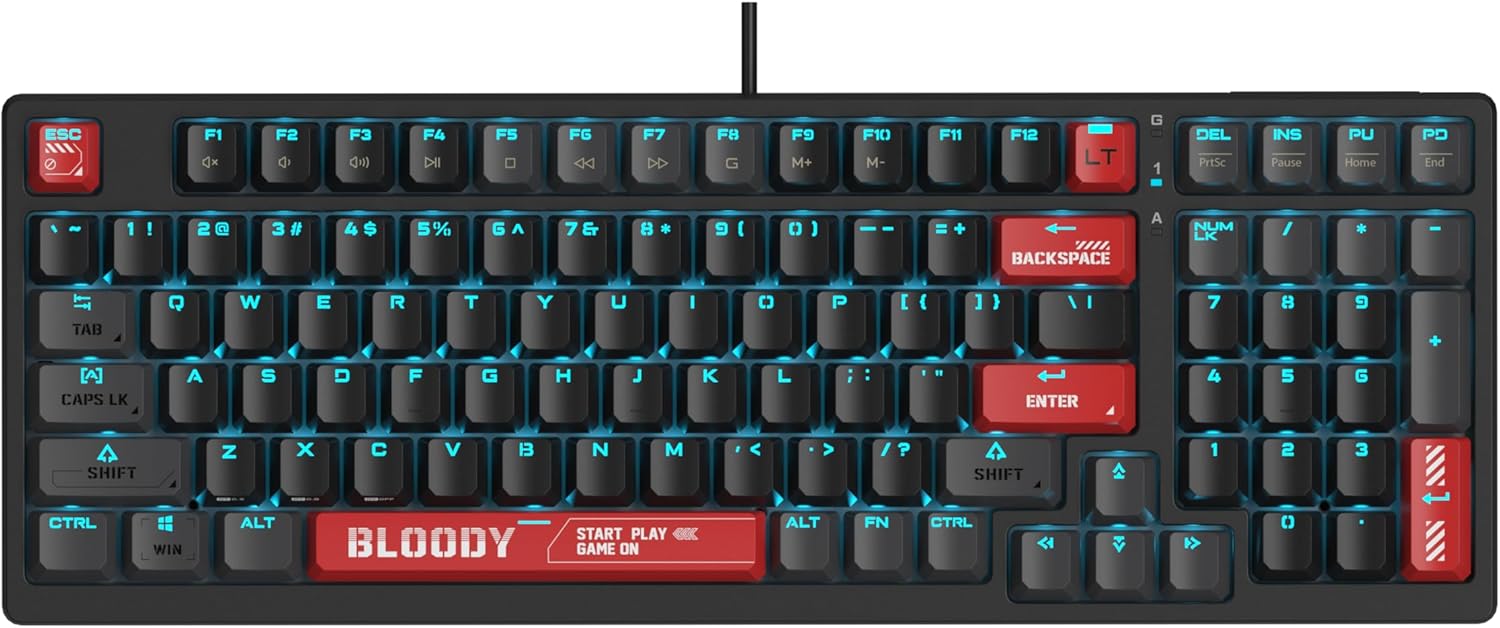
Image: The Bloody AT98 keyboard illuminated with its RGB backlighting, showcasing the key layout and design.
Multimediefunktioner
Secondary multimedia functions are integrated into the F-key row. These functions are typically activated by pressing the FN key in combination with the corresponding F-key (e.g., FN + F1 for volume down, FN + F2 for volume up, FN + F3 for mute). Specific key assignments may vary; consult the keyboard's quick start guide for details.
Opretholdelse
Rengøring af tastaturet
- Frakobl tastaturet fra computeren, før du rengør det.
- Brug en blød, fnugfri klud lidt damprengøres med vand eller en mild rengøringsopløsning til at tørre tasterne og overfladen af.
- Brug trykluft til støv og snavs mellem tasterne.
- Undgå at sprøjte væsker direkte på tastaturet.
- Brug ikke skrappe kemikalier eller slibende materialer.
Udskiftning af tastatur
The Bloody AT98 comes with additional keycaps and a keycap puller for customization. To replace keycaps:
- Fastgør forsigtigt tastaturaftrækkeren til den tastatur, du vil fjerne.
- Pull upwards with steady, even pressure until the keycap detaches from the switch.
- Juster den nye tastaturhætte med kontaktens stilk, og tryk godt ned, indtil den klikker på plads.
The PBT keycaps are designed for durability and a quick bounce-back feel.

Billede: Nærbillede view of the Bloody AT98 keyboard highlighting the PBT keycaps, emphasizing their material and design.
Dust Cover Usage
Utilize the provided dust cover when the keyboard is not in use to protect it from dust and debris, which can affect performance and longevity.
Fejlfinding
Tastaturet reagerer ikke
- Sørg for, at USB-C-kablet er korrekt tilsluttet til både tastaturet og computeren.
- Prøv at tilslutte tastaturet til en anden USB-port på din computer.
- Test tastaturet på en anden computer for at udelukke et computerspecifikt problem.
- Genstart din computer.
Baggrundsbelysningen virker ikke eller er forkert
- Check if the backlighting is turned off. Use the designated FN key combinations to cycle through lighting effects and adjust brightness.
- Ensure any keyboard software is up to date and correctly configured.
Nøgler registreres ikke eller dobbelttastes
- Clean the affected key(s) using compressed air to remove any debris.
- Verify that the keycap is properly seated on the switch.
- If using custom actuation points, try resetting them to default settings.
Softwareproblemer
- Download the latest software and drivers from the official Bloody webwebsted.
- Sørg for, at dit operativsystem er opdateret.
Specifikationer
| Modelnavn | AT98-BloodyRed |
| Mærke | Blodig |
| Tastaturbeskrivelse | Alpha Optical Switch |
| Switch Type | Linear Optical Switch |
| Nøgleantal | 98 nøgler |
| Actuation Point Customization | 0.8mm - 3.0mm (23 options) |
| Initial Force | 48 ± 3 cN |
| Samlet rejseafstand | 3.8 mm ± 0.2 mm |
| Holdbarhed | Op til 100 millioner tastetryk |
| Forbindelsesteknologi | USB-C |
| Kompatible enheder | PC |
| Produktdimensioner | 5.43 x 15.16 x 1.61 tommer (13.79 x 38.51 x 4.09 cm) |
| Varens vægt | 1.65 pund (0.75 kg) |
| Speciel funktion | eXact Reset System, RGB Backlit, PBT Keycaps, Dual-Height Feet |
Garanti og support
Garantioplysninger
For detailed warranty information, please refer to the warranty card included with your product or visit the official Bloody webwebsted. Gem din købsbevis til garantikrav.
Kundesupport
If you encounter any issues not covered in this manual or require further assistance, please contact Bloody customer support through their official webwebstedet eller kontaktoplysningerne på din produktemballage.
Officiel blodig Webwebsted: www.bloody.com


