1. Introduktion
This manual provides instructions for the assembly, operation, and maintenance of your FLEXISPOT 36-inch Standing Desk Converter, Model MT137. This height-adjustable workstation is designed to facilitate seamless transitions between sitting and standing positions, promoting a more dynamic and ergonomic work environment. It accommodates dual monitors and laptops, featuring a wide keyboard tray for enhanced comfort and productivity.
2. Sikkerhedsoplysninger
Vigtige sikkerhedsinstruktioner:
- Always secure the desk converter to your existing desk to prevent tipping.
- Read and follow all assembly instructions carefully to ensure safe and proper use.
- Do not place your hands near the strut during adjustments. The angle of the strut joints will change during the adjustment of the desktop height and may cause injury.
- Sørg for, at bordkonverteren er placeret på en stabil og plan overflade.
- Do not overload the desk converter. Refer to the specifications section for maximum weight capacities.
- Keep children and pets away from the desk converter during operation.
3. Opsætning
The FLEXISPOT Standing Desk Converter is designed for quick and straightforward assembly. Most of the unit comes pre-assembled.
3.1 Pakkens indhold
Kontroller, at alle komponenter er til stede, før monteringen påbegyndes:
- Main Desk Converter Unit
- Tastaturbakke
- Mounting Hardware for Keyboard Tray
- Instruktionsmanual
3.2 Monteringstrin
- Pak enheden ud: Carefully remove all components from the packaging. Place the main desk converter unit on your existing desk in the desired position.
- Fastgør tastaturbakken: Align the keyboard tray with the designated attachment points on the main unit. Secure the tray using the provided mounting hardware (screws, brackets). Ensure it is firmly attached.
- Kabelstyring: Utilize the integrated cable management clips (if included) to organize any power or display cables, preventing clutter and ensuring smooth operation during height adjustments.
- Placer enheder: Position your monitor(s) or laptop on the upper desktop surface. Place your keyboard and mouse on the attached keyboard tray.

Figure 1: Fully assembled FLEXISPOT Standing Desk Converter with dual monitors and a laptop.

Figure 2: Illustration of attaching the keyboard tray to the main unit.
3.3 Samlingsvideo
Video 1: Overståetview of the FLEXISPOT 36 inch Standing Desk Converter, demonstrating its features and assembly process.
4. Betjeningsvejledning
The FLEXISPOT Standing Desk Converter features a gas spring system for smooth and effortless height adjustments.
4.1 Justering af højde
- At hæve: Locate the adjustment lever, typically on the side of the upper desktop. Squeeze the lever and gently lift the desktop to your desired standing height. Release the lever to lock the desk in place.
- At sænke: Squeeze the adjustment lever and apply gentle downward pressure on the desktop. Guide the desktop down to your preferred sitting height. Release the lever to lock the desk in place.
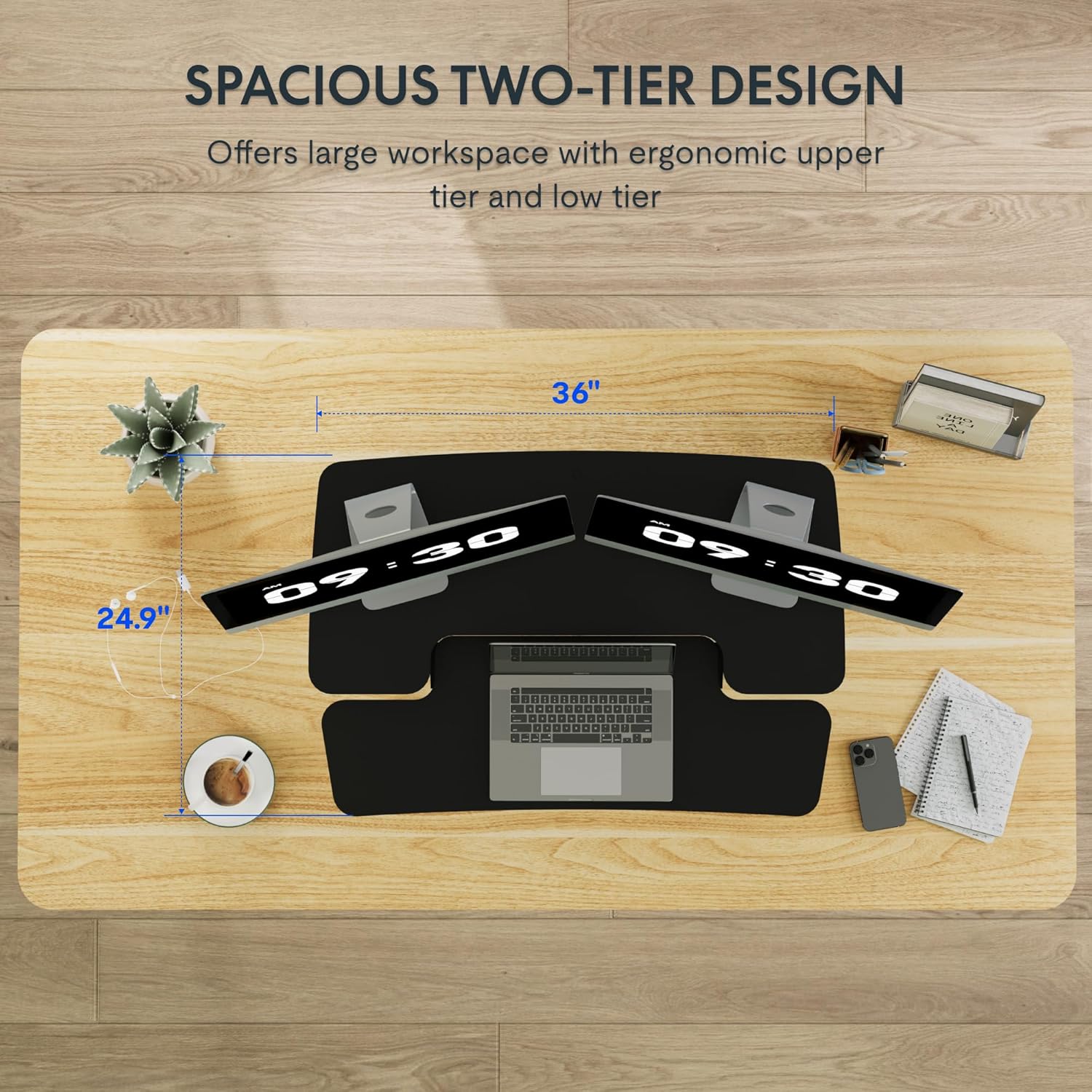
Figure 3: Close-up of the height adjustment lever and gas spring mechanism.

Figure 4: Visual representation of the desk converter's adjustable height range (4.7 to 16.6 inches).
4.2 Dual-Tier Design
The converter features a two-tier design:
- Upper Desktop: Designed to hold monitors or a laptop, keeping your screen at an ergonomic eye level.
- Lower Keyboard Tray: Provides space for your keyboard and mouse, allowing your wrists to remain in a neutral position. The U-shaped design of the upper deck also allows for a laptop to be placed directly on the keyboard tray if preferred.

Figure 5: The dual-tier design providing ample space for monitors, laptop, keyboard, and mouse.
5. Vedligeholdelse
To ensure the longevity and optimal performance of your FLEXISPOT Standing Desk Converter, follow these maintenance guidelines:
- Rensning: Tør overflader af med en blød, damp klud. Undgå slibende rengøringsmidler eller opløsningsmidler, der kan beskadige overfladen.
- Inspektion: Kontrollér regelmæssigt alle skruer og forbindelser for at sikre, at de er spændte. Spænd dem igen om nødvendigt.
- Bevægelse: Ensure the gas spring mechanism operates smoothly. If you notice any stiffness or unusual sounds, contact customer support. Do not attempt to lubricate or repair the gas spring yourself.
- Vægtfordeling: Always distribute weight evenly across the desktop and keyboard tray to prevent strain on the mechanism.
6. Fejlfinding
If you encounter any issues with your desk converter, refer to the following common problems and solutions:
| Problem | Mulig årsag | Løsning |
|---|---|---|
| Desk does not adjust smoothly. | Uneven weight distribution or mechanism obstruction. | Redistribute items evenly. Check for any obstructions around the X-frame. |
| Desk feels wobbly. | Løse forbindelser eller ujævn overflade. | Ensure all screws are tightened. Place the converter on a flat, stable desk. |
| Keyboard tray is not secure. | Forkert fastgørelse under samling. | Re-check the keyboard tray mounting hardware and ensure it is correctly installed and tightened. |
If the problem persists, please contact FLEXISPOT customer support for further assistance.
7. Specifikationer

Figure 6: Detailed dimensions and weight capacities of the FLEXISPOT Standing Desk Converter.
| Feature | Detalje |
|---|---|
| Mærke | FLEXISPOT |
| Modelnummer | MT137 (MB) |
| Produktmål (D x B x H) | 24" D x 35" B x 19.7" H |
| Farve | Sort |
| Stil | Moderne |
| Grundmateriale | Metal |
| Top materialetype | Træ |
| Varens vægt | 25.5 pund |
| Minimum højde | 4.7 tommer |
| Maksimal højde | 19.6 tommer |
| Upper Desktop Load Capacity | Op til 33 pund |
| Keyboard Tray Load Capacity | Op til 6.6 pund |
| Særlige funktioner | Adjustable Height, Ergonomic, Keyboard Tray Included |
8. Garanti og support
8.1 Garantioplysninger
This FLEXISPOT product comes with a Full Warranty. For specific details regarding the warranty period and coverage, please refer to the warranty card included with your product or visit the official FLEXISPOT webwebsted.
8.2 Kundesupport
For technical assistance, troubleshooting, or inquiries regarding your product, please contact FLEXISPOT customer support. Contact information can be found on the official FLEXISPOT webwebstedet eller på din produktemballage.
Online ressourcer:
- Besøg embedsmanden FLEXISPOT Store for produktinformation og support.


