1. Produktet er slutview
The Baseus Security Camera S1 Pro 2-Cam Kit and B1 2K Wireless Solocam provide comprehensive outdoor surveillance solutions. The S1 Pro features an innovative sun-powered tracking system and dual 3K cameras for wide and detailed views, while the B1 offers 2K clarity with a 145° field of view and color night vision.

Image: The complete Baseus Security Camera S1 Pro 2-Cam Kit and B1 2K Wireless Solocam setup, showcasing both camera types and the central hub.

Billede: Et nærbillede view of the Baseus S1 Pro security camera, highlighting its dual lens system and integrated solar panel.

Image: A detailed shot of the Baseus B1 2K Wireless Solocam, showing its single lens and compact design.
1.1 Baseus S1 Pro Features
- Sun-Powered Tracking System: Solar panel moves 40° left and right to optimize sunlight absorption, enhancing charging efficiency.
- Dual 3K Cameras: Equipped with wide-angle and telephoto lenses for comprehensive coverage and sharp 3K HD video.
- Farve Night Vision: Provides clear monitoring even in low light conditions.
- Simultaneous APP View: Monitor both cameras concurrently within the application.
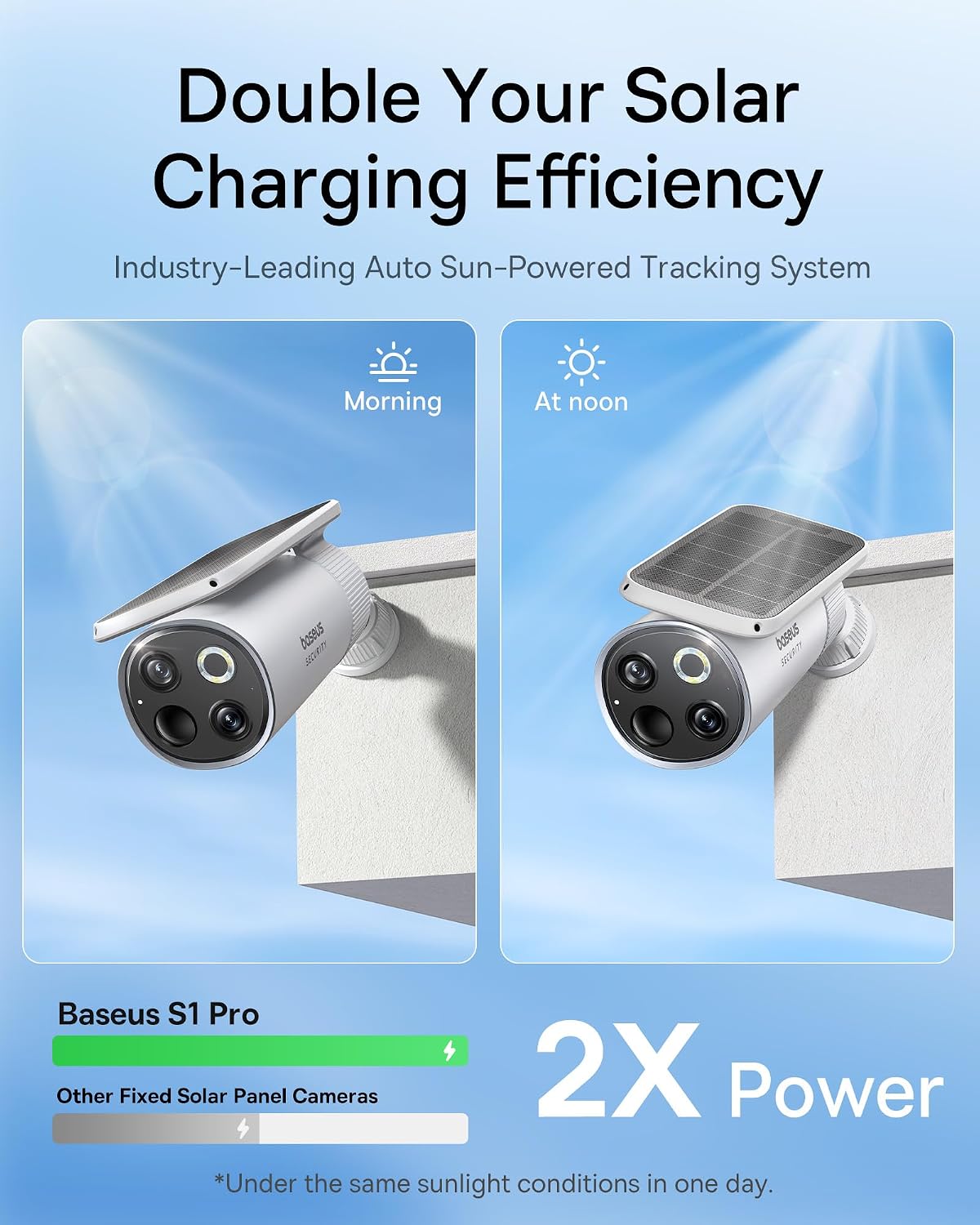
Image: Illustration demonstrating the Baseus S1 Pro's solar panel adjusting its angle for optimal sun exposure, leading to double the charging efficiency compared to fixed panels.

Image: A close-up of the Baseus S1 Pro's dual camera lenses, detailing the 3K clarity, 8x digital zoom, and f/1.6 aperture for both wide-angle and telephoto views.

Image: Screenshot of the Baseus app interface showing the crystal-clear dual view from the S1 Pro, with separate feeds for wide-angle and telephoto lenses.
1.2 Baseus B1 Features
- 2K HD-klarhed: Delivers sharp 2K HD videos for clear day and night monitoring.
- 145° synsfelt: Wide-angle lens provides comprehensive views, minimizing blind spots.
- Color Night Vision with 100lm Spotlight: Ensures clear visibility in low light and acts as a deterrent.
- IP67 All-Weather Durability: Built to withstand various weather conditions from -20°C to 50°C.

Image: Comparison showing the Baseus B1's clear 2K surveillance capabilities during both day and night, highlighting its color night vision feature.

Image: Visual comparison illustrating the Baseus B1's 145° ultra-wide field of view, demonstrating its ability to cover a larger area and reduce security blind spots compared to cameras with narrower FOV.

Image: The Baseus B1 camera mounted outdoors in rainy conditions, illustrating its IP67 rating and ability to withstand extreme temperatures from -20°C to 50°C.
2. Pakkens indhold
Please verify that all components are present in your package. The kit typically includes:
- Baseus S1 Pro Security Camera (x2 for 2-Cam Kit)
- Baseus B1 2K Wireless Solocam
- Monteringsbeslag og skruer
- USB opladningskabel
- Brugervejledning (dette dokument)
- Hurtig startvejledning
Note: Specific contents may vary based on the purchased kit version. Refer to your product packaging for exact details.
3. Opsætningsvejledning
3.1 Charging the Cameras
Before initial use, ensure your cameras are sufficiently charged. The S1 Pro utilizes solar power for continuous charging, while the B1 can be charged via its USB port.
- Baseus S1 Pro: Position the camera in an area with ample direct sunlight. The integrated solar panel will automatically charge the internal battery. For initial setup or if the battery is low, you may use a USB charger (not included) to fully charge it.
- Baseus B1: Connect the provided USB charging cable to the camera's charging port and to a standard USB power adapter (not included). The charging indicator light will show the charging status.
3.2 Download af app og kontoregistrering
At administrere og view your cameras, download the official Baseus Security app.
- Søg efter "Baseus Security" in your mobile device's app store (Google Play Store for Android or Apple App Store for iOS).
- Download og installer appen.
- Åbn appen, og følg instruktionerne på skærmen for at registrere en ny konto eller logge ind, hvis du allerede har en.
3.3 Camera Pairing and Installation
Follow these steps to add your cameras to the app and install them in your desired locations.
- Tilføj enhed: In the Baseus Security app, tap the "+" icon or "Add Device" to begin the pairing process.
- Select Camera Model: Choose "S1 Pro" or "B1" from the list of available devices.
- Følg instruktionerne i appen: The app will guide you through connecting the camera to your Wi-Fi network and completing the pairing. This typically involves scanning a QR code displayed on your phone with the camera.
- Montering:
- Vælg et passende udendørs sted, der giver den ønskede viewing angle and strong Wi-Fi signal. For S1 Pro, ensure adequate sunlight exposure.
- Use the provided mounting brackets and screws to securely attach the cameras to a wall or other stable surface.
- Adjust the camera angle to cover the desired surveillance area.
- Test forbindelse: After installation, verify the live feed in the app to ensure proper functioning and optimal viewvinkel.
4. Betjeningsvejledning
4.1 Live View og afspilning
- Få adgang til Live View: Open the Baseus Security app and select the desired camera from your device list to view its live feed. For S1 Pro, you can view both wide-angle and telephoto feeds simultaneously.
- Playback Recorded Footage: Navigate to the playback section within the app to review recorded events. Footage is typically stored on a microSD card (not included) or cloud storage (subscription may be required).
4.2 Bevægelsesdetektion og advarsler
Konfigurer indstillinger for bevægelsesdetektion for at modtage advarsler om mistænkelig aktivitet.
- In the app, go to the camera settings for the specific device.
- Locate "Motion Detection" or "Activity Zones".
- Adjust sensitivity levels and define specific areas for motion detection to minimize false alarms.
- Enable push notifications to receive instant alerts on your mobile device.
4.3 Night Vision and Spotlight (B1)
The B1 camera features advanced night vision capabilities.
- The camera automatically switches to night vision mode in low light conditions.
- The 100lm spotlight on the B1 can be configured to activate upon motion detection, providing color night vision and acting as a visual deterrent.
5. Vedligeholdelse
Regular maintenance ensures optimal performance and longevity of your security cameras.
- Rensning: Periodically wipe the camera lenses and solar panels (for S1 Pro) with a soft, damp cloth to remove dust, dirt, or smudges. Avoid abrasive cleaners.
- Batteriets sundhed: For S1 Pro, ensure the solar panel remains unobstructed to maximize charging efficiency. For B1, recharge the battery when prompted by the app or when the battery level is low.
- Firmwareopdateringer: Check the Baseus Security app regularly for available firmware updates. Keeping your camera's firmware up-to-date ensures access to the latest features and security enhancements.
- Miljøtjek: Periodically inspect the mounting area for stability and ensure cables (if any) are secure and undamaged.
6. Fejlfinding
| Problem | Mulig årsag | Løsning |
|---|---|---|
| Kameraet opretter ikke forbindelse til Wi-Fi | Incorrect Wi-Fi password; Weak Wi-Fi signal; Camera too far from router; Router settings. | Double-check Wi-Fi password. Move camera closer to router or use a Wi-Fi extender. Ensure router is on 2.4GHz band (if applicable). Restart camera and router. |
| Nej live view or recorded footage | Camera offline; Low battery; SD card error; Cloud storage issue. | Check camera's power status and Wi-Fi connection. Recharge battery. Reinsert or replace SD card. Verify cloud subscription status. |
| Hyppige falske bevægelsesalarmer | High sensitivity setting; Environmental factors (e.g., moving branches, shadows, insects). | Reduce motion detection sensitivity in the app. Define specific activity zones to exclude irrelevant areas. |
| Dårlig nattesynskvalitet | Dirty lens; Obstruction; Insufficient ambient light for color night vision. | Clean the camera lens. Ensure no obstructions are blocking the view. For B1, ensure the spotlight is enabled and functioning. |
| S1 Pro not charging via solar | Insufficient direct sunlight; Dirty solar panel; Obstruction. | Relocate camera to an area with more direct sunlight. Clean the solar panel regularly. Ensure no objects are casting shadows on the panel. |
If you encounter issues not listed here, please refer to the Baseus Security app's help section or contact customer support.
7. Specifikationer
| Feature | Beskrivelse |
|---|---|
| Mærke | Baseus |
| Model | S1 Pro (2-Cam Kit) & B1 |
| Anbefalede anvendelser | Udendørs sikkerhed |
| Strømkilde | Solar Powered (S1 Pro), Battery (B1) |
| Særlige funktioner | Night Vision (Color Night Vision for B1), Motion Detection, Two-Way Audio (assumed, common feature), Solar Tracking (S1 Pro) |
| Video Resolution (S1 Pro) | 3K HD (Dual Cameras) |
| Video Resolution (B1) | 2K HD |
| Felt af View (B1) | 145° |
| Vejrbestandighed | IP67 (for B1, assumed for S1 Pro as well for outdoor use) |
| Operating Temperature (B1) | -20°C til 50°C (-4°F til 122°F) |
8. Garanti og support
Baseus provides comprehensive support for its products.
- Garanti: Dette produkt er omfattet af en 2 års garanti fra købsdatoen. Gem venligst din købsbevis i tilfælde af garantikrav.
- Teknisk support: Livstids teknisk support er tilgængelig for dette produkt.
- Kontaktoplysninger: For technical assistance, warranty claims, or general inquiries, please visit the official Baseus website or contact their customer service through the Baseus Security app's support section.


