Indledning
This manual provides instructions for the assembly, operation, and maintenance of your FLEXISPOT MT137 32-inch Height Adjustable Standing Desk Converter. This product is designed to transform your existing desk into an ergonomic sit-to-stand workstation, promoting a healthier work routine.
Sikkerhedsoplysninger
- Følg altid monteringsvejledningen nøje.
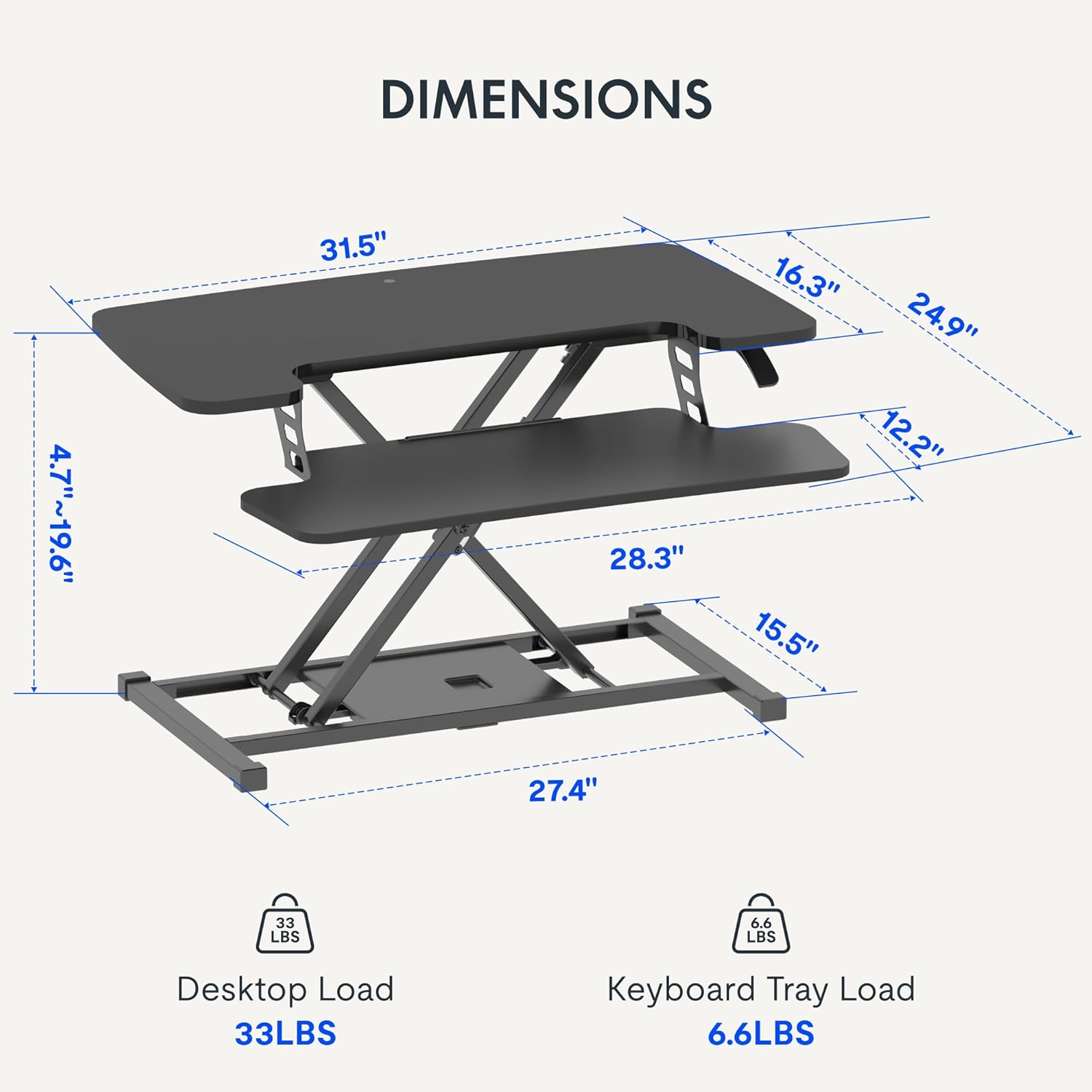
- Do not exceed the weight limit of 33 lbs (15 kg) on the upper desktop.
- Do not exceed the weight limit of 6.6 lbs (3 kg) on the keyboard tray.
- Ensure the desk converter is placed on a stable, flat surface.
- Hold hænder og fingre væk fra bevægelige dele under højdejustering.
Pakkens indhold
- Pre-assembled Desk Converter Unit
- Tastaturbakke
- Mounting Screws for Keyboard Tray
- Instruktionsmanual (dette dokument)
Opsætning og montering
- Udpakning: Fjern forsigtigt alle komponenter fra emballagen.
- Keyboard Tray Attachment: Position the keyboard tray beneath the main desktop. Align the pre-drilled holes on the keyboard tray with the mounting points on the converter's frame. Secure the keyboard tray using the provided screws.
- Placering: Place the assembled desk converter on a stable, flat desk surface.

The desk converter is largely pre-assembled, requiring only the attachment of the keyboard tray for immediate use.
Betjeningsvejledning
- Justering af højde: To adjust the height, locate the adjustment lever on the side of the upper desktop.
- Hævning af skrivebordet: Squeeze the lever and gently lift the desktop to your desired standing height. Release the lever to lock it in place. The gas spring mechanism assists in smooth elevation.
- Sænkning af skrivebordet: Squeeze the lever and apply gentle downward pressure to lower the desktop to your desired sitting height. Release the lever to lock it in place.
- Vægt kapacitet: The upper desktop supports up to 33 pounds (15 kg). The keyboard tray supports up to 6.6 pounds (3 kg). Do not exceed these limits.


Funktioner
- Ergonomisk design: Seamlessly transition between sitting and standing positions to promote a healthy work posture. The streamlined edges are designed to reduce wrist discomfort.
- Spacious Two-Tier Workstation: The upper desktop provides ample space for monitors or laptops, while the lower keyboard tray accommodates your keyboard and mouse. A U-shaped cutout on the upper deck allows for laptop placement directly on the tray, optimizing space.
- Sturdy X-Frame Construction: Built with a robust X-frame, ensuring stability and smooth, effortless height adjustments.
- Versatile Height Range: Offers a height adjustment range from 4.7 inches (12 cm) to 19.6 inches (50 cm), accommodating various user heights and work preferences.


Opretholdelse
- Rensning: Tør overflader af med en blød, damp klæde. Undgå slibende rengøringsmidler.
- Inspektion: Kontrollér regelmæssigt alle skruer og forbindelser for at sikre, at de er fastgjort.
Fejlfinding
- Vanskeligheder med at justere højden: Ensure no objects are obstructing the lifting mechanism. Verify that the weight on the desk does not exceed the specified limits.
- Wobling: Confirm the desk converter is placed on a flat, stable surface. Check all assembly screws for tightness.
Specifikationer
| Mærke | FLEXISPOT |
| Modelnavn | MT137 |
| Produktdimensioner | 61 cm D x 81 cm B x 50 cm H (24 cm D x 32 cm B x 19.7 cm H) |
| Farve | Sort |
| Grundmateriale | Metal |
| Top materialetype | Træ |
| Varens vægt | 24 pund (10.9 kg) |
| Maximum Upper Desktop Load | 33 pund (15 kg) |
| Maximum Keyboard Tray Load | 6.6 pund (3 kg) |
| Højdejusteringsområde | 4.7 tommer (12 cm) til 19.6 tommer (50 cm) |
| Montering påkrævet | Ja (Minimal) |
| Værktøjer anbefalet til montering | Skruetrækker |
| UPC | 810072862501 |
Garanti og support
Garantitype: This product comes with a Full Warranty.
For further assistance, warranty claims, or technical support, please contact FLEXISPOT customer service. Refer to the official FLEXISPOT webwebstedet for aktuelle kontaktoplysninger.


