1. Sikkerhedsoplysninger
Læs venligst alle instruktioner omhyggeligt inden installation og brug. Gem denne manual til senere brug.
- Udsæt ikke låsen for ekstreme temperaturer eller direkte sollys i længere perioder.
- Avoid contact with water or corrosive substances.
- Use only the specified battery type (3 x 1.5V alkaline batteries). Do not mix old and new batteries or different battery types.
- Sørg for korrekt polaritet, når du isætter batterierne.
- Keep mechanical keys in a safe place outside the property.
- Do not attempt to disassemble or repair the lock yourself. Contact support if issues arise.
2. Produktet er slutview
The AVATTO Smart Door Lock SDL-S1 offers multiple unlocking methods for enhanced security and convenience.

Figur 2.1: Overview of the AVATTO Smart Door Lock and its accessories.
2.1 Nøglefunktioner
- Flere oplåsningsmetoder: Fingerprint, Password, RFID Card, Smart Life App, and Mechanical Key.
- Justerbar cylinderlængde: The interior and exterior cylinder lengths can be freely adjusted (30-45mm exterior, 30-65mm interior).
- Dørtykkelseskompatibilitet: Suitable for doors with a thickness of 60mm to 90mm.
- Symmetric and Asymmetric Door Support: Adapters (5mm, 10mm, 20mm) are included to accommodate various door types.
- Smart Life App Integration: Manage users, set administrative rights, view lock logs, and receive notifications.
- Bluetooth-forbindelse: Effective transmission distance of 50 meters. A separate AVATTO Bluetooth Gateway is required for remote control via the app outside of Bluetooth range.

Figure 2.2: The five primary methods for unlocking the smart door lock.

Figur 2.3: Detaljeret view of the AVATTO Door Lock components.
3. Før installation
Before proceeding with installation, it is crucial to confirm the following measurements and door characteristics:
- Confirm Cylinder Type: Ensure your existing door lock cylinder is compatible.
- Confirm Cylinder Hole Size: Measure the dimensions of the cylinder hole in your door.
- Mål dørtykkelse: The lock is suitable for doors between 60mm and 90mm thick.
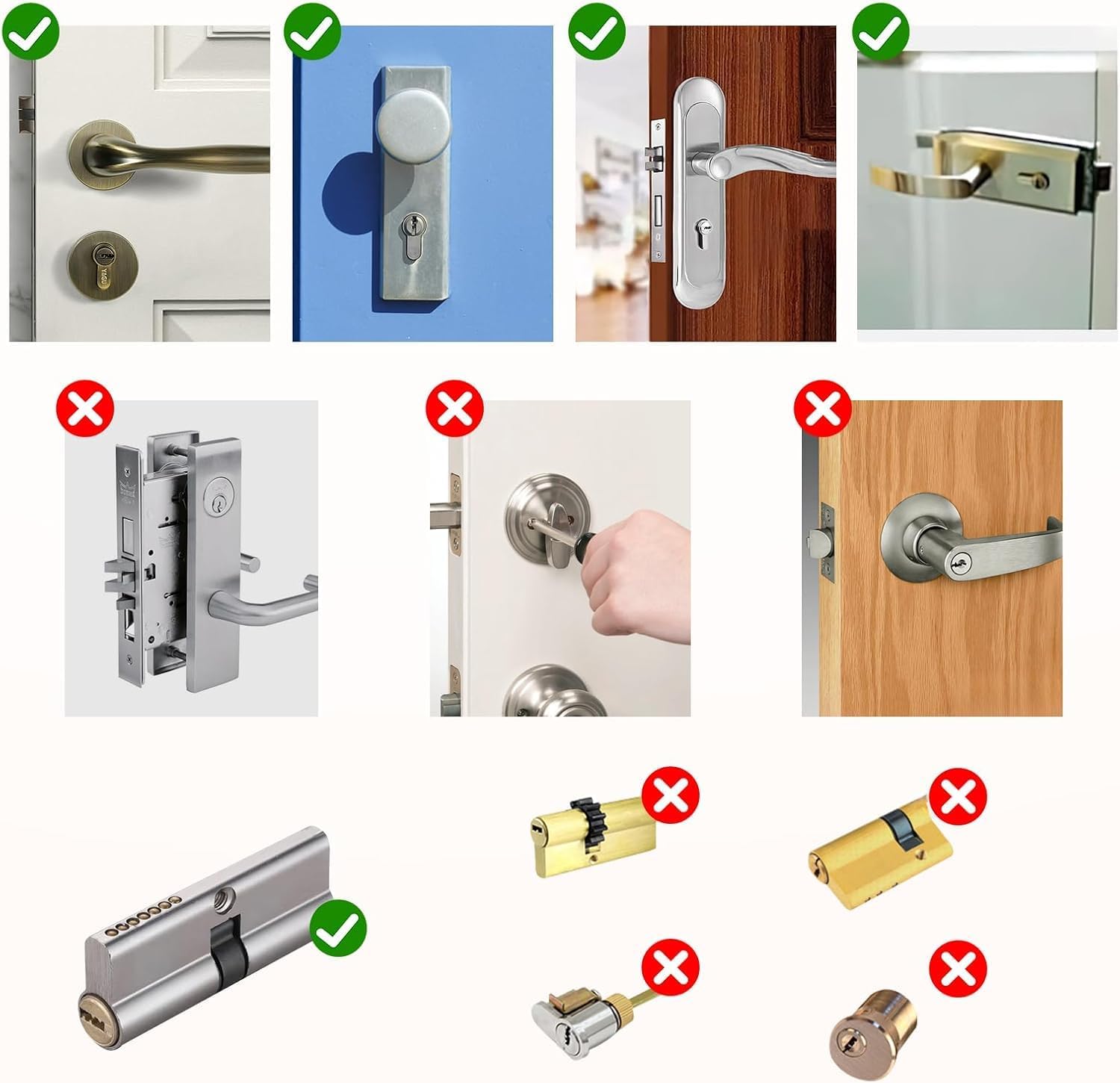
Figur 3.1: Eksamples of compatible (green check) and incompatible (red cross) door lock types.

Figure 3.2: Required dimensions for the lock cylinder hole.
4. Installationsvejledning
The AVATTO Smart Door Lock is designed for easy installation. Follow these general steps:
- Forbered døren: Ensure your door meets the thickness and cylinder hole requirements as outlined in Section 3.
- Adjust Cylinder Length: The lock cylinder length is adjustable to fit various door thicknesses. Refer to the table below and the diagrams for symmetric and asymmetric door configurations. The interior length can be adjusted from 30mm to 65mm, and the exterior from 30mm to 45mm.
- Installer cylinderen: Insert the adjusted cylinder into the door's lock hole.
- Sikr låsen: Fasten the lock components securely using the provided screws.
- Indsæt batterier: Open the battery compartment and insert 3 x 1.5V alkaline batteries, ensuring correct polarity.
- Test funktionalitet: After installation, test all unlocking methods (mechanical key, fingerprint, password, RFID card) to ensure proper operation before closing the door.

Figure 4.1: Adjustable lock cylinder length guide. Note: Product is suitable for 60-90mm door thickness.
4.1 Symmetric Door Installation
For symmetric doors, the distance from the center screw hole to both the interior and exterior sides of the door is equal.

Figur 4.2: Installation example for a symmetric door (e.g., 60mm door with 30mm interior and 30mm exterior).
4.2 Asymmetric Door Installation
For asymmetric doors, the distances from the center screw hole to the interior and exterior sides of the door are different. Use the provided adapters (5mm, 10mm, 20mm) to achieve the correct length.

Figur 4.3: Installation example for an asymmetric door, demonstrating the use of adapters.
5. Betjeningsvejledning
5.1 Oplåsningsmetoder
- Lås op med fingeraftryk: Placer din registrerede finger på fingeraftrykssensoren. Låsen låses op, hvis fingeraftrykket genkendes.
- Adgangskodelås: Indtast din registrerede adgangskode på tastaturet.
- RFID-kortoplåsning: Tap your registered RFID card on the designated area of the lock.
- Smart Life App Unlock: Open the Smart Life app on your smartphone and follow the prompts to unlock the door. Ensure Bluetooth is enabled on your phone and you are within range.
- Mekanisk nøgleoplåsning: In case of emergency or battery depletion, use one of the provided mechanical keys to unlock the door.

Figure 5.1: The smart lock showing various unlocking interfaces.
5.2 Brug af Smart Life-appen
The Smart Life app allows comprehensive management of your AVATTO Smart Door Lock:
- Tilføjelse af brugere: Register new fingerprints, passwords, and RFID cards for family members or guests.
- Administrative Rights: Assign different levels of access and control to various users.
- Lock Log: View en historik over alle låse- og oplåsningshændelser, inklusive metode og tidspunkt.
- Meddelelser: Receive real-time alerts on your phone for lock activity.
- Fjernbetjening (med gateway): To control the lock remotely from outside your home or office, an AVATTO Bluetooth Gateway (sold separately) is required. The gateway connects the lock to your Wi-Fi network.
5.3 Batteristatus
The battery status can be checked via the Smart Life app interface. When the battery is low, the lock may provide an audible or visual warning. In case of complete battery depletion, you can use an external battery (via the Type-C port) or the mechanical key to open the lock.
6. Vedligeholdelse
- Udskiftning af batteri: Replace all three 1.5V alkaline batteries when the low battery indicator appears.
- Rensning: Tør låsens overflade af med en blød, tør klud. Brug ikke slibende rengøringsmidler eller opløsningsmidler.
- Regelmæssig kontrol: Kontrollér regelmæssigt, at alle skruer er spændte, og at låsen fungerer problemfrit.
7. Fejlfinding
| Problem | Mulig årsag | Løsning |
|---|---|---|
| Lås reagerer ikke. | Lave eller døde batterier. | Replace batteries. Use external battery or mechanical key for emergency access. |
| Fingeraftryk ikke genkendt. | Finger is dirty or wet; fingerprint not properly registered. | Clean and dry finger. Re-register fingerprint if issue persists. Try another registered fingerprint. |
| Password not working. | Incorrect password entered; keypad issue. | Ensure correct password. Try resetting password via app if possible. |
| RFID-kort virker ikke. | Kortet er ikke registreret eller beskadiget. | Register the card via the app. Try another registered card. |
| Smart Life App cannot connect to lock. | Bluetooth slukket; uden for rækkevidde; app-problem. | Ensure Bluetooth is on and you are within 50m. Restart app/phone. Check gateway connection for remote access. |
| Lock is stuck or difficult to turn. | Improper installation; mechanical obstruction. | Recheck installation steps. Ensure no foreign objects are obstructing the mechanism. Do not force. |
8. Specifikationer
- Model: SDL-S1
- Mærke: AVATTO
- Dimensioner (L x B x H): 1.8 x 4 x 4 cm (Cylinder); 680 grams
- Materiale: Metal
- Farve: Sort
- Strømtype: Electric operation (Battery-powered)
- Batterier påkrævet: 3 x 1.5V Alkaline Batteries (not included)
- Dørtykkelseskompatibilitet: 60 mm - 90 mm
- Særlige funktioner: Fingerprint Unlock, Password Unlock, RFID Unlock, Smart Life App Unlock, Mechanical Key Unlock, Adjustable Cylinder Length.
- Inkluderede komponenter: Smart Door Lock, 2 Mechanical Keys, IC Card, User Manual.
9. Garanti og support
Dette produkt leveres med en 2 års garanti fra købsdatoen.
For any questions, technical support, or to obtain additional resources such as detailed installation videos, network connection guides, or product presentation videos, please contact AVATTO customer support. Refer to your purchase documentation for specific contact details.
You can also visit the official AVATTO website for the latest support information and FAQs.


