1. Produktet er slutview
This Sungale Bluetooth Transmitter & Receiver is a versatile audio device designed to enhance your audio experience. It functions as both a wireless receiver and a transmitter, allowing you to stream audio wirelessly to or from various devices. It supports Bluetooth 5.3 technology, offering low distortion, low power consumption, low latency, and high-fidelity stereo sound.
Nøglefunktioner omfatter:
- Dual Mode-funktionalitet: Easily switch between Transmitter (TX) and Receiver (RX) modes.
- Bluetooth 5.3: For stable, high-quality wireless audio streaming.
- Intelligent støjreduktion: CVC8.0 noise cancellation and DSP technology for clear audio.
- Håndfri opkald: Built-in microphone and multi-function button for convenient call management.
- Lang batterilevetid: Up to 6-12 hours of usage on a single charge.
- Bred kompatibilitet: Connects to TVs, home stereos, car speakers, headphones, MP3 players, computers, and more via a 3.5mm Aux jack.

Image 1.1: The Sungale Bluetooth Transmitter & Receiver, showcasing dens kompakte design og 3.5 mm lydstik.
2. Produktkomponenter
Familiarize yourself with the various parts of your device:
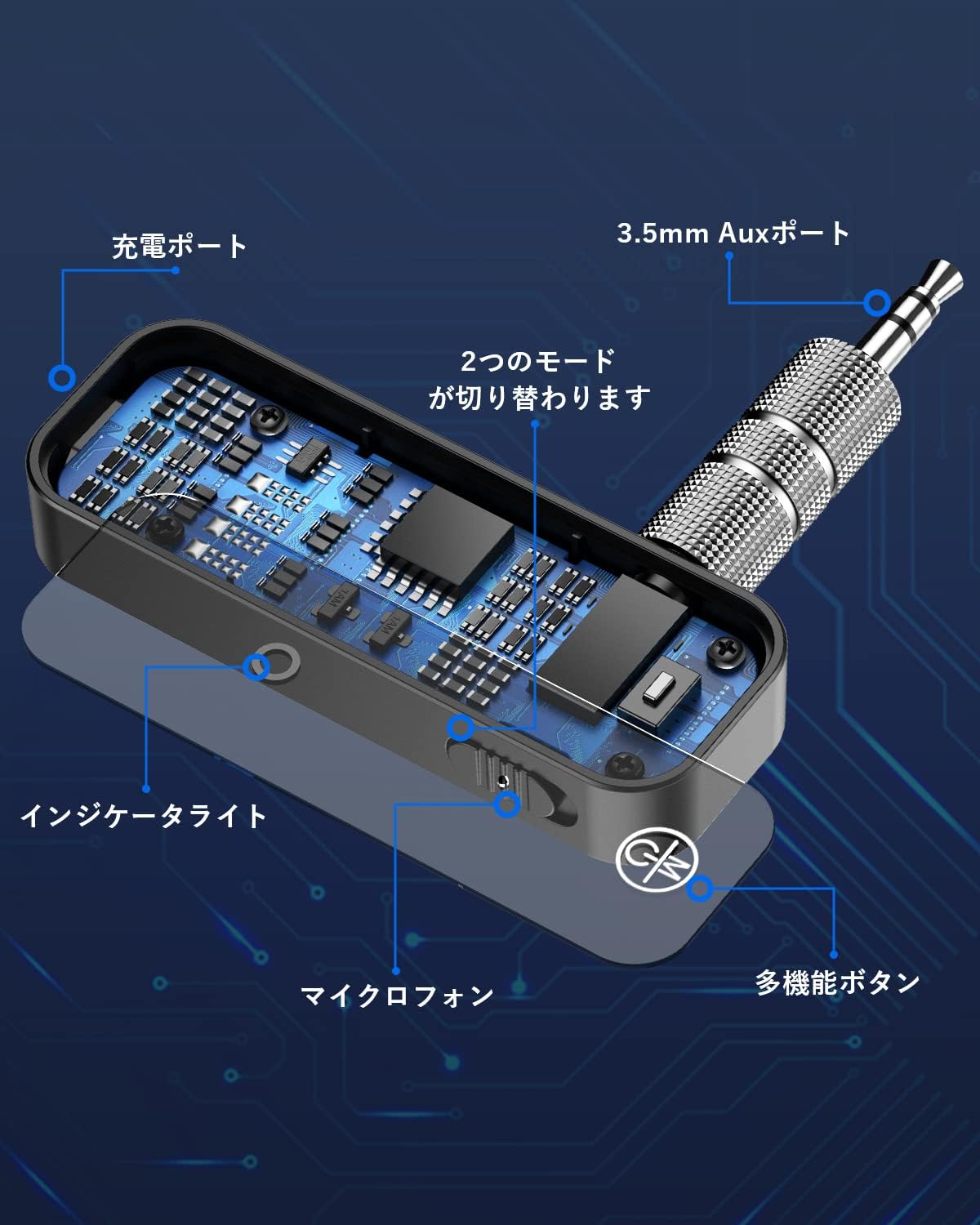
Image 2.1: Detailed diagram illustrating the device's components, including the charging port, 3.5mm Aux port, indicator light, microphone, multi-function button, and mode switch.
- 3.5mm Aux Port: Til lydindgang/udgang.
- Opladningsport: USB-port til opladning af enheden.
- Indikatorlys: Viser forbindelses- og batteristatus.
- Mikrofon: Til håndfri opkald.
- Multifunktionsknap: Controls power, play/pause, answer/end calls.
- Mode Switch: Skifter mellem sender- (TX) og modtager- (RX) tilstande.
3. Opladning af enheden
The device has a built-in rechargeable lithium battery. Before first use, fully charge the device.
- Connect the charging cable (not explicitly listed but implied) to the charging port on the device.
- Tilslut den anden ende af opladningskablet til en USB-strømkilde (f.eks. en computers USB-port eller en USB-vægadapter).
- The indicator light will show the charging status. Once fully charged, the light may change color or turn off.
A full charge provides approximately 6-12 hours of usage. The device can be used while charging.

Billede 3.1: En intern view of the device highlighting its battery capacity, indicating approximately 6 hours of operation.
4. Opsætning og parring
4.1 Tænd/sluk
- For at tænde: Press and hold the Multi-function Button until the indicator light illuminates.
- For at slukke: Press and hold the Multi-function Button until the indicator light turns off.
4.2 Valg af tilstand
Use the Mode Switch to select between Transmitter (TX) and Receiver (RX) modes before connecting to your audio source/device.
4.3 Parring i modtagertilstand (RX)
In RX mode, the device receives audio from a Bluetooth-enabled source (e.g., smartphone, tablet) and outputs it to a non-Bluetooth audio system (e.g., car stereo, home speakers).
- Skift enheden til RX-tilstand.
- Connect the 3.5mm Aux port of the device to the AUX input of your non-Bluetooth audio system (e.g., car stereo, wired headphones, home speaker).
- The indicator light will flash, indicating it is in pairing mode.
- On your Bluetooth audio source (e.g., smartphone), enable Bluetooth and search for available devices.
- Select "Sungale BT Adapter" (or similar name) from the list to pair.
- Once paired, the indicator light will become solid, and audio from your source will play through your connected audio system.

Image 4.1: Illustration of the device operating in Bluetooth Receiver (RX) mode, connecting a smartphone to a speaker system.
4.4 Parring i sendertilstand (TX)
In TX mode, the device takes audio from a non-Bluetooth source (e.g., TV, CD player) and transmits it wirelessly to a Bluetooth-enabled receiving device (e.g., Bluetooth headphones, Bluetooth speaker).
- Skift enheden til TX-tilstand.
- Connect the 3.5mm Aux port of the device to the audio output of your non-Bluetooth source (e.g., TV headphone jack, CD player audio out).
- The indicator light will flash, indicating it is in pairing mode.
- Put your Bluetooth receiving device (e.g., headphones, speaker) into pairing mode.
- The Sungale device will automatically search for and connect to nearby Bluetooth receiving devices.
- Once paired, the indicator light will become solid, and audio from your source will be transmitted to your Bluetooth receiving device.

Image 4.2: The device in Transmitter (TX) mode, connected to a TV to send audio wirelessly to headphones.

Image 4.3: The device in Transmitter (TX) mode, connected to a speaker to send audio wirelessly.
5. Betjening af enheden
5.1 Music Playback (RX Mode)
- Afspil/pause: Tryk kort på multifunktionsknappen.
- Næste nummer: Dobbelt tryk på multifunktionsknappen.
- Forrige nummer: Tryk tre gange på multifunktionsknappen.
5.2 Hands-free Calling (RX Mode)
When connected to a smartphone in RX mode, you can manage calls using the built-in microphone and Multi-function Button.
- Besvar opkald: Tryk kort på multifunktionsknappen.
- Afslut opkald: Tryk kort på multifunktionsknappen under et opkald.
- Afvis opkald: Tryk og hold multifunktionsknappen nede i 2 sekunder.
- Genopkald sidste nummer: Double press the Multi-function Button when not on a call.
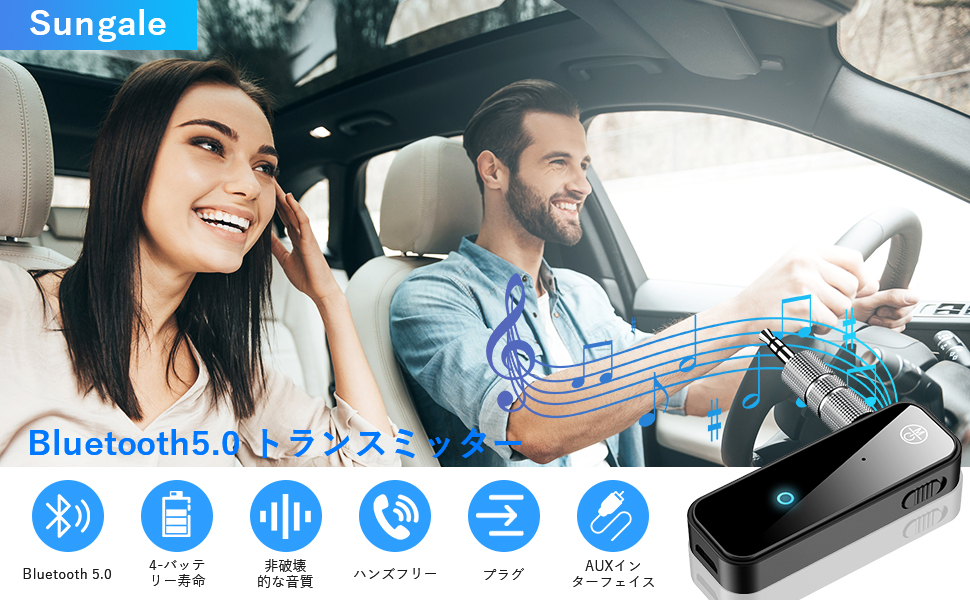
Image 5.1: A couple in a car utilizing the device for hands-free communication and music streaming, demonstrating its car compatibility.
5.3 Navigation Broadcasts (RX Mode)
When connected to your car audio system via RX mode, the device supports broadcast voice announcements from existing navigation applications on your smartphone.

Image 5.2: The device integrated into a car's dashboard, illustrating its use for streaming music and potentially navigation audio.
6. Vedligeholdelse
To ensure the longevity and optimal performance of your Sungale Bluetooth Transmitter & Receiver, follow these maintenance guidelines:
- Rensning: Brug en blød, tør klud til at rengøre enheden. Undgå at bruge skrappe kemikalier, opløsningsmidler eller slibende rengøringsmidler.
- Opbevaring: Opbevar enheden et køligt, tørt sted væk fra direkte sollys og ekstreme temperaturer.
- Undgå vand: This device is not waterproof. Keep it away from water and other liquids.
- Håndteres med forsigtighed: Undgå at tabe eller udsætte enheden for kraftige stød.
- Batteripleje: Ved langtidsopbevaring skal batteriet oplades til ca. 50% hver par måneder for at forhindre dyb afladning.
7. Fejlfinding
If you encounter issues with your device, refer to the following troubleshooting steps:
| Problem | Mulig årsag | Løsning |
|---|---|---|
| Enheden tænder ikke. | Lavt batteri. | Oplad enheden helt. |
| Kan ikke parres med en enhed. | Incorrect mode selected (TX/RX). Enheden er ikke i parringstilstand. Bluetooth device too far away. | Sørg for, at den korrekte tilstand er valgt. Restart the device and put it into pairing mode. Move devices closer (within 10 meters). |
| Ingen lydudgang/-indgang. | 3.5mm Aux cable not connected properly. Lydstyrken er for lav. Incorrect audio source/output selected on connected device. | Ensure the 3.5mm Aux cable is securely connected. Increase volume on both the device and connected audio system. Verify audio settings on your source/receiving device. |
| Dårlig lydkvalitet eller statisk støj. | Interferens. Device too far from connected device. Lavt batteri. | Flyt dig væk fra andre trådløse enheder. Reduce distance between devices. Oplad enheden. |
Hvis problemet fortsætter efter at have prøvet disse løsninger, bedes du kontakte kundesupport.
8. Specifikationer
| Feature | Detalje |
|---|---|
| Modelnummer | 1029T6824JSQA2 |
| Mærke | Sungale |
| Bluetooth version | 5.3 |
| Tilstande | Sender (TX), Modtager (RX) |
| Støjreduktion | CVC8.0, DSP Technology |
| Batteritype | Genopladeligt lithium batteri |
| Batterilevetid | 6-12 timer (ca.) |
| Batterivægt | 10 gram |
| Dimensioner | 10 x 6.7 x 1.9 cm |
| Vægt | 30 gram |
| Forbindelse | 3.5mm Aux Jack |
9. Sikkerhedsoplysninger
Please read and follow these safety precautions to prevent damage to the device or injury to yourself:
- Enheden må ikke skilles ad, repareres eller modificeres.
- Hold enheden væk fra ekstreme temperaturer, fugtighed og ætsende stoffer.
- Do not expose the device to fire or dispose of it in fire, as the battery may explode.
- Opbevares utilgængeligt for børn.
- Brug kun godkendte opladningskabler og adaptere.
10. Garanti og support
For warranty information or technical support, please refer to the documentation included with your purchase or contact Sungale customer service through their official webwebstedet eller forhandleren, hvor produktet blev købt.


