1. Introduktion
Thank you for choosing the DYONDER Wireless Switch Pro Controller. This controller is designed to enhance your gaming experience across multiple platforms, including Nintendo Switch, Switch Lite, Switch OLED, PC, Android, and iOS devices. It features advanced functionalities such as RGB lighting, Turbo function, adjustable vibration, and precise Hall Effect joysticks.

Billede 1.1: Forside view of the DYONDER Wireless Switch Pro Controller, showcasing dens ergonomiske design og knaplayout.
2. Pakkens indhold
- 1 x DYONDER Wireless Switch Pro Controller
- 1 x USB-C opladningskabel
- 1 x brugermanual
3. Controllerlayout
Familiarize yourself with the buttons and features of your DYONDER controller:
- Venstre/højre analoge pinde: For precise movement and camera control. Features Hall Effect technology for enhanced durability and accuracy.
- D-Pad: Retningsbestemt input.
- A/B/X/Y-knapper: Standard handlingsknapper.
- V/H-knapper: Skulderknapper.
- ZL/ZR-udløsere: Linear triggers for nuanced input, especially in racing games.
- + (Start) / - (Select) Buttons: System function buttons.
- Hjemknappen: Vender tilbage til systemets startskærm.
- Skærmbillede-knap: Tager skærmbilleder.
- Turbo knap: Aktiverer/deaktiverer Turbo-funktionen.
- Lystilstandsknap: Skifter mellem RGB-belysningstilstande.
- Knap til justering af vibration: Adjusts vibration intensity (located on the back).
- USB-C-port: Til opladning og kabelforbindelse.

Billede 3.1: Detaljeret view of key controller components, highlighting the 3D joysticks, Hall triggers, D-pad, and screenshot button.
4. Opsætning
4.1 Opladning af controlleren
Before first use, fully charge the controller. Connect the provided USB-C cable to the controller's charging port and the other end to a USB power source (e.g., Nintendo Switch dock, PC, USB wall adapter). The charging indicator will show the charging status.
- Opladningstid: Cirka 2-3 timer.
- Battery Life: Approximately 15-18 hours of gameplay on a full charge.

Image 4.1: The controller charging via USB-C, illustrating its battery capacity and usage duration.
4.2 Connecting to Nintendo Switch/Lite/OLED (Wireless)
- Gå til HOME-menuen på din Nintendo Switch-konsol.
- Vælg 'Controllere' > 'Skift greb/rækkefølge'.
- Press and hold the Home button on the DYONDER controller for 3-5 seconds until the LED indicators start flashing rapidly.
- Når den er tilsluttet, lyser den/de tilsvarende afspiller-LED('er) på controlleren konstant.
4.3 Connecting to PC (Wireless/Wired)
Trådløs forbindelse (Bluetooth):
- Sørg for, at din pc har Bluetooth aktiveret.
- Gå til indstillingerne 'Bluetooth og andre enheder' på din pc.
- Vælg 'Tilføj Bluetooth eller anden enhed' > 'Bluetooth'.
- Press and hold the Home button on the DYONDER controller for 3-5 seconds until the LED indicators flash rapidly.
- Vælg controlleren fra listen over tilgængelige enheder, der skal parres.
Kablet forbindelse:
- Tilslut controlleren til din pc med USB-C-kablet.
- The controller should be automatically recognized as a game controller.
4.4 Connecting to Android/iOS (Wireless)
The controller supports Android HID mode and iOS games.
- Aktiver Bluetooth på din Android- eller iOS-enhed.
- Gå til Bluetooth-indstillinger.
- Press and hold the Home button on the DYONDER controller for 3-5 seconds until the LED indicators flash rapidly.
- Vælg controlleren fra listen over tilgængelige enheder, der skal parres.

Image 4.2: Visual representation of the controller's wide compatibility across various gaming platforms.
5. Betjeningsvejledning
5.1 Tænd/sluk
- Tænd: Press the Home button once.
- Sluk: Press and hold the Home button for 5 seconds. The controller will also power off automatically after 5 minutes of inactivity.
5.2 RGB-lystilstande
The controller features an embedded RGB strip with 8 colors and 3 lighting modes. Press the dedicated Lystilstand knap to cycle through the modes:
- Strobetilstand: Rapid flashing of colors.
- Åndedrætstilstand: Farverne falmer ind og ud.
- Statisk tilstand: A single, constant color.
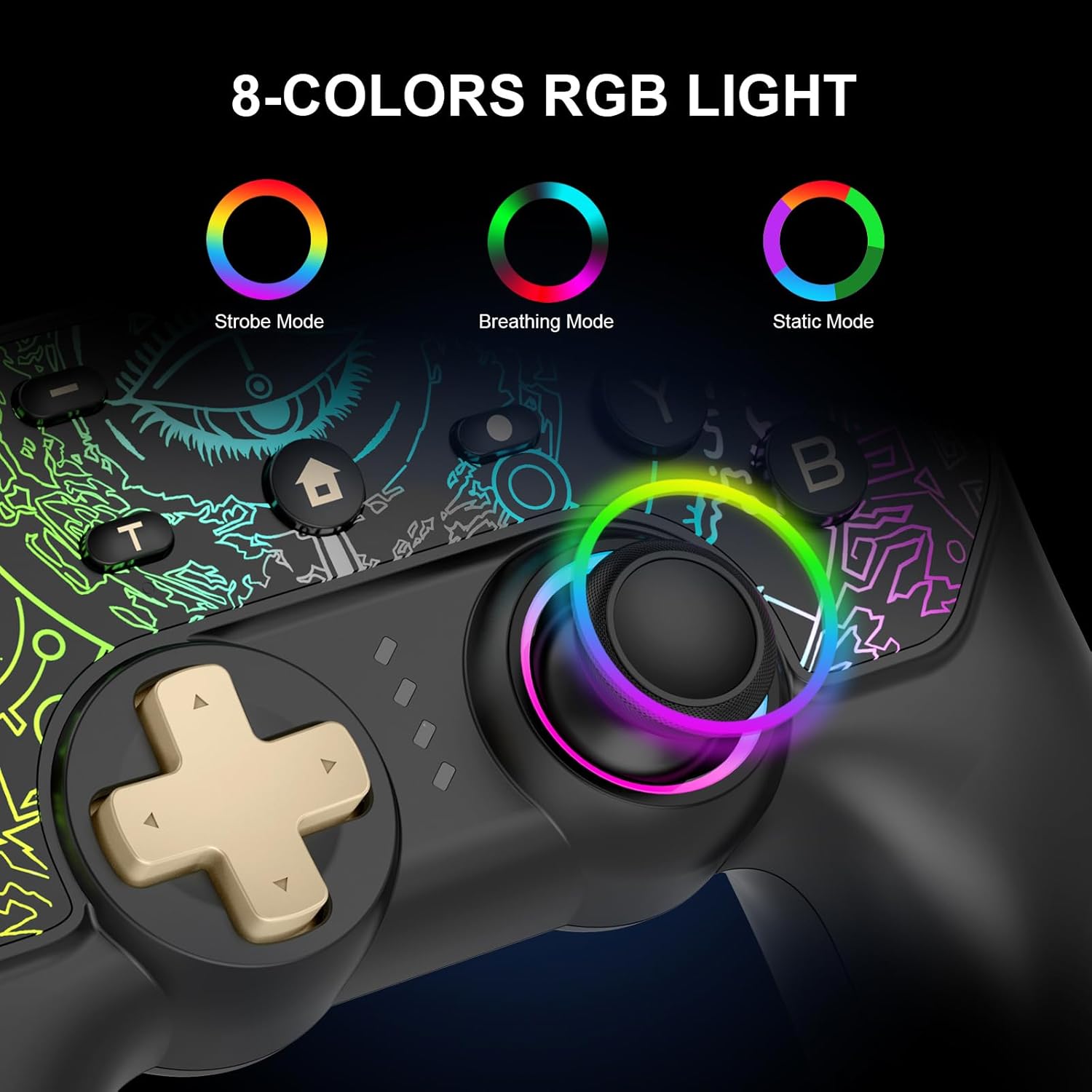
Image 5.1: Illustration of the 8-color RGB lighting and its three distinct modes.

Billede 5.2: Endnu en view of the RGB lighting, detailing the Breathing, Constant Light, and Flashing modes.
5.3 Turbofunktion
The Turbo function allows for continuous rapid firing of a button. To activate or deactivate:
- Tryk og hold på Turbo-knap, then press the desired action button (A/B/X/Y, L/R, ZL/ZR) to set Turbo.
- Repeat the process to deactivate Turbo for that button.
You can also adjust the Turbo speed:
- Trykke 'T' button + Right Stick Up: Increase Turbo speed.
- Trykke 'T' button + Right Stick Down: Decrease Turbo speed.
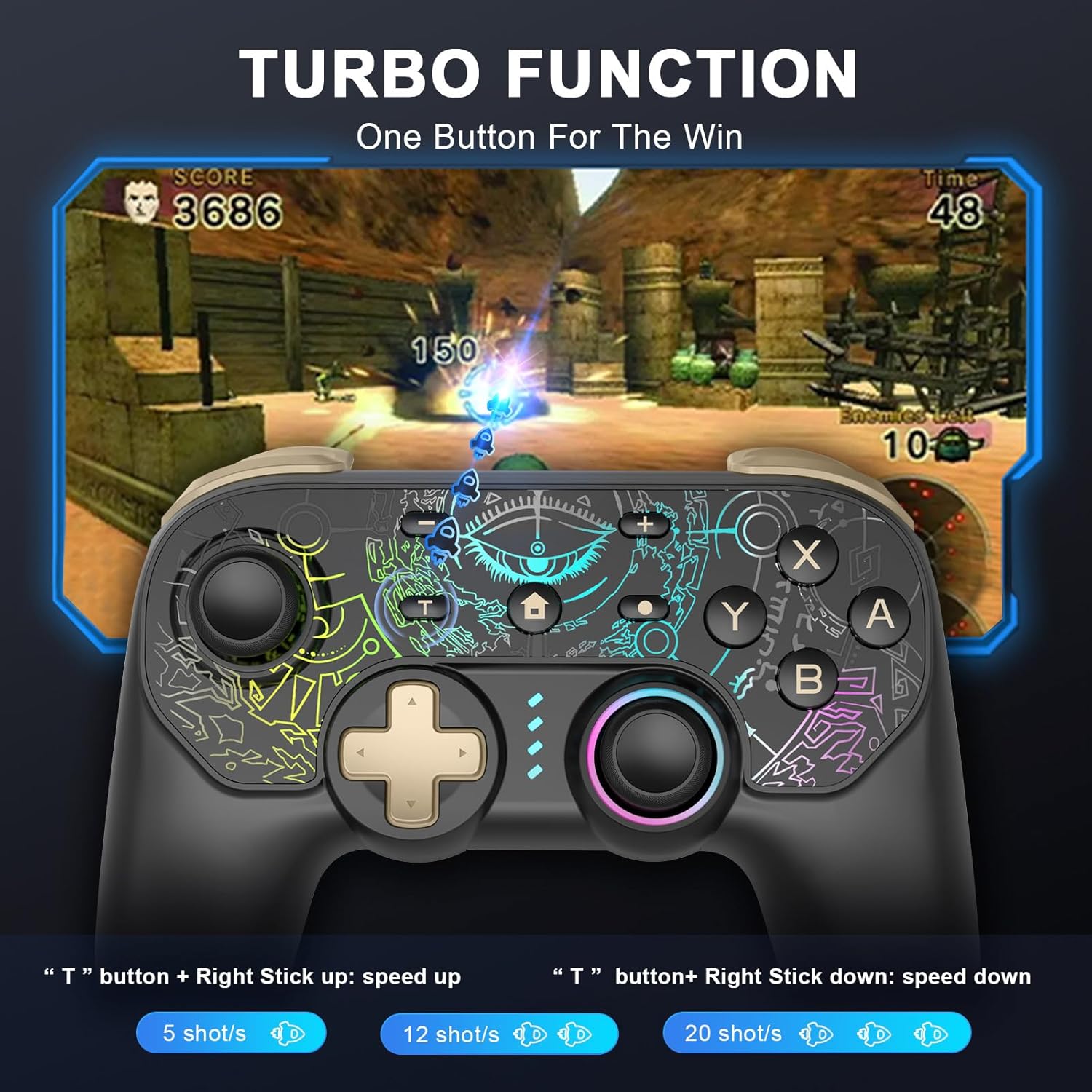
Image 5.3: Visual guide to activating and adjusting the Turbo function for rapid input.
5.4 Vibrationsjustering
The controller features 5 adjustable vibration modes. Use the Vibration Adjustment button on the back of the controller to cycle through the intensity levels.

Image 5.4: Depiction of the controller's 5-level vibration feedback system.
5.5 Hall Effect Joysticks and Linear Triggers
The controller is equipped with Hall Effect joysticks, which utilize magnetic sensors for enhanced precision and to prevent drift over time. The linear triggers provide accurate input, ranging from weak to strong, ideal for games requiring nuanced control like racing simulations.

Image 5.5: An illustration demonstrating the internal mechanism and benefits of the Hall Effect joystick technology.
5.6 6-akset gyro-bevægelseskontrol
The integrated 6-axis gyroscope allows for precise motion control, enabling intuitive direction and view adjustments in compatible games.
Image 5.6: Visual representation of the 6-axis gyro motion control capability.
5.7 Skærmbilledefunktion
Press the dedicated Screenshot button to capture in-game moments instantly.
6. Vedligeholdelse
- Hold controlleren tør og væk fra ekstreme temperaturer.
- Rengør controlleren med en blød, tør klud. Undgå at bruge skrappe kemikalier eller slibende materialer.
- Store the controller in a safe place to prevent damage when not in use.
7. Fejlfinding
- Controlleren forbinder ikke: Ensure the controller is charged. Try re-pairing the controller by following the connection steps for your specific device. Ensure Bluetooth is enabled on your device.
- Inputforsinkelse eller manglende respons: Ensure the controller is fully charged. Move closer to your device to reduce potential interference. For PC, try a wired connection.
- Knapper virker ikke: Ensure the controller is properly connected. If specific buttons are unresponsive, contact customer support.
- Vibration virker ikke: Check if vibration is enabled in your game settings. Ensure the vibration intensity is not set to the lowest level on the controller.
- RGB-lys virker ikke: Press the Light Mode button to cycle through modes. Ensure the controller has sufficient battery.
8. Specifikationer
| Feature | Detalje |
|---|---|
| Model | B0DKT5Q16N |
| Forbindelse | Trådløs (Bluetooth), Kablet (USB-C) |
| Kompatibilitet | Nintendo Switch/Lite/OLED, PC (Windows 7/8/10), Android (HID mode), iOS |
| Batterikapacitet | 1000mAh litiumpolymer (inkluderet) |
| Opladningstid | 2-3 timer |
| Spilletid | 15-18 timer |
| Særlige funktioner | 8-Color RGB Lighting (3 modes), Turbo Function, 5-Level Vibration, Hall Effect Joysticks, 6-Axis Gyro Motion Control, Linear Triggers |
| Varens vægt | 10.6 ounce |
| Pakkedimensioner | 6.5 x 5.12 x 2.64 tommer |
9. Garanti og support
DYONDER provides after-sales support for its products. If you encounter any issues or have questions regarding your controller, please contact our professional after-sales team. We are dedicated to ensuring your complete satisfaction.
For assistance, please refer to the contact information provided with your purchase or visit the official DYONDER support webwebsted.
