Indledning
Welcome to the user manual for your NITHO NEXUS Wireless Controller. This manual provides detailed instructions on how to set up, operate, maintain, and troubleshoot your controller, ensuring you get the most out of its advanced features. The NEXUS controller is designed for a superior gaming experience across multiple platforms, including PC, iOS, and Android devices.
Key features include a precise 6-axis gyroscope, customizable RGB lighting effects, Hall effect triggers for enhanced precision, and an adjustable turbo function.
Pakkens indhold
- NITHO NEXUS Wireless Controller
- USB Type-C opladerkabel
- Brugervejledning (dette dokument)
Produkt overview
Familiarize yourself with the various components of your NITHO NEXUS Wireless Controller.
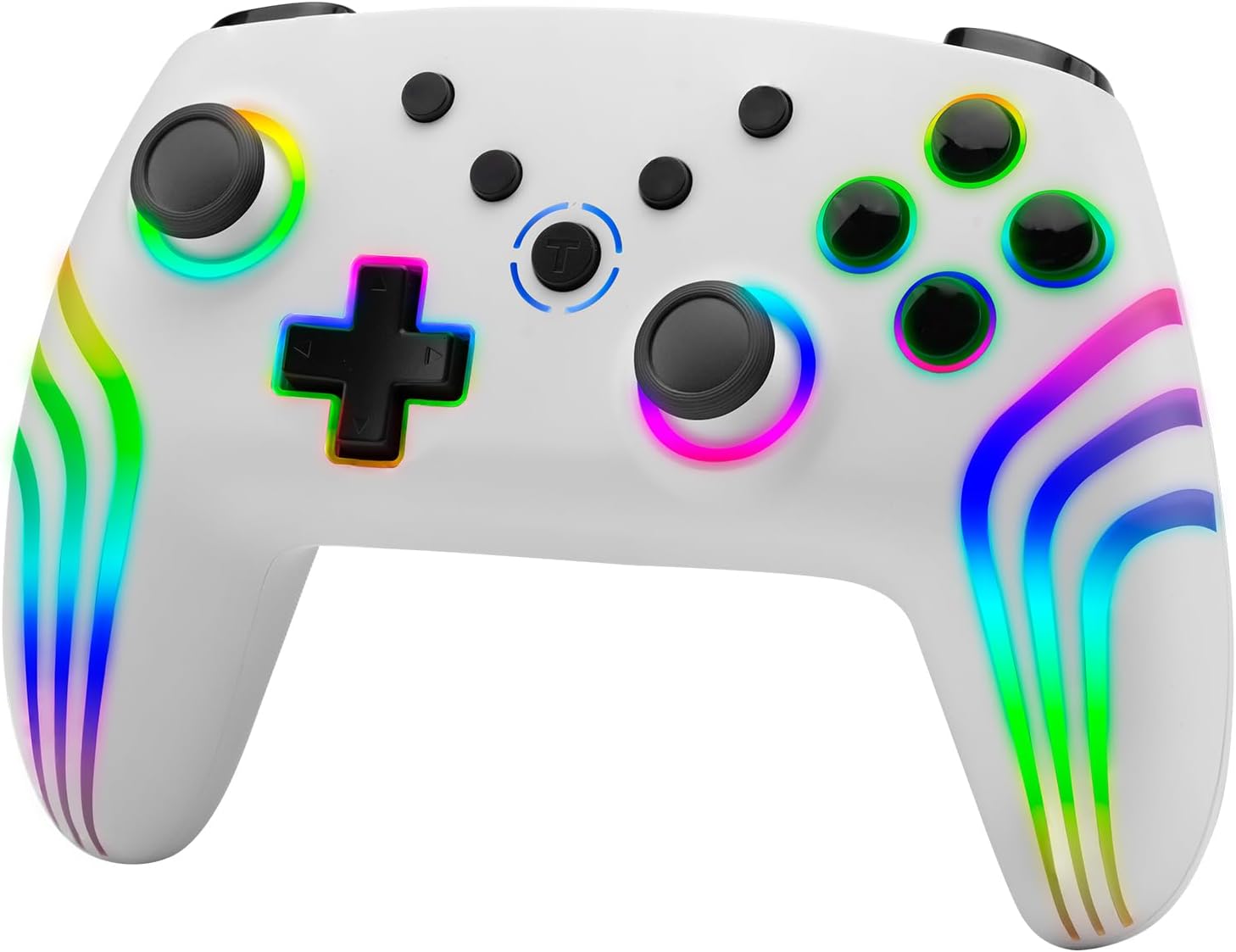
Figur 1: Front view of the NITHO NEXUS Wireless Controller, showcasing its ergonomic design and vibrant RGB lighting along the handles and around the joysticks and buttons.

Figur 2: The controller highlighting its long battery life, capable of up to 8 hours of continuous playtime on a single charge.

Figur 3: Nærbillede view of the high-quality analog mini sticks, designed for precise control and durability.

Figur 4: Illustration of the Hall Effect Triggers, which provide accurate and responsive input for an enhanced gaming experience.

Figur 5: Diagram illustrating the 6-axis motion sensor capability, allowing for motion-controlled gameplay.

Figur 6: Indre view highlighting the dual motor vibration system, providing immersive haptic feedback during gameplay.

Figur 7: Close-up of the programmable turbo and auto turbo buttons, allowing for rapid, customizable input sequences.

Figur 8: Controlleren viserasing its dynamic RGB LED light effects, which can be customized to personal preference.

Figur 9: Dimensional drawing of the NITHO NEXUS Wireless Controller, indicating its physical measurements (161mm x 111mm x 65mm).
Opsætning
1. Opladning af controlleren
Before first use, fully charge the controller. Connect the included USB Type-C cable to the controller's charging port and the other end to a USB power source (e.g., PC, USB wall adapter).
- Opladningstid: Cirka 2.5 til 3 timer.
- Batterilevetid: Op til 8 timers spilletid på en fuld opladning.
2. Parring med enheder
The NITHO NEXUS controller supports wireless connection via Bluetooth for PC, iOS, and Android devices.
2.1. Parring med pc (Windows)
- Sørg for, at Bluetooth er aktiveret på din Windows-pc.
- På controlleren skal du trykke på og holde Parringsknap (refer to Product Overview for location) until the indicator lights begin to flash rapidly.
- Gå til på din pc Indstillinger > Enheder > Bluetooth og andre enheder.
- Klik Tilføj Bluetooth eller anden enhed og vælg Bluetooth.
- Select "NITHO NEXUS Controller" from the list of available devices.
- Once paired, the indicator light on the controller will become solid.
2.2. Parring med iOS-enheder
- Ensure Bluetooth is enabled on your iOS device (iPhone, iPad).
- På controlleren skal du trykke på og holde Parringsknap until the indicator lights begin to flash rapidly.
- På din iOS-enhed skal du gå til Indstillinger > Bluetooth.
- Under "OTHER DEVICES", select "NITHO NEXUS Controller".
- Once paired, the indicator light on the controller will become solid.
2.3. Parring med Android-enheder
- Sørg for, at Bluetooth er aktiveret på din Android-enhed.
- På controlleren skal du trykke på og holde Parringsknap until the indicator lights begin to flash rapidly.
- På din Android-enhed skal du gå til Indstillinger > Tilsluttede enheder > Bluetooth.
- Tryk på Par ny enhed and select "NITHO NEXUS Controller" from the list.
- Once paired, the indicator light on the controller will become solid.
Betjeningsvejledning
1. Tænd/sluk
- For at tænde: Tryk på Hjem-knap.
- For at slukke: Tryk og hold nede Hjem-knap for 3 seconds until the indicator lights turn off. The controller will also automatically power off after 5 minutes of inactivity.
2. Justering af vibrationsintensitet
The controller features 4 adjustable vibration intensity modes.
- Modes: None, Weak, Medium, Strong.
- To adjust: Refer to the controller's specific button combination for vibration adjustment (usually a combination of a function button and a directional pad input). (Note: Specific button combination not provided in source, general instruction given.)
3. 6-Axis Motion Sensor
The built-in high-sensitivity 6-axis gyroscope detects motion, tilt, and rotation, enhancing gameplay in supported titles.
- Sørg for, at det spil, du spiller, understøtter bevægelsesstyring.
- Calibrate the gyroscope if you experience drift or inaccurate motion sensing. (Note: Calibration method not provided in source, general instruction given.)
4. Adjustable Turbo Function
The turbo function allows for rapid, repetitive button presses. It can be set to manual turbo or auto turbo.
- Turbohastigheder: 8, 15 eller 25 skud i sekundet.
- Indstilling af turbo:
- Tryk og hold på Turbo knap.
- While holding Turbo, press the desired action button (e.g., A, B, X, Y) to assign turbo to it.
- Release both buttons. The assigned button will now activate turbo when pressed.
- Setting Auto Turbo:
- Follow steps for setting Turbo.
- Tryk på Turbo knap again, then press the already turbo-assigned action button. This will toggle it to auto turbo.
- The button will now continuously activate without needing to be held down.
- Justering af turbohastighed:
- Tryk og hold på Turbo knap.
- Brug Op/Ned directional pad to cycle through the turbo speeds.
- Deaktivering af Turbo:
- Tryk og hold på Turbo knap.
- Press the turbo-assigned action button twice to disable turbo for that specific button.
- To clear all turbo settings, press and hold the Turbo knap og den Minus (-) knap samtidigt i 3 sekunder.
5. RGB LED Lighting Effects
The controller features customizable multi-color RGB LED lighting effects.
- To cycle through lighting modes: Press the RGB knap (if available) or a specific button combination. (Note: Specific button combination not provided in source, general instruction given.)
- To turn off/on lights: Press and hold the RGB knap or relevant combination.
Opretholdelse
Proper maintenance ensures the longevity and optimal performance of your NITHO NEXUS Wireless Controller.
- Rensning: Brug en blød, tør klud til at tørre controlleren af. Ved genstridigt snavs, tør letampRengør kluden med vand. Brug ikke skrappe kemikalier eller slibende rengøringsmidler.
- Opbevaring: Opbevar controlleren et køligt, tørt sted væk fra direkte sollys og ekstreme temperaturer.
- Batteripleje: Avoid fully discharging the battery frequently. If storing for an extended period, charge the controller to about 50% every few months to preserve battery health.
- Undgå dråber: Beskyt controlleren mod fysiske stød og fald, som kan beskadige interne komponenter.
Fejlfinding
| Problem | Mulig årsag | Løsning |
|---|---|---|
| Controlleren tænder ikke. | Lavt batteri. | Charge the controller using the provided USB Type-C cable. |
| Controlleren parres ikke med enheden. | Bluetooth is off on the device; Controller not in pairing mode; Interference. | Ensure Bluetooth is enabled. Put controller into pairing mode (flashing lights). Move closer to the device. Try restarting both controller and device. |
| Inputforsinkelse eller afbrydelse. | Low battery; Too far from device; Wireless interference. | Charge the controller. Move closer to the device. Avoid obstacles between controller and device. Reduce other wireless activity. |
| Knapper eller joysticks reagerer ikke. | Software glitch; Physical damage. | Restart the controller. If problem persists, contact customer support. |
| Motion controls are inaccurate. | Gyroscope calibration needed. | Perform gyroscope calibration (refer to device or game settings, or controller manual if specific steps are provided). |
Specifikationer
| Feature | Detalje |
|---|---|
| Modelnummer | MLT-NEXS-W |
| Kompatibilitet | PC (Windows), iOS, Android |
| Forbindelse | Trådløs (Bluetooth) |
| Batteritype | Lithium-ion (inkluderet) |
| Batterilevetid | Op til 8 timers spilletid |
| Opladningstid | Cirka 2.5-3 timer |
| Dimensioner (L x B x H) | 16.1 x 6.5 x 11.1 cm (6.34 x 2.56 x 4.37 tommer) |
| Vægt | 250 g (0.55 lbs) |
| Sensorer | 6-axis Gyroscope, Accelerometer |
| Udløsere | Hall-effekt udløsere |
| Vibration | Dual Motor Vibration (4 intensity modes) |
| Belysning | RGB LED Lighting Effects |
| Særlige funktioner | Adjustable Turbo Function (8, 15, 25 shots/sec) |
Garanti og support
Garantioplysninger
NITHO products are covered by a limited warranty against defects in materials and workmanship. Please refer to the warranty card included with your product or visit the official NITHO webwebstedet for detaljerede garantivilkår og -betingelser, der er specifikke for din region.
This warranty does not cover damage caused by accident, abuse, misuse, natural disaster, or unauthorized modification or repair.
Kundesupport
If you encounter any issues or have questions not covered in this manual, please contact NITHO customer support. For the most up-to-date contact information, please visit:
Please have your product model number (MLT-NEXS-W) and purchase information ready when contacting support.


