1. Introduktion
This manual provides detailed instructions for the installation, operation, and maintenance of your ieGeek S3 2K Wireless Outdoor Security Camera. Please read this manual thoroughly before using the product to ensure proper function and safety. Keep this manual for future reference.
2. Produktet er slutview
The ieGeek S3 is a 2K battery-powered wireless security camera designed for both indoor and outdoor use. It features 180° pan rotation, smart motion detection, color night vision, and two-way audio communication.
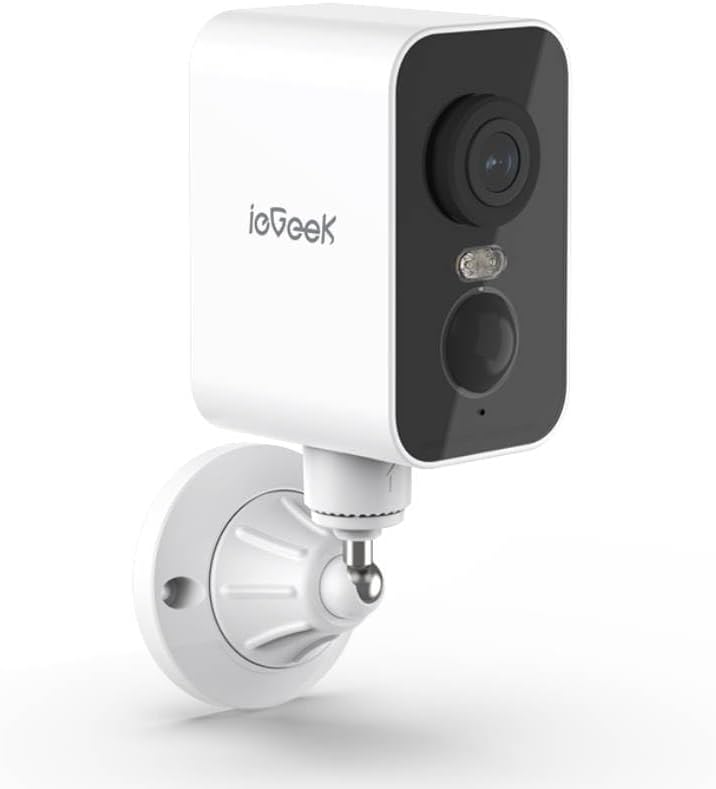
Figur 2.1: ieGeek S3 2K Wireless Outdoor Security Camera. This image displays the white rectangular camera body with a black front panel housing the lens, an LED light, and a motion sensor. The camera is attached to a white wall-mount bracket.
2.1 Hvad er der i æsken
- ieGeek S3 Battery Security Camera
- Bracket Screw Pack (for wall mounting)
- Installationsmærkat
- Ladekabel
- Instruktionsmanual (dette dokument)
3. Opsætning
3.1 Opladning af kameraet
Before initial use, fully charge the camera's built-in 5200 mAh lithium-ion battery using the provided charging cable. Connect the cable to the camera's charging port and a standard USB power adapter (not included). The charging indicator light will provide status.
3.2 Download af app og oprettelse af konto
- Download the 'CloudEdge' or 'ieGeek Cam' app from your smartphone's app store (iOS or Android).
- Åbn appen, og følg instruktionerne på skærmen for at oprette en ny konto eller logge ind, hvis du allerede har en.
3.3 Fysisk installation (vægmontering)
The ieGeek S3 camera is designed for wall mounting and has an IP65 waterproof rating, making it suitable for outdoor environments.
- Choose a suitable location for installation. Ensure the camera has a clear field of view og god Wi-Fi-signalstyrke.
- Use the provided installation sticker to mark the drill holes on the wall.
- Bor huller og isæt vægankrene.
- Attach the mounting bracket to the wall using the screws from the bracket screw pack.
- Secure the camera to the mounting bracket. Adjust the camera angle as needed.
3.4 Enhedsparring med app
- Ensure your smartphone is connected to a 2.4GHz Wi-Fi network. The camera supports 2.4GHz Wi-Fi only.
- Open the 'CloudEdge' or 'ieGeek Cam' app and tap the '+' icon to add a new device.
- Vælg din kameramodel fra listen.
- Follow the in-app instructions to power on the camera and reset it if necessary (usually by pressing a reset button until an indicator light flashes).
- Scan the QR code displayed on your phone screen with the camera lens. Hold the phone approximately 4-8 inches (10-20 cm) from the camera.
- Once the camera confirms successful scanning (e.g., with an audible prompt), proceed in the app to complete the connection.
- Name your camera and set its location.
4. Betjening af kameraet
4.1 Live View and Pan Rotation
Fra appens hovedskærm skal du trykke på dit kamera for at få adgang til live-optagelsen. view. You can use the on-screen controls to pan the camera 180° horizontally to adjust the viewvinkel.
4.2 Bevægelsesdetektion og advarsler
The camera features AI motion detection. When motion is detected, the camera will record a video clip and send an alert to your smartphone. You can customize motion detection sensitivity and alert settings within the app.
4.3 Tovejslyd
Utilize the built-in microphone and speaker for two-way communication. Tap the microphone icon in the live view to speak through the camera, and listen to audio from the camera's location.
4.4 Nattesyn
The camera automatically switches to color night vision in low-light conditions, providing clear surveillance up to 33 feet (10 meters) using its infrared LEDs.
4.5 Videolagring
Optaget video footage kan opbevares på to måder:
- TF Card (MicroSD): Insert a TF card (up to 128GB, not included) into the camera's designated slot for local storage.
- Cloud Storage: Optional cloud storage services may be available through the app for remote access and backup of recordings.
4.6 Alexa-integration
The ieGeek S3 camera is compatible with Amazon Alexa. Follow the instructions in the 'CloudEdge' or 'ieGeek Cam' app to link your camera with your Alexa account for voice control and viewing live feeds on compatible Alexa devices.
5. Vedligeholdelse
5.1 Batteriopladning
The camera is battery-powered. When the battery level is low, you will receive an alert via the app. Recharge the camera using the provided charging cable. Battery life varies based on usage and environmental factors.
5.2 Rengøring
To maintain optimal performance, periodically clean the camera lens and housing with a soft, dry cloth. Avoid using harsh chemicals or abrasive materials that could damage the camera's surface or lens.
6. Fejlfinding
- Kameraet opretter ikke forbindelse til Wi-Fi: Ensure your Wi-Fi network is 2.4GHz. Check Wi-Fi signal strength at the camera's location. Try resetting the camera and repeating the pairing process.
- Dårlig billedkvalitet: Rengør kameralinsen. Sørg for, at der ikke er nogen forhindringer i kameraets synsfelt. viewTjek din internetforbindelses hastighed.
- Bevægelsesdetektion virker ikke: Verify motion detection is enabled in the app settings. Adjust sensitivity levels. Ensure the camera is positioned correctly to capture motion in the desired area.
- Batteriet aflades hurtigt: Hyppige bevægelsesdetekteringshændelser, live view access, and two-way audio use can consume battery faster. Reduce motion detection sensitivity or frequency if possible. Ensure the camera is fully charged.
- App-problemer: Ensure the app is updated to the latest version. Try restarting the app or your smartphone.
7. Specifikationer
| Modelnavn | ieGeek Battery Cam S3 |
| Videooptagelsesopløsning | 2K (3 MP effektiv stillbilledopløsning) |
| Indendørs/Udendørs brug | Indendørs, Udendørs |
| Strømkilde | Batteridrevet (5200 mAh litium-ion) |
| Forbindelsesteknologi | 2.4GHz Wi-Fi (Wi-Fi 6 Technology) |
| Controller type | CloudEdge, Amazon Alexa, ieGeek Cam App |
| Monteringstype | Vægmontering |
| Særlige funktioner | Pan Rotating 180°, AI Motion Detection, Color Night Vision, 2-Way Audio |
| Viewi vinkel | 180 grader (panorering) |
| Night Vision Range | 33 fod (10 meter) |
| Billedhastighed | 15 billeder i sekundet |
| Vandmodstandsniveau | Vandtæt (IP65) |
| Opbevaringsmuligheder | TF Card (MicroSD) up to 128 GB, Cloud Storage (optional) |
| Dimensioner (L x B x H) | 3.9 x 1 x 3.9 tommer |
| Varens vægt | 11.2 ounce |
| Kompatible enheder | Alexa, Smartphone, Smartwatch, Tablet |
8. Garanti og support
For warranty information, please refer to the specific terms provided at the time of purchase or contact ieGeek customer support directly. If you encounter any issues or have questions regarding your ieGeek S3 camera, please visit the official ieGeek website or contact their customer service team for assistance.
Online support: Visit the ieGeek Store on Amazon


