1. Introduktion
This manual provides comprehensive instructions for the installation, operation, and maintenance of your GRIFEMA Dual Monitor Mount, model GB2004-2. Designed to support two monitors ranging from 13 to 32 inches, this mount enhances your workspace ergonomics and organization. Please read these instructions carefully before assembly and use to ensure safe and correct operation.
2. Sikkerhedsoplysninger
- Sørg for, at alle komponenter er til stede og ubeskadigede før montering. Må ikke anvendes, hvis nogen af delene mangler eller er defekte.
- Verify that your desk surface can support the combined weight of the mount and two monitors.
- Overskrid ikke den maksimale vægtkapacitet på 10 kg (22 lbs) pr. arm.
- Always tighten all screws securely. Loose connections can cause instability.
- Hold børn og kæledyr væk under installationen.
- If you encounter any difficulties, consult the troubleshooting section or contact customer support.
3. Pakkens indhold
Kontroller venligst, at alle følgende komponenter er inkluderet i din pakke:
- Hovedstang med base
- Dobbelt skærmarme
- VESA Plates (2x)
- Skrivebord Clamp Forsamling
- Grommet-monteringsbeslag
- Kabelhåndteringsklip
- Hex Keys and Mounting Screws (various sizes)
- Instruktionsmanual

Figur 1: Overview of the GRIFEMA Dual Monitor Mount components.
4. Opsætning og installation
The GRIFEMA Dual Monitor Mount offers two installation methods: desk clamp and grommet mount. Choose the method best suited for your desk.
4.1. Choose Installation Method

Figur 2: Illustration of the two available installation methods for the monitor mount.
4.1.1. Skrivebord Clamp Installation
- Fastgør skrivebordet clamp assembly to the main pole.
- Placer clamp on the edge of your desk. Ensure the desk thickness is between 10mm and 70mm.
- Spænd clamp skruen, indtil beslaget er sikkert fastgjort til skrivebordet.
4.1.2. Montering af rørbeslag
- If your desk has a grommet hole, insert the main pole through it. If not, a hole must be drilled (ensure proper safety precautions and desk compatibility).
- Secure the main pole from underneath the desk using the grommet plate and tightening screw.
4.2. Attaching Monitor Arms and Monitors
- Slide the dual monitor arms onto the main pole at your desired height. Secure them with the provided locking mechanism.
- Attach the VESA plates to the back of your monitors using the appropriate screws. This mount supports VESA patterns of 75x75mm and 100x100mm.
- Carefully slide the monitors (with VESA plates attached) onto the monitor arms until they click into place. Ensure they are securely locked.
4.3. Kabelforvaltning
Utilize the integrated cable management clips along the arms and pole to route your monitor cables. This helps maintain a tidy and organized workspace.
5. Betjening og justeringer
The GRIFEMA Dual Monitor Mount offers full articulation for optimal viewkomfort.
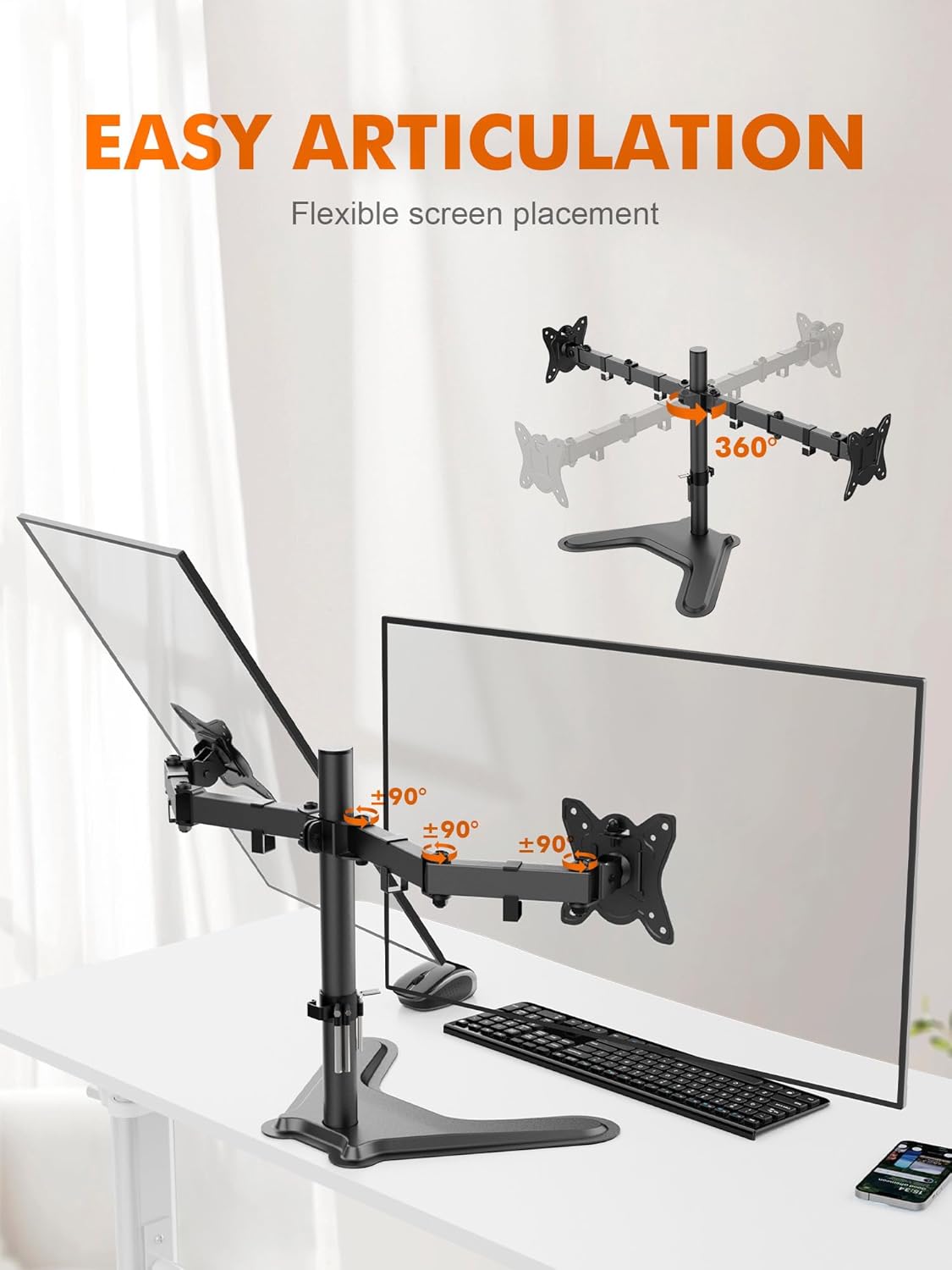
Figur 3: Demonstrating the flexible articulation of the monitor arms.
5.1. Højdejustering
To adjust the height of the monitor arms, loosen the locking mechanism on the main pole, slide the arms to the desired vertical position (maximum arm height 395mm), and then re-tighten the mechanism securely.
5.2. Hældningsjustering
Monitors can be tilted up to ±90 degrees (up or down) to reduce glare and achieve a comfortable viewing angle. Loosen the tilt knob behind the VESA plate, adjust the monitor, and then re-tighten.
5.3. Drejejustering
Each monitor arm can swivel up to ±90 degrees (left or right) at the joint closest to the main pole, allowing you to share your screen or adjust your viewing stilling.
5.4. Rotation Adjustment
Monitors can be rotated 360 degrees, allowing for easy switching between landscape and portrait orientations without removing the monitor.

Figur 4: Detaljeret view of tilt, swivel, and rotation capabilities.
6. Vedligeholdelse
Regelmæssig vedligeholdelse sikrer din skærmbeslags levetid og optimale ydeevne.
- Rensning: Tør holderen af med en blød kludamp klud. Undgå slibende rengøringsmidler eller opløsningsmidler.
- Tjek forbindelser: Kontrollér regelmæssigt alle skruer og bolte for at sikre, at de forbliver stramme. Spænd dem igen om nødvendigt.
- Smøring: No lubrication is typically required for the moving parts.
7. Fejlfinding
If you encounter issues with your GRIFEMA Dual Monitor Mount, refer to the following common problems and solutions:
- Monitors are not stable or sag: Ensure all VESA plate screws are tightened. Verify that the monitor weight does not exceed 10 kg per arm. Adjust tension screws on the arms if available (refer to specific arm design).
- Mount feels loose on the desk: Spænd skrivebordsklemmen igenamp or grommet mount screw. Ensure the desk surface is suitable and stable.
- Vanskeligheder med at justere skærmens position: Check if any locking mechanisms or tension screws are overly tightened. Loosen slightly to allow movement, then re-tighten to hold position.
- Manglende dele: Contact GRIFEMA customer support immediately if any parts are missing from the package.
8. Specifikationer
| Modelnummer | GB2004-2 |
| Understøttet skærmstørrelse | 13-32 tommer |
| Vægt kapacitet | Up to 10 kg (22 lbs) per arm |
| VESA-kompatibilitet | 75x75mm, 100x100mm |
| Tilt vinkel | ±90 grader |
| Drejevinkel | ±90 grader |
| Rotation | 360 grader |
| Maximum Arm Height | 395 mm |
| Maksimal armforlængelse | 450 mm |
| Skrivebord Clamp Tykkelse | 10 mm - 70 mm |
| Materiale | Aluminiumslegering |
| Farve | Sort |

Figur 5: Dimensional specifications of the monitor mount.
9. Garanti og support
GRIFEMA products are manufactured with quality and durability in mind. For warranty information or technical support, please refer to the contact details provided with your purchase or visit the official GRIFEMA webwebsted.


