1. Introduktion
The ULANZI C041 Rotatable Half Collar Mount Plate is designed to enhance your photography experience by providing a stable and versatile mounting solution for DSLR cameras with compatible lenses. This mount allows for quick transitions between horizontal and vertical shooting orientations without recomposing your shot, and offers precise angle adjustments. It features an Arca-Swiss quick release interface for broad compatibility with various photography equipment.
2. Hvad er der i æsken
- ULANZI C041 Rotatable Half Collar Mount Plate (95mm Adapter Ring)
- Built-in Hex Wrench
3. Specifikationer
| Feature | Detalje |
|---|---|
| Model | C041 (also referred to as CA03 on product) |
| Kompatibilitet | DSLR Cameras, Arca-Type Plate, Canon, Nikon, Fujifilm, Sigma Lenses (95mm ring mount) |
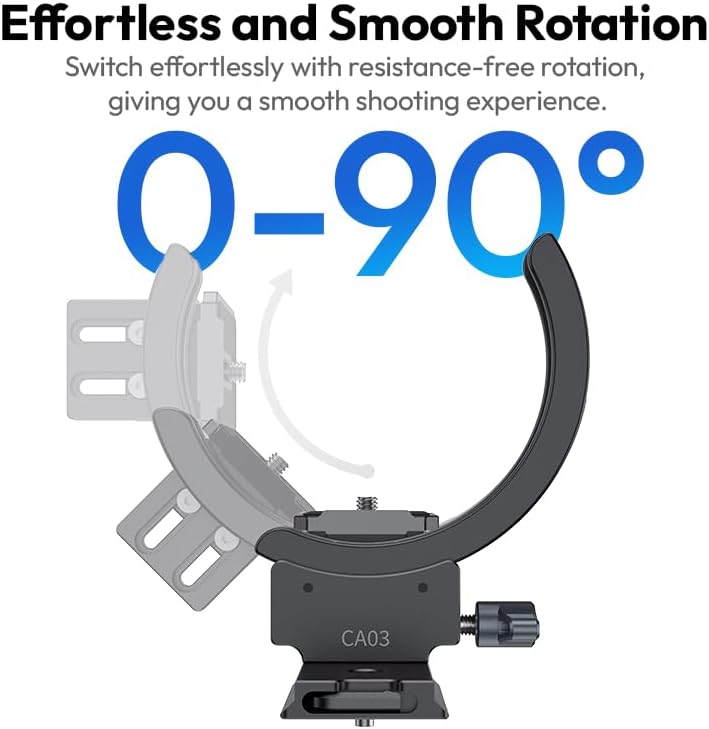
| Rotationsvinkel | 0-90° smooth tilt |
| Monteringsgrænseflade | Arca-Swiss dovetail groove, standard 3/8" & 1/4" threads |
| Installation | Semi-enclosed C-Bracket design for easy, lens-on installation |
| Anti-deviation Features | Anti-dangle bosses, Arri locating holes |
| Adjustable Baseplate Height | 15.3 mm / 0.60 tommer |
| Varens vægt | 12 ounces (0.75 pund) |
| Pakkedimensioner | 5.83 x 5.79 x 2.87 tommer |
4. Opsætning
Follow these steps to properly install the ULANZI C041 Rotatable Half Collar Mount Plate onto your camera and lens setup.
- Forbered din linse: Ensure your lens has a 95mm diameter for compatibility with the adapter ring. The semi-enclosed C-Bracket design allows installation without removing the lens from the camera.
- Attach the Mount Plate: Slide the C-Bracket of the ULANZI C041 around your lens. Position it so that the baseplate aligns with the bottom of your camera.
- Adjust Baseplate Height: The baseplate height is adjustable (up to 15.3mm / 0.60 inch) to ensure the center of the lens aligns with the rotation axis. Use the built-in hex wrench to loosen the adjustment screw, set the desired height, and then tighten securely. This ensures optimal balance and smooth rotation.
- Sikre kameraet: Attach your camera to the mount plate using the standard 1/4" or 3/8" screw. Ensure it is firmly tightened to prevent any movement.
- Bekræft clearance: After installation, check that the mount does not obstruct any camera ports, buttons, or the battery compartment. Ensure full movement of the flip screen, if applicable.

5. Betjeningsvejledning
The ULANZI C041 offers flexible shooting options and stable performance.
5.1. Switching Between Vertical and Horizontal Shooting
The mount plate allows for a quick and seamless transition between vertical (portrait) and horizontal (landscape) shooting modes. This feature ensures that your subject remains centered during the transition, eliminating the need for recomposition.

5.2. Angle Adjustment (0-90° Tilt)
The integrated smooth bearing allows for a 0-90° tilt, providing precise angle adjustment for various shooting scenarios. To adjust the angle, loosen the locking mechanism, rotate the camera to the desired position, and then secure the lock.
5.3. Enhanced Stability Features
The mount incorporates multiple anti-deviation details, such as anti-dangle bosses and Arri locating holes. These features prevent the lens from shifting during use, contributing to a more stable shooting experience. The Arca-Swiss dovetail groove and 3/8" & 1/4" threads allow for easy mounting on tripods, monopods, and other photography equipment, facilitating quick switching and expansion.

6. Vedligeholdelse
To ensure the longevity and optimal performance of your ULANZI C041 Rotatable Half Collar Mount Plate, follow these simple maintenance guidelines:
- Rensning: Use a soft, dry cloth to wipe down the mount plate after each use to remove dust, dirt, or fingerprints. For stubborn grime, a slightly damp en klud kan bruges, efterfulgt af øjeblikkelig tørring. Undgå barske kemikalier eller slibende materialer.
- Smøring: The rotating mechanism is designed for smooth operation. Avoid applying external lubricants unless specifically instructed by ULANZI support, as this could attract dust and degrade performance.
- Opbevaring: Store the mount plate in a clean, dry environment away from extreme temperatures and humidity. If not in use for extended periods, consider storing it in its original packaging or a protective pouch.
- Inspektion: Periodically check all screws and connections to ensure they are tight. If any components appear loose or damaged, discontinue use and contact customer support.
7. Fejlfinding
If you encounter any issues with your ULANZI C041 Rotatable Half Collar Mount Plate, refer to the following common problems and solutions:
- Spørgsmål: The rotation mechanism feels stiff or makes a grinding sound.
Løsning: Ensure the locking mechanism is fully disengaged before rotating. Check for any debris or foreign objects obstructing the rotation. Clean the area around the bearing with a soft, dry cloth. If the issue persists, contact customer support. - Spørgsmål: The camera or lens shifts after being mounted.
Løsning: Verify that all mounting screws (for both the lens collar and the camera attachment) are securely tightened. Ensure the baseplate height is correctly adjusted for your lens to maintain balance. The anti-deviation features are designed to prevent shifting, so re-check installation steps. - Spørgsmål: The mount plate obstructs camera ports or screen movement.
Løsning: Re-evaluate the position of the C-Bracket on your lens. The semi-enclosed design allows for some adjustment. Ensure the baseplate height is correctly set to provide adequate clearance. - Spørgsmål: Difficulty attaching to a tripod or other equipment.
Løsning: Confirm that your tripod head or accessory uses an Arca-Swiss compatible clamp or has standard 1/4" or 3/8" mounting screws. Ensure the mount plate is correctly aligned with the receiving clamp or screw.
If these troubleshooting steps do not resolve your issue, please contact ULANZI customer support for further assistance.
8. Garanti og support
ULANZI products typically come with a limited warranty. Please refer to the warranty card included with your product or visit the official ULANZI website for detailed warranty terms and conditions. For technical support, product inquiries, or warranty claims, please contact ULANZI customer service through their official channels.
Online support: Besøg ULANZI officielle butik på Amazon or the ULANZI official webwebsted med ofte stillede spørgsmål, supportressourcer og kontaktoplysninger.


