1. Introduktion
Tak for købetasing the MISTRAL Horizon Twilight MHV7123DR-TL 7-inch DC High Velocity Fan. This manual provides essential information for the safe operation, installation, and maintenance of your fan. Please read it thoroughly before use and retain it for future reference.

Billede 1.1: Front view of the MISTRAL Horizon Twilight MHV7123DR-TL fan, showcasing its compact design and the fan head with the Mistral logo. A remote control is visible to the right of the fan.
2. Sikkerhedsinstruktioner
For at mindske risikoen for brand, elektrisk stød eller personskade skal du altid følge disse grundlæggende sikkerhedsforanstaltninger:
- Sørg for, at strømforsyningen voltage stemmer overens med typeskiltet på ventilatoren.
- Brug ikke ventilatoren med en beskadiget ledning eller stik. Kontakt kvalificeret servicepersonale, hvis den er beskadiget.
- Keep fingers and other objects away from the fan blades and moving parts during operation.
- Brug ikke blæseren i vådt eller damp steder, såsom badeværelser eller vaskerum.
- Tag ventilatorens stik ud af stikkontakten, før du rengør eller udfører vedligeholdelse.
- Dette apparat er ikke beregnet til brug af personer (inklusive børn) med nedsatte fysiske, sensoriske eller mentale evner, eller mangel på erfaring og viden, medmindre de har fået opsyn eller instruktion i brugen af apparatet af en person, der er ansvarlig for deres sikkerhed.
- Børn skal være under opsyn for at sikre, at de ikke leger med apparatet.
3. Pakkens indhold
Bekræft at alle varer er til stede i pakken:
- MISTRAL Horizon Twilight MHV7123DR-TL Fan Unit
- Fjernbetjening
- Brugervejledning (dette dokument)
4. Produktet er slutview
Gør dig bekendt med komponenterne i din ventilator:
4.1 Fan Unit
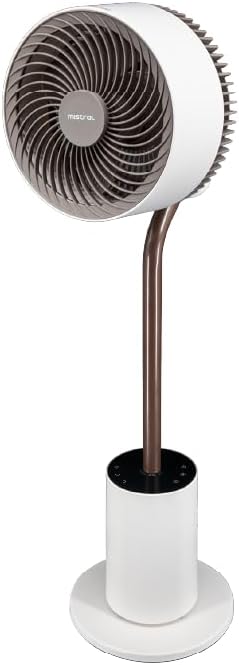
Billede 4.1: Detaljeret front view of the fan, highlighting the fan head, stand, and control base. This image provides a clear perspective of the fan's overall structure.
- Ventilatorhoved: Contains the fan blades and motor.
- Frontvagt: Beskyttelsesdæksel til ventilatorbladene.
- Rear Guard: Back cover of the fan head, housing the atmosphere light.
- Stå: Forbinder ventilatorhovedet til basen.
- Control Base: Houses the control panel and power input.
- Strømledning: Til tilslutning til en stikkontakt.
4.2 Fjernbetjening
The remote control allows convenient operation of all fan functions from a distance. (Refer to Image 1.1 for a visual of the remote control.)
- Power knap: Tænder/slukker ventilatoren.
- Hastighedsknap: Adjusts fan speed (1-12 speeds + Booster).
- Mode knap: Cycles through Normal, Natural, Sleeping, and ECO modes.
- Oscillationsknap: Activates/deactivates 3D oscillation (horizontal and vertical).
- Timer knap: Sets the operating timer (up to 12 hours).
- Lys knap: Controls the atmosphere light (On/Off, brightness adjustment).
- Indicating Lights Off Button: Turns off the control panel's indicator lights.
5. Opsætning
The MISTRAL Horizon Twilight fan typically comes pre-assembled. Follow these steps for initial setup:
- Udpakning: Tag forsigtigt ventilatoren og alt tilbehør ud af emballagen.
- Placering: Place the fan on a stable, flat surface. Ensure there is adequate space around the fan for proper air circulation and oscillation.
- Strømtilslutning: Sæt strømstikket i en passende stikkontakt.
- Batterier til fjernbetjening: Open the battery compartment on the remote control and insert the required batteries (not included, typically AAA). Ensure correct polarity.
6. Betjeningsvejledning
Operate your fan using either the control panel on the base or the remote control.
6.1 Tænd/sluk
- Tryk på Magt button on the control panel or remote control to turn the fan On or Off.
6.2 Hastighedskontrol
- Tryk på Hastighed button to cycle through 12 fan speed settings.
- A Booster Speed setting is also available for maximum airflow.
6.3 Tilstande
Tryk på Mode knappen for at vælge mellem følgende driftstilstande:
- Normal tilstand: Giver en konstant luftstrøm ved den valgte hastighed.
- Naturlig tilstand: Simulerer naturlig brise ved at variere ventilatorhastigheden periodisk.
- Sovemodus: Fungerer ved en lavere, mere stille hastighed, gradvist nedsatasing over time for comfortable sleep.
- ØKO -tilstand: Adjusts fan speed automatically based on ambient temperature to optimize energy consumption.
6.4 3D Oscillation
The fan features 3D oscillation for wider air distribution.
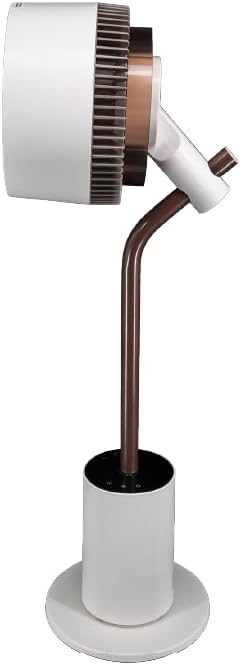
Billede 6.4: Side view of the fan, illustrating its ability to tilt vertically, which is part of its 3D oscillation feature. The fan head is angled upwards.
- Tryk på oscillation button to activate or deactivate the oscillation function.
- Horisontal oscillation: Left and Right movement at 30°, 60°, 90°, or 120° angles.
- Lodret oscillation: Up and Down movement at 50° or 90° angles.
- The fan can oscillate both horizontally and vertically simultaneously for 3D airflow.
6.5 Timer funktion
- Tryk på Timer button to set the fan to automatically turn off after a specified period.
- The timer can be set for up to 12 hours. Each press typically increases the timer by 1 hour.
6.6 Aroma Diffuser
The fan includes an aroma diffuser feature for a pleasant environment.
- Locate the aroma diffuser compartment (usually at the back of the fan head or base).
- Open the compartment and add a few drops of your preferred essential oil onto the provided pad (if applicable).
- Close the compartment. The fan's airflow will gently diffuse the aroma.
6.7 Inner Mood Lighting
The fan features an atmosphere light on the back of the rear guard.

Billede 6.7: The MISTRAL fan with its inner mood lighting activated, casting a warm glow from behind the fan head. This demonstrates the adjustable atmosphere light feature.
- Tryk på Lys button on the remote control to turn the mood light On/Off.
- Tryk på Lys button repeatedly to cycle through 3 adjustable brightness levels.
6.8 Indicating Lights Off Function
- Tryk på Indicating Lights Off button on the remote control to turn off the control panel's indicator lights, which can be useful in dark environments like a bedroom.
7. Vedligeholdelse
Regelmæssig rengøring og vedligeholdelse vil sikre optimal ydeevne og forlænge din ventilators levetid.
- Rengøring af ydersiden: Tør ventilatorens yderflader af med en blød, tør klud.amp klæde. Brug ikke slibende rengøringsmidler eller opløsningsmidler.
- Rengøring af ventilatorblade: Unplug the fan before attempting to clean the blades. If accessible, gently wipe the blades with a soft cloth to remove dust. Do not immerse the fan in water.
- Aroma Diffuser Pad: If using an aroma diffuser, regularly clean or replace the aroma pad to prevent residue buildup.
- Opbevaring: When not in use for extended periods, unplug the fan, clean it, and store it in a cool, dry place, preferably in its original packaging.
8. Fejlfinding
Hvis du støder på problemer med din ventilator, kan du se følgende almindelige problemer og løsninger:
| Problem | Mulig årsag | Løsning |
|---|---|---|
| Ventilatoren tænder ikke. | No power supply; Power button not pressed; Remote control batteries depleted. | Check power cord connection and wall outlet; Press the Power button; Replace remote control batteries. |
| Svag luftstrøm. | Low speed setting; Fan blades are dirty. | Increase fan speed; Clean fan blades (refer to Maintenance section). |
| Ventilatoren laver usædvanlig lyd. | Obstruction near blades; Fan not on a stable surface. | Unplug and check for obstructions; Place fan on a flat, stable surface. |
| Fjernbetjening virker ikke. | Batteries depleted or incorrectly inserted; Obstruction between remote and fan. | Replace batteries, ensuring correct polarity; Ensure clear line of sight to the fan's receiver. |
9. Specifikationer
| Feature | Detalje |
|---|---|
| Model | MHV7123DR-TL |
| Fan type | 7-inch DC High Velocity Fan |
| Motortype | Børsteløs DC-motor |
| Hastigheder | 12 Speeds + Booster Speed |
| Tilstande | Normal, Natural, Sleeping, ECO |
| oscillation | 3D Oscillation (Left/Right: 30°, 60°, 90°, 120°; Up/Down: 50°, 90°) |
| Timer | 12 timer |
| Særlige funktioner | Aroma Diffuser, Inner Mood Lighting (3 adjustable brightness), Indicating Lights Off Function, Remote Control |
| Strømkilde | Elektrisk med ledning |
| Produktdimensioner | 25D x 25W x 90H centimeter |
| Formfaktor | Stand / Floor Fan |
10. Garanti og support
MISTRAL products are manufactured to high-quality standards. For warranty information, please refer to the warranty card included with your purchase or visit the official MISTRAL website. For technical support or service inquiries, please contact MISTRAL customer service.
Gem venligst dit købsbevis for garantikrav.


