1. Introduktion
Thank you for choosing the Technaxx SUP Battery Air Pump TX-266. This device is designed to provide efficient and convenient inflation for various inflatables, including Stand-Up Paddle Boards, tents, and other items. It features a dual-stage inflation system, a digital display for pressure control, and a built-in power bank function. Please read this manual thoroughly before operating the device to ensure safe and optimal use.
2. Sikkerhedsinstruktioner
- Pumpen må ikke anvendes i våde omgivelser, og den må ikke nedsænkes i vand.
- Hold enheden væk fra børn.
- Ensure the correct pressure setting for your inflatable to prevent over-inflation and damage.
- Bloker ikke luftindtaget eller -udløbet under drift.
- Brug kun det medfølgende tilbehør og opladningskabler.
- Opbevar pumpen på et køligt, tørt sted, når den ikke er i brug.
- If the device shows signs of damage, do not use it and contact customer support.
3. Pakkens indhold
Bekræft at alle varer er til stede i pakken:
- SUP Battery Air Pump TX-266
- 6 x Nozzles (various sizes)
- 1 x Pump Hose (1 meter)
- 1 x 12V Car Charging Cable
- 1 x USB-C opladningskabel
- 1 x Brugermanual (dette dokument)
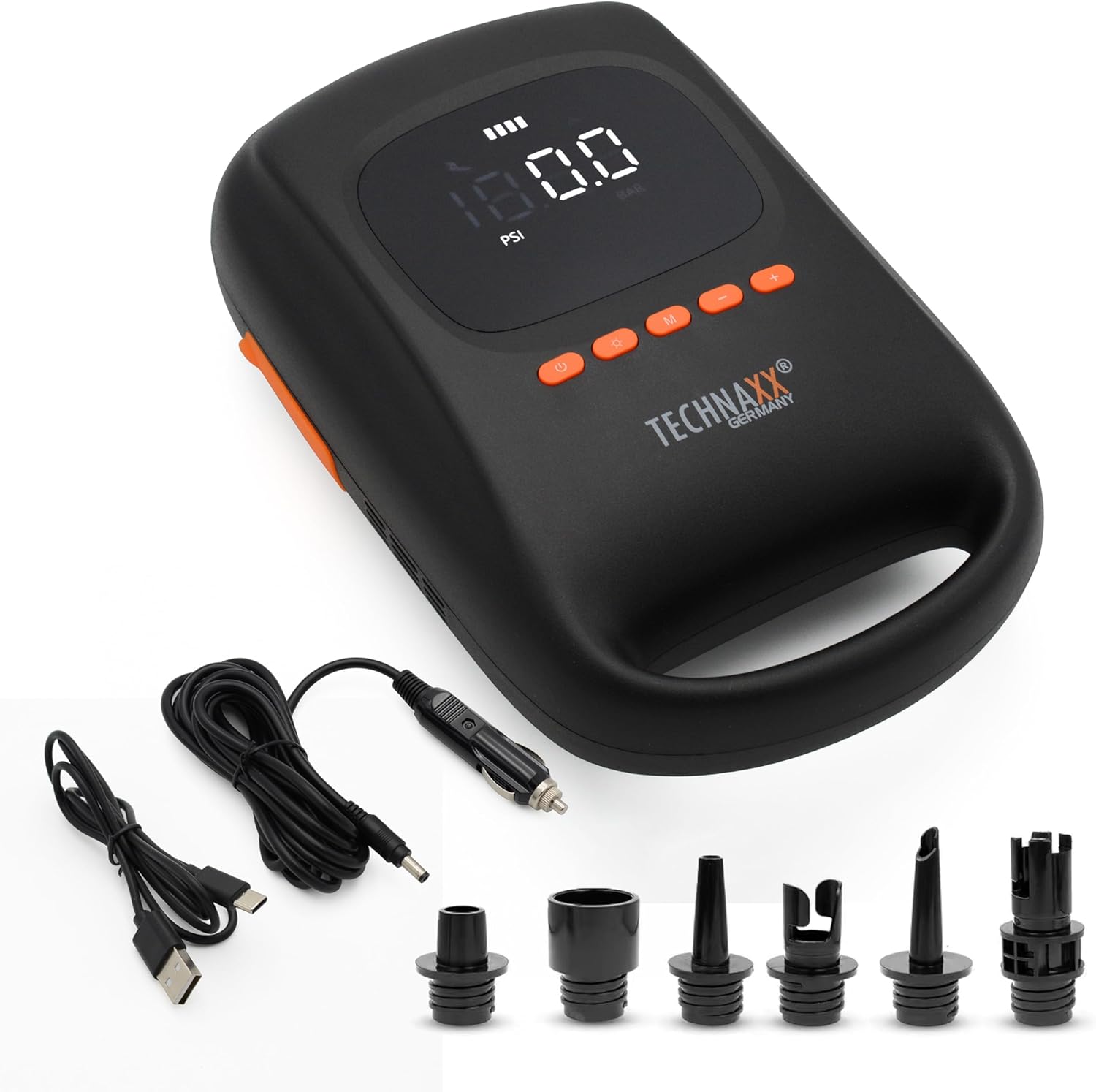
Image: The Technaxx SUP Battery Air Pump TX-266 shown with its complete set of accessories, including the pump unit, various nozzles, pump hose, 12V car charger, and USB-C charging cable.
4. Produktet er slutview
Familiarize yourself with the main components of the Technaxx SUP Battery Air Pump TX-266.

Billede: Et nærbillede view of the Technaxx SUP Battery Air Pump TX-266, highlighting the digital display, control buttons, attached hose, and the array of included nozzles for different valve types.
- Digital skærm: Shows real-time pressure and battery status.
- Kontrolknapper: Power, Mode, Pressure Adjustment (+/-).
- Oppustningsport: Connect the hose for inflation.
- Deflationsport: Connect the hose for deflation.
- LED lys: Two integrated LED lights for illumination.
- USB Output (Power Bank): Til opladning af eksterne enheder.
- DC-indgang: For charging the pump's internal battery.
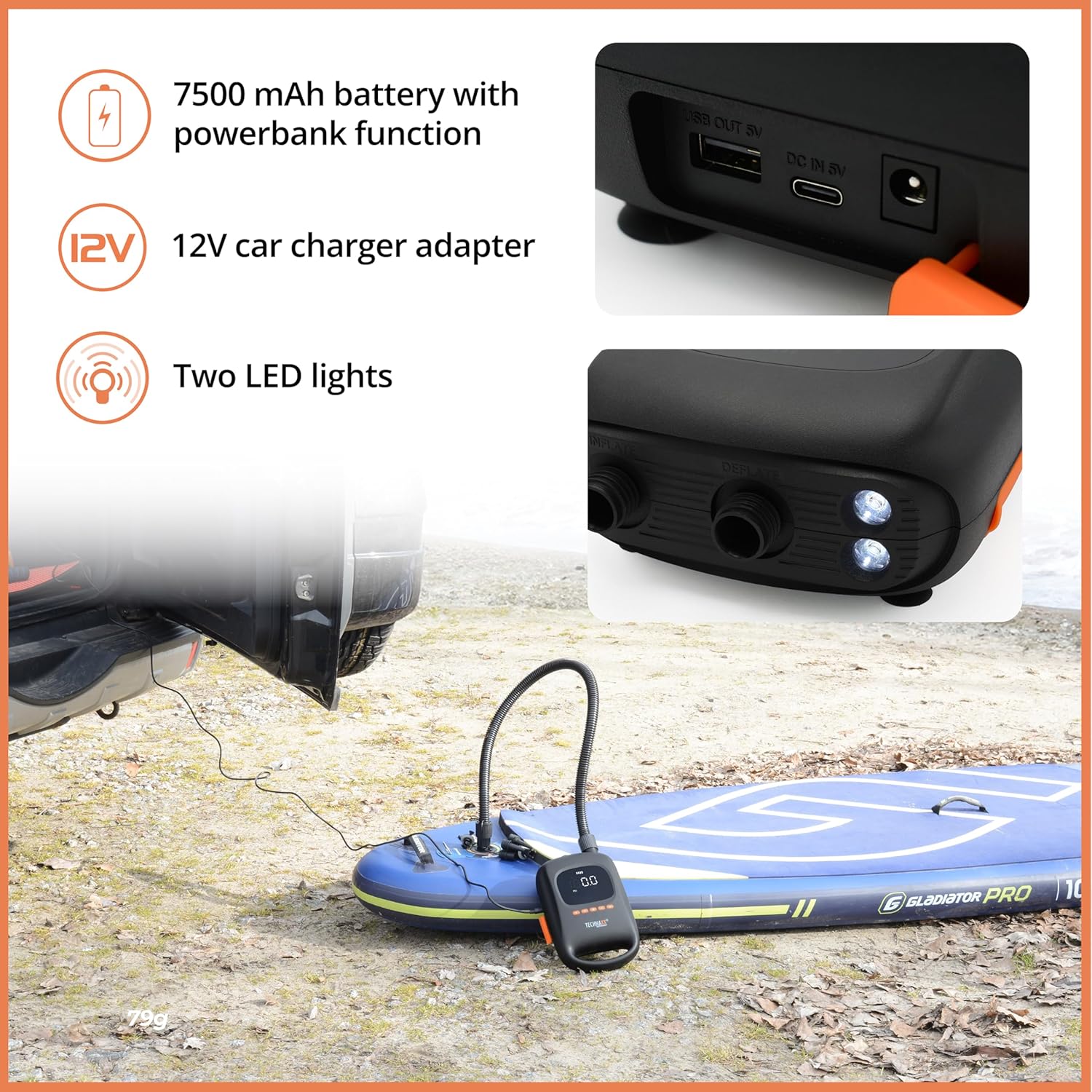
Image: This image illustrates the side of the Technaxx SUP Battery Air Pump TX-266, detailing the USB output for power bank functionality, the DC input for charging, and the two integrated LED lights.
5. Opsætning
- Oplad pumpen: Before first use, fully charge the pump using the provided USB-C cable and a suitable USB power adapter (not included) or the 12V car charger. The battery indicator on the digital display will show charging progress.
- Vælg dyse: Choose the appropriate nozzle for your inflatable's valve type.
- Fastgør slange: Securely attach the pump hose to the selected nozzle.
- Connect Hose to Pump: For inflation, connect the other end of the hose to the "INFLATE" port on the pump. For deflation, connect it to the "DEFLATE" port.
6. Betjeningsvejledning
6.1. Inflation
- Tænd: Tryk på tænd / sluk-knappen (U) to turn on the pump. The digital display will illuminate.
- Sæt tryk: Use the 'M' button to cycle through preset modes (SUP, TENT) or use the '+' and '-' buttons to manually adjust the target pressure (up to 20 PSI). The unit can be switched between PSI and BAR if available (refer to display for current unit).
- Connect to Inflatable: Insert the nozzle into the inflatable's valve.
- Start inflation: Tryk på tænd / sluk-knappen (U) again to start the inflation process. The pump will automatically stop once the set pressure is reached.
- Afbryde: Remove the nozzle from the valve and disconnect the hose from the pump.

Image: The Technaxx SUP Battery Air Pump TX-266 actively inflating a paddleboard on a sandy beach, with the digital display showing the current pressure. Two paddleboards are visible in the background.
6.2. Deflation
To deflate an item, connect the hose to the "DEFLATE" port on the pump and then to the inflatable's valve. Press the power button (U) to start deflation. The pump will run until manually stopped or the item is deflated.
6.3. Powerbank-funktion
The TX-266 features a 7500 mAh battery that can also function as a power bank. Connect your USB-powered device (e.g., smartphone, tablet) to the USB OUT 5V port on the pump using a compatible USB cable. The pump will begin charging your device.
6.4. LED-lys
The pump is equipped with two LED lights for illumination in low-light conditions. Refer to the device's controls for activating and deactivating the LED lights (usually a dedicated button or a long press of the power button).
7. Preset Modes
The pump offers preset modes for common inflatable types. Press the 'M' button to cycle through these modes:
- SUP Mode: Optimized pressure settings for Stand-Up Paddle Boards.
- TENT Mode: Suitable for inflatable tents and similar items.
- Tilpasset tilstand: Allows manual adjustment of pressure for other inflatables like mattresses, furniture, inflatable beds, sleeping pillows, swimming rings, or other inflatable toys.

Image: A collage demonstrating the versatility of the Technaxx SUP Battery Air Pump TX-266, showing it in use with a paddleboard, an inflatable pool, a floating flamingo, and a pool mattress.
8. Opladning af enheden
The Technaxx TX-266 can be charged using two methods:
- USB-C kabel: Connect the provided USB-C cable to the DC IN 5V port on the pump and to a standard USB power adapter (e.g., phone charger, computer USB port).
- 12V biloplader: Use the provided 12V car charging cable to connect the pump to your vehicle's cigarette lighter socket.
The battery indicator on the digital display will show the charging status. Ensure the pump is fully charged before extended use for optimal performance.
9. Vedligeholdelse
- Rensning: Tør pumpens yderside af med en blød, tør klud. Brug ikke slibende rengøringsmidler eller opløsningsmidler.
- Opbevaring: Store the pump and its accessories in a clean, dry environment, away from direct sunlight and extreme temperatures.
- Batteripleje: Ved langtidsopbevaring skal batteriet oplades til cirka 50-70% hver 3.-6. måned for at opretholde batteriets tilstand.
- Luftfilter: Periodically check the air intake filter for dust or debris and clean it if necessary to ensure efficient operation.
10. Fejlfinding
| Problem | Mulig årsag | Løsning |
|---|---|---|
| Pumpen tænder ikke. | Lavt batteri eller ingen opladning. | Charge the pump fully using the provided cables. |
| Pump not inflating. | Hose or nozzle not properly connected; target pressure already reached; air intake blocked. | Ensure all connections are secure. Check the set pressure. Clear any obstructions from the air intake. |
| Unøjagtig trykaflæsning. | Nozzle not fully sealed to valve. | Ensure a tight seal between the nozzle and the inflatable's valve. |
| Pump stops prematurely. | Target pressure reached; low battery; overheating. | Check the set pressure. Recharge the battery. Allow the pump to cool down if it has been running for an extended period. |
11. Specifikationer
| Model: | TX-266 |
| Mærke: | Technaxx |
| Batterikapacitet: | 7500 mAh Lithium Ion |
| Maksimalt tryk: | 20 PSI (138 Kilopascal) |
| Luftstrømskapacitet: | 350 LPM |
| Strømkilde: | Batteridrevet (1 lithium-ion-batteri inkluderet) |
| Opladningsindgang: | USB-C, 12V Car Charger |
| Power Bank Output: | USB OUT 5V |
| Materiale: | ABS housing, Metal pump parts |
| Produktmål (LxBxH): | 11.34 cm x 7.21 cm x 3.71 cm |
| Varens vægt: | 3.31 pund |
| UPC: | 810016320654 |
12. Garanti og support
This Technaxx product is covered by a 2 års producentgaranti fra købsdatoen. Denne garanti dækker fejl i materialer og udførelse ved normal brug.
For technical support, warranty claims, or further assistance, please contact Technaxx customer service. Refer to the official Technaxx webwebstedet eller din købsdokumentation for kontaktoplysninger.
Gem venligst din købsbevis af garantihensyn.


