1. Introduktion
This user manual provides detailed instructions for the setup, operation, and maintenance of your Thomson 50-inch 4K Ultra HD Smart Android TV (Model: 50UA5S13W). Please read this manual thoroughly before using the television to ensure proper and safe operation. Keep this manual for future reference.

Billede: Forside view of the Thomson 50-inch 4K Ultra HD Smart Android TV, showcasing its slim bezels and white finish.
2. Vigtige sikkerhedsoplysninger
Always adhere to the following safety precautions to prevent electric shock, fire, damage to the device, or personal injury.
- Udsæt ikke TV'et for regn eller fugt.
- Åbn ikke tv'etasing; overlad al service til kvalificeret personale.
- Sørg for tilstrækkelig ventilation; bloker ikke ventilationsåbningerne.
- Beskyt netledningen mod at blive trådt på eller klemt.
- Tag stikket ud af tv'et under tordenvejr eller når det ikke bruges i længere perioder.
- Hold tv'et væk fra varmekilder og direkte sollys.
- Brug kun tilbehør/tilbehør specificeret af producenten.
3. Pakkens indhold
Før du fortsætter med opsætningen, skal du kontrollere, at alle nedenstående varer er inkluderet i din pakke:
- Thomson 50-inch 4K Ultra HD Smart Android TV
- Remote Control (with backlit buttons)
- Batterier til fjernbetjening
- TV-stativer (2 stk.)
- Skruer til TV stativer
- Strømledning
- Hurtig startvejledning
- Brugervejledning (dette dokument)
4. Opsætning
4.1 Fysisk installation
You can either place the TV on a flat surface using the provided stands or mount it on a wall (wall mount not included).
Montering af stativene:
- Placer forsigtigt tv'et med forsiden nedad på en blød, ren overflade for at forhindre, at skærmen beskadiges.
- Juster hver stander med de tilsvarende skruehuller i bunden af tv'et.
- Fastgør stativerne med de medfølgende skruer.
Vægmontering:
This TV supports VESA 200x200 wall mounts. Please refer to the wall mount's instructions for proper installation. Ensure the wall can support the weight of the TV (approximately 12.22 kg).

Billede: Forside view of the Thomson TV, illustrating its dimensions: 112 cm width, 69 cm height, and 8 cm depth.

Billede: Side view of the Thomson TV, showing its slim profile.
4.2 Tilslutning af eksterne enheder
Connect your external devices to the appropriate ports on the TV's rear panel.
- HDMI (4x HDMI 2.0): Til tilslutning af Blu-ray-afspillere, spillekonsoller, set-top-bokse osv.
- USB (2x USB 2.0): Til tilslutning af USB-lagerenheder for at afspille medier eller til softwareopdateringer.
- LAN: Til kablet internetforbindelse.
- Lydudgang (digital optisk): Til tilslutning til soundbars eller hjemmebiografsystemer.
- Satellit (DVB-S2): Til tilslutning af satellitantenne.
- Antenna (DVB-T2/C): Til jordbaseret eller kabelbaseret antennetilslutning.
- AV-indgang: Til tilslutning af ældre enheder med composite video/audio-udgange.
- Fælles grænseflade (CI+): Til indsættelse af et CAM-modul og et smartkort til krypterede kanaler.

Billede: Bagside view of the Thomson TV, detailing the various input and output ports including HDMI, USB, LAN, Audio Out, Satellite, Antenna, AV In, and Common Interface.
4.3 Første opsætning og netværksforbindelse
After connecting the power cord and turning on the TV, you will be guided through the initial setup process.
- Tænd: Plug in the power cord and press the power button on the remote control or TV.
- Sprogvalg: Vælg dit foretrukne sprog.
- Netværks forbindelse: Connect to your Wi-Fi network or use a wired LAN connection. This is essential for Smart TV features.
- Google-kontoopsætning: Sign in with your Google account to access the Google Play Store, Google Assistant, and other Android TV features.
- Kanalscanning: The TV will guide you through scanning for available channels via the Triple-Tuner (DVB-S2, DVB-T2, or DVB-C).
5. Operating Your Thomson Smart Android TV
5.1 Android TV Interface and Streaming
Your Thomson TV runs on Android TV, providing access to a vast library of content and applications. The home screen offers personalized recommendations and quick access to your favorite streaming services like Netflix, Prime Video, YouTube, and Disney+.

Image: The Android TV home screen, displaying popular streaming applications and content recommendations.
5.2 Google Assistent
The integrated Google Assistant allows you to control your TV and smart home devices using voice commands. Simply press the Google Assistant button on your remote and speak your command.
- "Play [Movie Title] on Netflix."
- "Open YouTube."
- "Hvordan er vejret?"
- "Dim the lights." (Requires compatible smart home devices)

Image: A user interacting with the TV using Google Assistant voice commands via the remote control.
5.3 Chromecast indbygget
With Chromecast built-in, you can easily cast movies, shows, photos, and more from your compatible smartphone, tablet, or laptop directly to your TV screen.

Image: Illustration of Google Cast functionality, demonstrating how content can be streamed wirelessly from various smart devices to the Thomson TV.
5.4 Audio and Visual Enhancements (Dolby Atmos & Dolby Vision)
Experience immersive sound and stunning visuals with Dolby Atmos and Dolby Vision technologies.
- Dolby Atmos: Creates a multi-dimensional sound experience, making audio flow around you. (Compatible sound device needed)
- Dolby Vision: Delivers incredible brightness, contrast, and color, bringing entertainment to life.

Image: An illustration depicting the immersive, multi-dimensional sound experience provided by Dolby Atmos, with sound waves emanating from the TV and surrounding viewers.

Image: A side-by-side comparison illustrating the enhanced visual quality of Dolby Vision 4K UHD compared to standard SDR, highlighting improved brightness, contrast, and color.
5.5 Fjernbetjeningens funktioner
The included remote control is designed for ease of use, featuring backlit buttons for visibility in low light and a dedicated favorites button.

Image: The Thomson TV remote control, showcasing its ergonomic design, a dedicated button for favorite apps, backlit buttons for use in the dark, and integrated voice control functionality.
6. Vedligeholdelse
Korrekt vedligeholdelse sikrer dit TV's levetid.
- Rengøring af skærmen: Gently wipe the screen with a soft, lint-free cloth. For stubborn marks, use a specialized screen cleaner applied to the cloth, not directly to the screen.
- Rengøring af Casing: Brug en blød, tør klud til at tørre tv'et afasing. Brug ikke slibende rengøringsmidler eller opløsningsmidler.
- Ventilation: Ensure the ventilation openings are not blocked by dust or objects.
- Sluk: Tag altid stikket ud af stikkontakten før rengøring eller når tv'et ikke er i brug i længere perioder.
7. Fejlfinding
Her er løsninger på almindelige problemer, du kan støde på:
| Problem | Mulig årsag | Løsning |
|---|---|---|
| Ingen strøm | Netledningen er ikke tilsluttet; der er ingen strøm fra stikkontakten. | Kontroller netledningens forbindelse; test stikkontakten med en anden enhed. |
| Intet billede/lyd | Forkert inputkilde; løs kabelforbindelse. | Select correct input source; check all cable connections. |
| Fjernbetjeningen virker ikke | Løse batterier; blokering mellem fjernbetjening og tv. | Udskift batterierne; fjern eventuelle forhindringer. |
| Kan ikke oprette forbindelse til Wi-Fi | Forkert adgangskode; routerproblem; TV'et er for langt fra routeren. | Verify password; restart router; move TV closer or use wired connection. |
| Apps Crashing/Slow Performance | Too many apps running; low storage; software glitch. | Close unused apps; clear cache; restart TV; check for software updates. |
8. Tekniske specifikationer
| Feature | Specifikation |
|---|---|
| Modelnummer | 50UA5S13W |
| Skærmstørrelse | 50 tommer (126 cm) |
| Displayteknologi | UHD (A+ Panel Quality) |
| Opløsning | 3840 x 2160 (4K Ultra HD) |
| Opdateringshastighed | 60 Hz |
| Operativsystem | Android TV |
| Forbindelse | Wi-Fi, Bluetooth, 4x HDMI 2.0, 2x USB 2.0, LAN, Digital Optical Audio Out, AV In, CI+ |
| Tunere | Triple-Tuner (DVB-S2, DVB-T2, DVB-C) |
| Lydteknologi | Dolby Digital, Dolby Atmos (compatible sound device needed) |
| Videoteknologi | Dolby Vision, 4K UHD |
| Dimensioner (B x H x D) | 112 x 69 x 8 cm (uden stativ) |
| Vægt | 12.22 kg |
| Energieffektivitetsklasse (SDR) | E (53 kWh/1000t) |
| Energieffektivitetsklasse (HDR) | E (54 kWh/1000t) |
| VESA vægbeslag | 200x200 (not included) |

Image: Official product data sheet for the Thomson 50UA5S13W television, detailing technical specifications and energy consumption.
For flere detaljer henvises til EPREL Product Database.
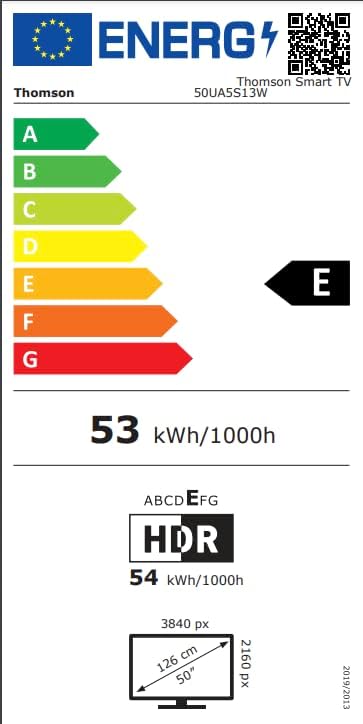
Image: Energy efficiency label for the Thomson 50UA5S13W TV, showing its 'E' rating for both SDR and HDR content.
9. Garanti og support
Thomson offers a 3 års garanti on your television, ensuring peace of mind and reliable performance. For technical support, service, or warranty claims, please contact the manufacturer's authorized service center or refer to the contact information provided in your product documentation.
Fabrikant: THOMSON (StreamView GmbH)
Webwebsted: www.streamview.com
E-mail: kontakt@streamview.com
Telefon: +4318900066
Adresse: Franz-Josefs-Kai 1, 1010 Wien, Østrig


