Indledning
Tak for købetasing the VOKSUN EM3378YC Wireless Weather Station. This device provides comprehensive weather information including indoor/outdoor temperature and humidity, weather forecasts, time, date, moon phase, and atmospheric pressure. This manual will guide you through the setup, operation, and maintenance of your new weather station to ensure optimal performance.

Image: The VOKSUN EM3378YC Wireless Weather Station main display unit and its accompanying outdoor sensor.
Sikkerhedsoplysninger
- Udsæt ikke hovedenheden for ekstreme temperaturer, direkte sollys eller høj luftfugtighed.
- Udendørssensoren er vejrbestandig, men bør ikke nedsænkes i vand.
- Brug kun den specificerede strømadapter til hovedenheden.
- Opbevar batterier utilgængeligt for børn. Bortskaf brugte batterier ansvarligt.
- Forsøg ikke selv at adskille eller reparere enheden. Kontakt kundesupport for at få hjælp.
Pakkens indhold
Kontroller venligst pakkens indhold for at sikre, at alle varer er til stede:
- 1 x VOKSUN EM3378YC Main Weather Station Unit
- 1 x trådløs udendørssensor
- 1 x strømadapter
- 1 x Brugermanual (dette dokument)
Produkt overview
Gør dig bekendt med hovedkomponenterne og deres funktioner.
Hovedvejrstationsenhed

Image: Detailed diagram showing the front LCD display and rear controls/ports of the main weather station unit.
Part A: Positive LCD Display
- Outdoor wireless channel and receiving icon
- Indendørs temperatur
- Indendørs fugtighed
- Indendørs komfortindikator
- Tid
- Måned og dato
- Uge
- Vejrudsigt
- Udetemperatur
- Atmosfærisk tryk
- Udendørs fugtighed
- Histogram of historical pressure trends
- Outdoor comfort indicator
- Solopgangstid
- Månefase
- Udvalgt by
- Tidevandsniveau
- Solnedgangstid
Part B: Back Button and Power
- ☀/zz" Touch field (Snooze/Light)
- Støtteramme
- Batterirum
- Hængende hul
- ▼" Button (Down)
- ▲/" Button (Up)
- ▲" Button (Set)
- ▲" Button (Channel)
- ▲" Button (Alarm)
- ▲" Button (Memory)
- Stik til strømforsyning
- USB-opladerudgang
Trådløs fjernbetjening
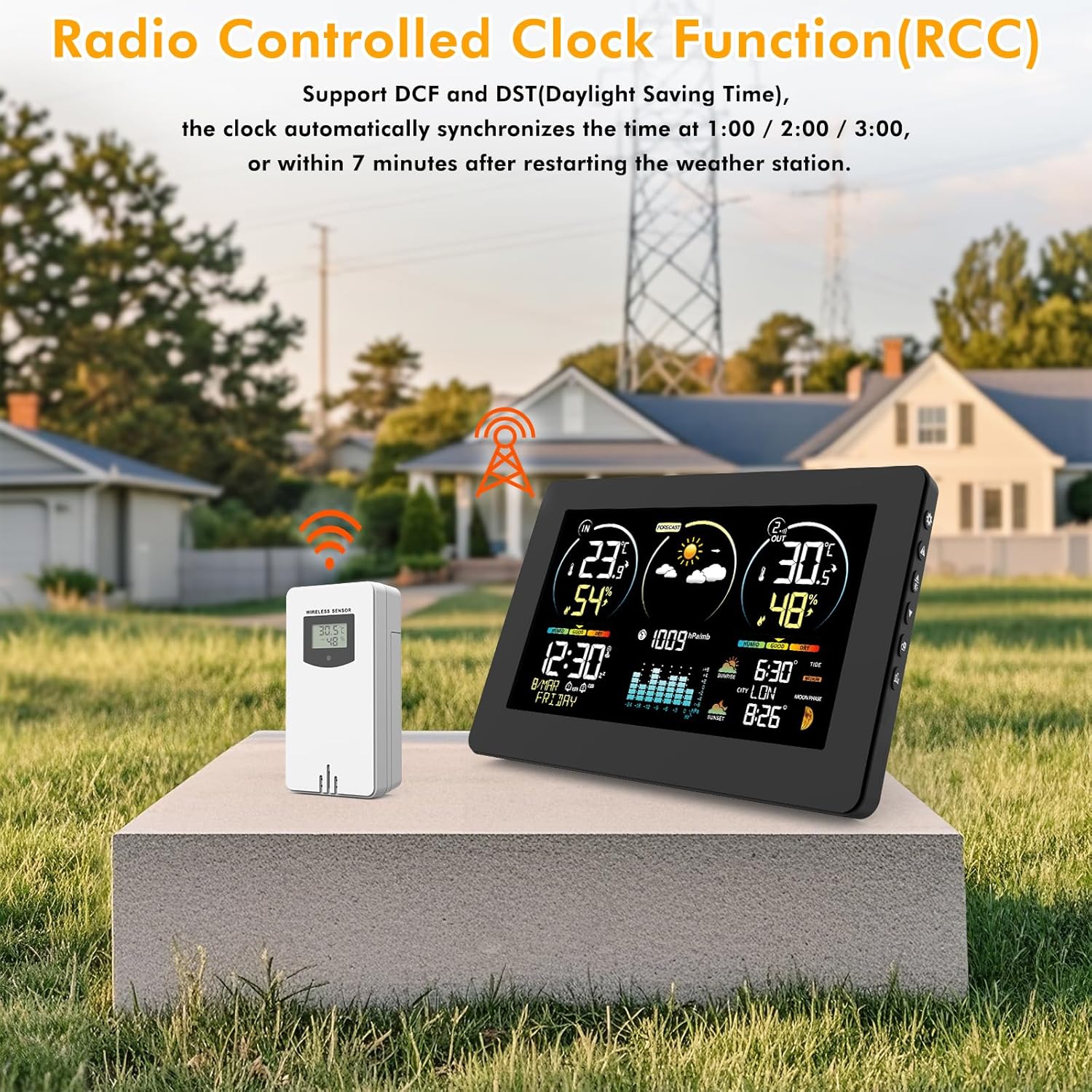
Image: Detailed diagram showing the front display and internal components of the wireless remote sensor.
Part C: Wireless Remote Sensor
- LCD display - Temperature
- LCD display - Humidity
- Sende signal LED
- ℃/℉" button (Celsius/Fahrenheit)
- "TX" button (Transmit)
- "CHANNEL 1 or 2 or 3" switch
- Batterirum
Opsætning
1. Strømforsyning til hovedenheden
The main unit can be powered by the included DC5V adapter or by AA batteries (not included).

Image: Illustration of the two power supply options: DC5V adapter for continuous power and AA batteries for backup or portable use.
- Brug af strømadapter: Connect the DC5V adapter to the power supply socket (B12) on the back of the main unit and plug it into a wall outlet. The display will light up.
- Brug af batterier: Open the battery compartment (B3) on the back and insert 3 x AA batteries (not included), observing polarity (+/-). The display will briefly light up. Note: Batteries are primarily for backup during power outages; for continuous display illumination, use the power adapter.
2. Setting up the Wireless Outdoor Sensor
- Open the battery compartment (C7) on the back of the outdoor sensor.
- Insert 2 x AA batteries (not included), observing polarity (+/-). The sensor's LCD display (C1, C2) will show temperature and humidity.
- Select a channel (1, 2, or 3) using the "CHANNEL" switch (C6). If you have multiple sensors, assign a different channel to each.
- Press the "TX" button (C5) to manually send a signal to the main unit.
3. Pairing the Sensor with the Main Unit
The main unit will automatically search for the outdoor sensor upon initial power-up. If pairing does not occur automatically or if you are adding a new sensor:
- Ensure both units have fresh batteries or are powered.
- Place the sensor near the main unit during the pairing process.
- On the main unit, press and hold the "CHANNEL" button (B9) for a few seconds to initiate a search for outdoor sensors. The outdoor temperature/humidity section on the main unit's display will flash.
- Once connected, the outdoor temperature and humidity will appear on the main unit's display, and the receiving icon (A1) will become stable.
4. Sensorplacering
For accurate readings and optimal wireless transmission (up to 60 meters in open air), consider the following:

Billede: Eksamples showing suitable locations for the outdoor sensor, such as under an eave, near a door, or by a window, ensuring protection from direct elements while maintaining wireless range.
- Placer udendørssensoren i et skyggefuldt område, væk fra direkte sollys og varmekilder, for at sikre nøjagtige temperaturaflæsninger.
- Protect the sensor from direct rain and snow. An ideal location is under an eave or a covered porch.
- Avoid placing the sensor near large metal objects or electronic devices that could interfere with the wireless signal.
- Ensure the distance between the main unit and the sensor is within the 60m (200ft) wireless range, minimizing obstacles like thick walls.
Betjeningsvejledning
1. Indledende indstillinger (tid, dato, by)
After powering on, the unit will attempt to receive the DCF radio-controlled signal for automatic time synchronization. This may take several minutes or hours. If the signal is not received or you prefer manual setting:

Image: The weather station displaying the Radio Controlled Clock (RCC) function, indicating automatic time synchronization.
- Press and hold the "SET" button (B7) to enter setting mode. The setting item will flash.
- Use the "▲" (B6) and "▼" (B5) buttons to adjust the value.
- Press "SET" again to confirm and move to the next setting (e.g., 12/24 hour format, hour, minute, year, month, day, language, city).
- For city selection (A16), refer to the manual's city code list (if available) or select the closest major city for accurate sunrise/sunset times and tide information.
- Press "SET" repeatedly until all settings are confirmed and the unit returns to normal display.

Image: The weather station display highlighting the manual city selection feature and the various moon phase icons.
2. Temperature Unit Selection (℃/℉)
- On the main unit, briefly press the "▼" button (B5) to switch between Celsius (℃) and Fahrenheit (℉) for temperature display.
- On the outdoor sensor, use the "℃/℉" button (C4) to change its local display unit.
3. Weather Forecast (A8)
The weather station predicts weather conditions for the next 12-24 hours based on atmospheric pressure changes. The forecast icons include Sunny, Partly Cloudy, Cloudy, Rainy, Heavy Rain, Snowy, and Heavy Snow.
Image: The weather station's display showing various weather forecast icons, indicating predicted conditions for the next 12 hours.
Note: The forecast is an estimation and may not always be 100% accurate. It is based on local pressure trends and not satellite data.
4. Comfort Display (A4, A13)
The comfort indicator provides a general guide to indoor and outdoor comfort levels based on temperature and humidity. It typically shows "DRY", "GOOD" (Comfort), or "WET".

Image: A visual guide explaining the comfort index display, correlating humidity ranges with "Dry", "Good", and "Humid" conditions.
- TØRRE: Fugtighed 1-35% RF
- COMFORT (GOOD): Fugtighed 45-65% RF
- VÅD: Fugtighed 66-80% RF
- If humidity is 35-44% RH, it's considered "Dry".
- If humidity is 80-99% RH, it's considered "To Wet".
5. Alarms and Snooze
- Indstilling af alarm: Press the "ALARM" button (B10) to view the alarm time. Press and hold "ALARM" to enter alarm setting mode. Use "▲" and "▼" to adjust hour and minute. Press "ALARM" to confirm.
- Aktivering/deaktivering af alarm: Briefly press "ALARM" to toggle the alarm on/off. An alarm icon will appear/disappear on the display.
- Snooze-funktion: When the alarm sounds, touch the "☀/zz" touch field (B1) to activate snooze. The alarm will sound again after approximately 5 minutes.
6. Justering af baggrundslys
When powered by the adapter, the display backlight is continuously on. Briefly touch the "☀/zz" touch field (B1) to adjust the brightness level (multiple levels available).
When powered by batteries only, the backlight will turn off after a few seconds to conserve power. Touch the "☀/zz" touch field (B1) to temporarily illuminate the display.
Opretholdelse
- Rensning: Tør hovedenheden og sensoren af med en blød kludamp klæde. Brug ikke slibende rengøringsmidler eller opløsningsmidler.
- Udskiftning af batteri: Replace batteries in both the main unit (if used) and the outdoor sensor when the low battery indicator appears on the display. Ensure correct polarity.
- Opbevaring: Hvis enheden opbevares i en længere periode, skal alle batterier fjernes for at forhindre lækage.
Fejlfinding
| Problem | Mulig årsag | Løsning |
|---|---|---|
| Intet display på hovedenheden. | No power; batteries dead or incorrectly inserted; power adapter not connected. | Check power adapter connection. Replace batteries, ensuring correct polarity. |
| Outdoor temperature/humidity not displayed or flashing. | Sensor not paired; sensor batteries dead; sensor out of range or interference. | Replace sensor batteries. Re-pair sensor (see Setup section). Move sensor closer to main unit or away from interference sources. |
| Unøjagtige temperatur-/fugtighedsmålinger. | Sensor exposed to direct sunlight/heat/moisture; sensor placed near heat/cold sources. | Relocate sensor to a shaded, protected area. Ensure proper ventilation around both units. |
| Weather forecast is incorrect. | Forecast is an estimation based on pressure trends; local weather conditions can vary. | This is normal. The forecast is a general guide, not a precise prediction. Allow time for pressure trends to establish. |
| DCF time synchronization fails. | Weak signal due to location/interference; manual setting required. | Move the main unit closer to a window or away from electronic devices. Manually set the time if automatic synchronization is not possible. |
Specifikationer
| Feature | Detalje |
|---|---|
| Modelnummer | EM3378YC |
| Indendørs temperaturområde | -9.9℃ til +50℃ (14.2℉ til 122℉) |
| Udendørs temperaturområde | -40℃ til +70℃ (-40℉ til 158℉) |
| Fugtighedsområde | 20% til 95% RH |
| Trådløs transmissionsrækkevidde | Op til 60 meter (200 fod) i åbent område |
| Frekvens | 433 MHz |
| Hovedenhedens strøm | DC5V Power Adapter (included) or 3 x AA Batteries (not included) |
| Udendørs sensorstrøm | 2 x AA batterier (medfølger ikke) |
| Dimensioner (hovedenhed) | Approx. 20.5 cm (L) x 13 cm (H) x 3 cm (W) |
| Vægt | 600 g (varevægt) |
| Materiale | Polycarbonat (PC) |
| Særlige funktioner | External sensor, DCF function, Connectivity up to 3 external sensors, Large Display, Customizable Alert, Adjustable Brightness |
Garanti og support
VOKSUN products come with a standard manufacturer's warranty. For specific warranty terms and conditions, please refer to the product packaging or contact VOKSUN customer support.
If you encounter any issues or have questions not covered in this manual, please contact VOKSUN customer support.
For excellent support, you may also email allmart_help@outlook.com as suggested by other users.


