1. Introduktion
This manual provides essential instructions for the setup, operation, maintenance, and troubleshooting of your MGI Zip Navigator Remote Controlled Golf Cart. Please read this manual thoroughly before using the product to ensure safe and efficient operation. The MGI Zip Navigator is designed to enhance your golfing experience by providing effortless transportation of your golf clubs across various terrains.
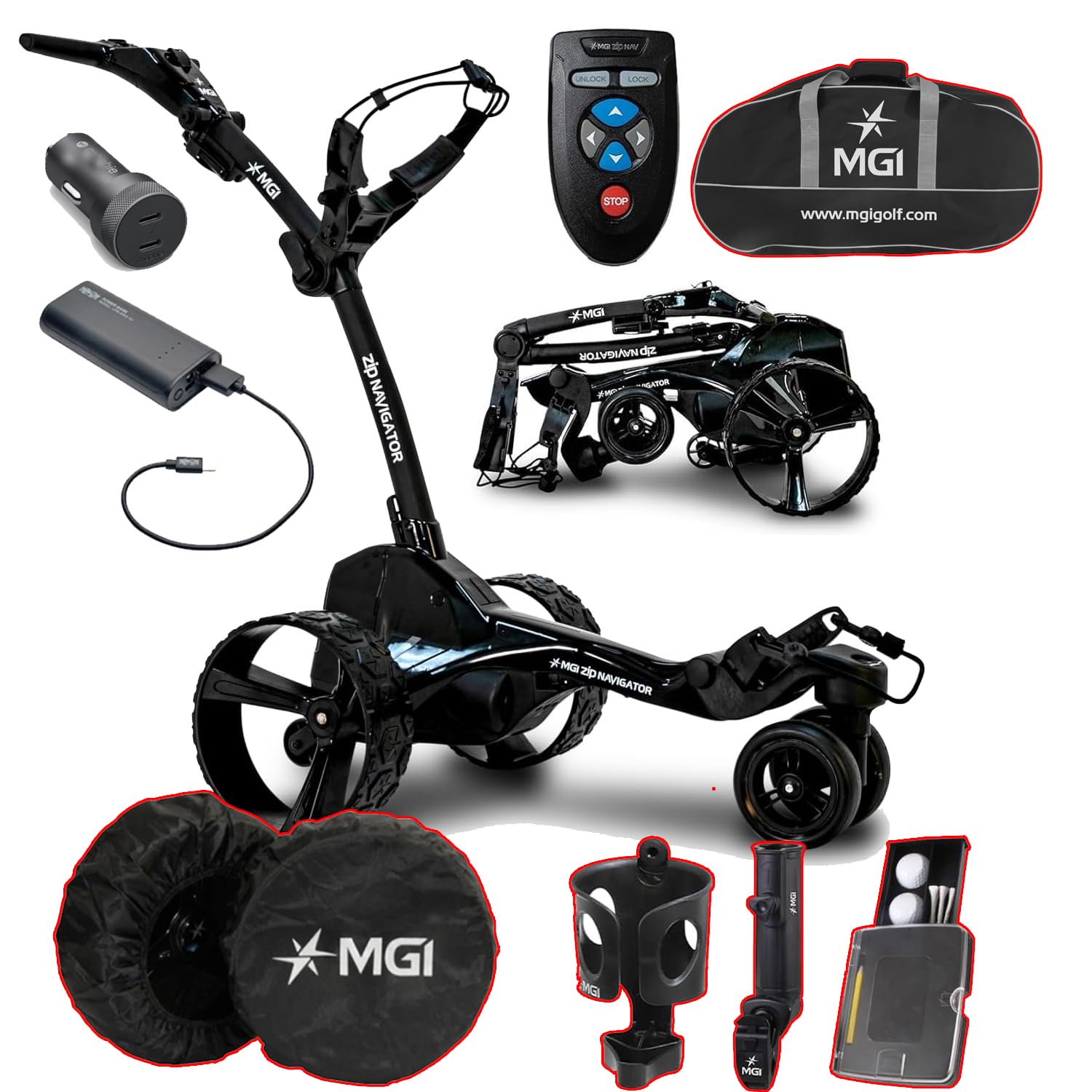
This image displays the MGI Zip Navigator golf cart in its operational state, alongside its remote control, battery pack, charging cable, travel bag, wheel covers, cup holder, umbrella holder, and a golf ball/tee holder.
2. Hvad er der i æsken
Kontroller, at alle komponenter er til stede ved udpakning:
- MGI Zip Navigator Golf Cart Frame
- Fjernbetjening
- Zip High Performance Lithium 36 Hole Battery
- Batterioplader
- USB Charging Port (integrated into handle)
- Travel Cover (for Power Bundle & Travel Cover variant)
- Hjulkapsler
- Kopholder
- Umbrella Holder
- Golf Ball and Tee Holder
- Brugervejledning (dette dokument)
3. Opsætning
3.1 Udpakning
Fjern forsigtigt alle komponenter fra emballagen. Gem emballagen til senere opbevaring eller transport, hvis det er nødvendigt.
3.2 Assembly (Zip Fold Technology)
The MGI Zip Navigator features an innovative Zip Fold system for quick setup and compact storage. To unfold the cart:
- Placer den foldede vogn på en plan overflade.
- Release the main latch mechanism.
- Gently extend the frame until it locks into its operational position.
- Sørg for, at alle låsemekanismer er forsvarligt låst inden brug.
- The rear wheels can be inverted on the axle to reduce the footprint when not in use.
The MGI Zip Navigator golf cart is shown in its folded position, highlighting its compact design for easy transport and storage. The rear wheels can be inverted to further reduce its footprint.
3.3 Batteriinstallation og opladning
The MGI Zip Navigator uses a 'Click & Go' Lithium Battery System.
- Opladning: Connect the battery charger to a power outlet and then to the battery's color-coded charge port (Red & Black). The charger indicator will show Red when charging and Green when fully charged.
- Installation: Once charged, align the battery with the vertical slot on the cart and click it into place. Ensure it is securely seated.
- Fjernelse: Use the easy-to-access lifting handle to remove the battery when needed.
The image shows the compact lithium battery pack and its charging cable, demonstrating the 'Click & Go' system for easy installation and removal.
4. Betjeningsvejledning
4.1 Betjening af fjernbetjening
The MGI Zip Navigator is controlled via a full-directional remote. Familiarize yourself with the buttons:
- Retningspile: Use these to move the cart forward, backward, left, and right.
- LÅS OP: Activates the remote control.
- LÅSE: Deactivates the remote control to prevent accidental movement.
- STOP: Standser vognens bevægelse øjeblikkeligt.
The remote control features directional arrows for forward, backward, left, and right movement, along with 'UNLOCK', 'LOCK', and 'STOP' buttons for precise control of the golf cart.
4.2 Digital Display and Settings
The cart features an advanced digital display:
- Variabel hastighedskontrol: Adjust speed from 1 to 20.
- Batteriniveauindikator: Four color-coded levels show the remaining charge.
- Distance Modes: Two resettable distances (A & B) in yards or meters, and a total odometer in miles or kilometers.
- USB opladningsport: Located underneath the top handle for charging remote control or mobile devices.
4.3 Navigating Terrain
The MGI Zip Navigator is designed for various course conditions:
- Automatic Downhill Speed: This feature automatically adjusts the cart's speed when descending slopes, maintaining control.
- Patented Gyroscope: Automatically tracks the cart on a straight course, even on uneven ground, allowing you to walk freely.
- Twin 230 Watt Motors: Provide reliable power and agility for smooth movement.
4.4 Adjusting the Cart
Customize the cart for your comfort:
- Adjustable Ergonomic T-Bar Top Handle: Features a premium soft rubber grip for comfortable handling.
- Adjustable Independent Top Bag Support: Ensures a secure and customized fit for various golf bag sizes.
5. Vedligeholdelse
5.1 Rengøring
Regular cleaning helps maintain your cart's performance and appearance:
- Tør stellet og hjulene af med en kludamp klud efter hver brug for at fjerne snavs og snavs.
- Undgå at bruge skrappe kemikalier eller slibende rengøringsmidler.
- Ensure all electrical components are dry before storage.
5.2 Pleje af batterier
Korrekt batteripleje forlænger dets levetid:
- Always fully charge the battery after each use, even if only partially discharged.
- Opbevar batteriet på et køligt, tørt sted.
- If storing for extended periods, charge the battery every 1-2 months to prevent deep discharge.
5.3 Opbevaring
When not in use, store your MGI Zip Navigator properly:
- Fold the cart using the Zip Fold Technology to its most compact size.
- Consider inverting the rear wheels for additional space saving.
- Store in a dry, protected area away from extreme temperatures.
- Use the provided travel cover for protection during transport or storage.
Various accessories are displayed, including protective wheel covers, a cup holder, an umbrella holder, and a compact holder for golf balls and tees, all designed to enhance the user experience.
6. Fejlfinding
If you encounter issues with your MGI Zip Navigator, refer to the following common problems and solutions:
| Problem | Mulig årsag | Løsning |
|---|---|---|
| Vognen tænder ikke. | Batteriet er ikke installeret korrekt eller afladet. | Sørg for, at batteriet er fuldt opladet og klikket sikkert på plads. |
| Fjernbetjeningen reagerer ikke. | Fjernbetjeningens batteri er lavt eller ikke parret. | Charge the remote control via the cart's USB port. Refer to pairing instructions in the full manual (if applicable). Ensure remote is 'UNLOCKED'. |
| Cart veers off course. | Gyroscope calibration needed or uneven terrain. | The patented gyroscope should correct this automatically. If persistent, ensure the cart is on level ground when starting. |
| Vognen kæmper på stigninger. | Lav batteriopladning. | Sørg for, at batteriet er fuldt opladet før brug. |
For issues not listed here, please contact MGI customer support.
7. Specifikationer
| Feature | Specifikation |
|---|---|
| Skærmstørrelse | 2.5 tommer |
| Garanti | 3 års producent |
| Human Interface Input | Touchscreen (on cart display), Remote Control |
| Forbindelsesteknologi | Bluetooth |
| Motorer | To 230 watt motorer |
| Foldede dimensioner (omvendte baghjul) | 27.55 x 18.5 x 16.5 tommer |
| Vægt (uden batteri) | 28.6 LBS |
| Vægt (med batteri) | 34.96 LBS |
| Batteritype | Lithium (36 Hole Extended) |
8. Garanti og support
Your MGI Zip Navigator Golf Cart comes with a 3 års producentgarantiDenne garanti dækker materiale- og fabrikationsfejl ved normal brug. Gem venligst din købsbevis i tilfælde af garantikrav.
For technical support, warranty claims, or to purchase replacement parts, please visit the official MGI webwebstedet eller kontakt deres kundeserviceafdeling. Du kan finde mere information og produkter på MGI-butik på Amazon.


