1. Introduktion
The LewanSoul Qtruck is a versatile 4-in-1 smart robot car kit designed for educational programming. It is based on the Micro:bit platform, making it suitable for beginners learning Micro:bit programming. The kit allows for the construction of four distinct robot configurations, offering a comprehensive learning experience in robotics, programming, and engineering principles.

Image 1: The Qtruck robot car shown in its four different configurations, highlighting its versatility.
2. Hvad er der i æsken
Verify that all components listed below are present in your Qtruck kit. If any parts are missing or damaged, please contact customer support.

Billede 2: En overview of all components included in the Qtruck kit, including the chassis, robotic arm parts, sensors, motors, and tools.
- Qtruck Tank Car Robot Chassis
- Micro:bit V2 Board (if included in your package)
- Micro:bit Expansion Board
- 3DOF Robotic Arm Components
- Ultralydssensor
- 4-Channel Line Following Sensor
- DC Motors (2x)
- Servos (3x LFD-01M)
- Tracks (2x) and Driven Wheels (4x)
- Couplings (2x)
- 18650 litiumbatteri (1800mAh)
- USB datakabel
- 4PIN Sensor Wire
- Accessory Bag (screws, nuts, screwdriver, wrench)
- Brugermanual

Image 3: A visual breakdown of each component, aiding in identification and inventory check.
3. Monteringsvejledning
Follow these steps carefully to assemble your Qtruck robot car. Refer to the included user manual for detailed diagrams and specific screw placements.
- Chassismontering: Begin by assembling the main chassis components. Ensure all parts are securely fastened. The design allows for easy assembly.
- Motor- og skinneinstallation: Attach the DC motors to the chassis and install the tracks onto the wheels.
- Sensorintegration: Mount the ultrasonic sensor and the 4-channel line follower sensor to their designated positions on the chassis.
- Robotic Arm Construction: Assemble the 3DOF robotic arm, attaching the servos as indicated in the manual. The metal servo horn provides high hardness and stability.
- Micro:bit and Expansion Board: Securely insert the Micro:bit V2 board into the expansion board, then mount the combined unit onto the robot chassis. The special design facilitates easy installation.
- Ledningsføring: Connect all motors, servos, and sensors to the Micro:bit expansion board according to the wiring diagram provided in the detailed manual.
- Batteri installation: Insert the 18650 lithium battery into its compartment and connect it to the power input.
Video 1: This video demonstrates the assembly process of the Qtruck robot car, including the installation of various components and sensors.
4. Programming and Control
The Qtruck robot car supports multiple methods for programming and control, offering flexibility for different skill levels.
4.1. Makecode Graphical Programming
The robot is primarily programmed using Micro:bit's Makecode platform. This drag-and-drop block-style programming environment is user-friendly and ideal for beginners to learn coding logic.

Image 4: A laptop displaying the Makecode graphical programming interface, connected to the Qtruck robot for code upload.

Billede 5: En detaljeret view of the Makecode block-based programming environment, illustrating how code is constructed.
4.2. Kontrolmetoder
The Qtruck can be controlled using mobile applications or a Handlebit controller (sold separately).
- Mobil app kontrol: Utilize a dedicated mobile application to control the robot's movements and functions via Bluetooth.
- Handlebit Control: For a more tactile experience, the robot can be controlled using a Handlebit, a Micro:bit compatible joystick controller.

Image 6: Demonstrates both Handlebit and mobile application control methods for the Qtruck robot.
5. Nøglefunktioner og -funktioner
5.1. 4-in-1 Robot Kit
The Qtruck kit offers the flexibility to build and program four different robot configurations:
- Transportation Robot: Equipped with a robotic arm for picking up and moving objects.
- Obstacle Avoidance Robot: Utilizes sensors to detect and navigate around obstacles.
- Balanceringsrobot: Designed to maintain balance while moving.
- Way-exploring Robot: Capable of exploring paths and environments.

Image 7: Visual representation of the four distinct robot configurations that can be built with the Qtruck kit.
5.2. 3DOF Robotic Arm
The Qtruck features a 3-Degrees-of-Freedom (3DOF) robotic arm, enabling it to perform horizontal and vertical movements for grasping and transporting items. The arm is equipped with anti-blocking servos for reliable operation.

Image 8: A visual explanation of the robotic arm's movement, showing its horizontal and vertical range of motion.
5.3. Advanced Sensors
The robot is equipped with several sensors to enhance its functionality:
- Ultralydssensor: Used for distance measurement and obstacle avoidance, allowing the robot to navigate complex environments.
- 4-Channel Line Follower Sensor: Enables the robot to detect and follow lines, making it suitable for track-following challenges.
- Lydmodul: Allows for intelligent sound control, adding an interactive element to the robot's functions.

Image 9: The robot demonstrating its ranging and obstacle avoidance capabilities using the ultrasonic sensor.
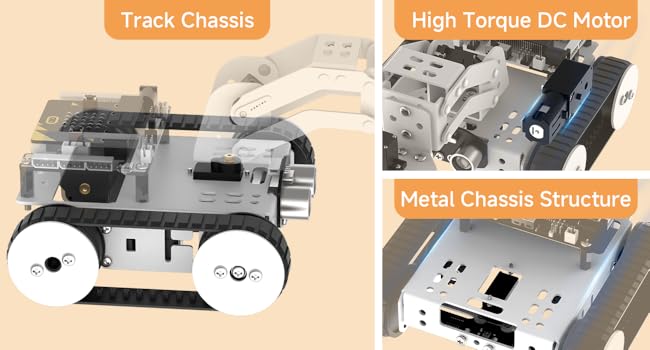
Image 10: The robot actively measuring distances and avoiding obstacles in its path.

Image 11: The Qtruck robot demonstrating its line-following ability with the 4-channel line follower sensor.
5.4. LEGO Compatibility
The Qtruck supports expansion with LEGO bricks, allowing for further customization and creative designs. This feature enhances the educational value by integrating with existing building systems.

Image 12: Illustrates the compatibility of the Qtruck robot with LEGO components for expanded functionality and design.
6. Specifikationer
| Feature | Detalje |
|---|---|
| Produktdimensioner | 5.9 x 3.9 x 10 tommer |
| Varens vægt | 2 pund |
| Anbefalet alder | 15 år og opefter |
| Batterier | 1 Lithium Ion batteri påkrævet (medfølger) |
| Controller system | Micro:bit + Micro:bit Expansion Board |
| Programmering Software | MakeCode (offline version), Micro:bit graphical programming/JavaScript |
| Input Sensors | Sound sensor, ultrasonic sensor, line follower, light sensor, accelerometer, electronic compass, temperature sensor |
| Output Components | Buzzer, RGB lights, motor ports, servo ports, 5x5 LED dot matrix |
| Meddelelse | USB, Bluetooth |
| Køretid | Cirka 120 minutter |

Image 13: A visual representation of the technical specifications, including dimensions, weight, and operational details.
7. Vedligeholdelse
Proper maintenance ensures the longevity and optimal performance of your Qtruck robot car.
- Rensning: Regularly clean the robot's chassis and tracks with a soft, dry cloth. Avoid using water or harsh chemicals.
- Batteripleje: When not in use for extended periods, remove the battery. Store the battery in a cool, dry place. Do not overcharge or completely discharge the battery.
- Komponentkontrol: Periodically inspect all connections, screws, and moving parts (motors, servos, tracks) to ensure they are secure and free from obstruction.
- Softwareopdateringer: Check the official LewanSoul website or Micro:bit resources for any firmware or software updates for the Micro:bit board or the robot's programming environment.
8. Fejlfinding
If you encounter issues with your Qtruck robot, refer to the following common problems and solutions:
- Robotten tænder ikke:
- Sørg for, at batteriet er fuldt opladet og korrekt installeret.
- Check all power connections to the Micro:bit expansion board.
- Motors not moving:
- Verify that the motor wires are securely connected to the expansion board.
- Check your programming code to ensure motor commands are correctly implemented.
- Sørg for, at batteriet har tilstrækkelig opladning.
- Robotic arm not responding:
- Bekræft at servoforbindelserne er korrekte og sikre.
- Review the programming code for correct servo control commands.
- Sensors not detecting:
- Check sensor wiring for proper connection to the expansion board.
- Sørg for, at sensoren er ren og uhindret.
- Verify that the programming code correctly reads sensor inputs.
- Problemer med Bluetooth-forbindelse:
- Ensure Bluetooth is enabled on both the robot (via Micro:bit program) and your control device.
- Make sure the robot is within range of the control device.
- Genstart både robotten og styreenheden.
9. Sikkerhedsoplysninger
Please read and adhere to the following safety guidelines to prevent injury or damage to the product:
- This product contains small parts and is recommended for users aged 15 and up. Adult supervision is advised for younger users.
- Do not expose the robot or its components to water or excessive moisture.
- Handle the lithium battery with care. Do not puncture, disassemble, or expose it to extreme temperatures.
- Ensure all electrical connections are secure before powering on the robot to avoid short circuits.
- Do not force components during assembly. If parts do not fit, re-check the instructions.
- Keep hair, loose clothing, and fingers away from moving parts (motors, tracks, robotic arm) during operation.
10. Garanti og support
LewanSoul is committed to providing high-quality products and customer satisfaction. For any questions, technical assistance, or warranty claims, please contact our customer support team.
Kundesupport: For assistance, please refer to the contact information provided in your product packaging or visit the official LewanSoul website. We provide pre and after-sales services to ensure a positive experience.
Garanti: This product comes with a standard manufacturer's warranty. Please retain your proof of purchase for any warranty-related inquiries. Details of the warranty period and coverage are available on the official LewanSoul webwebsted.
