1. Introduktion
This manual provides essential information for the safe and efficient operation of your TOPBULL 40A MPPT Solar Charge Controller. This device is designed to optimize power harvesting from your solar panels and efficiently charge various battery types in 12V or 24V systems. It features advanced Maximum Power Point Tracking (MPPT) technology, comprehensive protection functions, and a user-friendly LCD interface.

Billede 1: Forside view of the TOPBULL 40A MPPT Solar Charge Controller, showing the LCD display and control buttons.
2. Sikkerhedsinstruktioner
Please read all safety instructions carefully before installation and operation. Failure to follow these instructions may result in personal injury or damage to the controller or other components.
- Sørg for, at alle forbindelser er korrekte og sikre, før du tilslutter strømmen.
- Do not disassemble or attempt to repair the controller. Refer to qualified personnel for service.
- Installer styreenheden i et godt ventileret område, væk fra brandfarlige materialer og fugt.
- Always connect the battery to the controller first, then the solar panel, and finally the load. Disconnect in the reverse order.
- Wear appropriate personal protective equipment, including eye protection, when working with batteries and electrical systems.
- The controller includes multiple electronic protections such as reverse polarity, overcharge, over-discharge, overload, short-circuiting, TVS lightning, overpower, reverse current, and overtemperature protection. However, proper installation is crucial for optimal safety.
3. Pakkens indhold
Bekræft at alle varer er til stede i pakken:
- TOPBULL 40A MPPT Solar Charge Controller
- Monteringsskruer
- Brugervejledning (dette dokument)

Image 2: Contents of the product package, showing the controller, user manual, and mounting hardware.
4. Produktet er slutview
The TOPBULL 40A MPPT Solar Charge Controller features a clear LCD display and intuitive buttons for monitoring and configuration. It is equipped with terminals for solar panel input, battery connection, DC load output, and dual USB ports.
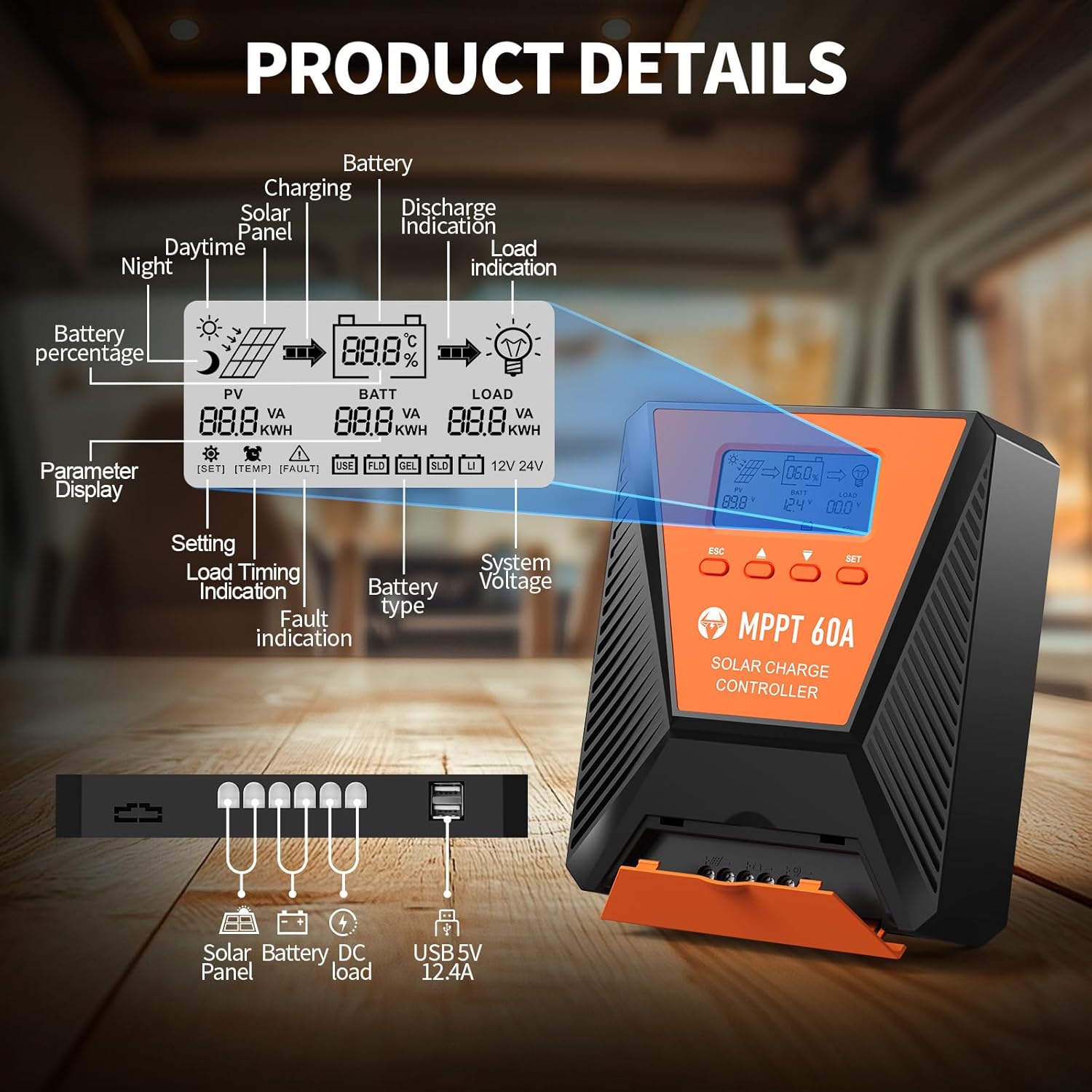
Billede 3: Detaljeret view of the controller's LCD display, showing various indicators and parameters, along with the connection ports at the bottom.
LCD-displayindikatorer:
- Reporter: Solpanel voltage og magt.
- BATT: Batteri voltage, charge status, and type.
- BELASTNING: Load status and power.
- Batteri Percentage: Aktuelt batteriopladningsniveau.
- Charging/Discharge Indication: Arrows indicating power flow.
- Fejlindikation: Error codes displayed if issues occur.
- System Voltage: Automatically detected 12V or 24V.
Kontrolknapper:
- ESC: Exit menu or cancel setting.
- OP/NED-pile: Navigate menus or adjust values.
- SÆT: Enter menu or confirm setting.
5. Opsætning og installation
Follow these steps for proper installation of your solar charge controller:
- Montering: Choose a suitable location for the controller, ensuring adequate ventilation and protection from direct sunlight, high temperatures, and moisture. Use the provided mounting screws to secure the controller.
- Batteriforbindelse: Connect the battery to the controller's battery terminals first. Ensure correct polarity (positive to positive, negative to negative). The controller will automatically detect the 12V or 24V system voltage.
- Solpaneltilslutning: Connect the solar panel to the controller's solar input terminals. Ensure correct polarity. The controller will begin charging the battery.
- DC Load Connection (Optional): Connect your DC loads to the load terminals. Ensure correct polarity.

Image 4: Connection diagram illustrating how to connect the solar panel, battery bank, inverter (for AC load), and DC load to the MPPT controller.
The controller supports various deep cycle battery types, including FLD, LiFePO4, SLD, GEL, and AGM. It also supports 0V lithium battery charging (lithium battery activation function).

Image 5: The controller is compatible with various 12V/24V battery types, automatically identifying voltage and supporting custom parameters and 0V lithium battery charging.
6. Betjeningsvejledning
LCD Display and Parameter Settings:
The LCD display provides real-time information about your solar charging system. Use the four buttons (ESC, UP, DOWN, SET) to navigate menus and adjust parameters.
- Trykke SÆT for at komme ind i hovedmenuen.
- Bruge OP/NED to scroll through options such as battery type, load timer settings, and other customizable parameters.
- Trykke SÆT again to select an option and then use OP/NED at ændre værdier.
- Trykke SÆT to confirm changes, or ESC at afslutte uden at gemme.
Opladningsproces:
The controller utilizes a smart 4-stage charging process to optimize battery health and longevity:
- Bulkafgift: Rapid charging to bring the battery to approximately 80% capacity.
- Absorptionsafgift: Charging at a constant voltage to bring the battery to 100% capacity.
- Flydeafgift: Maintaining the battery at full charge with a lower voltage.
- Equalization Charge (for specific battery types): Periodically overcharging to balance cell voltages.
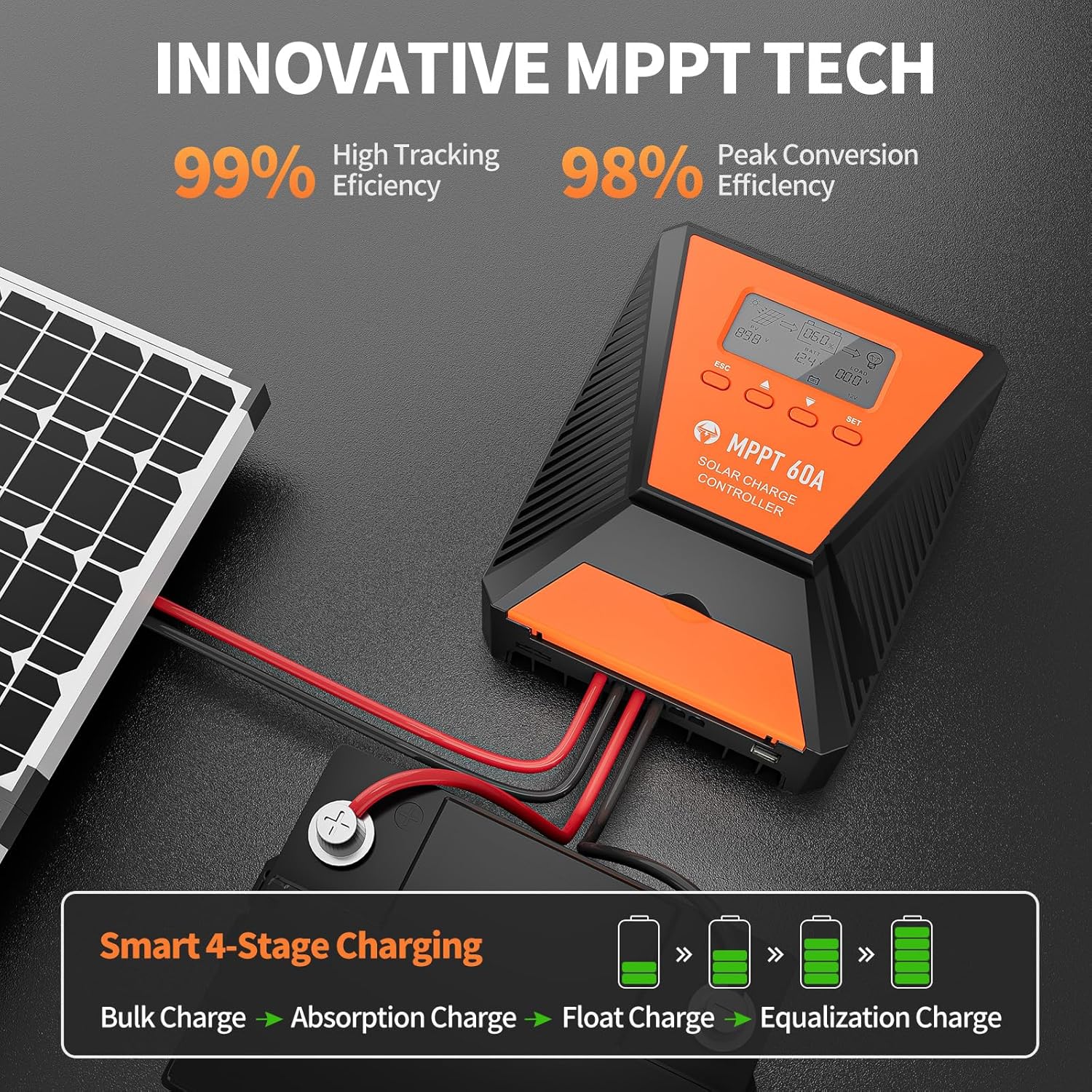
Image 6: The controller features 99% high tracking efficiency and 98% peak conversion efficiency, along with a smart 4-stage opladningsproces.
USB-opladning:
The controller includes dual USB ports for charging electronic devices. These ports provide 5V DC output.
7. Vedligeholdelse
Regular maintenance ensures optimal performance and extends the lifespan of your solar charge controller and battery system.
- Tjek forbindelser: Kontrollér regelmæssigt alle ledningsforbindelser for tæthed og korrosion.
- Rengør controller: Hold controlleren ren og fri for støv og snavs. Brug en tør klud til rengøring.
- Ventilation: Ensure the installation area remains well-ventilated to prevent overheating. The controller is designed with a metal case and dual high-speed intelligent fans for enhanced heat dissipation.
- Batteriinspektion: Follow the manufacturer's maintenance guidelines for your specific battery type.
- Temperaturkompensation: The controller features a temperature compensation function that automatically adjusts charging and discharging parameters to prolong battery life.
8. Fejlfinding
If you encounter issues with your controller, refer to the LCD display for error codes and consult the following common troubleshooting steps:
- Ingen visning: Check battery connections and ensure the battery has sufficient voltage.
- Ingen opladning: Verify solar panel connections and ensure adequate sunlight. Check for any fault indications on the LCD.
- Indlæsning virker ikke: Check load connections and ensure the load is within the controller's rated capacity. Verify load timer settings.
- Fejlkoder: The LCD display will show specific error codes for various issues (e.g., overvoltage, undervoltage, overtemperature, short circuit). Refer to the controller's internal error code list (if provided in a separate document) for detailed explanations and solutions.
The controller incorporates 9 intelligent protection features to safeguard your system:
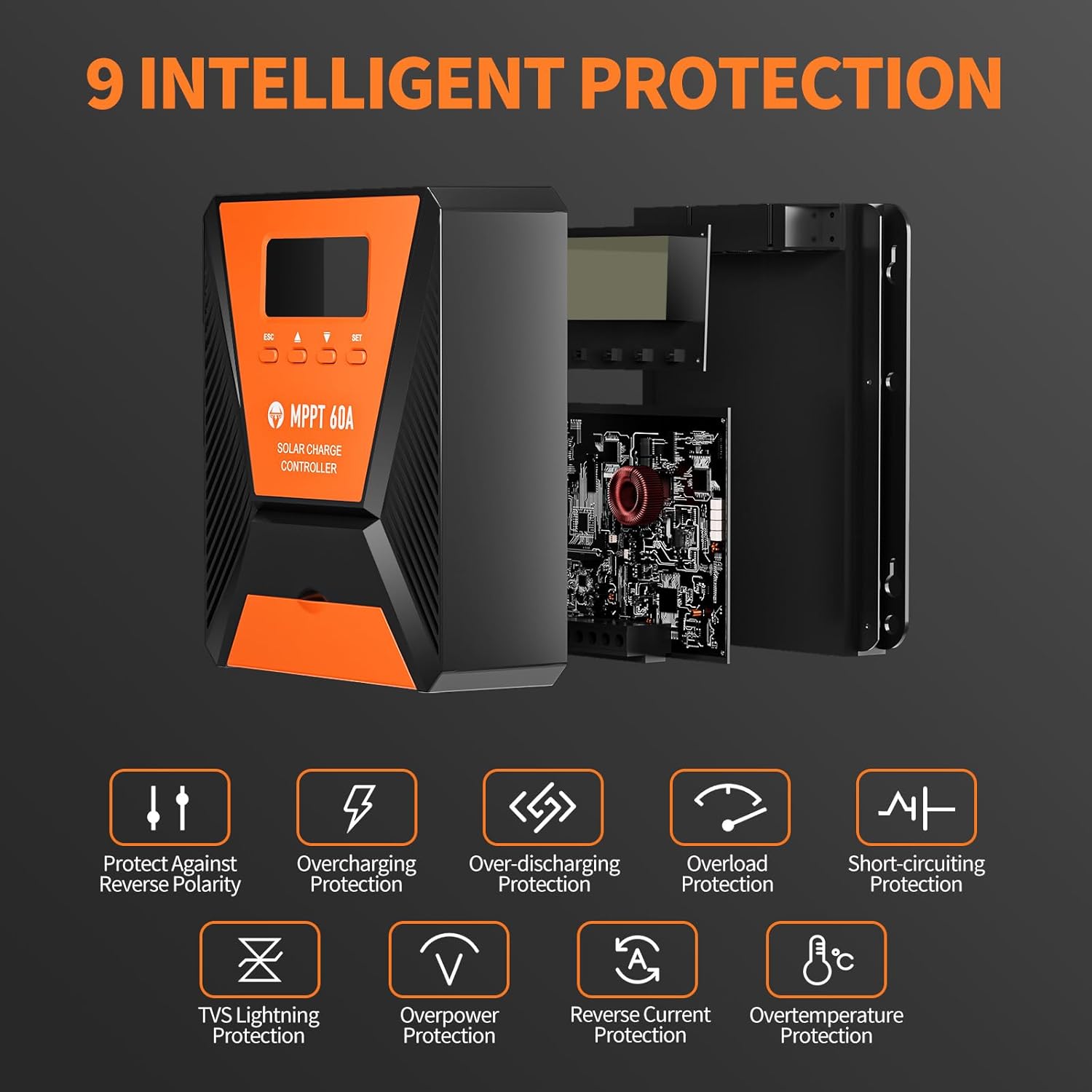
Image 7: The controller provides 9 intelligent protection features, including protection against reverse polarity, overcharging, over-discharging, overload, short-circuiting, TVS lightning, overpower, reverse current, and overtemperature.
9. Specifikationer
| Feature | Specifikation |
|---|---|
| Model | 40A |
| Mærke | TOPBULL |
| System Voltage | 12V/24V Automatic Recognition |
| Sporingseffektivitet | >99 % |
| Maksimal konverteringseffektivitet | Max 98 % |
| Kompatible batterityper | FLD, LiFePO4, SLD, GEL, AGM |
| Max PV-indgang Voltage | 100V DC |
| Max Solar Input Power (12V System) | 720W |
| Max Solar Input Power (24V System) | 1440W |
| USB udgang | Dual USB Ports, 5V DC |
| Display Type | LCD |
| Dimensioner (pakke) | 23.6 x 22.1 x 10.59 cm |
| Vægt (pakke) | 1.25 kg |
| Inkluderet tilbehør | Monteringsskruer |
10. Garanti og support
TOPBULL is committed to providing professional technical support. If you have any questions or require assistance with your MPPT solar charge controller, please contact our customer service. We strive to meet your needs and provide the best possible support.


