1. Introduktion
Thank you for choosing the XIAOMI Flexible Rechargeable LampDenne manual indeholder vigtige oplysninger til sikker og effektiv brug af din nye lampLæs venligst den grundigt inden brug, og gem den til senere brug.

Figure 1: XIAOMI Flexible Rechargeable Lamp
2. Sikkerhedsoplysninger
- Do not disassemble, repair, or modify the lamp dig selv.
- Behold lamp away from water, moisture, and high temperatures.
- Brug kun det medfølgende opladningskabel eller et certificeret USB-C-kabel til opladning.
- Undgå direkte øjenkontakt med lyskilden i længere perioder.
- Bortskaf produktet og dets batteri på en ansvarlig måde i henhold til lokale regler.
3. Pakkens indhold
Bekræft at alle varer er til stede i pakken:
- XIAOMI Fleksibel Genopladelig Lamp Enhed
- Lamp Grundlag
- Clamp Vedhæftet fil
- USB-C ladekabel
- Brugervejledning (dette dokument)
4. Produktet er slutview
The XIAOMI Flexible Rechargeable Lamp is designed for versatile illumination, functioning as a desk lamp, clip-on lamp, or handheld light source. It features a magnetic attachment for easy angle adjustment and multiple lighting modes.

Figure 2: Versatile Usage Modes

Figure 3: Design Details (Charging Port, Button, Anti-slip Strip)
5. Opsætning
- Indledende opkrævning: Oplad batteriet helt før første brug.amp using the provided USB-C cable. Connect the cable to the lamp's Type-C port and a compatible USB power adapter (not included). The battery status indicator will show charging progress.
- Assembly (Desk Lamp): Placer lamp unit onto the circular lamp base. The magnetic connection will secure it.
- Assembly (Clip-on Lamp): Fastgør clamp accessory to a suitable surface (e.g., desk edge, shelf). Then, magnetically attach the lamp unit to the designated area on the clamp.
6. Betjeningsvejledning
6.1 Tænd/sluk og valg af tilstand
- Kort tryk: Briefly press the power button to turn the lamp ON eller OFF.
- Langt tryk: Press and hold the power button to cycle through the four available lighting modes.

Figure 4: Four Lighting Modes
6.2 Vinkeljustering
Lamp head is attached magnetically, allowing for flexible positioning:
- Lodret rotation: Juster lamp head up or down by up to 180 degrees.
- Vandret rotation: Drej lamp head horizontally by up to 360 degrees.
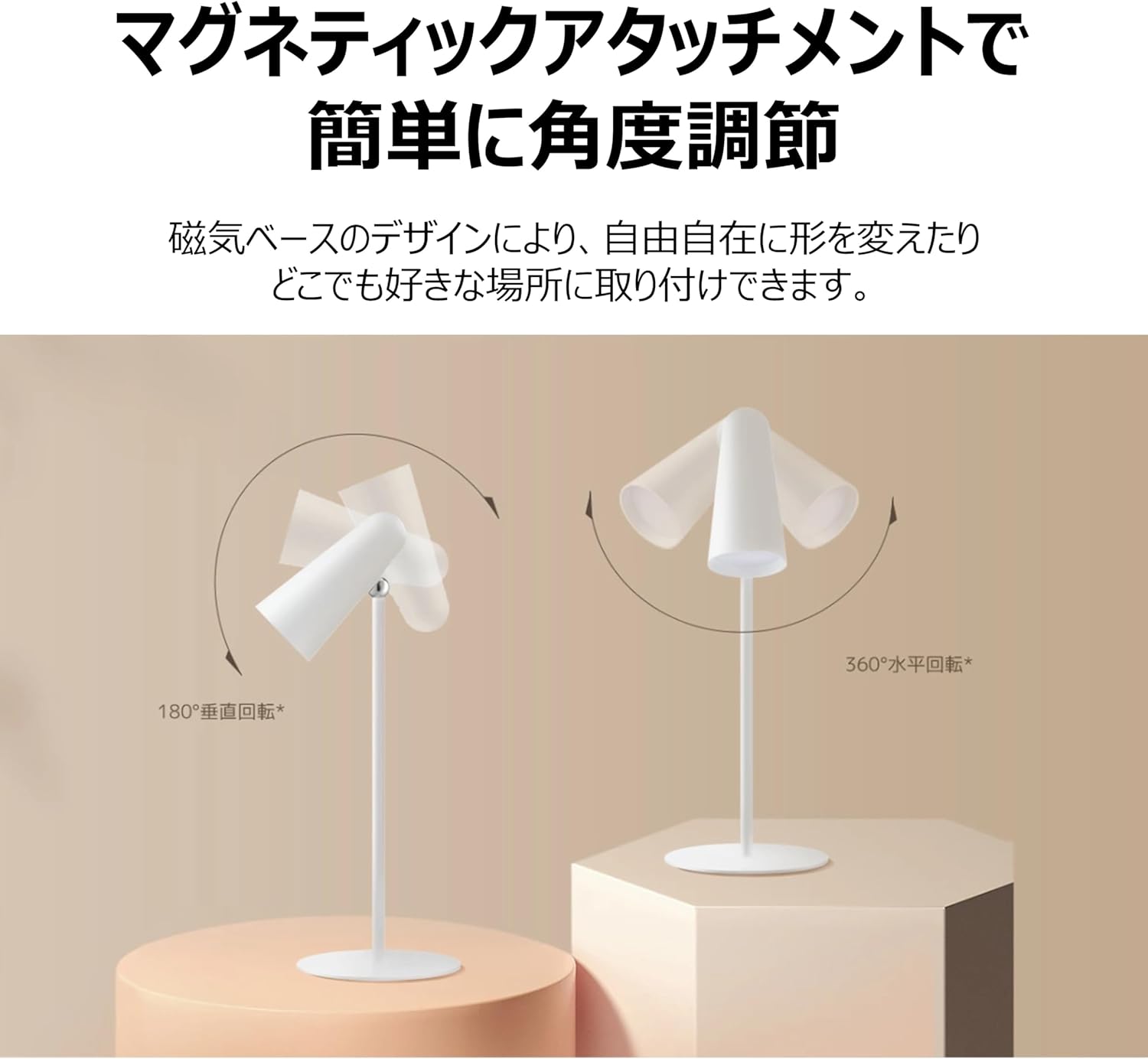
Figure 5: Magnetic Angle Adjustment
6.3 Opladning
Tilslut lamp to a power source using the USB-C cable. The lamp maintains consistent brightness even while charging. A full charge provides over 40 hours of illumination at the lowest brightness setting.

Figure 6: Charging the Lamp
7. Vedligeholdelse
- Rensning: Tør lamp med en blød, tør klud. Brug ikke slibende rengøringsmidler eller opløsningsmidler.
- Opbevaring: Opbevar lamp på et køligt, tørt sted, når den ikke er i brug i længere perioder.
- Batteripleje: To prolong battery life, avoid fully discharging the lamp frequently. Charge it regularly, even if not in constant use.
8. Fejlfinding
| Problem | Mulig årsag | Løsning |
|---|---|---|
| Lamp tændes ikke | Lavt batteri; Tænd/sluk-knappen er ikke trykket korrekt ind | Oplad lamp; Ensure a firm short press on the power button. |
| Lamp oplader ikke | Defekt kabel eller adapter; Løs forbindelse | Check USB-C cable and adapter; Ensure connections are secure; Try a different cable/adapter. |
| Lyset er svagt eller flimrer | Lavt batteri | Oplad lamp fuldt ud. |
| Magnetic attachment feels loose | Lamp not properly seated on base/clamp | Re-seat the lamp unit firmly onto the magnetic base or clamp. |
9. Specifikationer
| Feature | Specifikation |
|---|---|
| Modelnummer | BHR8959GL |
| Mål (D x B x H) | 4.72 cm x 2.21 cm x 11.42 cm |
| Varens vægt | 14.1 ounces (400 gram) |
| Strømkilde | Batteridrevet (lithium-ion) |
| Batterilevetid | Up to 40 Hours (lowest brightness) |
| Lyskildetype | LED |
| Wattage | 5 watt |
| Voltage | 5 volt |
| Materiale | Plastic (Acrylonitrile Butadiene Styrene base) |
| Kontrolmetode | Touch (Magnetic Switch) |
| Color Rendering Index (CRI) | Ra90 |
| Inkluderede komponenter | Stand, Clamp |
10. Garanti og support
This XIAOMI product is covered by a limited warranty. For detailed warranty terms and conditions, please refer to the warranty card included with your purchase or visit the official XIAOMI webwebsted.
For technical support, troubleshooting assistance, or service inquiries, please contact XIAOMI customer support through their official channels. Contact information can typically be found on the XIAOMI webwebstedet eller din købsdokumentation.


