1. Introduktion
This manual provides essential instructions for the proper use and maintenance of your realme P2 Pro 5G smartphone. Please read this manual thoroughly before using your device to ensure optimal performance and safety.
1.1 Produkt overview
The realme P2 Pro 5G is a high-performance smartphone designed for advanced mobile communication and entertainment. It features a 6.7-inch 120Hz curved AMOLED display, powered by a Snapdragon 7s Gen 2 processor. The device includes a 50MP main camera with Optical Image Stabilization (OIS), an 8MP ultrawide lens, and a 32MP front camera. A 5200mAh battery supports 80W fast charging, complemented by a Stainless Steel Vapor Cooling system for efficient thermal management.
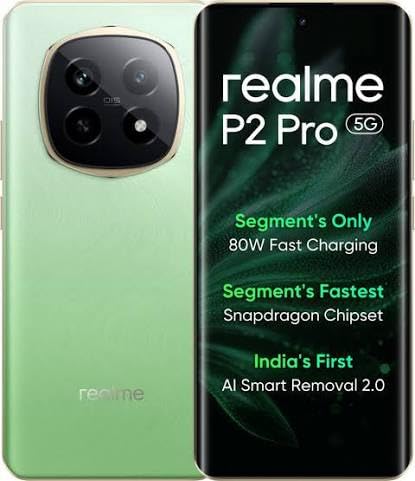
Figur 1.1: realme P2 Pro 5G Smartphone. This image displays the front and back of the realme P2 Pro 5G in Parrot Green. The front shows the curved display with a punch-hole camera, while the back highlights the large, circular camera module containing multiple lenses and the realme branding.
1.2 Pakkens indhold
Kontroller, at alle varer er til stede i din produktemballage. Hvis nogen varer mangler eller er beskadiget, skal du kontakte din forhandler.
- realme P2 Pro 5G Smartphone
- 80W SuperVOOC Charger
- USB Type-C-kabel
- SIM Ejector Tool
- Beskyttende etui
- Hurtig startvejledning
- Sikkerhedsoplysninger og garantikort
2. Opsætning
2.1 Installation af SIM -kort
- Find SIM-kortbakken på siden af din enhed.
- Sæt SIM-kortudkastningsværktøjet i det lille hul ved siden af bakken, og tryk forsigtigt, indtil bakken springer ud.
- Placer dit/dine Nano-SIM-kort i bakken med guldkontakterne nedad. Sørg for, at de vender korrekt.
- Sæt forsigtigt SIM-kortbakken tilbage i telefonen.
2.2 Første opladning og tænding
- Connect the USB Type-C cable to the phone's charging port and the 80W SuperVOOC charger.
- Plug the charger into a power outlet. The phone will begin charging.
- To power on, press and hold the Power button (located on the right side) until the realme logo appears.
- Følg instruktionerne på skærmen for at fuldføre den indledende opsætning, herunder valg af sprog, Wi-Fi-forbindelse og opsætning af Google-konto.
3. Betjening af din enhed
3.1 Grundlæggende navigation
- Berøringsbevægelser: Tryk for at vælge, swipe for at rulle, knib for at zoome.
- Startskærm: Få adgang til apps, widgets og notifikationer.
- Statuslinje: Displays notifications, time, battery status, and signal strength. Swipe down to access Quick Settings.
- Fingeraftrykssensor i displayet: Unlock your device securely by placing your registered finger on the designated area of the screen.
3.2 Opkald og beskeder
- Foretage opkald: Åbn Telefon-appen, indtast nummeret, og tryk på opkaldsikonet.
- Afsendelse af beskeder: Open the Messages app, tap the new message icon, enter recipient and message, then send.
3.3 Kamerafunktioner
Your realme P2 Pro 5G features a versatile camera system.
- Hovedkamera: 50MP with OIS for stable, high-resolution photos.
- Ultravidvinkelkamera: 8MP for capturing broader scenes.
- Forreste kamera: 32MP til klare selfies og videoopkald.
- Tilstande: Explore various modes like Portrait, Night, Pro, and Panorama within the Camera app.
3.4 Forbindelse
- Wi-Fi: Opret forbindelse til trådløse netværk for at få internetadgang. Gå til Indstillinger > Wi-Fi.
- Bluetooth: Par med trådløse hovedtelefoner, højttalere og andre enheder. Gå til Indstillinger > Bluetooth.
- 5G-netværk: Utilize high-speed 5G connectivity where available. Ensure your SIM card and plan support 5G.
- USB Type-C: Til opladning, dataoverførsel og tilslutning af tilbehør.
4. Vedligeholdelse
4.1 Pleje af batterier
- Use only the official 80W SuperVOOC charger and cable provided with your device.
- Undgå at udsætte telefonen for ekstreme temperaturer, da dette kan forringe batteriets levetid.
- For optimal batterilevetid bør du undgå at aflade batteriet helt ofte.
4.2 Rengøring af din enhed
- Tør forsigtigt skærmen og kabinettet af med en blød, fnugfri klud.
- Undgå at bruge skrappe kemikalier, slibende rengøringsmidler eller aerosolspray.
- Ensure no liquid enters openings such as the charging port or speaker grilles.
4.3 Softwareopdateringer
Regularly check for and install software updates to enhance performance, security, and introduce new features. Go to Indstillinger > Om enhed > Opdateret (or similar path depending on OS version).
5. Fejlfinding
If you encounter issues with your realme P2 Pro 5G, refer to the common solutions below.
| Problem | Mulig løsning |
|---|---|
| Enheden tænder ikke | Sørg for, at batteriet er opladet. Tilslut det til opladeren i mindst 10 minutter, og prøv derefter at tænde det igen. |
| Apps går ned eller fryser | Ryd appens cache (Indstillinger > Apps > [Appnavn] > Lager > Ryd cacheHvis problemet fortsætter, skal du genstarte enheden. |
| Dårlig batterilevetid | Check background app usage (Indstillinger > Batteri). Reduce screen brightness, disable unnecessary features like GPS or Bluetooth when not in use. |
| Problemer med netværksforbindelse | Toggle Airplane Mode on and off. Restart the device. Check SIM card insertion. Reset network settings (Indstillinger > System > Nulstillingsindstillinger > Nulstil Wi-Fi, mobil og Bluetooth). |
| Fingeraftrykssensoren virker ikke | Ensure your finger and the screen are clean and dry. Re-register your fingerprints if necessary (Settings > Security & privacy > Fingerprint unlock). |
For further assistance, please contact realme customer support.
6. Specifikationer
Detailed technical specifications for the realme P2 Pro 5G (Model: RMX3987).
| Feature | Detalje |
|---|---|
| Modelnummer | RMX3987 |
| Operativsystem | Android 14 |
| Processor | Snapdragon 7s Gen 2 (CPU Speed: 2.4 GHz) |
| VÆDDER | 12 GB (Up to 24GB Dynamic RAM) |
| Opbevaring | 256GB (as per product title) |
| Vise | 6.7-inch Curved AMOLED, 2412 x 1080 Resolution |
| Hovedkamera | 50 MP (Sony LYT-600 OIS Camera) |
| Forreste kamera | 32 MP |
| Batterikapacitet | 5200 mAh (1 Lithium Ion battery included) |
| Opladning | 80W hurtig opladning |
| Forbindelse | 5G, Bluetooth, USB, Wi-Fi, GPS |
| Særlige funktioner | In-display fingerprint sensor, 4500 mm² VC Cooling System |
| Dimensioner (LxBxH) | 16.13 x 7.39 x 0.82 cm |
| Vægt | 510 g |
| Farve | Parrot Green |
| Fabrikant | BBK Electronics |
7. Sikkerhedsoplysninger
- Forsøg ikke at adskille eller modificere enheden.
- Hold enheden væk fra vand og overdreven fugt.
- Undgå at udsætte enheden for direkte sollys eller høje temperaturer i længere perioder.
- Use only realme-approved accessories.
- Bortskaf enheden og dens batteri på en ansvarlig måde i henhold til lokale regler.
- Brug ikke enheden, mens du kører bil eller betjener tunge maskiner.
8. Garanti og support
Your realme P2 Pro 5G is covered by a limited warranty. Please refer to the warranty card included in your package for specific terms and conditions.
For technical support, service, or warranty claims, please visit the official realme support webwebsted eller kontakt deres kundeservice.
- realme officielle Webwebsted: www.realme.com
- Kundeservice: Refer to your region-specific realme support contact information.


