1. Introduktion
The IMIKI FRAME LITE ST2 is a versatile smartwatch designed for daily use, offering a blend of style and functionality. It features a 1.96-inch IPS display, Bluetooth connectivity, and various health monitoring capabilities. This manual provides essential information for operating and maintaining your device.
2. Pakkens indhold
Kontroller venligst, at alle varer er til stede i din pakke:
- IMIKI FRAME LITE ST2 Smartwatch
- Magnetisk opladningskabel
- Brugermanual
3. Enhed overview
Gør dig bekendt med hovedkomponenterne i dit smartwatch.
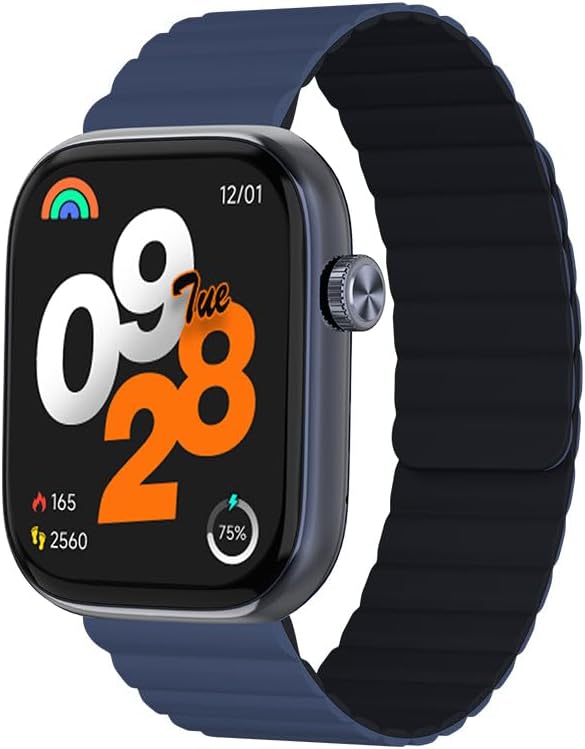
Billede 1: Front view of the IMIKI FRAME LITE ST2 Smartwatch, displaying the time, date, and activity metrics on its 1.96-inch IPS screen. The watch features a blue case and a blue magnetic strap.

Billede 2: Side view of the IMIKI FRAME LITE ST2 Smartwatch, highlighting its slim profile and the integrated crown button for navigation and control.
4. Opsætning
4.1 Opladning af smartwatchet
Before initial use, fully charge your IMIKI FRAME LITE ST2 Smartwatch.
- Tilslut det magnetiske opladningskabel til opladningspunkterne på bagsiden af smartwatchet.
- Sæt USB-enden af kablet i en standard USB-strømadapter (medfølger ikke) eller en computers USB-port.
- Urets display viser opladningsstatus. En fuld opladning tager cirka 2 timer.
A fully charged 250 mAh battery provides up to 15 days of typical use or 5 days of intensive use.
4.2 Installation af Companion-appen
To unlock the full features of your smartwatch, download and install the companion application on your smartphone.
- Scan the QR code provided in the quick start guide or search for the official IMIKI app in the Apple App Store (for iOS) or Google Play Store (for Android).
- Installer appen på din smartphone.
- Følg instruktionerne på skærmen for at oprette en konto og konfigurere din profile.
4.3 Parring med din smartphone
Ensure Bluetooth is enabled on your smartphone and the smartwatch is sufficiently charged.
- Open the IMIKI companion app on your smartphone.
- Naviger til afsnittet 'Enhed' eller 'Tilføj enhed' i appen.
- The app will search for available devices. Select 'IMIKI FRAME LITE ST2' from the list.
- Bekræft parringsanmodningen på både din smartphone og smartwatch, hvis du bliver bedt om det.
- Once paired, the smartwatch will synchronize data with your phone.
5. Betjening af smartwatchet
5.1 Grundlæggende navigation
- Berøringsskærm: Stryg til venstre, højre, op eller ned for at navigere gennem menuer og notifikationer. Tryk for at vælge elementer.
- Sideknap/krone: Press to wake the screen, return to the home screen, or access the app list. Rotate (if applicable) to scroll through lists.
5.2 Opkaldshåndtering
With Bluetooth 5.3 connectivity, you can manage calls directly from your smartwatch when paired with your smartphone.
- Besvarelse af opkald: Tap the green icon on the watch screen when an incoming call is displayed.
- Afvisning af opkald: Tryk på det røde ikon for at afvise et indgående opkald.
- Stemmeassistent: Access your smartphone's voice assistant directly from the watch for hands-free commands.
5.3 Health and Fitness Monitoring
The IMIKI FRAME LITE ST2 is equipped with sensors to track your health and fitness activities.
- Heart Rate Monitoring: The optical sensor continuously monitors your heart rate. View real-time data on the watch or in the app.
- Måling af ilt i blodet (SpO2): Measure your blood oxygen saturation levels. Ensure the watch is worn snugly on your wrist for accurate readings.
- Træningstilstande: Choose from 105 supported workout modes to track specific activities. The watch records statistics such as duration, calories burned, and heart rate during exercise.
- Søvnsporing: Monitor your sleep patterns, including deep sleep, light sleep, and wake times.
ALDRIG tilpasning
Personalize your smartwatch experience through the companion app.
- Se ansigter: Select from a variety of watch faces or create custom ones using the app.
- Notifikationsindstillinger: Manage which app notifications appear on your smartwatch.
6. Vedligeholdelse
6.1 Rengøring
Regular cleaning helps maintain the smartwatch's appearance and functionality.
- Tør skærmen og urhuset af med en blød, fnugfri klud.
- Til genstridigt snavs, let dampRengør kluden med vand. Undgå at bruge skrappe kemikalier eller slibende materialer.
- Rengør opladningskontakterne med jævne mellemrum for at sikre korrekt opladning.
6.2 Vandtæthed
The IMIKI FRAME LITE ST2 has an IP68 water resistance rating, meaning it is protected against dust ingress and can withstand immersion in water up to 1.5 meters for 30 minutes. It is suitable for daily use, such as hand washing or light rain. However, it is not recommended for swimming, diving, or exposure to high-pressure water.
6.3 Opbevaring
When not in use for extended periods, store the smartwatch in a cool, dry place. Ensure it has some charge to prevent deep discharge of the battery.
7. Fejlfinding
Hvis du støder på problemer med dit smartwatch, kan du se følgende almindelige løsninger:
- Uret tænder ikke: Sørg for, at uret er fuldt opladet. Tilslut det til opladeren i mindst 10 minutter.
- Kan ikke parres med smartphone:
- Sørg for, at Bluetooth er aktiveret på din telefon.
- Sørg for, at uret er inden for din telefons rækkevidde.
- Genstart både smartwatch og din smartphone.
- Ryd Bluetooth-cachen på din telefon (hvis relevant).
- Unøjagtige sundhedsdata: Sørg for, at uret sidder tæt på dit håndled, hverken for stramt eller for løst. Rengør sensoren på bagsiden af uret.
- Notifikationer vises ikke: Check notification settings in the companion app and on your smartphone. Ensure the app is running in the background.
- Skærmen reagerer ikke: Try restarting the smartwatch by pressing and holding the side button for several seconds.
8. Specifikationer
| Feature | Specifikation |
|---|---|
| Mærke | IMIKI |
| Modelnavn | IMIKI FRAME LITE ST2 |
| Skærmstørrelse | 1.96 tommer |
| Display Type | IPS |
| Forbindelsesteknologi | Bluetooth 5.3 |
| Kompatible enheder | Smartphone (Android & iOS) |
| Batterikapacitet | 250 mAh |
| Typisk brug Batterilevetid | Op til 15 dage |
| Intensive Usage Battery Life | Op til 5 dage |
| Opladningstid | Cirka 2 timer |
| Vandmodstandsvurdering | IP68 |
| Sundhedsovervågning | Blood Oxygen, Heart Rate |
| Træningstilstande | 105 |
| Rem Type | Magnetisk |
9. Garanti og support
For warranty information and customer support, please refer to the warranty card included in your product packaging or visit the official IMIKI webwebstedet. Behold din købskvittering som købsbevis.
If you require further assistance or have questions not covered in this manual, please contact IMIKI customer service through their official channels.


