1. Introduktion
The Inseego MiFi X Pro M3000 is a powerful and secure mobile hotspot designed to provide reliable 5G and 4G LTE connectivity. Equipped with Wi-Fi 6 technology, it supports up to 32 Wi-Fi enabled devices, offering a virtually lag-free connected experience. This manual provides essential information for setting up, operating, and maintaining your device.
Hvad er der i æsken
- Inseego MiFi X Pro M3000 Hotspot Device
- USB Type-C-kabel
- Power Adapter (if included with your specific package)
- Hurtig startvejledning (dette dokument)
2. Opsætning
2.1 Isætning af SIM-kort og batteri
- Sørg for, at enheden er slukket.
- Carefully remove the back cover of the MiFi X Pro.
- Insert your activated Nano SIM card into the designated SIM card slot. Ensure correct orientation as indicated on the device.
- Insert the battery into its compartment.
- Sæt bagdækslet på igen, og sørg for, at det klikker sikkert på plads.
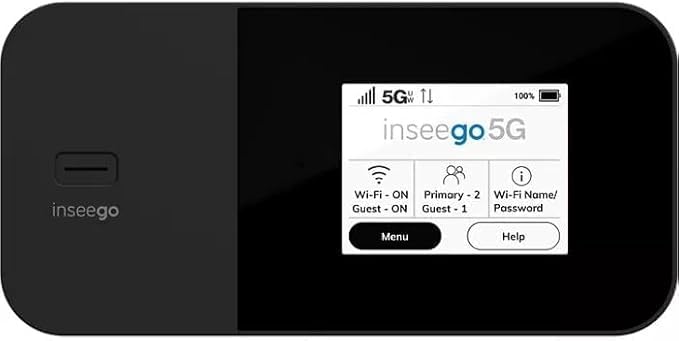
Figur 1: Forside view of the Inseego MiFi X Pro M3000, showing the display with network status, Wi-Fi, and menu options.
2.2 Tænding og indledende konfiguration
- Tryk og hold tænd/sluk-knappen nede (normalt placeret på siden eller toppen), indtil skærmen lyser.
- Follow the on-screen prompts to complete the initial setup, which may include setting a device password and Wi-Fi network name (SSID) and password.
- Alternatively, you can manage settings via the Inseego Mobile app or a web interface by connecting a device to the hotspot and navigating to the device's IP address (typically 192.168.1.1).
3. Betjening
3.1 Tilslutning af enheder
- Søg efter tilgængelige Wi-Fi-netværk på din Wi-Fi-aktiverede enhed (smartphone, tablet, bærbar computer).
- Select the Wi-Fi network name (SSID) displayed on your MiFi X Pro screen.
- Enter the Wi-Fi password displayed on your MiFi X Pro screen.
- Din enhed skulle nu have forbindelse til internettet.
3.2 Managing Wi-Fi Networks and Connections
- The MiFi X Pro supports simultaneous dual-band Wi-Fi 6 with primary and guest networks.
- Access the device's menu (via the touchscreen or web interface) to view connected devices, monitor data usage, and configure network settings.
- Guest networks can be enabled or disabled and configured with separate passwords for enhanced security.

Figur 2: Side view of the Inseego MiFi X Pro M3000, highlighting the USB-C port for charging and data, and the power button.
4. Vedligeholdelse
4.1 Batteripleje og opladning
- Charge the MiFi X Pro using the provided USB Type-C cable and power adapter.
- The device features fast-charging capabilities.
- For 24/7 operation, utilize the proprietary battery preservation mode when connected to AC power.
- Avoid exposing the device to extreme temperatures or direct sunlight for prolonged periods to preserve battery life.
4.2 Enhedsnulstilling
If you experience persistent issues, a factory reset may resolve them. Refer to the device's on-screen menu or web interface for instructions on performing a factory reset. This will erase all custom settings and return the device to its default state.
5. Fejlfinding
- Ingen internetforbindelse:
- Ensure your SIM card is properly inserted and activated with a data plan.
- Check the signal strength indicator on the device screen. Move to an area with better network coverage if necessary.
- Restart the MiFi X Pro and the connected device.
- Verify that your data plan has not been exceeded.
- Langsomme hastigheder:
- Reducer antallet af tilsluttede enheder.
- Ensure you are within optimal Wi-Fi range (up to 35 feet).
- Tjek for netværksbelastning i dit område.
- Enheden tænder ikke:
- Ensure the battery is charged. Connect the device to a power source.
- If the battery is completely drained, it may take a few minutes of charging before the device can power on.
6. Specifikationer
| Feature | Detalje |
|---|---|
| Modelnavn | Inseego MiFi X Pro (M3000) |
| Forbindelse | 5G, 4G LTE, Wi-Fi 6 (802.11ax) |
| Frekvensbåndsklasse | Dual-Band |
| Max tilsluttede enheder | Op til 32 |
| Havne | 1 Gbps Ethernet port, USB-C port |
| Sikkerhedsfunktioner | Enterprise-grade security, Open VPN, VPN pass-through, static IP support, Wi-Fi privacy separation, WPA3 |
| Speciel funktion | WPS (Wi-Fi Protected Setup) |
| Batteri | Long-lasting, fast-charging, proprietary battery preservation mode |
| Farve | Sort |
| Varens vægt | 13.4 ounce |
| Pakkedimensioner | 6.69 x 4.37 x 2.32 tommer |
7. Garanti og support
For warranty information and technical support, please refer to the official Inseego website or contact your product retailer. Keep your purchase receipt for warranty claims.
This product is offered as an Amazon Renewed item, which typically includes a separate Amazon Renewed Guarantee. Please consult the Amazon Renewed Guarantee details for specific coverage and support related to your purchase.


