1. Introduktion
Thank you for choosing the EvoFox Ronin Wired Mechanical Gaming Keyboard. This manual provides detailed instructions for setting up, operating, and maintaining your keyboard to ensure optimal performance and longevity. The EvoFox Ronin is designed for a superior typing and gaming experience, featuring advanced sound dampening, customizable switches, and dynamic RGB lighting.

Image 1.1: EvoFox Ronin Wired Mechanical Gaming Keyboard (Black)
Nøglefunktioner:
- 9-Layer Gasket Structure: Advanced design for reduced noise, improved stability, and enhanced tactile feedback.
- Hot-Swappable Outemu Red Silent Switches: Customizable, durable, and smooth typing experience with included switch puller.
- Per-Key RGB Backlighting: 21 effects and Audio Sync Mode for personalized and immersive lighting.
- Dedicated Volume Knob: Convenient control over audio levels.
- Powerful Windows Software: Program keys, create macros, control backlighting, and manage profiles with onboard memory.
- Kompatibilitet på tværs af platforme: Easily switch between Windows and Mac modes.
- Detachable Braided USB-C Cable: Robust 1.5m cable with EMI ring for reliable connection and portability.
2. Pakkens indhold
Kontroller venligst, at alle varer er til stede i din pakke:
- 1 x EvoFox Ronin Mechanical Gaming Keyboard
- 1 x Keycap aftrækker
- 4 x Outemu Red Switches (Spare)
- 1 x brugermanual
3. Produktet er slutview
3.1 Pakningsstruktur
The EvoFox Ronin features an advanced 9-layer gasket structure. This design incorporates silicone gaskets, a mounting plate, and multiple layers of vibration and sound dampening materials to provide a stable, quiet, and comfortable typing experience by minimizing unwanted noise and resonance.
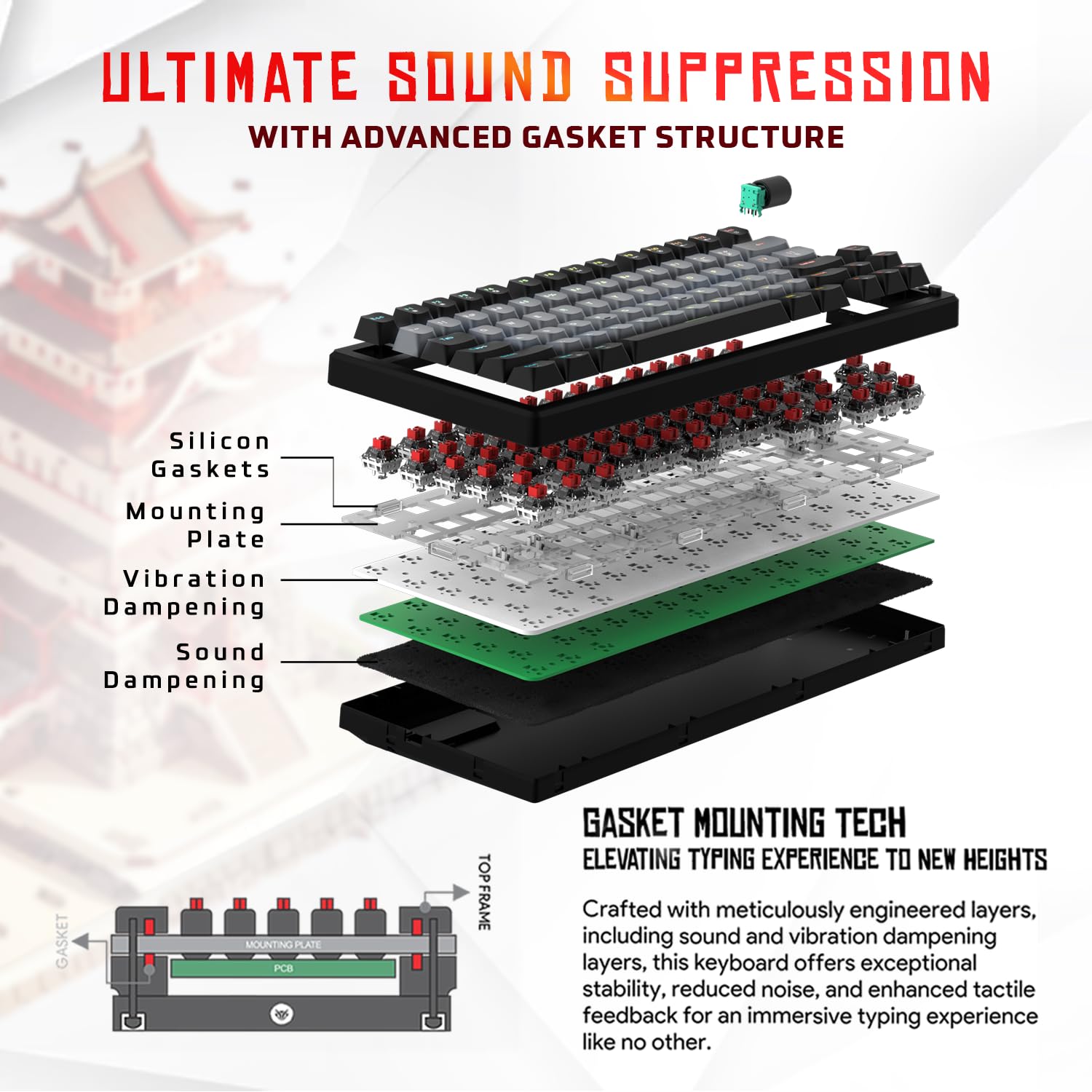
Billede 3.1: Eksploderet view of the 9-layer gasket structure, showing silicone gaskets, mounting plate, and dampening lag.
3.2 Outemu Red Silent Switches
The keyboard is equipped with Outemu Red Dust Proof Switches, known for their linear and silent operation. These switches are hot-swappable, allowing users to easily replace them with other compatible 3-pin mechanical switches without soldering, enabling full customization of the typing feel.

Image 3.2: Close-up of Outemu Red switches and the included switch puller, demonstrating hot-swappable functionality.
3.3 RGB-baggrundsbelysning pr. tast
Each key on the EvoFox Ronin features individual RGB backlighting, offering 16 million colors and 21 pre-set lighting effects. The lighting can be customized directly on the keyboard or through the dedicated software, including an Audio Sync Mode that reacts to sound.

Image 3.3: The EvoFox Ronin keyboard showcasing its customizable per-key RGB backlighting.
3.4 Dedicated Volume Knob
A metal volume knob is integrated into the keyboard for quick and precise audio adjustments. Rotate to change volume, and press to mute/unmute.
3.5 Aftageligt USB-C-kabel
The keyboard connects via a robust 1.5-meter braided USB-C cable, which is detachable for easy portability and storage. The cable includes an EMI ring to minimize signal interference.

Image 3.4: Features of the EvoFox Ronin, including the volume knob, detachable USB-C cable, and double-height adjustable legs.
4. Opsætningsvejledning
Follow these steps to set up your EvoFox Ronin keyboard:
- Pak tastaturet ud: Tag forsigtigt tastaturet og alt tilbehør ud af emballagen.
- Tilslut USB-C-kablet: Insert the USB-C end of the provided cable into the port on the back of the keyboard.
- Tilslut til computer: Plug the USB-A end of the cable into an available USB port on your computer (PC or Mac).
- Driver installation: Tastaturet er plug-and-play. Dit operativsystem burde automatisk registrere og installere de nødvendige drivere.
- Valgfri softwareinstallation: For advanced customization, download the dedicated Windows software from the official EvoFox webwebsted.
5. Betjeningsvejledning
5.1 Grundlæggende nøglefunktioner
The EvoFox Ronin functions as a standard TKL (Tenkeyless) keyboard. All keys perform their labeled functions. The keyboard supports N-Key Rollover, ensuring every key press is registered accurately, even during rapid input.
5.2 Multimedie- og funktionstaster
Access multimedia and additional functions by pressing the Fn key in combination with the designated F-keys or other keys. Refer to the keycap legends for specific functions (e.g., Fn + F1 for media player, Fn + F2 for volume down).
5.3 RGB-lysstyring
You can control the RGB lighting directly from the keyboard:
- Ændringseffekter: Bruge Fn + \| at cykle gennem 21 forskellige lyseffekter.
- Juster lysstyrke: Bruge Fn + Pil op for at øge lysstyrken og Fn + pil ned for at mindske lysstyrken.
- Juster hastighed: Bruge Fn + venstre pil to decrease effect speed and Fn + højre pil for at øge effekthastigheden.
- Lydsynkroniseringstilstand: Activate specific modes that react to audio input.
5.4 Softwaretilpasning
The dedicated Windows software allows for comprehensive customization:
- Nøgleprogrammering: Omdan en hvilken som helst tast til en anden funktion.
- Makrooprettelse: Record and assign complex key sequences to a single key.
- Backlighting Effects: Fine-tune RGB colors, effects, brightness, and speed.
- Profile Ledelse: Opret og gem flere profiles til forskellige applikationer eller spil.
- Afstemningsfrekvens: Adjust the polling rate up to 1000Hz.

Image 5.1: Screenshot of the EvoFox Ronin's dedicated software, showing options for light settings, button settings, and macro management.
5.5 Cross-Platform Compatibility
The keyboard supports both Windows and Mac operating systems. Use the designated key combination (typically Fn + Win or similar, refer to keycap legends) to switch between modes, ensuring correct key mapping for your OS.
6. Vedligeholdelse
6.1 Rengøring af tastaturet
Sådan bevarer du dit tastaturs udseende og funktionalitet:
- Frakobl tastaturet fra computeren, før du rengør det.
- Brug en dåse med trykluft til at fjerne støv og snavs mellem tasterne.
- Tør tastaturets overflade af med en blød, let fugtig klud.amp klud. Undgå for meget fugt.
- Brug ikke hårde kemikalier eller slibende rengøringsmidler.
6.2 Udskiftning af afbrydere
The EvoFox Ronin features hot-swappable switches, allowing for easy replacement without soldering:
- Frakobl tastaturet fra din computer.
- Brug den medfølgende tastaftrækker til forsigtigt at fjerne den ønskede tast.
- Brug den medfølgende afbrydertrækker til forsigtigt at gribe fat i de øverste og nederste klips på afbryderen og trække den lige op.
- Align the pins of the new switch with the holes on the PCB and gently press it down until it clicks into place. Ensure the pins are not bent.
- Udskift tastaturdækslet.

Image 6.1: A keycap being removed from the keyboard using a keycap puller.
7. Fejlfinding
If you encounter issues with your EvoFox Ronin keyboard, refer to the following common solutions:
- Tastaturet reagerer ikke:
- Sørg for, at USB-C-kablet er korrekt tilsluttet til både tastaturet og computeren.
- Prøv at tilslutte tastaturet til en anden USB-port på din computer.
- Test tastaturet på en anden computer for at udelukke et computerspecifikt problem.
- Genstart din computer.
- RGB-belysning virker ikke/forkert:
- Check the on-board lighting controls (Fn key combinations) to ensure brightness is not set to zero or an effect is not disabled.
- Hvis du bruger softwaren, skal du sørge for, at den kører, og at den korrekte profile er aktiv.
- Reinstall the keyboard software if issues persist.
- Nøgler registreres ikke:
- Sørg for, at der ikke sidder snavs fast under tastaturet eller kontakten.
- If a specific key is not working, try replacing its switch (refer to Section 6.2).
- Check for bent pins on the switch if you recently replaced one.
- Software Issues (e.g., Antivirus Flagging):
- Ensure you download the software from the official EvoFox website to avoid unofficial versions.
- If your antivirus flags the software, you may need to add an exception for the software's executable file. Proceed with caution and only if you trust the source.
- Contact EvoFox support for the latest software version or assistance.
8. Specifikationer
| Feature | Detalje |
|---|---|
| Mærke | EvoFox |
| Modelnavn | EvoFox Ronin TKL Wired |
| Tastaturbeskrivelse | Mekanisk |
| Forbindelsesteknologi | USB-C (kablet) |
| Afbrydere | Outemu Red Silent Dust Proof Switches (Hot-Swappable) |
| Baggrundsbelysning | Per-Key RGB (16 Million Colors, 21 Effects, Audio Sync Mode) |
| Afstemningsfrekvens | Op til 1000Hz |
| Key Rollover | N-Key Rollover (All Anti-Ghosting Keys) |
| Særlige funktioner | Advanced Gasket Structure, Compact TKL Design, Multimedia Keys, Pro Mod Hotswap Module, Powerful Windows Software, Dedicated Volume Controller |
| Kompatible enheder | Laptop, PC |
| Hardware platform | PC/Mac/Linux/Unix |
| Kabellængde | 1.5m Detachable Braided Type-C with EMI Ring |
| Materiale | Plast |
| Produktdimensioner | 32 x 13.5 x 2.6 cm |
| Varens vægt | 640 g |
| Oprindelsesland | Kina |
9. Garanti og support
The EvoFox Ronin Mechanical Gaming Keyboard comes with a standard manufacturer's warranty. Please refer to the warranty card included in your package for specific terms and conditions, including warranty period and coverage details.
For technical support, troubleshooting assistance, or warranty claims, please contact EvoFox customer support. You can find contact information on the official EvoFox website or through the manufacturer, Allied Electronics & Magnetics Private Limited.
Fabrikant: Allied Electronics & Magnetics Private Limited
Adresse: C-64/4, Okhla Phase - 2, New Delhi - 110020


