1. Produktet er slutview
The REDTIGER F77 is an advanced 4K+4K front and rear dash camera system designed to provide comprehensive vehicle surveillance. It features dual STARVIS 2 IMX678 sensors for superior image quality, especially in low-light conditions, and includes a built-in 128GB eMMC storage for reliable recording without the need for an external memory card. The F77 offers smart voice and touch control, fast 5.8GHz Wi-Fi connectivity, and integrated GPS for detailed incident logging. Its 24-hour parking monitoring capabilities ensure your vehicle is protected even when parked.

Image 1.1: The REDTIGER F77 dash camera system, showing both front and rear units alongside a smartphone displaying the companion app interface with map and camera view.
2. Hvad er der i æsken
Kontroller venligst indholdet af din pakke for at sikre, at alle varer er til stede:
- 1 * F77 4K Front Dash Cam
- 1 * F77 4K Rear Dash Cam
- 1 * 11.5 fod strømforsyningskabel med biloplader
- 1 * Data Transfer USB Cable
- 1 * 21.3 m kabel til bagkamera
- 2 * Elektrostatisk mærkat
- 2 * Adhesive Mount
- 5 * Cable Clip
- 1 * Brugervejledning
- 1 * Crowbar (for cable routing)
- 1 * Hurtigguide

Image 2.1: A visual representation of all components included in the REDTIGER F77 dash cam package.
3. Opsætning og installation
Proper installation is crucial for optimal performance of your REDTIGER F77 dash cam. The system uses a windshield mount for the front camera and adhesive for the rear camera.
3.1 Montering af frontkamera
- Clean the windshield area where the front dash cam will be mounted. Ensure it is free of dust and grease.
- Apply an electrostatic sticker to the chosen area on the windshield. This helps in easy removal and repositioning.
- Attach the adhesive mount to the electrostatic sticker. Press firmly for 30 seconds to ensure a secure bond.
- Skub det forreste dashcam på den monterede beslag.
- Connect the power supply cable to the front dash cam and route it along the windshield edge, down the A-pillar, and to the car's cigarette lighter socket. Use the provided cable clips and crowbar to neatly tuck away the cable.
3.2 Installation af bagkamera
- Identify a suitable location on your rear window, ensuring it does not obstruct your view and provides a clear recording angle.
- Clean the rear window surface thoroughly.
- Fastgør bagkameraet ved hjælp af dets klæbebeslag.
- Connect the rear camera cable to the rear camera and route it to the front dash cam. This cable can be routed along the headliner and side panels for a discreet installation.

Image 3.1: An illustration demonstrating the simple installation process for the REDTIGER F77 dash cam, including cable routing for both front and rear cameras.
Note: For 24-hour parking monitoring functionality, a separate hardwire kit (e.g., Asin: B09WCTZ3Y8) is required and must be installed according to its specific instructions. This kit provides continuous power to the dash cam even when the vehicle is off.
4. Betjeningsvejledning
4.1 Tænd/sluk
The dash cam will automatically power on and begin recording when connected to your vehicle's power supply and the ignition is turned on. It will power off automatically when the ignition is turned off.
4.2 HDR Night Vision with STARVIS 2 IMX678
The F77 is equipped with dual STARVIS 2 IMX678 sensors and 4K HDR/WDR technology, providing enhanced night vision and automatically balancing light and dark areas for clear images in various lighting conditions. The 7-layer glass f/1.8 wide aperture lens further improves light capture.

Image 4.1: Visual explanation of the F77's advanced night vision capabilities, highlighting the dual IMX678 sensors and optical components.
4.3 Built-in 128GB eMMC Storage
The dash cam features a built-in 128GB eMMC storage, eliminating the need for a separate memory card. This storage offers stable performance, high-speed transmission, and extended lifespan compared to traditional SD cards, reducing the risk of video damage or non-recording issues.

Image 4.2: An illustration detailing the benefits of the integrated 128GB eMMC storage, emphasizing its reliability and speed.
4.4 Smart Voice & Touch Control
The F77 supports 12 voice commands for hands-free operation, allowing you to control functions like locking video, taking pictures, or turning on/off audio without distraction. The 4-inch IPS touch screen provides intuitive navigation for accessing settings and viewing footage.
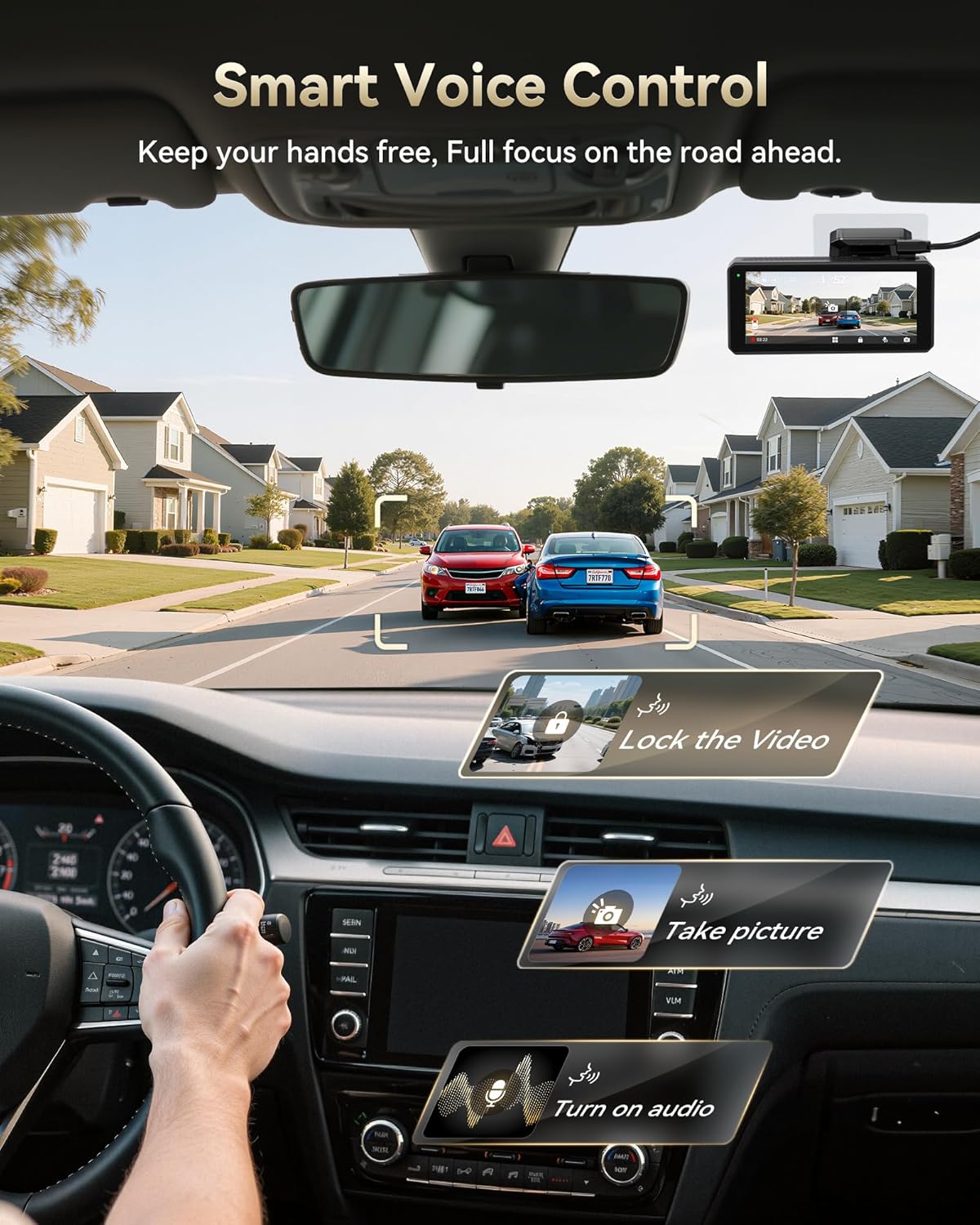
Image 4.3: A depiction of the voice control feature in action, showing various commands that can be used while driving.

Billede 4.4: En detaljeret view of the 4-inch IPS touch screen, illustrating its user-friendly interface for settings and playback.
4.5 5.8GHz Wi-Fi & Built-in GPS
The built-in 5.8GHz Wi-Fi enables faster data transfer and stable connection to the REDTIGER APP for quick viewing, downloading, and sharing of recordings. The integrated GPS records real-time speed and location data, providing crucial evidence if needed.

Image 4.5: This image highlights the high-speed 5.8GHz Wi-Fi and GPS capabilities, showing seamless integration with mobile devices for data management.
4.6 Loop & Collision Recording
The F77 supports 5-hour loop recording, automatically overwriting the oldest footage when the storage is full, ensuring continuous recording. The G-Sensor Parking Mode automatically locks and saves video when it detects collisions or sudden motion, preventing important footage fra at blive overskrevet.

Image 4.6: This graphic illustrates how loop recording ensures continuous coverage and how the G-Sensor protects critical footage under stød.
4.7 24-timers parkeringsovervågning
The dash cam offers G-Sensor Parking Mode for automatic recording upon collision detection and Time Lapse Parking Mode for continuous surveillance with condensed video. A separate hardwire kit (Asin: B09WCTZ3Y8) is required for this function.

Image 4.7: A visual representation of the 24-hour parking monitoring feature, showing its ability to detect collisions and record time-lapse video.
4.8 Accessing Footage
Footage can be accessed in several ways:
- REDTIGER App: Use the 5.8GHz Wi-Fi to connect your smartphone to the dash cam for live preview, downloading, and sharing videos.
- Direkte USB-forbindelse: Connect the dash cam to a PC using the provided USB cable to transfer files.
- Copy to SD Card: Although the F77 has built-in eMMC, it also has an SD card slot for copying files from the internal memory to an external SD card for easier transfer to other devices.

Image 4.8: This graphic illustrates the various methods available for users to access and manage their recorded dash cam footage.
5. Vedligeholdelse
- Rengøring af linser: Regularly clean the camera lenses with a soft, lint-free cloth to ensure clear recordings. Avoid abrasive materials that could scratch the lens.
- Firmwareopdateringer: Tjek den officielle REDTIGER website or app periodically for firmware updates. Keeping your dash cam's firmware up-to-date ensures optimal performance and access to new features.
- Kabelstyring: Periodically check all cables to ensure they are securely tucked away and not interfering with vehicle operation or safety features.
- Lagerstyring: While the eMMC storage is robust, regularly review og sikkerhedskopier vigtige fødevarertage.
6. Fejlfinding
| Problem | Mulig årsag | Løsning |
|---|---|---|
| Dashcam'et tænder ikke. | Ingen strømforsyning; løs forbindelse. | Check car charger connection; ensure vehicle ignition is on. Test charger in another socket. |
| Optagelsen stopper uventet. | eMMC storage full (unlikely with loop recording); power interruption. | Ensure continuous power supply. If issues persist, contact support. |
| Video footage er sløret eller uklar. | Beskyttelsesfilm på objektivet; snavset objektiv; forkert monteringsvinkel. | Remove any protective film. Clean lenses with a soft cloth. Adjust camera angle for optimal view. |
| Problemer med Wi-Fi-forbindelse. | Forkert adgangskode; interferens; app-problemer. | Ensure correct Wi-Fi password. Restart dash cam and smartphone. Reinstall REDTIGER app. |
| Front camera tilts upwards. | Mounting screw loose. | Remove the screw, apply thread locker, and retighten. |
If you encounter problems not listed here or if the suggested solutions do not resolve the issue, please contact REDTIGER customer support for further assistance.
7. Specifikationer
| Feature | Detalje |
|---|---|
| Produktdimensioner | 1.89 x 4.57 x 2.68 tommer |
| Varens vægt | 1.92 pund |
| Modelnavn | F77 |
| Videooptagelsesopløsning | 2160p (4K Front & Rear) |
| Billedsensor | Dual STARVIS 2 IMX678 |
| Opbevaring | Indbygget 128 GB eMMC |
| Forbindelse | 5.8GHz Wi-Fi, GPS |
| Vise | 4 tommer IPS touchskærm |
| Særlige funktioner | HDR, WDR, Voice Control, G-Sensor, Loop Recording, 24H Parking Monitor (requires hardwire kit), Super Capacitor |
| Monteringstype | Forrudemontering |
| Type køretøjstjeneste | Minivan, bus, bil, lastbil |
8. Garanti og kundesupport
REDTIGER offers an 18-month guarantee for the F77 dash cam. This warranty covers manufacturing defects and ensures peace of mind for your purchase. For any product-related inquiries, technical support, or warranty claims, please contact our customer support team.
- E-mail: help@redtigercam.com
- Telefon (USA): +1 888 966 8028
Our team aims to reply within 24 hours to assist you with any concerns.

Image 8.1: Contact details for REDTIGER customer support, including email and phone number.


