1. Introduktion
The ALORAIR Sentinel Pro 35X is an Energy Star Most Efficient 2025 certified commercial-grade dehumidifier designed for effective moisture removal in various environments. It features advanced SLGR (Super Low-Grain Refrigerant) technology, a built-in pump, and a durable metal shell for reliable performance. This manual provides essential information for the proper installation, operation, maintenance, and troubleshooting of your dehumidifier.
Video 1: ALORAIR Commercial Grade Dehumidifier Home Use with Pump. This video provides a general overview of the dehumidifier's features and applications.

Billede 1: Front view of the ALORAIR Sentinel Pro 35X Dehumidifier, showcasing its compact design and ALORAIR branding.
2. Sikkerhedsoplysninger
Read all instructions carefully before operating the unit. Failure to follow these instructions may result in electric shock, fire, or serious injury. Keep this manual for future reference.
- Always ensure the unit is plugged into a grounded electrical outlet.
- Betjen ikke enheden med en beskadiget strømledning eller stik.
- Bloker ikke luftindtag eller udstødningsventiler.
- Hold børn og kæledyr væk fra enheden under drift.
- Tag stikket ud af enheden, før du rengør eller udfører vedligeholdelse.
- Brug ikke enheden i nærheden af brandfarlige gasser eller brændbare materialer.
3. Opsætning
3.1 Udpakning og placering
Carefully remove the dehumidifier from its packaging. The unit is equipped with swivel casters for easy mobility. Place the unit on a level surface in the desired location. Ensure adequate clearance around the air intake and exhaust vents for optimal performance.

Billede 2: The dehumidifier shown in multiple application settings, including a washing room, living room, basement, wine cellar, and storage room, highlighting its versatility.
3.2 Dræningsmuligheder
The Sentinel Pro 35X offers two drainage methods: pump drainage and gravity drainage.
- Pumpedræning: The built-in condensate pump allows for long-distance or upward drainage up to 19.6 feet. Connect the provided smaller drain hose to the 'Pump Drainage' port on the back of the unit.
- Tyngdekraftsdræning: For gravity drainage, connect the provided larger drain hose to the 'Gravity Drainage' port. Ensure the hose is sloped downwards to allow water to flow out naturally.

Billede 3: Illustration of the two drainage options: Pump Drainage with a 19.6 ft height capability and Gravity Drainage with a 6.5 ft hose.
3.3 Installation af luftfilter
The unit comes with a MERV-1 air filter. Ensure the filter is properly installed before operation. The filter is located behind a removable panel on the back of the unit.
4. Betjeningsvejledning
4.1 Kontrolpanel overview
The dehumidifier features an intelligent touch panel for easy control. The display shows current humidity levels, error codes, ambient temperature, and coil temperature.
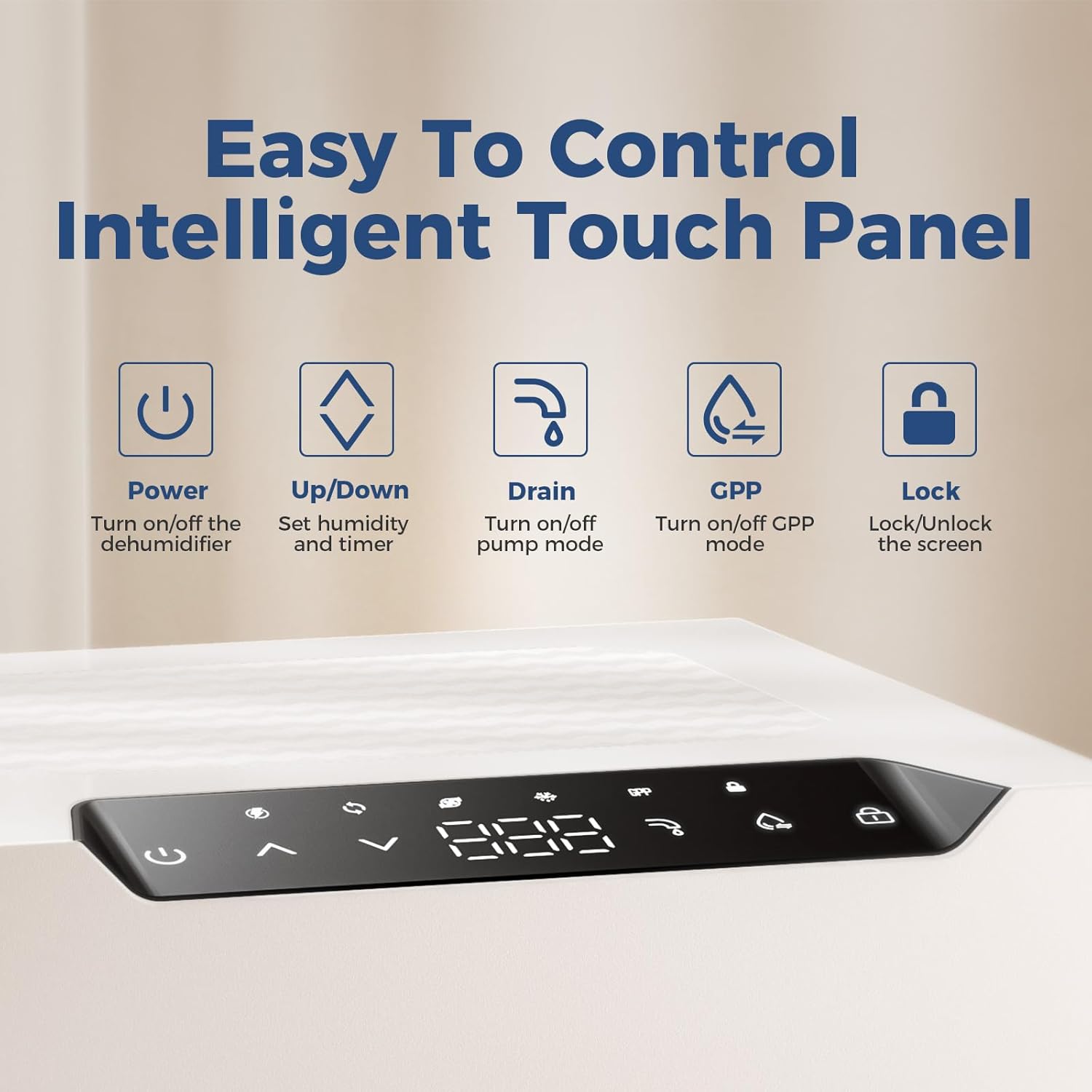
Billede 4: Close-up of the intelligent touch panel with buttons for Power, Up/Down (humidity/timer), Drain, GPP Mode, and Lock.
4.2 Tænd/sluk
Tryk på Magt knappen for at tænde eller slukke for affugteren.
4.3 Indstilling af ønsket luftfugtighed
Brug Up og Ned arrow buttons to set your desired humidity level. The unit can be set to maintain relative humidity between 25% and 80%.

Billede 5: Visual representation of the adjustable humidity range from 25% to 80% RH, demonstrating the unit's control capabilities.
4.4 GPP Mode
The GPP (Grains Per Pound) Mode adjusts the set point based on absolute humidity for precise control and high energy efficiency, especially at low temperatures. This mode can help save up to 30% on energy bills. Press the GPP button to activate or deactivate this mode.
4.5 Automatisk afrimning
The unit features an advanced auto-defrost system. Built-in sensors continuously monitor ambient temperature. If low temperatures are detected, the unit initiates an automatic defrost cycle to prevent frost buildup. During defrost, the compressor temporarily stops while the fan continues to operate, allowing frost to thaw. Normal operation resumes once the cycle is complete.
4.6 Kontinuerlig drift
The dehumidifier can operate continuously. With the smart humidity detection function, the dehumidifier will run automatically when the humidity exceeds your set value. You can also set the dehumidifier to continuous draining mode according to your needs.
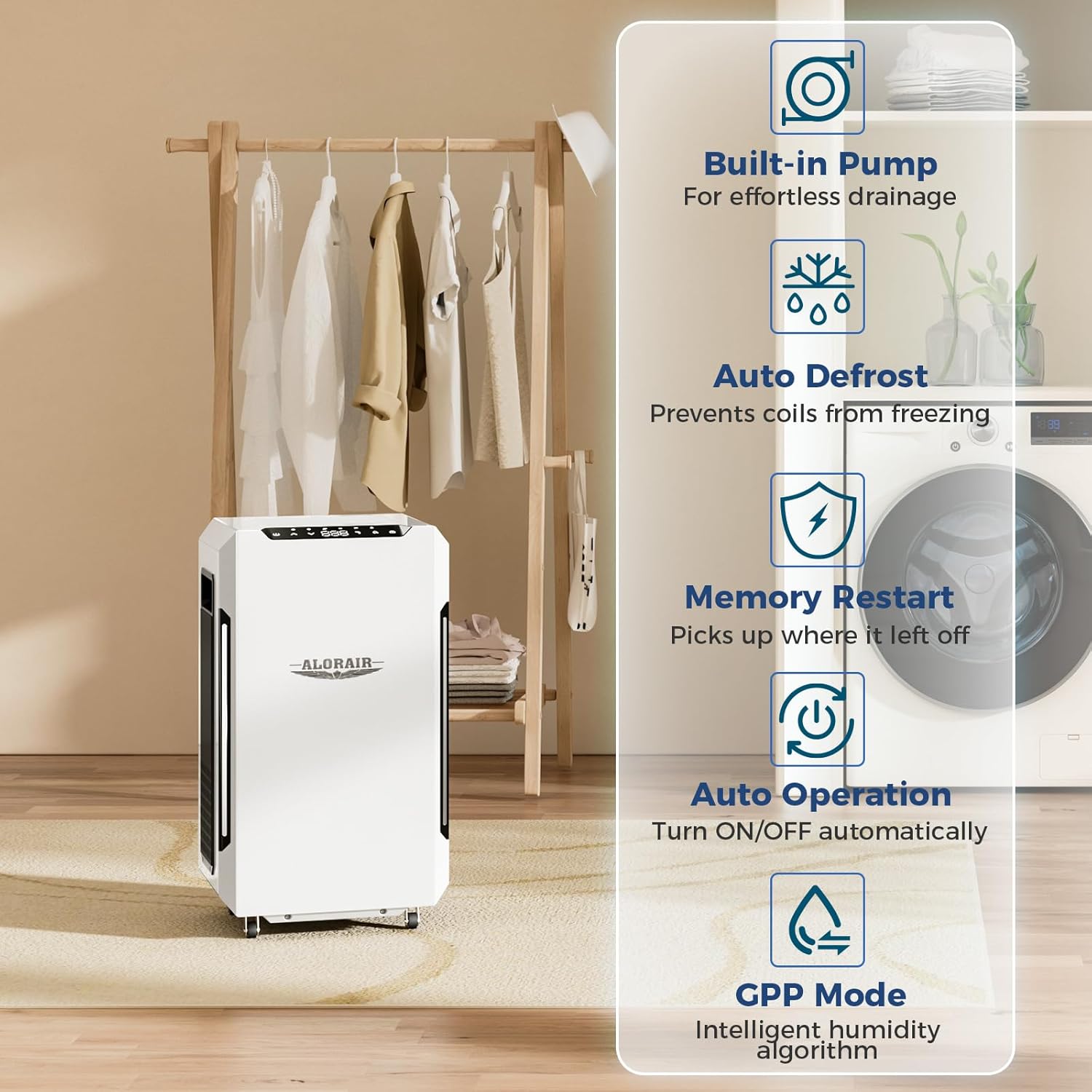
Billede 6: Key operational features of the dehumidifier, including Built-in Pump for effortless drainage, Auto Defrost to prevent freezing, Memory Restart, Auto Operation, and GPP Mode for intelligent humidity algorithm.
5. Vedligeholdelse
5.1 Air Filter Cleaning and Replacement
The MERV-1 air filter traps airborne pollutants and dust, protecting internal components and providing clean air. It is detachable and washable. We recommend cleaning the filter regularly and replacing it once every 3 months for optimal performance.
5.2 Generel rengøring
Tør ydersiden af enheden af med en blød, damp klud. Brug ikke slibende rengøringsmidler eller opløsningsmidler. Sørg for, at enheden er frakoblet, før du rengør den.
6. Fejlfinding
If the dehumidifier is not operating correctly, please refer to the following common issues before contacting customer support.
- Enheden tænder ikke: Check if the power cord is securely plugged into a grounded outlet. Ensure the power button has been pressed.
- No moisture removal: Verify that the desired humidity level is set lower than the current ambient humidity. Check if the air filter is clean and not obstructed.
- Vandlækage: Ensure drain hoses are properly connected and not kinked or blocked. For gravity drainage, confirm the hose has a continuous downward slope.
- Usædvanlig støj: Check for any loose parts or obstructions in the fan area. Ensure the unit is on a stable, level surface.
For persistent issues, please refer to the detailed troubleshooting section in the full user manual or contact ALORAIR customer support.
7. Specifikationer
| Feature | Specifikation |
|---|---|
| Mærke | ALORAIR |
| Modelnavn | Sentinel Pro 35X |
| Dækning af gulvareal | 1000 kvadratmeter |
| Affugtningskapacitet (AHAM) | 35 pints pr. dag (80°F, 60% RF) |
| Affugtningskapacitet (mætning) | 70 pints pr. dag (90°F, 90% RF) |
| Særlige funktioner | Adjustable Humidity Control, Built-In Pump, Energy Star Certified, Portable |
| Produktdimensioner | 12.8" D x 14.1" B x 24.5" H |
| Varens vægt | 40.48 pund |
| Materiale | Legeret stål |
| Wattage | 266 watt |
| Voltage | 115 volt |
| Driftstilstand | Sammenhængende |
| Luftmængde kapacitet | 180 kubikfod i minuttet |
| Øverste temperaturvurdering | 100.4 grader Fahrenheit |
| Inkluderede komponenter | Air Filter, Drain Hose, User Manual, Dehumidifier |
8. Garanti og support
ALORAIR dehumidifiers are fully compliant with electrical safety ETL standards. Every ALORAIR dehumidifier comes with a 5-year limited warranty.
- 6 måneders reservedele og arbejdskraft: Inkluderer forsendelsesomkostninger for reservedele eller enhed.
- 1 års reservedele og arbejdsløn: Excludes shipment charge to send the defective product back to be repaired or replaced.
- 3 års reservedele og arbejdskraftgaranti: Coverage for refrigeration system only.
- 5-årig kompressor og spole: Specific coverage for these components.
For additional warranty information or technical assistance, please refer to the full user manual or contact ALORAIR customer support.


