Tengsen Portable MP3/MP4 Player
Brugermanual
Indledning
Thank you for choosing the Tengsen Portable MP3/MP4 Player. This device is designed to provide a versatile multimedia experience, offering HiFi lossless audio playback, video capabilities, FM radio, voice recording, e-book reading, photo viewing, and more. This manual will guide you through the setup, operation, and maintenance of your new player to ensure optimal performance and enjoyment.
Hvad er inkluderet
- 1 x MP3 Player with Bluetooth
- 1 x USB mikrokabel
- 1 x høretelefoner
- 1 x brugermanual
Kom godt i gang (opsætning)
Opladning af enheden
Before first use, fully charge the MP3 player. Connect the included USB micro cable to the player's charging port and the other end to a USB power adapter (not included) or a computer's USB port. The device provides up to 50 hours of continuous music playback and approximately 8 hours of video playback on a full charge.
Adding Music and Files
At overføre files, connect the MP3 player to your computer using the provided USB cable. The device will appear as a removable disk. You can then drag and drop music, video, photo, and e-book files directly into the appropriate folders on the player.
Udvidelse af lagerplads
The MP3 player comes with 64GB of internal storage. If more space is needed, you can expand the storage capacity by inserting a Micro SD card (not included) into the dedicated slot. The device supports Micro SD cards up to 128GB.

The MP3 player supports up to 128GB Micro SD card expansion for extensive storage.
Betjeningsvejledning
Grundlæggende navigation
The player features a 1.8-inch HD color screen and classic button design for easy navigation. Use the central button and surrounding directional buttons to browse menus, select options, and control playback.
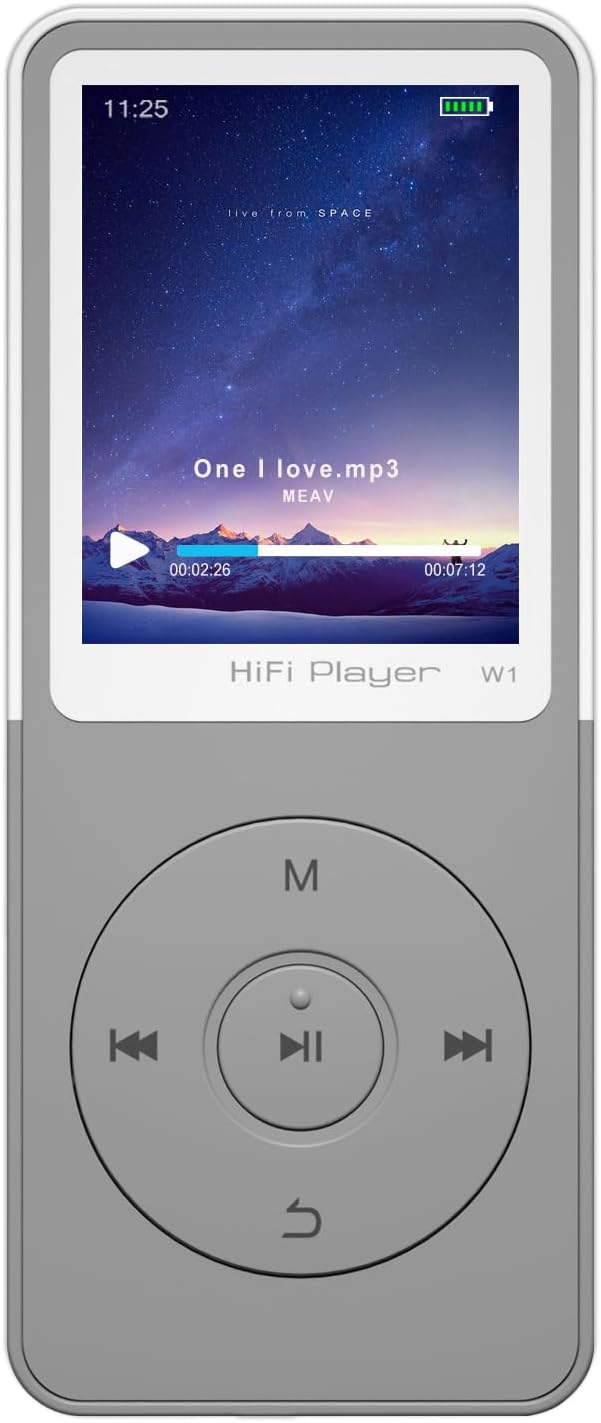
Front view of the MP3 player, highlighting the screen and intuitive button layout.
Musikafspilning
The device delivers HiFi lossless sound quality and supports a wide range of music formats including MP3, WMA, OGG, APE, FLAC, and WAV. Navigate to the 'Music' section to browse your audio library and select tracks for playback.

The player supports various music formats and features a built-in DAC audio chip for high-fidelity sound.
Bluetooth-forbindelse
The MP3 player features upgraded Bluetooth technology for stable and efficient wireless connections. To connect to Bluetooth headphones or speakers, go to the Bluetooth settings, enable Bluetooth, and pair with your desired device. Note: This player does not support connection with phones or tablets.

Connect your MP3 player wirelessly to Bluetooth headphones, earbuds, or speakers for enhanced audio experience.
FM radio
Enjoy your favorite radio stations with the built-in FM radio function. To use the FM radio, you must plug in wired headphones, as they serve as the antenna. The radio supports a normal range of 87.5-108.0 MHz.

Wired headphones are required to use the FM radio function, acting as the antenna.
Video Playback and Other Functions
The MP3/MP4 player supports video playback in AMV and AVI formats (note: conversion tools may be required for some AVI files). Beyond music and video, the device offers a suite of useful features including:
- E-bogslæser: Understøtter TXT-format.
- Foto Vieweh: Supports JPEG, BMP, GIF formats.
- Stemmeoptager: Records in WAV and MP3 formats.
- Vækkeur: Indstil alarmer til daglige påmindelser.
- Kalender: Hold styr på datoer.
- Folder Management: Organiser din fileer effektivt.
- Pauseskærme: Customize your display.

The MP3 player offers a variety of functions beyond music, including video, FM radio, recording, and e-books.
Produkt overview Video
Se denne video for et visuelt overblikview of the MP3 player's design and key features.
Officiel produktvideopræsentationasing the Tengsen MP3 Player's design and features.
Pleje og vedligeholdelse
To ensure the longevity of your MP3 player, follow these guidelines:
- Hold enheden tør. Fugt kan beskadige de interne kredsløb.
- Undgå ekstreme temperaturer. Må ikke udsættes for direkte sollys eller meget kolde omgivelser.
- Rengør enheden med en blød, tør klud. Brug ikke skrappe kemikalier eller slibende rengøringsmidler.
- Håndteres forsigtigt for at undgå fald eller stød.
- Opbevares i et rent, støvfrit miljø, når det ikke er i brug.
Fejlfinding Guide
If you encounter issues with your MP3 player, please refer to the following common solutions:
| Problem | Mulig løsning |
|---|---|
| Enheden tænder ikke | Sørg for, at batteriet er opladet. Tilslut til en strømkilde, og prøv igen. |
| Kan ikke overføre files | Check USB cable connection. Ensure the device is recognized by your computer. Try a different USB port or cable. |
| Ingen lyd under afspilning | Check volume level. Ensure headphones are properly connected or Bluetooth device is paired and connected. Verify audio file format er understøttet. |
| FM-radio virker ikke | Ensure wired headphones are plugged in, as they act as the antenna. Check for strong signal in your area. |
| Bluetooth-forbindelsen er ustabil | Ensure the player and Bluetooth device are within range. Disconnect and re-pair the devices. Avoid interference from other electronic devices. |
For yderligere assistance, kontakt venligst kundesupport.
Produktspecifikationer
| Feature | Detalje |
|---|---|
| Modelnavn | W1 |
| Produktdimensioner | 0.3 x 1.6 x 3.7 tommer |
| Varens vægt | 1.11 ounce |
| Skærmstørrelse | 1.8 tommer |
| Hukommelseslagringskapacitet | 64 GB (kan udvides op til 128 GB via Micro SD-kort) |
| Forbindelsesteknologi | Aux, Bluetooth, USB |
| Understøttede musikformater | MP3, WMA, OGG, APE, FLAC, WAV (does not support audiobooks/iTunes) |
| Understøttede videoformater | AMV, AVI (conversion tool required) |
| Understøttet e-bogsformat | TXT |
| Understøttede optagelsesformater | WAV, MP3 |
| Understøttede billedformater | JPEG, BMP, GIF |
| Batterilevetid (musik) | Op til 50 timer |
| Batterilevetid (video) | Cirka 8 timer |
| Særlige funktioner | Equalizer, FM Radio, Hi-Res Audio, Voice Recorder |
Garanti og kundesupport
Your Tengsen MP3/MP4 Player comes with a 12-month after-sales warranty. For any technical support or assistance, please feel free to communicate with our professional after-sales team. We are committed to ensuring your satisfaction with our product.


